 Chatfuel
Turns out the U.S. healthcare system loses $150 billion annually to missed appointments. That's your revenue walking out the door, your staff sitting idle, and your patients falling behind on care they actually need.
What if we told you you don't need a bigger team or more hours in the day to fix this? Survey responders who saw a decrease in their no-shows list modern appointment reminders and applying best practices to these reminders, as playing a major role in that improvement.
Let us walk you through how appointment reminder software works, when to send patient reminders for maximum impact, and how to set up a system that runs on autopilot—including a step-by-step walkthrough of Chatfuel's AI-powered solution that handles everything from Instagram lead capture to post-visit follow-ups.
What are automated patient appointment reminders?
We just mean scheduled messages sent to patients before their upcoming appointment without manual intervention. Systems that do this send confirmations and reminders via text, email, WhatsApp or social media messaging at intervals—e.g., when the appointment is booked, one week before, 24 hours before, and 2 hours before.
Unlike traditional voice call reminders that require staff to dial each patient, automatic appointment reminders connect with your medical scheduling software or health record system, pull appointment details, and send personalized messages automatically. Patients can confirm, cancel appointments, or reschedule directly from the reminder message, which updates your calendar in real-time—significantly reducing administrative workload.
Modern AI-powered reminder systems like Chatfuel go further by understanding context. Instead of rigid, template-based messages, they engage in natural conversations—answering questions about what to bring, where the office is located, or whether insurance is accepted.
How automated appointment reminders solve no-shows
The psychology behind missed appointments is simpler than you'd think. Patients aren't malicious—they're busy. Life happens. They forget. A dentist appointment booked six weeks ago gets buried under work deadlines, school pickups and everything else competing for attention. Plus, more time between booking and the actual appointment date means more opportunity to forget.
But, when patients miss follow-up appointments for chronic conditions, their health deteriorates. When they skip preventive screenings, problems go undetected. So, reliable appointment reminder software isn't just about filling chairs—it's about better patient care.
The effective timeline of automatic appointment reminders
There are specific windows when sending appointment reminders have maximum impact:
Immediate confirmation (right after booking): Confirms the patient's commitment while the decision is fresh and provides important information about the location and what to bring.
7-day reminder: Gives patients enough notice to identify conflicts and reschedule without leaving you with an unfilled gap. This is when most cancellations happen—and that's actually good news because you have time to fill the slot.
24-hour reminder: Catches patients who might have forgotten or had something come up. Include specific instructions for the appointment type here.
2-hour reminder: The final nudge. Reduces same-day no-shows and late arrivals, helping patients adjust their schedule and plan their route.
Why two-way communication changes everything
Traditional one-way reminders are basically automated voicemails. The patient receives information but can't respond. Modern customer service chatbots flip this.
When patients can reply directly to a reminder and dissolve their doubts ("Can I reschedule for Friday?" or "Do I need to bring my insurance card?"), they're far more likely to show up.
This dramatically improves attendance rates while reducing administrative workload for your team. Check out these proven appointment reminder templates that incorporate two-way communication triggers with customizable templates.
The reminder fatigue problem (and how to avoid it)
Patient reminders are great, but too many identical messages train patients to ignore them. If every reminder looks the same—"You have an appointment on [DATE] at [TIME]"—they blend into background noise (or worse: become annoying).
AI agents solve this by varying their approach with different reminders for each situation. One reminder might focus on preparation with specific instructions ("Bring your insurance card and arrive 10 minutes early for paperwork"). Another might emphasize value ("Looking forward to helping you with your skin concern tomorrow at 2 PM"). The information stays consistent, but the framing changes enough to maintain attention and patient satisfaction.
This variation also extends to channel preference. Some patients prefer social media DMs to email reminders; others check WhatsApp religiously but ignore SMS text messages or voice reminders. A multi-channel customer solution meets patients where they already are, providing additional information through their preferred channel.
Automated appointment reminder channels
The channel you choose matters as much as the timing. Each platform has distinct advantages depending on your patient demographics and where they spend their attention.
WhatsApp is the primary communication tool, especially for younger patients and international communities seeking reliable appointment attendance solutions.
WhatsApp Business allows for automated WhatsApp chatbots that can send rich media (images, videos, PDFs), maintain conversation history, and enable instant two-way communication. Patients can ask questions, reschedule, or request directions to your office location without switching apps.
The platform also supports voice messages for complex instructions and video calls if you need them.
Social media
Instagram, TikTok and Facebook messaging are perfect options for patient reminders for businesses that acquire customers through social ads.
Think about the patient journey: someone sees your Instagram ad, sends a DM asking about pricing, books an appointment—all without leaving the app. If you then send reminders through a different channel, you've broken that seamless experience.
AI agents for Instagram, TikTok and Facebook can handle the entire cycle: qualification, booking, automatic appointment reminders and follow-up. This continuity dramatically improves attendance while you see more patients because you're meeting them in their active space rather than forcing them to check yet another communication channel.
How to set up automated appointment reminders in Chatfuel
Most traditional appointment reminder software requires complex health record system integrations, IT support, and weeks of setup. Not Chatfuel—purpose-built for healthcare and wellness SMBs facing challenges like constant owner involvement, limited staff, social media lead acquisition and tight budgets.
The core innovation? Fuely AI, Chatfuel's intelligent agent that captures leads directly from Instagram, Facebook, WhatsApp and TikTok campaigns, qualifies them, books appointments, sends automatic appointment reminders, and manages follow-ups, all automatically, all in the patient's preferred messaging app during and outside business hours.
Here's how you set it up.
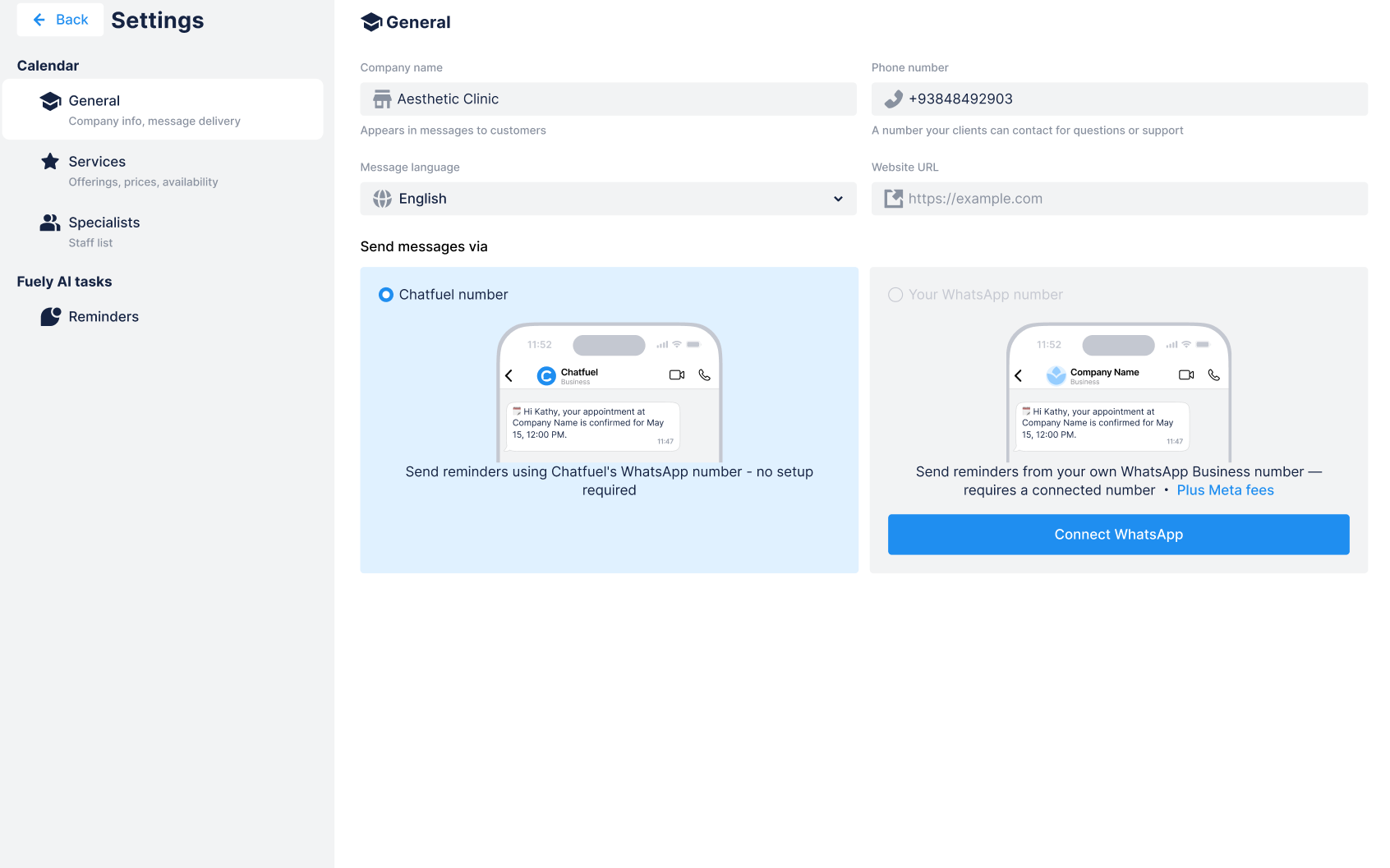
Step 1: Connect your WhatsApp and social channels
You have two options to get started:
Use Chatfuel's WhatsApp number for immediate setup. Your reminders are sent from a shared number—perfect for testing the system before committing your business number.
Connect your own WhatsApp Business number to send from your branded account. This requires adding a payment method in Meta.
Connect your Instagram, Facebook and TikTok accounts, too, so Fuely can capture leads from your existing ad campaigns and organic messages. Chatfuel handles this with one-click integrations.
Step 2: Configure your Calendar settings
Once that's done, go to the Calendar Settings tab and fill in important information:
Company name
Office phone number and location
Preferred language for notifications
Service names
Durations
Prices (optional, supports multiple currencies)
Descriptions with specific instructions (helps Fuely answer patient questions accurately)
When you add a service to a booking, the end time is calculated automatically based on the duration.
Add your providers (doctors, nurses, therapists, aestheticians) and their details, too. Fuely uses this information to match patients with the right specialist for their upcoming appointment and suggest available times.
Step 3: Customize your notification messages
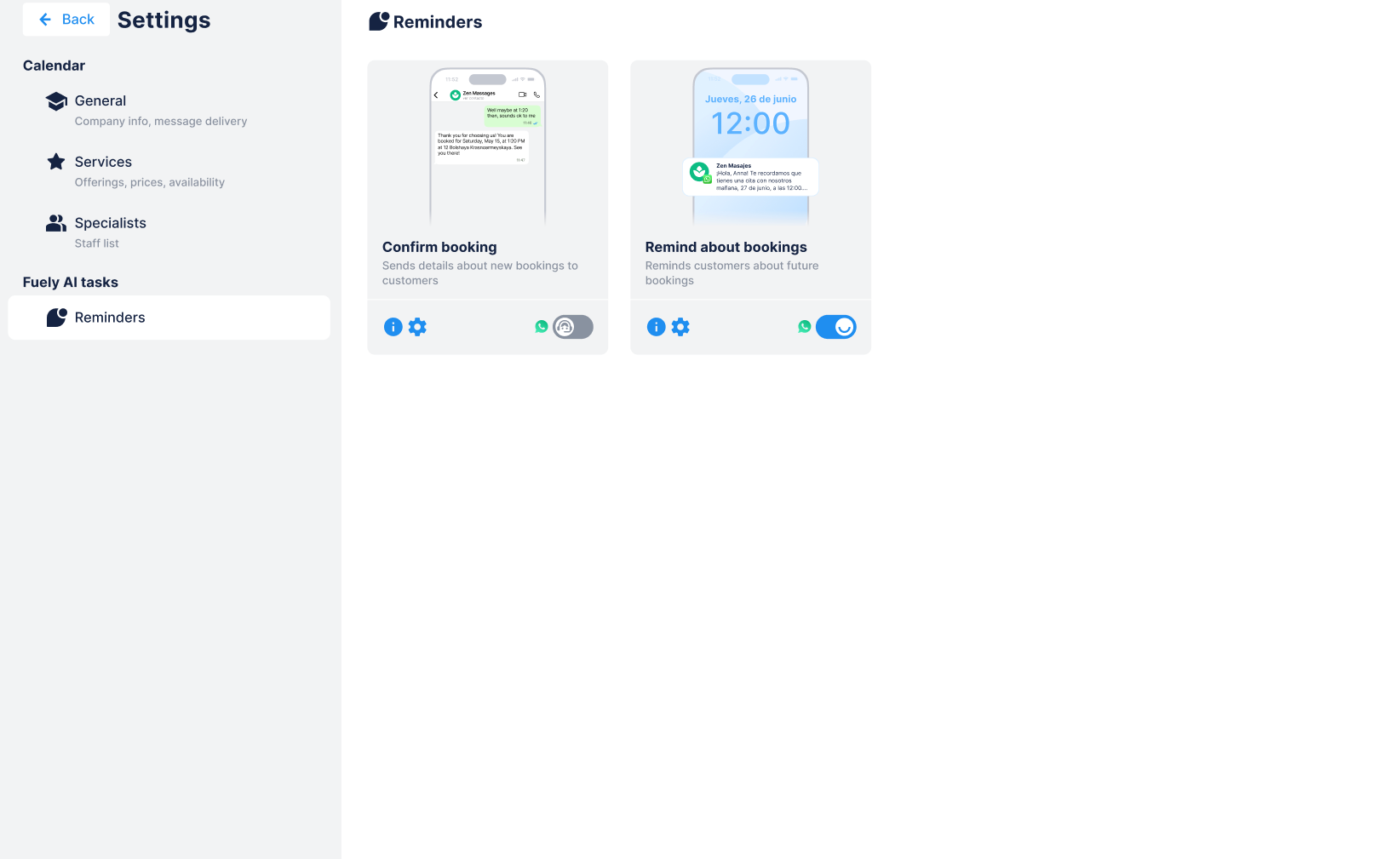
Personalize three types of our automatic appointment reminder customizable templates:
Immediate confirmation
1-day reminder
2-hour reminder
Each reminder automatically includes booking time, appointment date, office location and your company name. But you can add specific instructions in the "Additional info" field, e.g.:
"We're on the 3rd floor—take the elevator on the left"
"Please arrive 10 minutes early and bring your ID to reduce late arrivals"
"Cancellation policy: Please cancel appointments at least 24 hours in advance"
This is similar to how a simple CRM would function, except everything happens automatically through conversational AI for all your appointment types.
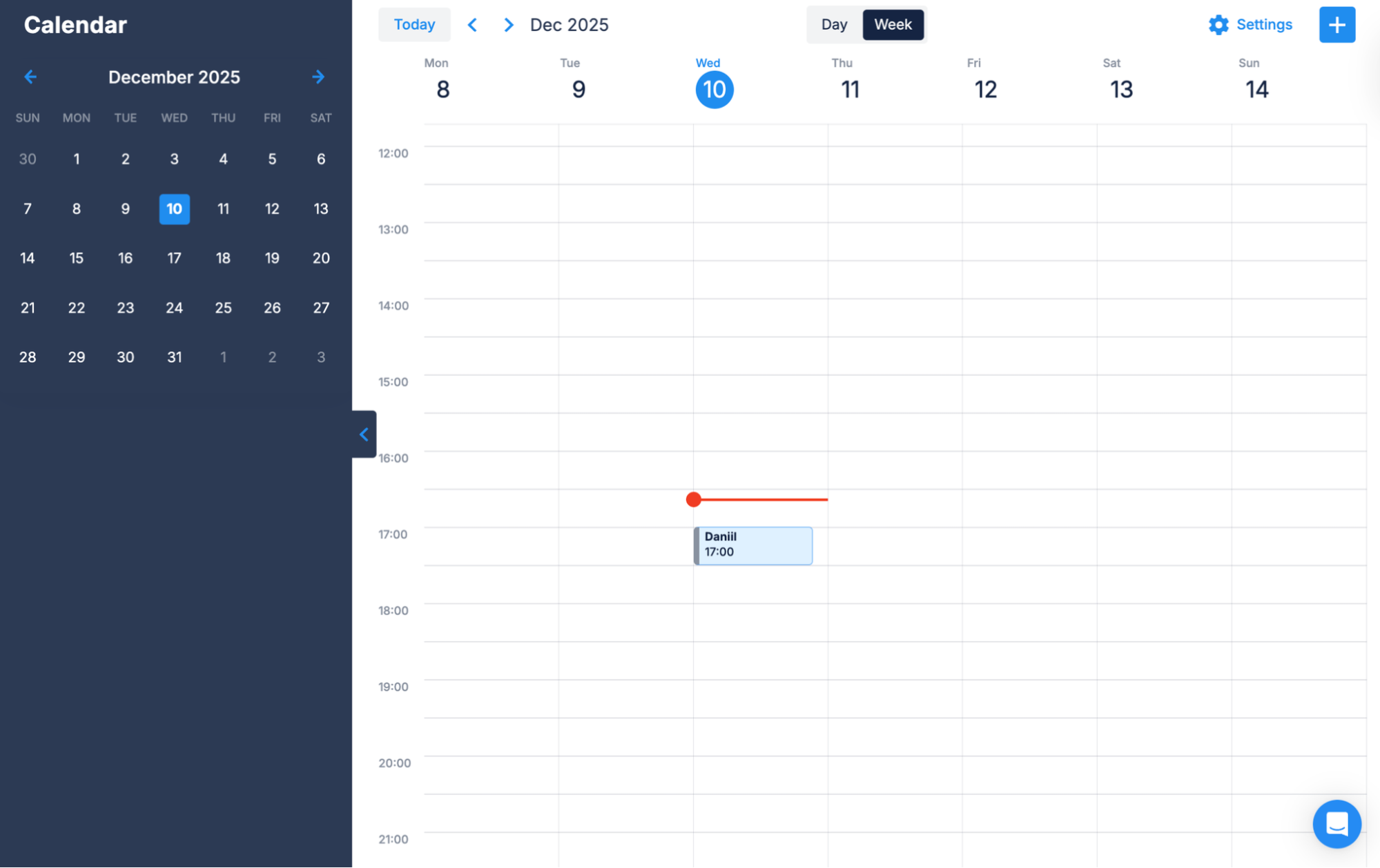
Step 4: Create your first booking
Click on any time slot in your calendar, and fill in important information:
WhatsApp contact (or type a new number to create a contact)
Phone number
Appointment date and time
Service (auto-fills duration)
Service provider
Click Save. Done.
Your booking appears in the calendar, and your patient immediately gets a confirmation message on WhatsApp with all the details about their upcoming appointment.
Why Chatfuel beats traditional appointment reminder software
Most reminder systems are built for large hospital networks with dedicated IT teams and complex health record system requirements. Chatfuel is a CRM with a Google Calendar integration built for the clinic owner wearing 12 different hats, the office manager juggling scheduling alongside a dozen other tasks, the wellness center with 3 employees, the aesthetic practice running Instagram ads.
You don't need a health record system integration (though Chatfuel connects via Zapier and API if you want it). You don't need weeks of setup. You don't need a training manual.
All it is is appointment reminder software that captures leads where they already are, qualifies them without wasting your time, books appointments automatically, sends timely reminders with customizable templates, and follows up naturally—reducing administrative workload and improving attendance.
You get better clinical outcomes through reliable appointment attendance: more patients seen with less manual effort and higher patient satisfaction through convenient, personalized communication.
Reduce no-shows, see more patients
While you're reading this, someone is forgetting their upcoming appointment with you, and you're about to discover an empty chair when it's too late to fill it.
The practices that cut their no-show rates and dramatically improved attendance didn't get there through better front-desk staff or stricter cancellation policies. They got there by meeting patients where they already are, and understanding their busy schedules.
Chatfuel is built specifically for healthcare and wellness SMBs who are ready to stop manually chasing appointments and focus on patient care. This is your solution for reducing administrative workload while seeing more patients.
Sign up for Chatfuel and set up your automated reminder system in 15 minutes.
FAQs
How much do automated patient appointment reminders cost?
Comprehensive appointment reminder software like Chatfuel starts with a free trial, then starts from $39, making it accessible for any office manager's budget. There’s also a free Calendar for appointments and Pro Calendar, which includes a one-page website for online booking and reminders from Chatfuel's number.
The real question isn't what sending appointment reminders costs—it's what no-shows cost. At $200+ per missed appointment, a reliable system that prevents no-shows pays for itself immediately.
Can automated appointment reminders integrate with my existing EHR or practice management software?
Chatfuel integrates with most practice management systems and health record systems through Zapier (no coding required) and direct API connections for custom setups. This means your existing calendar and patient database can sync with Chatfuel automatically—bookings flow both ways, and status updates happen in real time without burdening your office manager.
Are automated patient appointment reminders HIPAA-compliant and secure?
Yes, when implemented correctly. Chatfuel maintains a HIPAA-compliant infrastructure for healthcare clients, including encrypted messaging, secure data storage and proper access controls.
However, HIPAA compliance isn't just about the tool—it's about how you use it. Best practices for sending appointment reminders include:
Avoid including specific treatment details in reminder messages (use general language like "upcoming appointment" rather than "colonoscopy")
Enable encryption for all patient communications
Train staff on HIPAA requirements
Sign Business Associate Agreements (BAAs) with your technology providers
Can patients confirm, cancel, or reschedule appointments directly from automated reminders?
Absolutely—this is where Chatfuel excels, dramatically improving attendance rates. Every reminder includes interactive buttons for "Confirm," "Cancel appointments," or "Reschedule." When a patient taps one, Chatfuel updates the booking status in your calendar and notifies everyone involved about the change, confirmation or newly available time slot.
This two-way functionality transforms patient reminders from simple notifications into active customer loyalty tools. Patients feel heard, you get advance notice of changes, and your calendar stays accurate without manual updates, improving both attendance rates and patient experience in a simple process that doesn't require phone calls or SMS reminders.