


Connect Chatfuel MCP with Meta Ads MCP
Launch Meta ads from your assistant and set up Chatfuel for the people they bring: comment replies, lead qualification in WhatsApp, answers and bookings. Then put the week’s ad spend next to your chats and bookings.
What the integration can do
Tools the assistant calls on each side, named as the servers name them.
| Tool | What it does |
|---|---|
list_posts | Lists recent posts and reels of the Instagram account and the Facebook Page connected to your bot. |
setup_comment_replies | Sets up AI or fixed replies to comments, with a DM, for all posts or for chosen posts and keywords. |
enable_ai | Turns on the AI Agent for the channels you pick, including chats that start from ads. |
update_automation_setting | Changes one setting of an automation: when the AI replies, handoff to your team, follow-ups, lead qualification, booking rules or comment replies. |
test_reply | Sends a sample customer message to a sandbox chat and returns the AI Agent's reply. |
add_faq | Adds question and answer pairs to the FAQ the AI Agent answers from. |
setup_booking | Adds or updates bookable services and specialists, so the AI Agent books customers in the chat. |
review_chats | Summarizes customer chats for a period instead of returning every message. |
list_chats | Lists customer chats with their channel, status and lead stage. |
set_lead_stage | Moves a lead to another stage of the Leads board, such as Qualified or Won. |
list_bookings | Lists appointments between two dates: time, service, specialist, customer name and status. |
| Tool | What it does |
|---|---|
ads_get_ad_entities | Lists campaigns, ad sets and ads with spend, impressions, CTR, CPC, CPM and conversions for a date range. |
ads_insights_performance_trend | Shows how CPC, CPM, cost per result, ROAS, CTR and conversion rate change over time. |
ads_get_ig_media | Lists recent Instagram posts, reels and stories that can be boosted. |
ads_boost_ig_post | Turns an organic Instagram post into an ad. |
ads_create_campaign | Creates a campaign, paused. |
ads_create_ad_set | Creates an ad set with targeting, budget and optimization goal, paused. |
ads_create_ad | Creates an ad with a creative, paused. |
ads_activate_entity | Sets a paused campaign, ad set or ad live, so it starts spending budget. |
What to ask the assistant
Boosted post → a reply to every comment
WhenYou want more reach for a post or reel that already gets questions in the comments.
- Meta Ads MCP finds the post with
ads_get_ig_mediaand creates a boost withads_boost_ig_post. The boost is created paused. - Chatfuel MCP finds the same post with
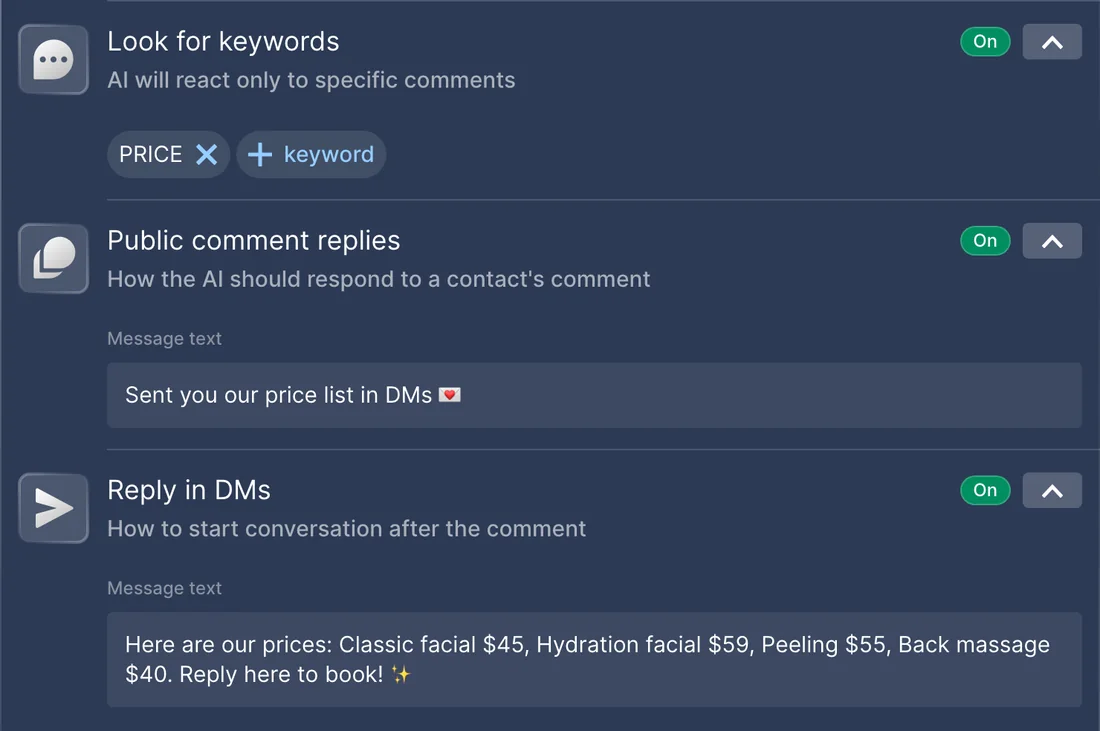
list_postsand sets up replies withsetup_comment_replies: a public reply and a DM with the answer. - You check the budget and say yes, and
ads_activate_entitysets the boost live.
ResultEvery comment under the post gets a public reply and a DM from the AI Agent while the boost brings new people.
AskBoost our latest reel, paused for now. Set up replies to comments that say “price”: a short public reply and the price list in a DM. Then show me the budget so I can launch it.
WhatsApp ad → lead qualification
WhenYour new ad sends people to WhatsApp, and the campaign is ready but paused.
- Meta Ads MCP finds the paused campaign with
ads_get_ad_entities. - Chatfuel MCP turns on the AI Agent for WhatsApp with
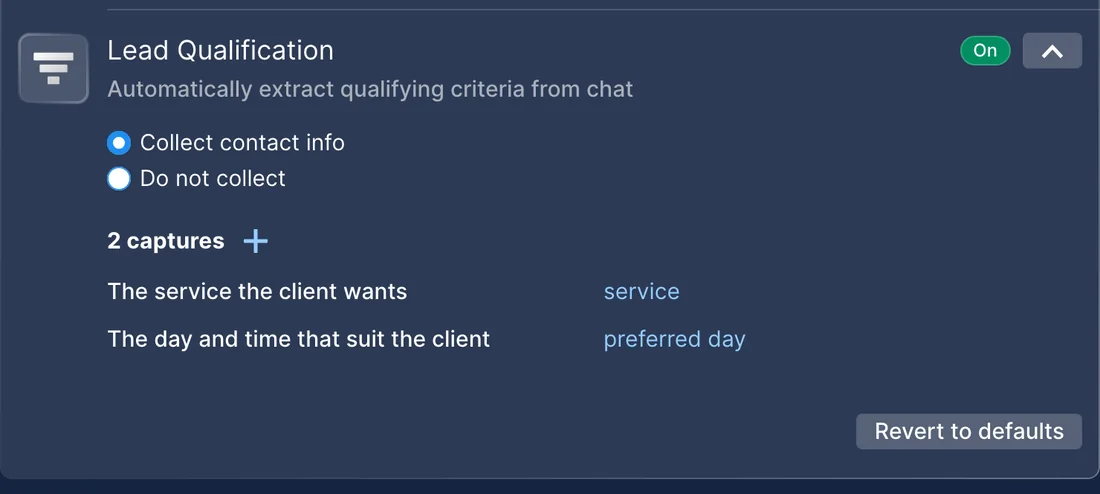
enable_aiand sets what it asks each new lead withupdate_automation_setting: name, the service they want and a convenient day. test_replychecks the first answer in a sandbox chat. After your yes,ads_activate_entitysets the campaign live.- Later,
list_chatsshows the new chats with their lead stage, andset_lead_stagemoves the leads you pick to Qualified.
ResultPeople from the ad get an answer in WhatsApp right away, and your team sees qualified leads on the Leads board.
AskOur WhatsApp ad campaign “Facials November” is ready but paused. Turn on the AI Agent in WhatsApp, have it ask for the client’s name, the treatment and a preferred day, test it, then launch the campaign.
Offer ad → the AI Agent answers and books
WhenYou launch an offer, and new customers will ask about it and want to book.
- Meta Ads MCP drafts the campaign, ad set and ad with
ads_create_campaign,ads_create_ad_setandads_create_ad. All three are created paused. - Chatfuel MCP adds the offer to the FAQ with
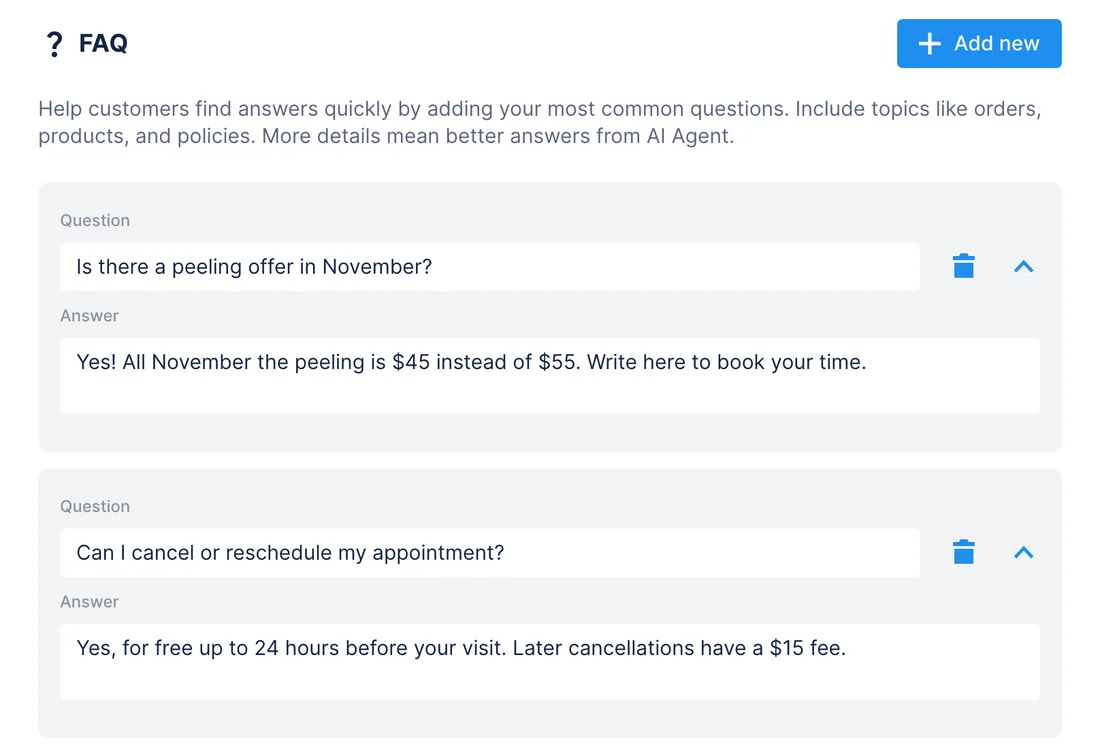
add_faqand makes it bookable withsetup_booking: the service, its price and its duration. test_replychecks the AI Agent’s answer in a sandbox chat. When it’s right,ads_activate_entitysets the campaign live.
ResultThe ads start only once the AI Agent can answer about the offer and book it in the chat.
AskDraft a paused Meta Ads campaign for our November peeling offer, $45 instead of $55. Add the offer to our Chatfuel FAQ and as a bookable 40-minute service, test how the AI answers “how much is the peeling?”, then launch it.
Cost per result up → the AI Agent learns
WhenA campaign's cost per result climbs for several days in a row.
- Meta Ads MCP shows when the climb started with
ads_insights_performance_trend. - Chatfuel MCP reviews the chats from those days with
review_chatsand lists the questions the AI Agent couldn't answer. - After your yes,
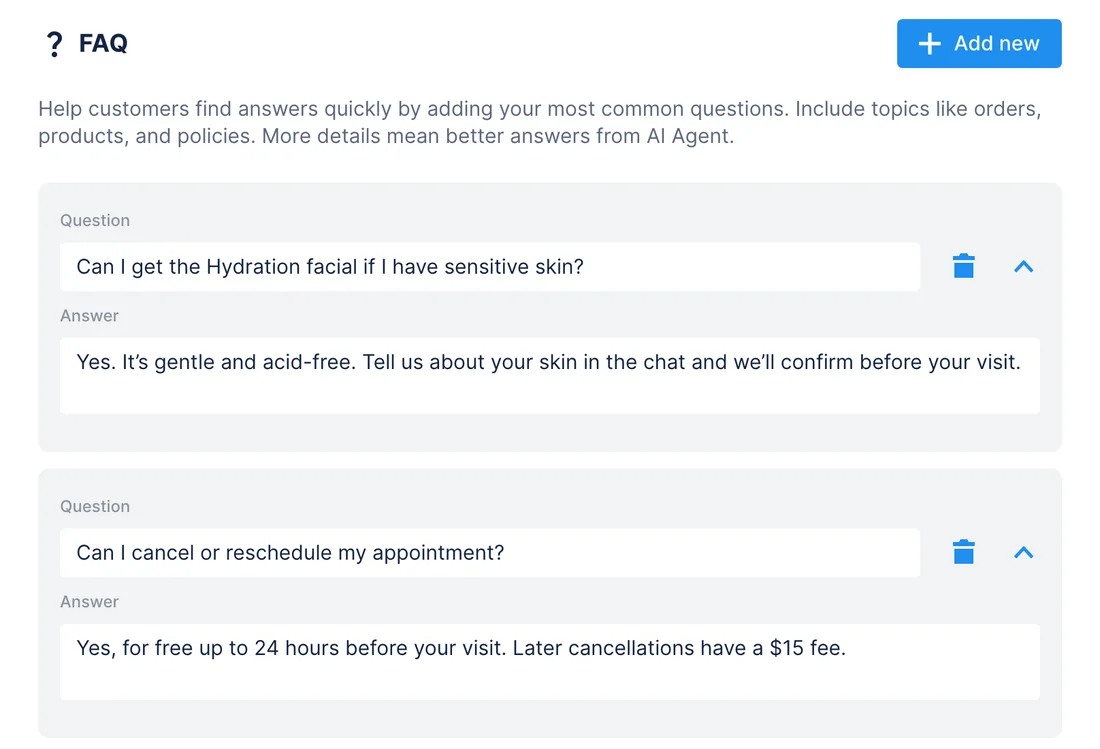
add_faqadds the missing answers to the knowledge base.
ResultYou see what customers asked while the cost climbed, and the AI Agent answers those questions from now on.
AskCost per result on our Hydration facial campaign has gone up since Tuesday. Check what customers asked in Chatfuel since then and suggest FAQ answers for what the AI couldn't answer.
Every week: ad spend → chats and bookings
WhenMonday morning, before you plan the week's budget.
- Meta Ads MCP pulls spend and results per campaign for the last 7 days with
ads_get_ad_entities. - Chatfuel MCP summarizes the same days' chats with
review_chats, counts them by lead stage withlist_chatsand lists bookings withlist_bookings. - The assistant puts both sides in one table.
ResultOne view of what you spent and what came in over the same days. It doesn't tie a booking to a specific ad: neither server shares that link.
AskShow last week's Meta Ads spend and results by campaign next to our Chatfuel chats, lead stages and bookings for the same days.
How to connect
Connect Chatfuel MCP
Add Chatfuel to your assistant and sign in with your Chatfuel account. Claude and ChatGPT list it in their directories.
Add Meta Ads MCP
Add a connector with the URL https://mcp.facebook.com/ads, sign in with Facebook, approve the permissions and pick the ad accounts the assistant may use.
Ask about both in one chat
The assistant calls tools from both servers. Chatfuel asks for a yes before it changes your bot, and Meta Ads creates new ads paused.
- Add Chatfuel from Claude's connector directory and sign in.
- Open Settings › Connectors › Add custom connector, name it Meta Ads and paste https://mcp.facebook.com/ads.
- Sign in with Facebook, approve the permissions and select your ad accounts.
- Chatfuel MCP
- claude.ai/directory/chatfuel
- Meta Ads MCP
https://mcp.facebook.com/ads
- Install the Chatfuel plugin from ChatGPT's plugin directory and sign in.
- Turn on Developer mode in Settings › Connectors › Advanced settings, then create a connector named Meta Ads with https://mcp.facebook.com/ads and OAuth.
- Sign in with Facebook. In a chat, choose Meta Ads in the composer's Developer mode menu.
- Chatfuel MCP
- chatgpt.com/plugins
- Meta Ads MCP
https://mcp.facebook.com/ads
- Add Chatfuel to ~/.cursor/mcp.json with the URL https://mcp.chatfuel.com/panel.
- Add Meta Ads next to it with "type": "streamable-http" and "url": "https://mcp.facebook.com/ads".
- Cursor asks you to sign in to each server the first time it uses it.
- Chatfuel MCP
https://mcp.chatfuel.com/panel- Meta Ads MCP
https://mcp.facebook.com/ads
What you need
- A Chatfuel account with a bot. For comment replies, Instagram or a Facebook Page connected to it.
- Access to a Meta ad account. Meta asks for ads_mcp_management plus ads_read or ads_management; the Instagram and Page tools also need instagram_basic and pages_show_list.
- An assistant that connects remote MCP servers: Claude, ChatGPT with Developer mode, or Cursor.
- With a system user token instead of sign-in, only Employee-role tokens work. Admin-role tokens can't access Meta Ads MCP.
Limits
- Meta Ads MCP is in open beta, and Meta notes that not every account has every tool yet.
- Neither server links a chat or a booking to the ad that started it. Compare totals for a period, not results per ad.
- Meta Ads MCP doesn't read Instagram comments, DMs or Messenger chats. Chatfuel MCP covers those.
- Campaigns, ad sets, ads and boosts are created paused and spend nothing until you activate them.
- Meta's WhatsApp Business Tools MCP needs admin access to the WhatsApp app a number runs on for most of its tools. A number connected through Chatfuel runs on Chatfuel's app, so work with those chats through Chatfuel MCP.
FAQ
Yes. Meta runs it at https://mcp.facebook.com/ads and documents its tools on developers.facebook.com. Meta announced it in open beta in April 2026.
No. Chatfuel chats don't record the ad that started them, and Meta Ads MCP doesn't share that link either. The assistant shows ad results and Chatfuel's chats and bookings for the same days side by side.
New campaigns, ad sets, ads and boosts are created paused, and the assistant asks before ads_activate_entity sets anything live. A business admin can also block campaign creation or budget changes in Meta Business Suite › Settings › Integrations › Ads MCP server.
Most of its tools need admin access to the WhatsApp app the number runs on. A number connected through Chatfuel runs on Chatfuel's app, and that server has no tool to read incoming messages, so read and answer those chats with Chatfuel MCP.
No. Its Instagram tools list the posts you can boost and boost them. Comments, DMs and Messenger chats come from Chatfuel MCP, which also sets up the replies.
No. Meta says owning a Meta app isn't required: you sign in with Facebook when the assistant connects. Your own app is an option for setups that need a client ID.
More integrations
Connect Chatfuel MCP
Start a free trial, add Chatfuel to your assistant and ask about Meta and your chats in one place.