
Turn every fan conversation into a sale
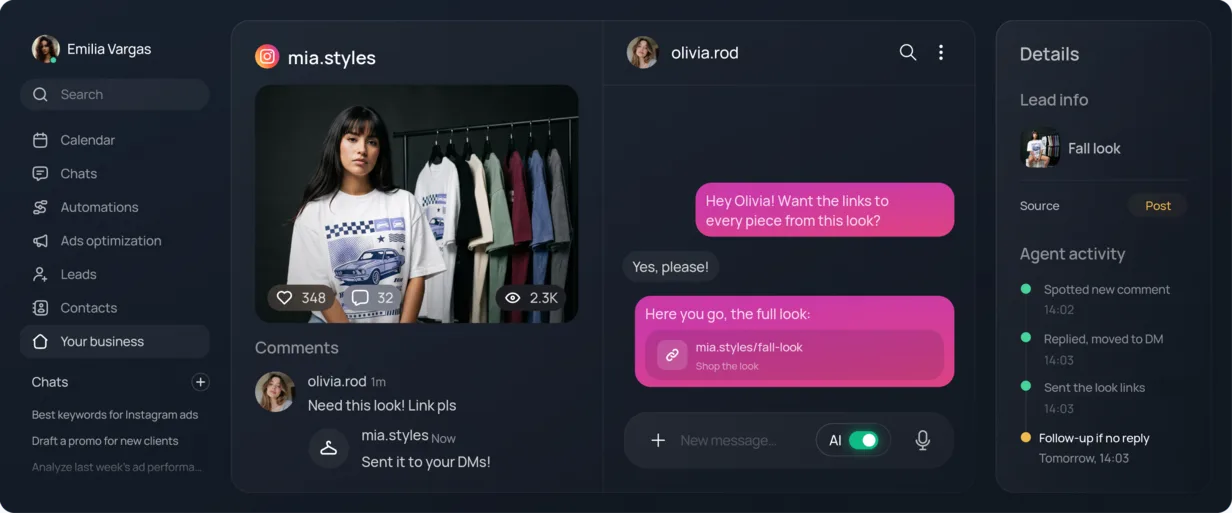
Every “link pls” under your posts and reels gets a DM with the link, the code, or the freebie — automatically, so you can keep creating.
Trusted by agencies and businesses






- WhatsApp Business Solution Provider
How it works for creators
Connect
Link your Instagram account in a few clicks. No developer, no code.

Set keywords
Choose what triggers a reply — “link”, “price”, “send it”, whatever your audience actually types.
Go live
Your automation runs on your next post, comment, or Story reply.

Reply
Comments get answered publicly and privately, instantly — even while you’re offline.


Grow
Watch new leads come in from your comments and refine your replies as your audience grows.
Who this works best for
Different content, different ask — same automation underneath.
Content creators & educators
Creators who build an audience through tutorials, tips, or educational content.
With Chatfuel:
Comments answered instantly, DMs with the link or freebie they asked for.
Affiliate & shopping creators
Creators who recommend products and earn through affiliate links (LTK, Shopee, TikTok Shop).
With Chatfuel:
Comment “link” and the right affiliate link lands in their DM automatically — no manual copy-paste for every comment.
Course & coaching creators
Creators launching a course, webinar, or paid community.
With Chatfuel:
Launch and webinar funnels delivered straight to DM, qualifying who’s ready to buy before you jump on a call.
Already recommending tools to your audience? Get paid for it.
Refer Chatfuel to your audience or fellow creators and earn recurring commission for up to 12 months — the same Affiliate Program agencies use.


- Unlimited referralsShare your link with your whole audience.
- Monthly payoutsGet paid every month.
- Earn moreYour commission grows with every referral.
Learn more about Instagram automation
- Instagram comment automation
Turn comments on your posts into DMs and qualified leads.
Read more - Reels replies
Answer every comment on your Reels with a public reply and a DM.
Read more - Story replies
Reply to everyone who answers your Stories, right in their DMs.
Read more - Keyword triggers
Start the right reply when someone types a keyword.
Read more
FAQ
Answers to the questions we get asked most.
Chatfuel does this specifically — a comment with a chosen keyword triggers a public reply plus a private DM, and the lead’s info is saved so you can follow up later.
Set “WEBINAR” as a trigger keyword. Everyone who comments it gets an automatic public reply plus a DM with your registration link — no manual copy-paste per comment.
Yes — pick the word, add the link (a freebie on Google Drive or Dropbox works too), and Chatfuel sends it by DM the moment someone comments it, while also replying publicly so the thread doesn’t look ignored.
Set up one keyword trigger for that link, and every matching comment gets the same reply automatically — this is exactly the problem it’s built to solve.
Chatfuel can — the AI Agent answers a question in a comment or DM, and if someone wants a trial class, it asks for their preferred time and books it. Reminders go out on WhatsApp a day and two hours before the class.
The DM reply references what the follower actually asked, not a generic copy-pasted blast — so it still reads like a real reply even though it’s automatic.
Yes. In Chatfuel the DM after a comment is written by the AI Agent, and it doesn’t stop at the link. When the person writes back, the same automation keeps answering their questions from your knowledge base for about a day after its last reply, and shares your paid offer or checkout link when they’re ready. If they go quiet mid-conversation, follow-ups nudge them twice inside Instagram’s messaging window.
Write both steps into the automation’s instructions — for example, “send the guide link, ask what they want to learn next, and offer the course when it fits” — and turn on follow-ups. Instagram allows one DM to a new commenter until they reply, so the guide goes out first. Once they answer, the AI Agent steers the conversation toward the course, and if they stop replying it sends two follow-ups. Their timing is automatic; what they say is up to you.
Chatfuel does it with a handoff rule, such as “when the person says they want to buy, hand the chat to me.” The AI Agent sends the link and answers questions until that moment, then steps back: the chat lands in your Chats inbox with a notification, and the AI stays out of it while you’re handling it. One Chatfuel customer summed up exactly this boundary: “Stop replying to my DMs. I want to reply myself. Do not reply to messages in my DM if not part of an automated comments to DM automation.”
Yes, with one nuance. Chatfuel sends the link or code you put in the comment rule’s instructions, so each post or keyword can have its own — but everyone who comments on it gets the same one; codes aren’t generated per person. Instagram allows one private reply per comment until the person writes back. After that, the AI Agent answers what it can, and a handoff rule moves the chat to you with a notification — for example, when the lead asks for a person.
Yes. In Chatfuel, comments and direct messages are separate automations, and the direct-messages one is off until you turn it on. Turn on only the comment automation: the AI Agent answers commenters, including their DM replies for about a day after it messaged them, and every other DM stays yours. To check, comment the keyword from a second account and you’ll get the DM; then send a plain message from an account that hasn’t commented — nothing should happen.
Yes. Tell Chatfuel’s AI Co-pilot what you want in a sentence (“when someone comments GUIDE, reply publicly and DM them the free guide link”) and it sets up the comment automation and confirms what it changed — no trigger and message blocks to connect. A rule can match the exact word, any comment that contains it, or every comment, and since the AI Agent writes each reply, it answers the comment the person actually left.
Write the stages into the AI Agent’s instructions instead of sending everything at once — for example, “send the free checklist first, share the workshop link if they want more, and send the course link when they ask about price.” The AI follows those conditions as the conversation goes. One Chatfuel customer set this up for exactly that reason: “No queremos enviar los tres enlaces al mismo tiempo. La persona debe avanzar progresivamente dependiendo de su nivel de interés” — “We don’t want to send all three links at once. The person should move forward gradually, depending on how interested they are.” There’s no separate stages feature: the logic lives in your instructions.
Chatfuel can. Its replies aren’t fixed templates in one language: the AI Agent writes each public reply and DM from your instructions and knowledge base, and it understands what people write in any language. Add one line to the comment automation’s instructions — for example, “reply in the language the person writes in: Spanish, Portuguese or English” — and every follower gets the link and the rest of the conversation in their own language. If a teammate handles one language, a handoff rule can send those chats to them, like “route followers who write in Portuguese to Ana.”