


Connect Chatfuel MCP with Shopify MCP
Shopify prices and stock turn into answers your AI Agent gives in WhatsApp, Instagram and other chats. A new discount code goes out in DMs to people who comment, and order questions get a reply with the tracking. You ask once, and the assistant works in both.
What the integration can do
Tools the assistant calls on each side, named as the servers name them.
| Tool | What it does |
|---|---|
get_knowledge_base | Returns what the AI Agent answers from: company info, instructions, business hours, FAQ, services and specialists. |
add_faq | Adds question and answer pairs to the FAQ the AI Agent answers from. |
update_faq | Changes or removes FAQ entries after you confirm. A removed entry can't be restored. |
test_reply | Sends a sample customer message to a sandbox chat and returns the AI Agent's reply. |
list_posts | Lists recent posts and reels of the Instagram account and the Facebook Page connected to your bot. |
setup_comment_replies | Sets up AI or fixed replies to comments, for all of them or by keyword; on Instagram and Facebook also a DM and a choice of posts. |
list_chats | Lists customer chats with their channel, status and lead stage. |
get_chat | Returns the latest messages of one customer chat with its channel, status and lead stage. |
send_chat_message | Sends the text you approved to a customer in their chat and moves the chat to live chat. |
return_chat_to_ai | Hands a chat in live chat back to the AI Agent after your yes, and the AI Agent answers the customer's last message. |
set_company_info | Saves the company name, email, phone, address, website and how to pay that the AI Agent uses, after you confirm. |
| Tool | What it does |
|---|---|
search_products | Searches the store's catalog by keyword or by a filter such as price, tag or status. |
get-product | Returns one product's title, status, variants, images, tags and inventory. |
get-inventory-levels | Returns the stock of each variant of a product across your store's locations. |
search_collections | Finds collections by keyword, title or collection type. |
create-discount | Creates a percentage-off code for the whole store, chosen products or a collection, and asks you to confirm the start date and who can use it. |
get-order | Returns one order's line items, fulfillment status, shipping address and tracking, without changing the order. |
get-shop-info | Returns the connected store's name, domain, email, plan, currency, time zone and country. |
What to ask the assistant
Products and stock in Shopify → answers in every chat
WhenNew serums are in your Shopify store, and people keep asking in WhatsApp and Instagram what they cost and whether they're in stock.
- Shopify MCP finds the skincare products with
search_products, opens each one withget-productand checks its stock withget-inventory-levels. - Chatfuel MCP reads the current FAQ with
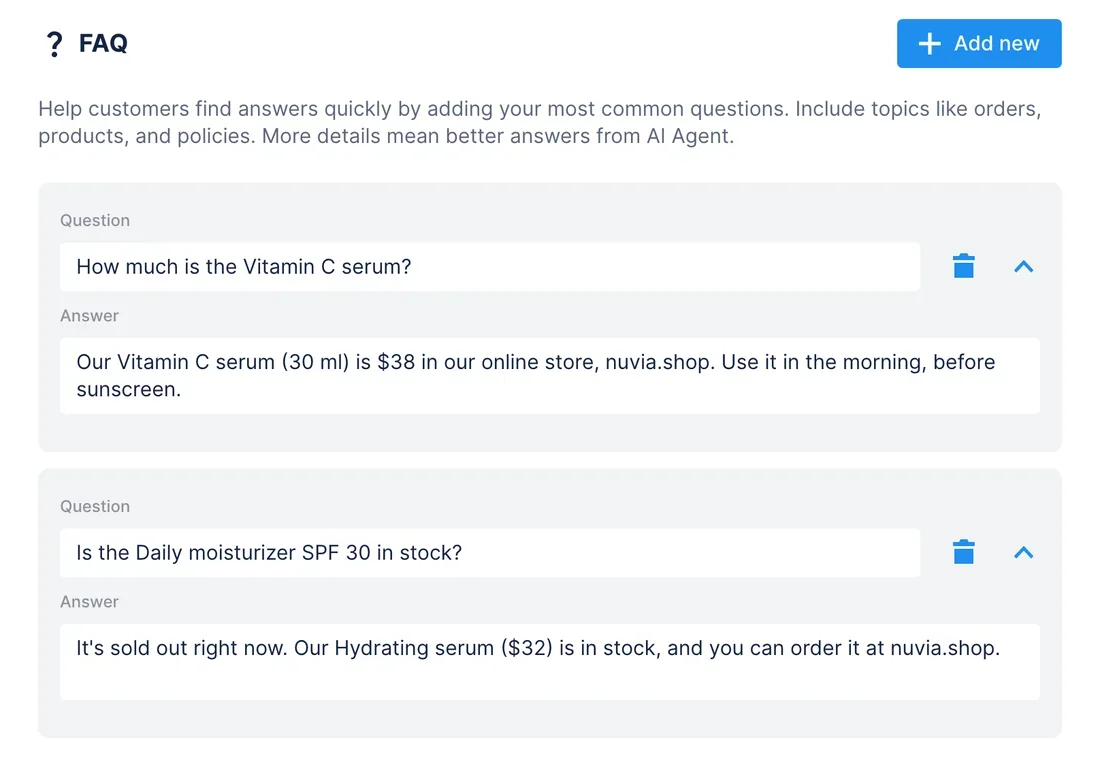
get_knowledge_base.add_faqadds an answer for each new product, andupdate_faqfixes answers with an old price once you say yes. test_replyasks the AI Agent about a serum in a sandbox chat, so you read its answer before customers do.
ResultThe AI Agent quotes prices and availability as your Shopify store showed them when you asked. After a restock or a price change, ask the assistant again.
AskRead the skincare products in our Shopify store with their prices and stock. Add an FAQ answer to Chatfuel for each one, fix any FAQ price that's out of date, then test how the AI Agent answers “is the vitamin C serum in stock?”
New discount in Shopify → the code in a DM to every commenter
WhenYou post a reel about your skincare line and want to thank everyone who comments with a code.
- Shopify MCP finds the Skincare collection with
search_collectionsand creates NUVIA15, 15% off that collection, withcreate-discount. It asks you to confirm the start date and who can use the code. - Chatfuel MCP finds the reel with
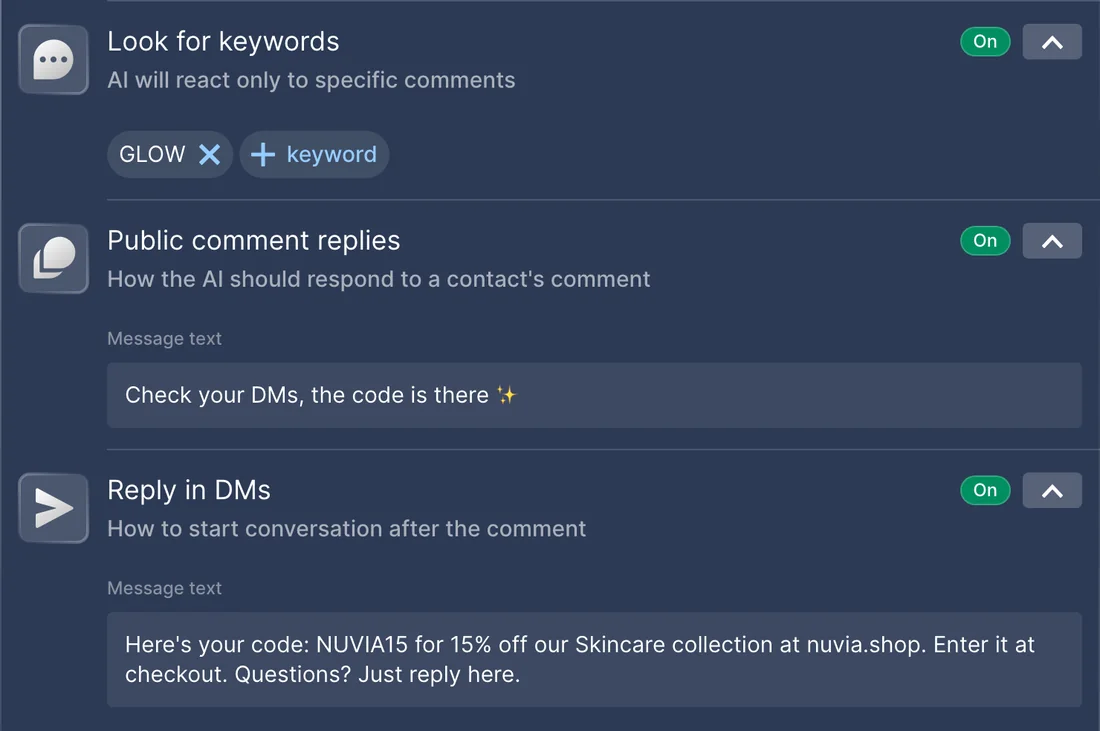
list_posts, andsetup_comment_repliessets the replies: comments with “glow” get a short public reply and the code in a DM. add_faqadds the code to the FAQ, so the AI Agent gives the same terms when someone asks in a chat.
ResultEveryone who comments the keyword gets NUVIA15 in their DMs, and chats get the same code and terms from the AI Agent.
AskCreate a Shopify code NUVIA15: 15% off our Skincare collection, starting today, for all customers. Then set up Chatfuel replies on our latest reel: people who comment “glow” get a short public reply and the code in a DM. Add the code to our FAQ too.
“Where's my order?” in a chat → a reply with the tracking
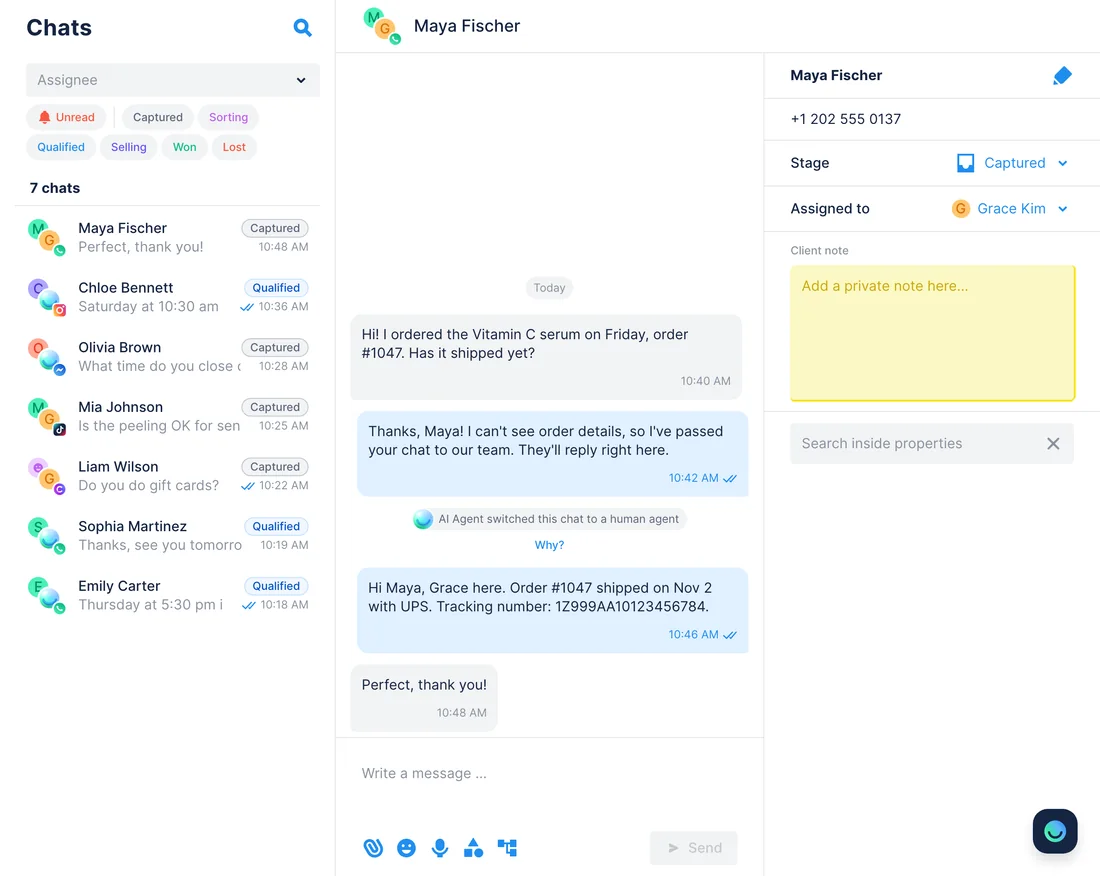
WhenA customer asks in WhatsApp where her online order is. The AI Agent can't see Shopify, so it passes the chat to your team.
- Chatfuel MCP finds the unread chats with
list_chatsand reads each one withget_chat, including the order number the customer typed. - Shopify MCP opens each order with
get-order: what was bought, whether it shipped and the tracking. - The assistant drafts a reply for each chat, and
send_chat_messagesends it after your yes to that exact text. Once the customer answers,return_chat_to_aican hand the chat back to the AI Agent, which replies to that answer.
ResultCustomers get the shipping status in the chat they wrote from, and nobody on your team searches Shopify admin order by order.
AskWhich unread chats ask about an online order? Look up each order number in Shopify and draft a reply with the shipping status and tracking. I'll approve every message.
Store details in Shopify → the AI Agent points to your shop
WhenClients ask in chats whether they can buy your serums online, and the AI Agent doesn't know the store's address yet.
- Shopify MCP returns the store's name, domain and email with
get-shop-info. - Chatfuel MCP compares them with the knowledge base from
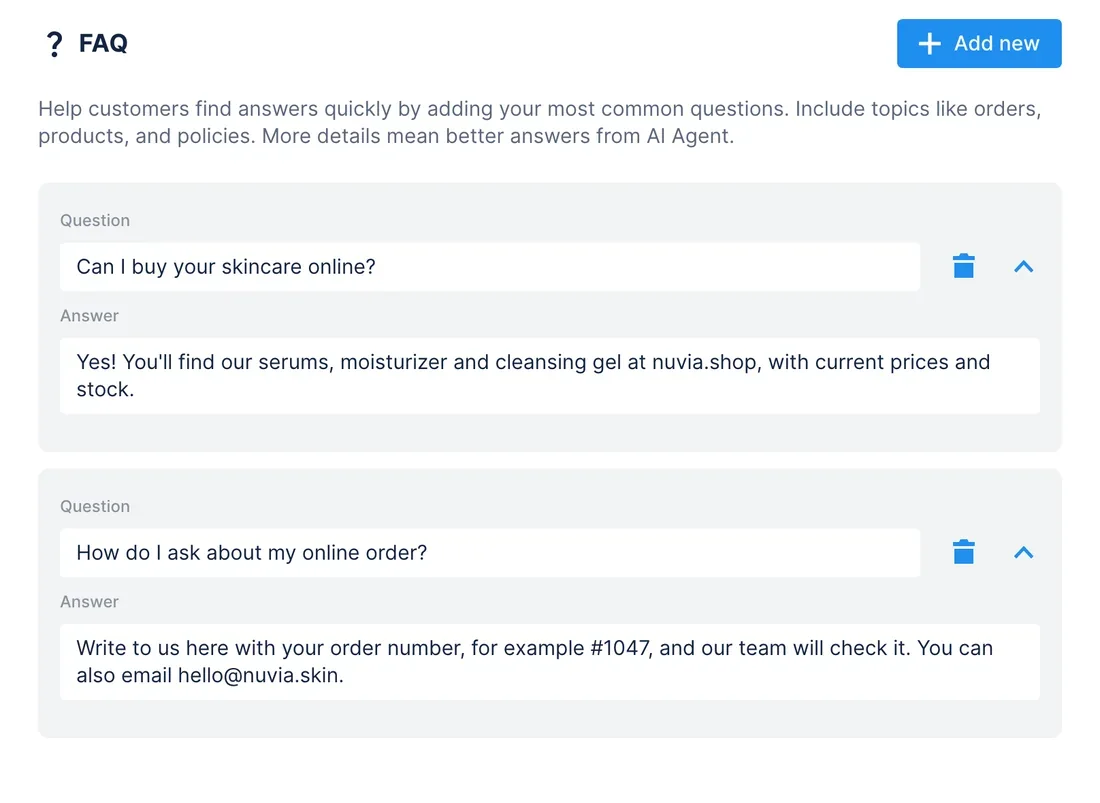
get_knowledge_base. After your yes,set_company_infosaves the website and email, andadd_faqadds answers about buying online. test_replyasks the AI Agent where to buy the serums, and you check the answer in a sandbox chat.
ResultWhen someone asks where to buy, the AI Agent sends them to your Shopify store and explains how to ask about an order.
AskGet our store details from Shopify and put the website and email into Chatfuel's company info. Add FAQ answers about buying our skincare online and asking about an order, then test them.
How to connect
Connect Chatfuel MCP
Pick Chatfuel in Claude's or ChatGPT's directory, or paste https://mcp.chatfuel.com/panel into Cursor's mcp.json, then log in to Chatfuel.
Install Shopify's integration
Use the integration Shopify makes for your assistant: the connector in Claude, the plugin in ChatGPT or the plugin in Cursor. Shopify then asks you to approve store access in your Shopify admin.
Name both in your message
Mention Shopify and Chatfuel so the assistant uses both. Shopify only reads until you approve write access, and Chatfuel waits for your yes before it changes the bot or writes to a customer.
- In Claude, open the connector directory, find Chatfuel and log in to your Chatfuel account.
- In a desktop browser, open the Shopify connector at claude.ai/directory/connectors/shopify and connect it.
- Claude sends you to your Shopify admin: approve the access the connector asks for. On this page, only creating a discount code needs write access.
- Chatfuel MCP
- claude.ai/directory/chatfuel
- Shopify MCP
- From Claude's directory
- In ChatGPT, open Plugins, install Chatfuel and log in.
- In a desktop browser, open chatgpt.com/plugins/shopify and install the Shopify plugin.
- In your Shopify admin, approve the access the plugin asks for on your store.
- Chatfuel MCP
- chatgpt.com/plugins
- Shopify MCP
- From ChatGPT's directory
- Paste https://mcp.chatfuel.com/panel into ~/.cursor/mcp.json as the chatfuel server and log in when Cursor asks.
- Type /add-plugin shopify in Cursor Chat, or click Add to Cursor on Shopify Merchant in the Cursor Marketplace.
- Sign in to Shopify and approve access to your store. Shopify supports this plugin, not its server added by URL.
- Chatfuel MCP
https://mcp.chatfuel.com/panel- Shopify MCP
/add-plugin shopify
What you need
- A Chatfuel bot with a chat channel connected, such as WhatsApp or Instagram. Comment replies need Instagram or a Facebook Page.
- A Shopify store you own, or a staff account on it with access to products, orders and discounts. The assistant can't do more than that account.
- Shopify's integration for your assistant: the connector in Claude, the plugin in ChatGPT or the plugin in Cursor, set up in a desktop browser. Your plan's usual pricing applies, with no extra Shopify fee.
- Write access approved in your Shopify admin, if the assistant should create discount codes. Reading products, stock and orders doesn't need it.
Limits
- Nothing moves between Shopify and Chatfuel on its own. A new order, a restock or a shipment reaches the chats only when you ask the assistant.
- Shopify products go into the FAQ, not Chatfuel's product catalog, which is edited only in the dashboard. FAQ prices and stock stay as they were when you asked.
- The AI Agent doesn't see Shopify orders. The assistant answers order questions when you ask, one chat at a time, and needs the order number the customer typed.
- A reply goes out only within the channel's window: 24 hours after the customer's last WhatsApp message, 7 days on Instagram and Messenger.
- Shopify's integrations read orders and customers without changing them, create only percentage-off codes and never refund or cancel an order, even with write access.
- Replies limited to one post or keyword turn off Chatfuel's reply to every comment on that platform, so other comments go unanswered unless you ask for both. On TikTok, comment replies send no DM.
FAQ
Yes. The Shopify connector for Claude, the Shopify plugin for ChatGPT and Shopify's Cursor plugin are made by Shopify and connect to its Setup MCP service. Shopify asks you to use these integrations rather than add its server by URL.
No. Chatfuel's AI Agent doesn't see Shopify. When you ask, the assistant reads the chats, opens each order with get-order and drafts a reply, and Chatfuel sends it only after your yes.
Only when you ask, and only in recent chats: WhatsApp takes free-form text up to 24 hours after the customer's last message, Instagram and Messenger up to 7 days. Chatfuel MCP has no templates or broadcasts, and an order is matched to a chat by name or phone, so check each match.
Not through MCP: the catalog is edited in the Chatfuel dashboard. The assistant puts each product's name, price and availability in the FAQ, which the AI Agent answers from.
Yes, with Shopify's plugin: type /add-plugin shopify in Cursor Chat and sign in to your store. Shopify documents the actions for Claude and ChatGPT; in Cursor the list comes from the live server and can differ.
No. Shopify blocks refunds, cancellations, payment captures, returns and gift card changes for connected AI tools, even with write access. Do them in Shopify admin.
More integrations


Connect Chatfuel MCP
Start a free trial, add Chatfuel to your assistant and ask about Shopify and your chats in one place.