
 Katie Ranaraja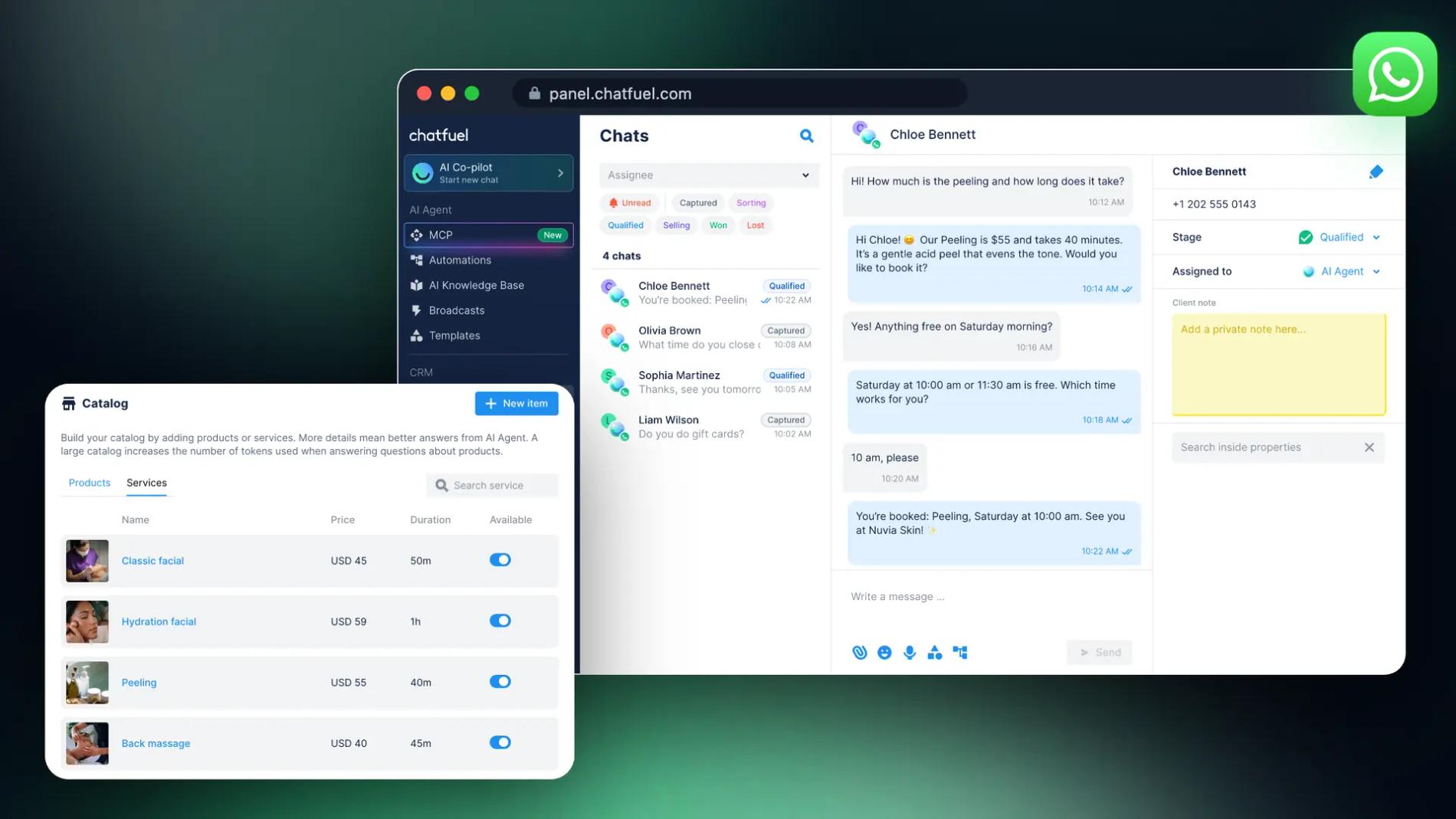
Your customers already have WhatsApp open all day. They'd rather send a quick message than call, fill in a form or wait for an email reply. WhatsApp Business is how a company answers them from a business account, with its own profile, tools and rules.
More than 3 billion people use WhatsApp, and according to Meta, people have more than a billion active conversations with businesses every day across WhatsApp, Messenger and Instagram.
WhatsApp Business comes in two versions:
- The WhatsApp Business Platform, used through a partner like Chatfuel. Your whole team answers from one number, and an AI Agent replies to every chat in seconds, day and night.
- The WhatsApp Business app, a free app for one phone and up to four linked devices.
This guide explains the difference, how to set up each one, what it costs and how to use both on the same number.
See also: How to Use WhatsApp Business Web on Desktop
What is WhatsApp Business?
WhatsApp Business is WhatsApp for companies. Meta launched the WhatsApp Business app in January 2018, and today it offers two products: the app for small businesses and the WhatsApp Business Platform for medium and large ones.
- The WhatsApp Business app works like regular WhatsApp, with business tools on top: a business profile, a catalog, quick replies, greeting and away messages. It runs on one phone, plus WhatsApp Web and the desktop app as linked devices.
- The WhatsApp Business Platform, often called the WhatsApp Business API, has no app of its own. Your number connects to software such as Chatfuel, where a team inbox, automation and AI work on top of it.
Customers see the same thing either way: a chat with your business name. The difference is on your side: who can answer, how much is automated and how many people you can reach.
| WhatsApp Business Platform with Chatfuel | WhatsApp Business app | WhatsApp (personal) | |
|---|---|---|---|
| Made for | Businesses with a steady flow of chats, teams | Small businesses, one owner | Friends and family |
| Who can reply | Unlimited teammates, each with their own login | One phone plus up to 4 linked devices (10 with a paid subscription) | One phone plus linked devices |
| Automatic replies | AI Agent answers every chat and hands it to your team | Greeting message, away message, quick replies | None |
| Messages to many people | Broadcasts with approved templates to any opted-in contact | Broadcast lists (only contacts who saved your number) and paid business broadcasts | Broadcast lists |
| Price | Chatfuel plan plus Meta's fee per delivered message | Free app, paid extras | Free |
How to use WhatsApp Business with Chatfuel
Chatfuel connects your number to the WhatsApp Business Platform as an official Meta Business Partner and puts an AI Agent and a team inbox on top. You don't need developers or your own server. Here's how to set it up.
1. Connect your number, or keep the app
In Chatfuel, open Settings and click Add number in the WhatsApp section. You'll log in with Facebook, pick or create a business portfolio and confirm your number. To do this, you need the Admin or Editor role in Chatfuel and Full control of the business portfolio in Meta.
- A new number that isn't on WhatsApp yet gets verified by SMS or a call. Any number that can receive them works, including a landline. Guide: How to connect a new phone number.
- A number already in the WhatsApp Business app connects with Coexistence: select Connect a WhatsApp Business app, scan a QR code from the app and choose whether to share up to 6 months of chats. Your contacts, chat history and catalog stay, and you keep using the app on your phone. Guide: Connect a WhatsApp Business app number.
2. Teach the AI Agent about your business
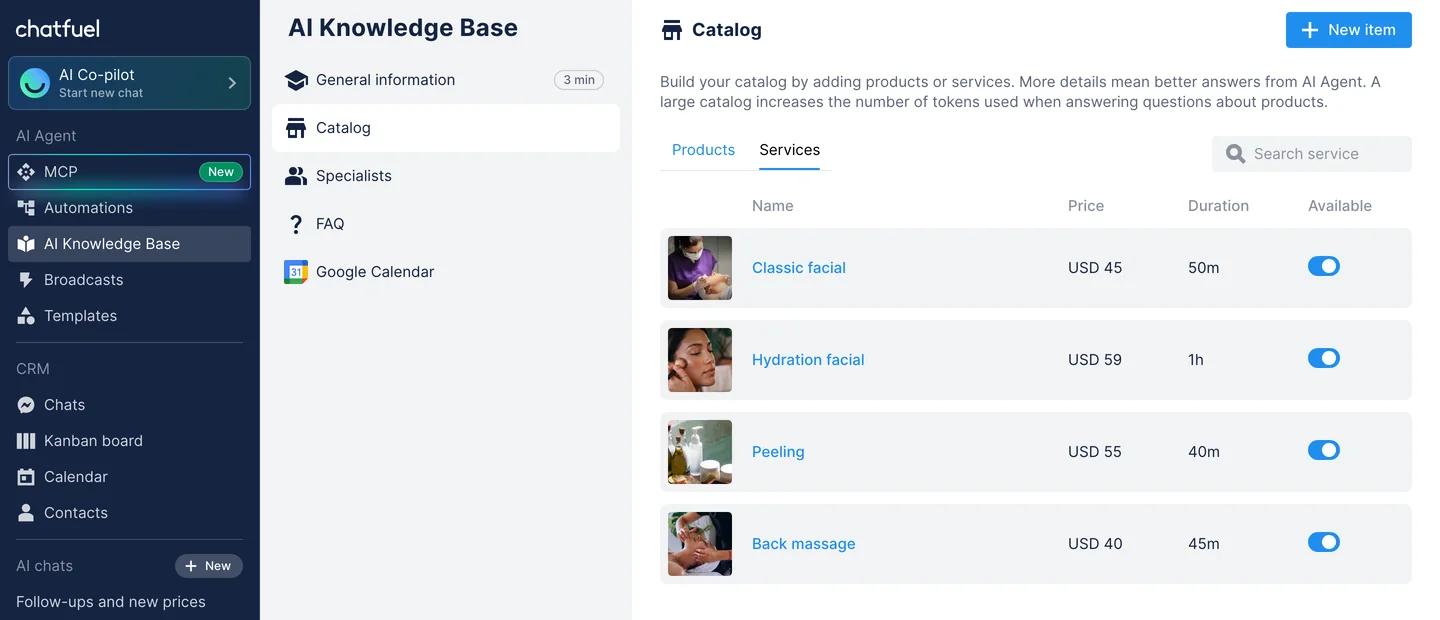
Go to AI Agent → AI Knowledge Base. Add your general information, services or products with prices, FAQs and policies such as opening hours or refunds. The AI Agent answers only from what you put here, so the more specific you are, the better its answers.
3. Let the AI Agent answer every chat
Go to AI Agent → Automations. WhatsApp has an automation for each source: incoming messages, ads that click to WhatsApp and posts that click to WhatsApp. They start switched off, so turn on the ones you want answered. The AI Agent replies in seconds, understands voice messages, qualifies leads and books appointments. Use Test automation to try it before customers do. Guide: How to activate AI in WhatsApp.
4. Bring in your team
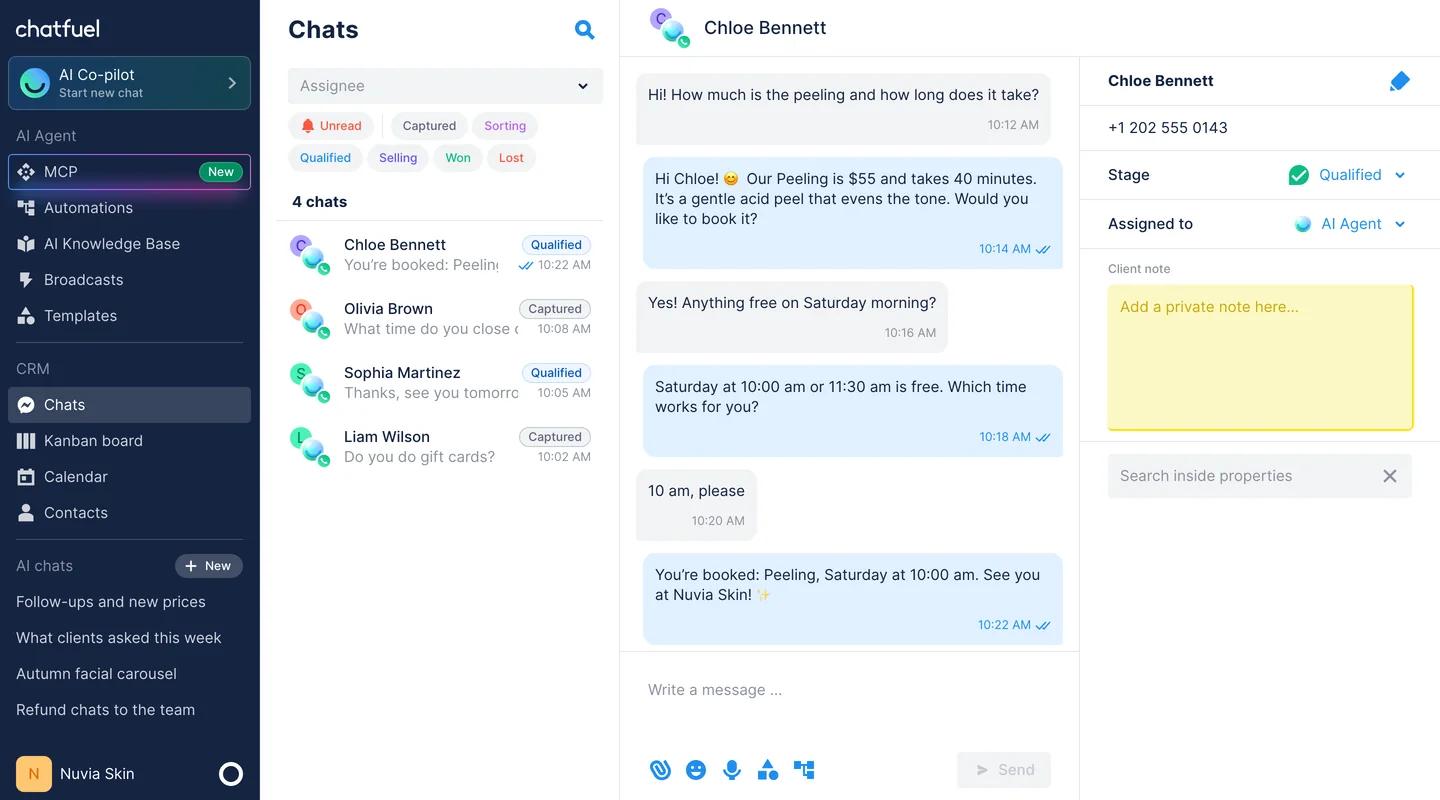
Every WhatsApp chat lands in Chats, where you see who is talking to the AI Agent, at which stage and who the chat is assigned to. Set up Switch to human agents to decide which chats go to people, for example complaints or large orders. A teammate can also take over any chat at any time: as soon as they reply, the AI Agent stops in that chat. Invite as many teammates as you need: every plan includes unlimited seats. See Live chat.
5. Reach customers after 24 hours
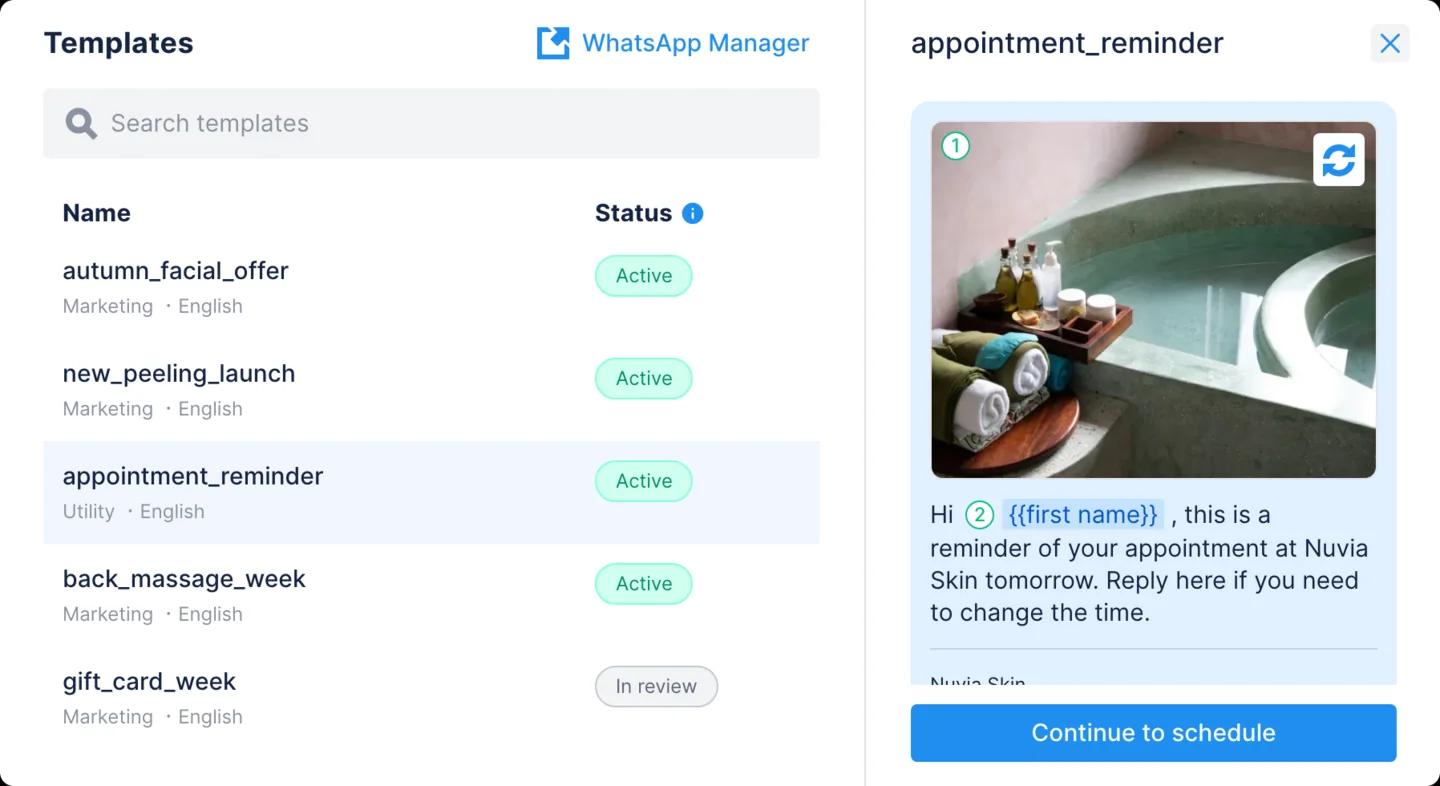
Inside the 24-hour customer service window, which reopens with every customer message, you can reply freely. After it closes, WhatsApp only allows approved message templates. You create them in WhatsApp Manager in three categories (Marketing, Utility and Authentication), and they appear in Chatfuel under AI Agent → Templates. Then go to Broadcasts → New mass message to send a template to a segment now or on a schedule. When customers reply, the AI Agent picks up the conversation.
More in the WhatsApp broadcast guide.
6. Bring customers to the chat
Your number gets its own wa.chatfuel.com link and QR code, shown in Settings → WhatsApp. Share it on your website, Instagram profile, packaging and receipts. Our free tools also make a link with a pre-filled message and a WhatsApp chat button for your website, with no account needed. For paid traffic, run ads that click to WhatsApp: the AI Agent answers ad leads the moment they write.
See how Chatfuel works on WhatsApp
How to set up the WhatsApp Business app
The WhatsApp Business app is free to download on Android and iPhone. According to WhatsApp's setup guide, it takes a few minutes:
- Download WhatsApp Business from Google Play or the App Store.
- Agree to the Terms of Service.
- Enter your business phone number and the 6-digit code you get by SMS.
- Enter your business name, choose a category and add a profile photo.
- Fill in your business profile: description, address, business hours, email and website.
One number can be on WhatsApp Messenger or on WhatsApp Business, not both at once. If you move your current number to the Business app, save your WhatsApp contacts to the phone first, because WhatsApp warns they won't move over. Using a separate number for the business keeps your personal chats apart.
WhatsApp Business app features
These are the main tools in the app, according to WhatsApp's Help Center:
- Business profile. Address, business hours, description, email and website, visible to anyone who opens your chat.
- Catalog. Products or services with photos and, in some countries, prices, shown on your profile.
- Quick replies. Up to 50 saved answers you insert with a shortcut.
- Greeting message. Sent automatically on a customer's first message or after 14 days without messages.
- Away message. Sent always, on a custom schedule or outside your business hours.
- Lists. Formerly labels: group chats and contacts, for example new customers or unpaid orders.
- Short link and QR code. Open a chat with you in one tap or scan.
- Username. An optional @name customers can message without your number. It's rolling out gradually, and you can reserve one now.
- Linked devices. One phone plus up to 4 devices with WhatsApp Web or the desktop app. With the paid multi-agent option, up to 10 devices and chat assignment.
Some features are paid. Meta Verified is a subscription with a verified badge, impersonation protection and support. Business broadcasts charge per delivered message and are available only in some countries.
The app's automation stops at fixed messages: a greeting, an away message and quick replies a person has to pick. It can't read a question and answer it, and every reply still comes from the same phone. That's where the WhatsApp Business Platform comes in.
What is the WhatsApp Business Platform (API)?
The WhatsApp Business Platform lets software send and receive WhatsApp messages for your business. Since Meta retired the On-Premises API in October 2025, it runs only as the Cloud API, hosted by Meta. There are two ways in: connect through a partner like Chatfuel in a few clicks, or build your own integration with developers.
What changes compared with the app:
- No device limit. Your team answers from an inbox in the browser or a mobile app, not from one phone.
- Automation and AI. Software reads and answers every incoming message, like Chatfuel's AI Agent.
- The 24-hour window. You reply freely for 24 hours after the customer's last message. After that, only approved templates in the Marketing, Utility or Authentication categories.
- Messaging limits. A new account can start chats with up to 250 people a day. After business verification, the limit grows step by step: 2,000, 10,000, 100,000 and unlimited, according to Meta. The limit applies to the whole business portfolio, and replies inside the 24-hour window don't count.
- Official Business Account. A verified badge next to your name for notable brands. Meta requires a verified business portfolio, two-step verification and at least 30 days on the platform.
More in our guide to the WhatsApp Business API.
Can you use the app and the API on the same number?
Yes. With Coexistence, one number works in the WhatsApp Business app and in the WhatsApp Business Platform at the same time. You keep answering from your phone, and Chatfuel's AI Agent answers the chats you don't.
- What stays: your number, contacts, catalog and up to 6 months of chat history, if you choose to share it.
- Who answers: if you reply to a chat from the app, the AI Agent stops in that chat. Assign it back to the AI Agent in Chatfuel when you're done.
- What Meta limits: according to Meta's documentation, connecting logs out your linked devices (link WhatsApp Web again afterwards), group chats don't sync, and broadcast lists become read-only. Messages you send from the app stay free, while messages sent through the platform follow API pricing.
Turn off the app's greeting message after you connect, so it doesn't answer on top of the AI Agent.
How much does WhatsApp Business cost?
The app is free. The paid extras are optional: a Meta Verified subscription and business broadcasts, charged per message.
The platform is billed by Meta per delivered message, by category and by the customer's country, according to Meta's pricing page:
- Marketing, utility and authentication templates are charged per delivered message.
- Replies inside the 24-hour window (service messages) are charged since 1 October 2026, after the first 1,000 a month per phone number. Utility templates sent inside the window are paid too.
- Chats from ads that click to WhatsApp open a free window of up to 7 days when you reply within 24 hours.
With Chatfuel, plans start at $20 a month with $20 in credits, with a 7-day free trial. Meta's message fees come out of the same wallet, so you get one bill. Every plan includes all channels, unlimited contacts and unlimited teammates. See Chatfuel pricing.
See also: WhatsApp Business Pricing: App, API and Meta Fees
Summary
WhatsApp Business is WhatsApp for companies, and it comes in two versions. To answer every chat with a team and an AI Agent, connect your number to the WhatsApp Business Platform with Chatfuel: the AI Agent replies from your knowledge base in seconds, your team takes over in Chats, and broadcasts reach customers after the 24-hour window. Already on the WhatsApp Business app? Keep it with Coexistence.
The free WhatsApp Business app suits a business that answers a few chats a day from one phone. It gives you a business profile, a catalog, quick replies and greeting and away messages, with up to 4 linked devices.
FAQs
How do I use WhatsApp Business with AI?
Connect your number to Chatfuel through the WhatsApp Business Platform, add your services, prices and policies to the AI Knowledge Base, and turn on the WhatsApp automations. The AI Agent then answers every incoming chat, including voice messages, and hands chats to your team when needed.
If your number is already in the WhatsApp Business app, connect it with Coexistence and keep using the app.
Is WhatsApp Business free?
The WhatsApp Business app is free to download and use. Meta Verified and business broadcasts are optional paid extras.
The WhatsApp Business Platform is paid: Meta charges per delivered message by category and country, and you pay the partner that runs the software. With Chatfuel, plans start at $20 a month with $20 in credits, and Meta's fees come out of the same wallet.
What is the difference between WhatsApp and WhatsApp Business?
WhatsApp Messenger is for personal chats. WhatsApp Business is a separate app with business tools: a business profile, a catalog, quick replies, greeting and away messages, and lists.
For more people, automation and AI, businesses use the WhatsApp Business Platform through a partner like Chatfuel.
Can several people use one WhatsApp Business account?
In the WhatsApp Business app, you can link up to 4 devices to one phone, or up to 10 with the paid multi-agent option, and everyone shares one account.
With Chatfuel, unlimited teammates answer from one number, each with their own login and role, and chats are assigned to the right person.
Can I keep the WhatsApp Business app and use Chatfuel?
Yes. With Coexistence, the same number works in the app and in Chatfuel. Your contacts, catalog and up to 6 months of chats stay. If you reply from the app, the AI Agent stops in that chat.
Do I need the WhatsApp Business API to send broadcasts?
To message customers who didn't save your number, or more than a few hundred at once, yes. On the platform, you send approved templates to contacts who agreed to hear from you, and Meta charges per delivered message.
The app's broadcast lists reach only contacts who saved your number. Its paid business broadcasts are available only in some countries.
