


Connect Chatfuel MCP with Stripe MCP
Create Stripe payment links and promo codes from your assistant and get them to customers through Chatfuel: in their chat, in the FAQ your AI Agent answers from and in DMs to people who comment. Then check Stripe for who paid and mark them Closed Won.
What the integration can do
Tools the assistant calls on each side, named as the servers name them.
| Tool | What it does |
|---|---|
list_chats | Lists customer chats with their channel, status and lead stage. |
get_chat | Returns the latest messages of one customer chat with its channel, status and lead stage. |
send_chat_message | Sends the text you approved to a customer in their chat and moves the chat to live chat. |
return_chat_to_ai | Hands a chat in live chat back to the AI Agent after your yes, and the AI Agent answers the customer's last message. |
add_faq | Adds question and answer pairs to the FAQ the AI Agent answers from. |
test_reply | Sends a sample customer message to a sandbox chat and returns the AI Agent's reply. |
list_posts | Lists recent posts and reels of the Instagram account and the Facebook Page connected to your bot. |
setup_comment_replies | Sets up AI or fixed replies to comments, for all of them or by keyword; on Instagram and Facebook also a DM and a choice of posts. |
set_lead_stage | Moves a lead to another stage of the Leads board, such as Qualified or Won. |
| Tool | What it does |
|---|---|
stripe_api_search | Finds the Stripe API method for a task by keyword, such as creating a payment link. |
stripe_api_read | Reads Stripe data with any GET method of the API: products, prices, payment links, customers and Checkout Sessions. |
stripe_api_write | Creates or changes Stripe data with the API's POST, PATCH, PUT and DELETE methods: products, prices, payment links, coupons and promotion codes. |
What to ask the assistant
A customer wants to buy → a Stripe link in their chat
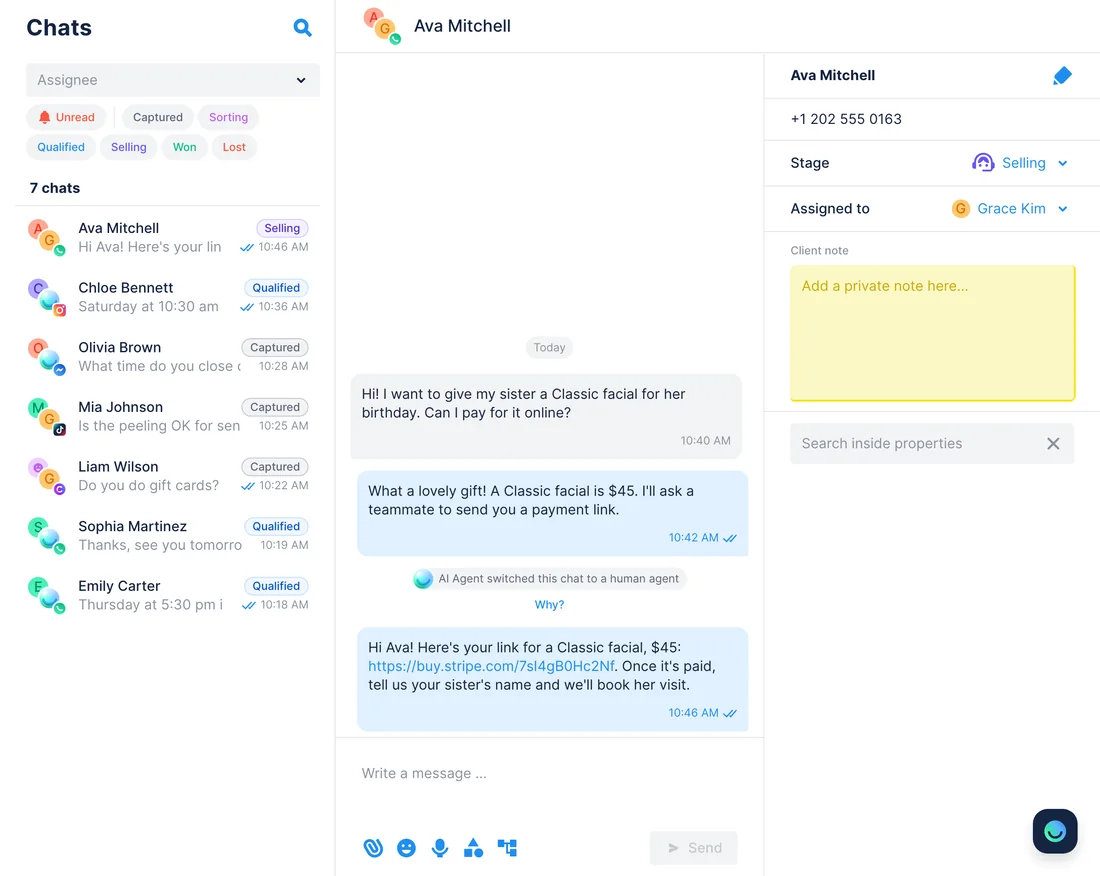
WhenA customer wants to pay online for a Classic facial as a gift. The AI Agent has no link for that, so it hands the chat to your team.
- Chatfuel MCP finds the chat with
list_chats, andget_chatshows what the customer wants to buy. - Stripe MCP checks your prices and payment links with
stripe_api_read. If none fits,stripe_api_writecreates a payment link for that price. - The assistant writes the message with the link, and
send_chat_messagesends it once you approve that exact text. - When the customer replies,
return_chat_to_aigives the chat back to the AI Agent after another yes, and it answers that reply.
ResultA few minutes after asking, the customer has a link to Stripe's checkout page in the same chat, and the AI Agent is back in the conversation.
AskAva Mitchell wants to pay online for a Classic facial as a gift. Find or create a Stripe payment link for it, draft a WhatsApp message with the link and send it after I approve.
New package in Stripe → the AI Agent shares its payment link
WhenYou start selling a new package and want customers to pay for it without leaving the chat.
stripe_api_searchfinds the right API method, and Stripe MCP creates the product, its price and a payment link withstripe_api_write.- Chatfuel MCP puts the package into the FAQ with
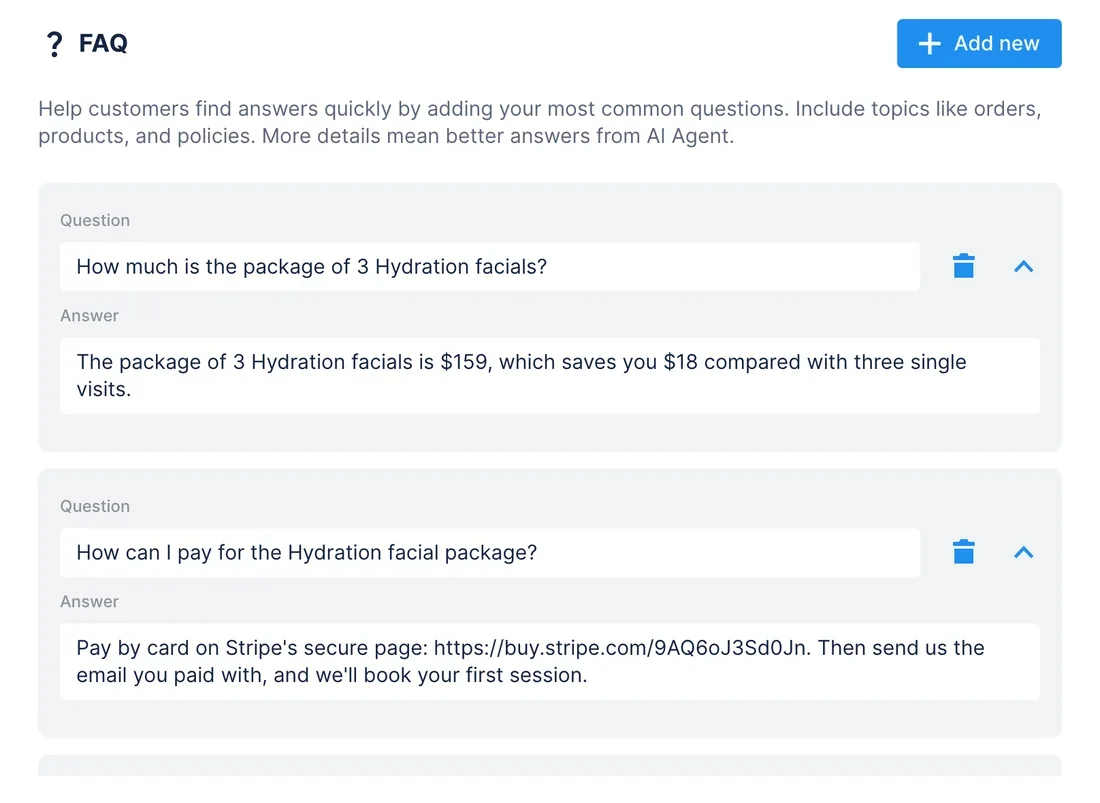
add_faq: what it includes, what it costs and the link to pay. test_replyasks the AI Agent in a sandbox chat how to pay for the package, so you can check that the link is in its answer.
ResultWhenever someone is ready to buy, the AI Agent sends the payment link in WhatsApp, Instagram or any other channel, with no wait for your team. The payment itself happens on Stripe's page.
AskCreate a package of 3 Hydration facials for $159 in Stripe with a payment link. Add it to our Chatfuel FAQ with the link, then test what the AI Agent says to “how can I pay for the package?”
Promo code in Stripe → a DM for every comment
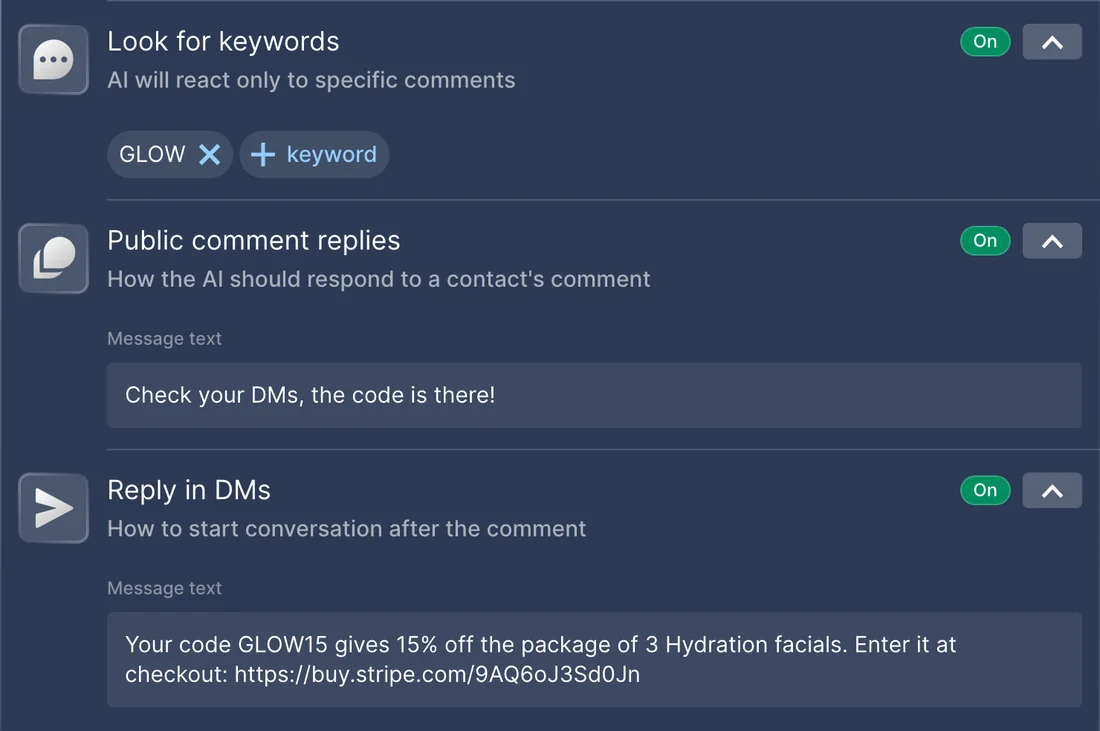
WhenYou announce a Glow week on Instagram: whoever comments GLOW under the post gets 15% off the Hydration facial package.
- Stripe MCP creates a 15% coupon with the promotion code GLOW15 through
stripe_api_writeand allows promo codes on the package's payment link. - Chatfuel MCP finds the post with
list_posts, andsetup_comment_repliesanswers every comment with GLOW: a short public reply plus a DM with the code and the link. add_faqadds the code to the FAQ, so the AI Agent can answer questions about the promo in DMs.
ResultEach commenter receives the code together with the link, and Stripe takes the discount off at checkout. TikTok has no DM for comments, so there the public reply asks people to write first.
AskCreate a 15% coupon with the code GLOW15 in Stripe and allow codes on the Hydration facial package's payment link. Then set up replies on our latest Instagram post: comments with GLOW get the code and the link in a DM.
“I've paid” in the chat → Closed Won on the Leads board
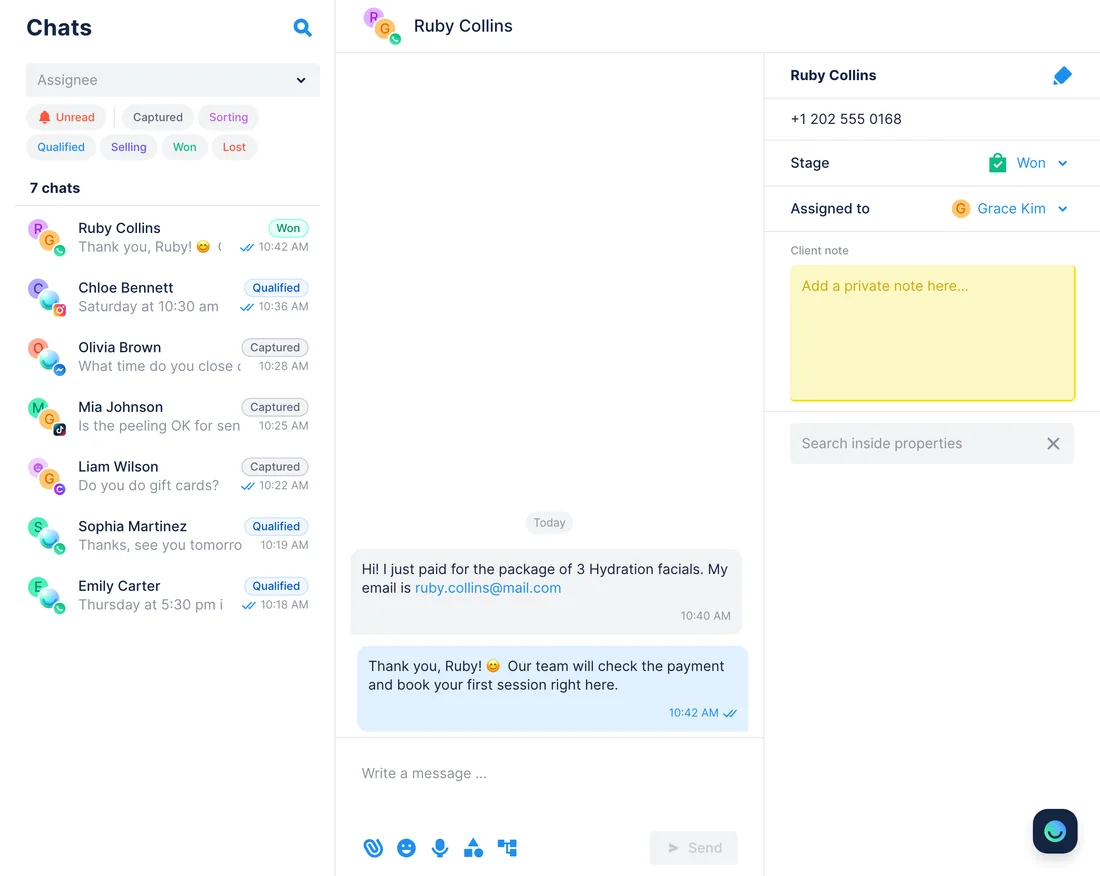
WhenSeveral customers write that they've paid for the package, yet the Leads board still has them in Selling.
- Chatfuel MCP lists the leads at the Selling stage with
list_chats, andget_chatfinds the email each customer typed. - Stripe MCP looks those emails up with
stripe_api_read: customers with that exact email and completed Checkout Sessions of the package's payment link. - For every payment it finds,
set_lead_stagemoves the lead to Closed Won after your yes, and the chat returns to the AI Agent.
ResultThe Leads board shows who really paid, checked against Stripe. A customer who never typed an email, or paid with another one, stays in Selling, and the assistant names them so you can check.
AskFind the leads in Selling who say they paid for the Hydration facial package. Check their emails in Stripe and move the ones with a completed payment to Closed Won.
How to connect
Add Chatfuel MCP
Find Chatfuel in Claude's or ChatGPT's directory, or paste its URL into Cursor, then log in to Chatfuel.
Add Stripe MCP
Claude and ChatGPT list Stripe in their directories. In Cursor, Stripe's plugin or the address https://mcp.stripe.com adds it. Sign in to Stripe and pick live mode, a sandbox or both.
Ask in one chat
The assistant reads from one server and writes to the other. Turn on tool approval in your client, as Stripe advises; Chatfuel waits for your yes before it changes the bot or messages a customer.
- Find Chatfuel in Claude's connector directory, add it and log in.
- Open Stripe's listing in the same directory and click Connect to Claude. On Team and Enterprise, an owner adds it to the workspace first.
- Sign in to Stripe in the OAuth window, choose the accounts or sandboxes and their permissions, then enable Stripe under + › Connectors in a chat.
- Chatfuel MCP
- claude.ai/directory/chatfuel
- Stripe MCP
- From Claude's directory
- Get the Chatfuel plugin from ChatGPT's directory, install it and log in.
- Install Stripe's official plugin from the same directory.
- Connect your Stripe account in the OAuth window and give ChatGPT the permissions it asks for.
- Chatfuel MCP
- chatgpt.com/plugins
- Stripe MCP
- From ChatGPT's directory
- Put Chatfuel in ~/.cursor/mcp.json under the address https://mcp.chatfuel.com/panel.
- Run /add-plugin stripe in Cursor's chat, or stripe agent setup with the Stripe CLI: Stripe's plugin adds its MCP server and skills.
- Prefer to set it up by hand? Click Install in Cursor on docs.stripe.com/mcp, or add "stripe" with "url": "https://mcp.stripe.com" to mcp.json, then sign in with OAuth.
- Chatfuel MCP
https://mcp.chatfuel.com/panel- Stripe MCP
https://mcp.stripe.com
What you need
- A Chatfuel bot with at least one channel connected. For the promo code use case, an Instagram account or a Facebook Page, where comment DMs go out.
- A Stripe account with MCP access on. An administrator turns it on or off for the whole team, separately for live mode and sandboxes.
- Sign-in with OAuth, or an agent API key for clients that can't use OAuth. From December 2026, Stripe MCP refuses full-access secret keys and restricted keys without the Agent tag.
- Claude (web or Desktop), ChatGPT or Cursor. On Claude Team and Enterprise, an owner adds the Stripe connector to the workspace before members connect.
Limits
- Nothing runs by itself: a payment in Stripe doesn't move a lead or message the customer. Stripe's webhooks send events to your own URL, and Chatfuel MCP has no input for them, so ask the assistant to check.
- A payment link belongs to a price, not to a customer. To tell who paid, the assistant needs the email the customer typed in the chat; Chatfuel MCP doesn't share emails or phones otherwise.
- The AI Agent shares the links you save in its FAQ. It can't create links, take payments or check them; the assistant does that when you ask.
- Each chat message needs your yes to its exact text. WhatsApp takes it within 24 hours of the customer's last message, Instagram and Messenger within 7 days, and the chat stays in live chat until you hand it back.
- Stripe asks you to approve refunds in the Dashboard (Human confirmation), and an approval expires after 24 hours. Stripe also warns about prompt injection when its server runs next to others, so keep tool approval on.
- On TikTok a comment reply can't include a DM: the public reply invites the person to write first.
- A keyword rule for one post switches off the reply to every comment on that platform, so other comments stop getting answers unless you ask the assistant to keep both.
FAQ
Yes. Stripe hosts it at https://mcp.stripe.com and documents its tools at docs.stripe.com/mcp. It's listed in the MCP Registry as com.stripe/mcp, and Claude and ChatGPT carry Stripe in their own directories.
No. The AI Agent sends the link you saved in its FAQ, and the payment happens on Stripe's page. New links, prices and promo codes come from the assistant, through stripe_api_write, when you ask for them.
It searches Stripe for the email the customer wrote in the chat: customers with that exact email and the Checkout Sessions of your payment link. If someone paid with another email or never typed one, there's no match, and you check them by hand.
Stripe allows it through stripe_api_write but puts refunds under Human confirmation: you approve the request in the Stripe Dashboard within 24 hours, then tell the assistant to retry. The use cases on this page don't issue refunds.
Only until November 30, 2026. From December, Stripe MCP answers full-access secret keys and restricted keys without the Agent tag with a 401. Sign in with OAuth or create an agent API key; agent keys come with approval rules for payouts, refunds and account changes.
Stripe recommends turning on your client's tool approval and taking care with other servers because of prompt injection. Customer messages are text from outside, so review every Stripe write before you approve it. Chatfuel also asks for a yes before it messages a customer.
More integrations


Connect Chatfuel MCP
Start a free trial, add Chatfuel to your assistant and ask about Stripe and your chats in one place.