 Guest experts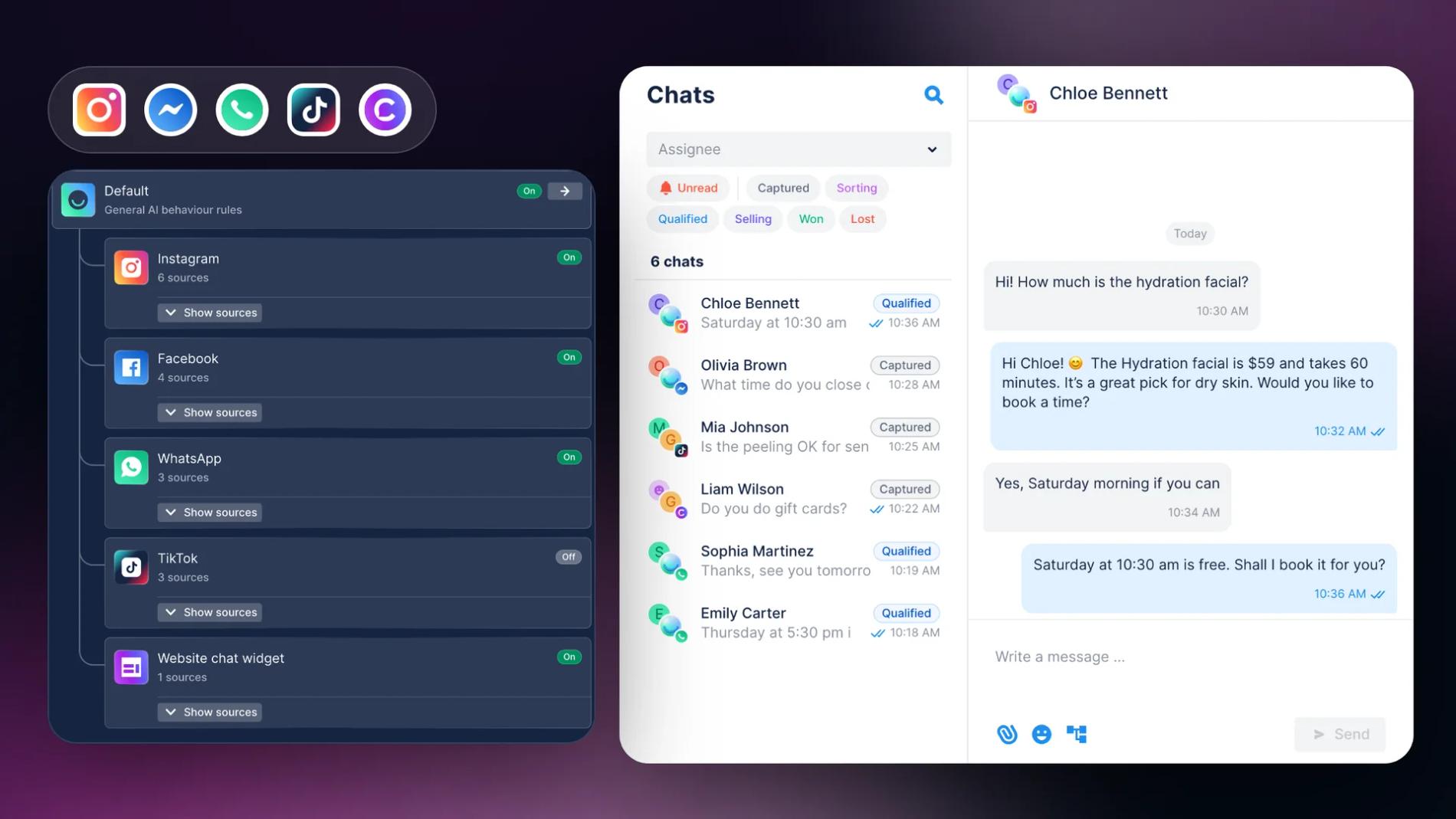
Your customers don't stick to one channel. One finds you on Instagram, another taps a WhatsApp button on your website, a third writes under a TikTok video. Multi-channel customer communication means answering all of them where they write, quickly, without making anyone repeat themselves.
The hard part is keeping up. Every channel has its own app and its own inbox, and replies slow down as the number of chats grows. A good multi-channel tool puts those conversations in one place and automates the answers that keep repeating.
Here are five tools worth comparing:
- Chatfuel: an AI Agent and a shared inbox for WhatsApp, Instagram, Facebook Messenger, TikTok and website chat.
- HubSpot Service Hub: a help desk on top of HubSpot's CRM, priced per seat.
- Twilio: messaging and contact center APIs for teams with developers.
- tawk.to: a free live chat and shared inbox with paid AI add-ons.
- Zendesk: a full help desk for email, chat, social and phone support.
See also: Customer support automation: choosing the right tools
Multichannel vs. omnichannel communication
The two terms often get mixed up, but they describe different setups.
Multichannel communication means you're present on several channels, such as WhatsApp, Instagram, email and website chat. Each channel works on its own, often in its own app, and the experience can differ from one channel to the next.
Omnichannel communication connects those channels. Conversations, customer details and answers are shared, so whoever replies, a person or an AI, works from the same information. As Salesforce puts it, multichannel is about offering access, while omnichannel is about offering continuity.
Most businesses start multichannel and move toward omnichannel as the number of chats grows. Software helps when it does three things:
- brings every channel into one inbox;
- answers with the same knowledge and rules everywhere;
- hands a chat to the right person, with the whole conversation in front of them.
In Chatfuel, for example, one AI Agent with one AI Knowledge Base answers on every connected channel, and every conversation lands in the same Chats list.
Multi-channel communication tools compared
| Tool | Channels | Best for | Starting price |
|---|---|---|---|
| Chatfuel | WhatsApp, Instagram, Facebook Messenger, TikTok, website chat | Businesses that sell and support in messengers and want AI to answer first | $20/month with $20 in credits, unlimited teammates |
| HubSpot Service Hub | Live chat, email, forms, Facebook Messenger, calling; WhatsApp on Professional and up | Teams that already use HubSpot CRM | Free for 2 users; Starter from $20/seat/month |
| Twilio | SMS, MMS, RCS, WhatsApp, Messenger, web chat, voice, email | Companies with developers who build their own contact center | Pay per message; Flex from $1 per active user hour |
| tawk.to | Website chat, email, WhatsApp, Messenger, Instagram, Telegram, SMS (via Twilio) | Small teams on a zero budget | Free; AI Assist from $29/month |
| Zendesk | Email, messaging, live chat, Facebook, Instagram, X, WhatsApp, voice | Support teams that work with tickets and a help center | Suite Team $55/agent/month (annual) |
Prices as listed on each vendor's website in October 2026.
1. Chatfuel
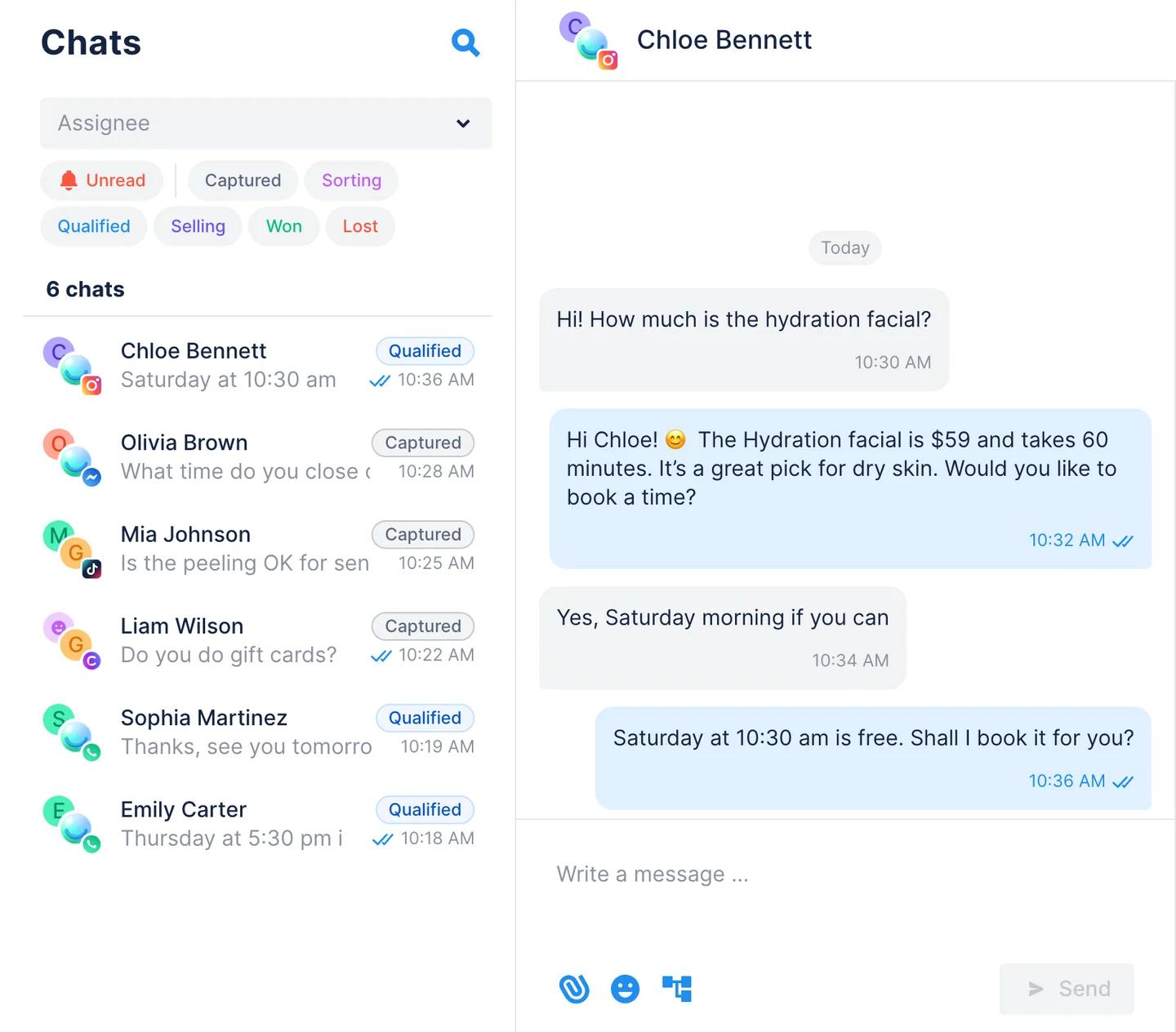
Chatfuel is an AI agent platform for messaging channels. It connects WhatsApp through the official WhatsApp Business Platform, Instagram, Facebook Messenger, TikTok and a chat widget for your website. Conversations from all five land in one inbox, where an AI Agent replies first and your team steps in when a person is needed.
What you get:
- One inbox for five channels. Chats lists conversations from every channel together, with the channel icon on each contact. Comments on Instagram, Facebook and TikTok posts show up there too, so you can answer them like a DM.
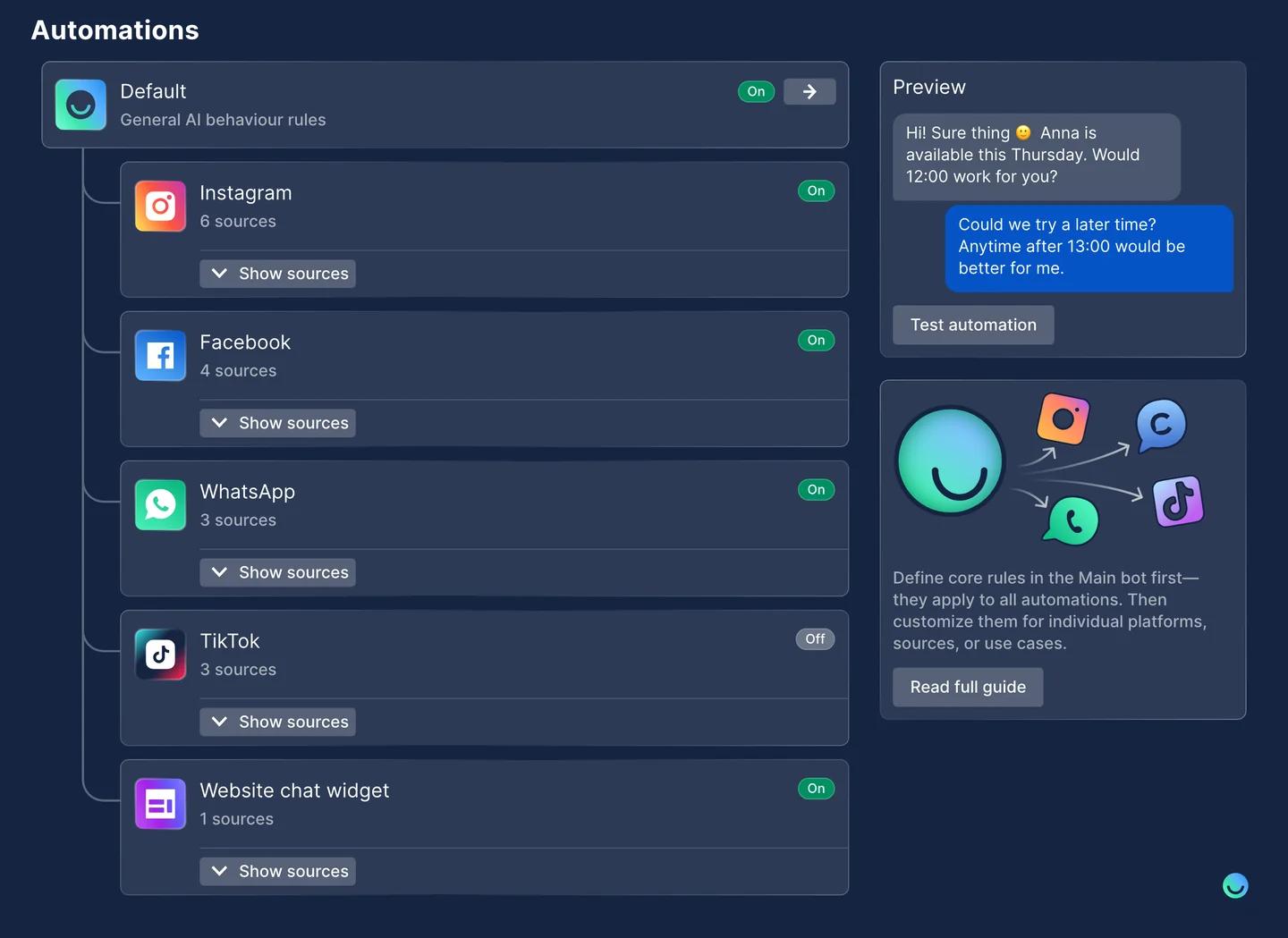
- One AI Agent everywhere. The AI Agent answers from your AI Knowledge Base (business info, prices or catalog, FAQ) on every channel. In Automations, each channel has its own switch, and its settings follow Default unless you change them for that channel.
- Handoff to your team. With Switch to human agents, the AI Agent passes a chat to your team when it should, and assignment rules decide who gets it. Teammates are unlimited, each with their own login and role, and they reply from the browser or the Chatfuel mobile app.
- Sales tools built in. The AI Agent collects contact details (Lead Qualification), sends follow-ups to customers who went quiet (Send follow-ups) and books appointments in the Calendar. Every chat becomes a lead on the Kanban board, and the AI moves new leads through the first stages for you.
- Broadcasts and comment replies. Send approved WhatsApp templates to a segment with Broadcasts (WhatsApp only), and reply to comments on Instagram, Facebook and TikTok automatically.
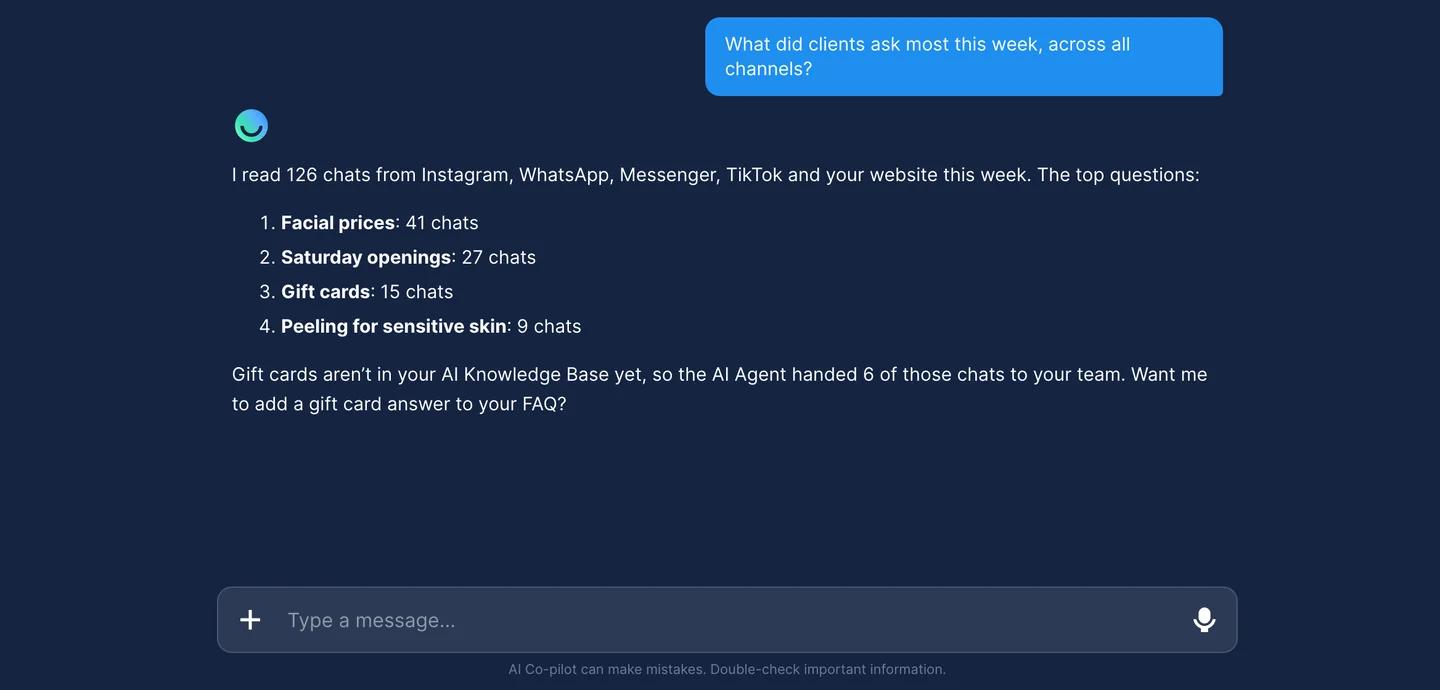
- AI Co-pilot. Set up and change everything by chatting, or ask about your chats: what customers ask most, who went silent, how many new leads came in this month.
Pricing: the Business plan costs $20 a month and includes $20 in credits for AI replies and messages. Agency plans for several client companies start at $100 a month, and yearly billing saves 10%. Every plan includes all channels, unlimited contacts and teammates, and no seat fees. Meta's WhatsApp message fees come out of the same credit wallet. Each plan starts with a 7-day free trial with $15 in credits. See Chatfuel pricing.
Results: the agency GoSky AI built a Messenger bot on Chatfuel for the car mat store 3D Mats. It automated 70% of repetitive inquiries, raised the repurchase rate by 30% and helped reach a 999% return on ad spend.
Best for: small and midsize businesses whose customers write in WhatsApp, Instagram, Messenger, TikTok or website chat.
Keep in mind: Chatfuel works in messaging channels only. It doesn't handle email, SMS or phone calls, and it doesn't support Telegram, Viber or LINE.
2. HubSpot Service Hub
HubSpot Service Hub is the customer service part of HubSpot's customer platform. It adds a help desk, a shared inbox, a knowledge base and customer feedback to the same CRM your marketing and sales teams use, so agents see each contact's full history.
Channels: live chat, email, forms, Facebook Messenger and calling. WhatsApp comes with the Professional and Enterprise plans and is capped at 1,000 messages a month.
AI: Customer Agent, HubSpot's AI agent for support, comes with Professional and Enterprise seats, with 14 days of free unlimited use after you buy a seat. AI features run on HubSpot Credits that each plan includes.
Pricing:
- Free tools: $0 for up to 2 users.
- Starter: from $20 per seat a month.
- Professional: from $90 per seat a month (annual), plus a one-time $1,500 onboarding fee.
- Enterprise: from $150 per seat a month (annual), plus a one-time $3,500 onboarding fee.
Best for: companies that already run marketing and sales in HubSpot.
Keep in mind: per-seat prices and onboarding fees add up as the team grows, and WhatsApp needs a Professional plan.
3. Twilio
Twilio is a communications platform for developers. Instead of a ready-made inbox, it gives you APIs to send and receive messages and calls, plus Twilio Flex, a programmable contact center your developers shape around your process.
Channels: SMS, MMS, RCS, WhatsApp, Facebook Messenger, Apple Messages for Business and web chat through the Messaging and Conversations APIs, plus voice and email (SendGrid). The old MessagingX name is gone; the product is now simply Twilio Messaging.
AI: Flex has Agent Copilot (in beta) to help human agents, and ConversationRelay lets developers connect AI voice agents to phone calls.
Pricing: pay as you go. WhatsApp messages cost $0.005 each in Twilio fees, plus Meta's fees for templates. Flex costs $1 per active user hour, $150 per named user a month, or $35 per monthly active user plus usage. Its free trial includes 5,000 active user hours.
Best for: companies with engineering teams that want to build their own communication stack.
Keep in mind: little works out of the box. The inbox, AI logic and reports are yours to build and maintain.
4. tawk.to
tawk.to began as a free live chat widget and now calls itself a free omnichannel inbox. The core product, with unlimited agents and chats, costs nothing; the company earns from paid add-ons.
Channels: website chat, email, WhatsApp, Facebook Messenger, Instagram, Telegram and SMS (through your own Twilio account) in one inbox, plus ticketing and a knowledge base.
AI: AI Assist answers customers from your content. It has a free tier for small volumes, and paid plans start at $29 a month. Voice Agents for phone calls start at $49 a month plus usage.
Pricing: free. You pay only for add-ons such as AI Assist, Voice Agents, white-labeling or virtual assistants (from $7.50 an hour).
Best for: small teams and startups that need a shared inbox on no budget.
Keep in mind: AI and branding removal cost extra, and some channels, like SMS, depend on third-party accounts.
5. Zendesk
Zendesk is a customer service platform built around tickets. Zendesk Suite combines ticketing, messaging and live chat, a help center and voice in one agent workspace, and every Suite plan includes AI agents.
Channels: email, web and in-app messaging, live chat, voice, and social and messaging apps such as Facebook, Instagram, X, WhatsApp, LINE, WeChat and Slack. Some channels, including WhatsApp, have extra fees.
AI: AI agents answer in messaging and email, and on the phone with Zendesk voice. You pay per automated resolution: each plan includes 5 to 10 per agent a month, then $1.50 each on a commitment or $2.00 pay as you go.
Pricing: Suite Team costs $55 per agent a month with annual billing ($69 month to month), and Suite Professional costs $115 ($149). Support Team, the ticketing-only plan, starts at $19 but has no social channels.
Best for: support teams with high ticket volumes, service levels to meet and several departments.
Keep in mind: per-agent prices plus per-resolution AI fees mean costs grow with both your team and your automation.
How to choose a multi-channel communication tool
Start with the channels your customers use
List where customers actually write to you today. If most of them message you on WhatsApp and Instagram, a messenger-first tool like Chatfuel covers them out of the box. If email tickets and phone calls dominate, a help desk like Zendesk or HubSpot fits better. Twilio can cover almost any channel if you have developers to connect it.
Check how the inbox and handoff work
One inbox is the baseline. Look at what happens when a chat needs a person: does it reach the right teammate, and can they see the whole conversation? In Chatfuel, Switch to human agents rules route chats to your team, and the teammate replies in the same thread.
Decide how much the AI should do
Some tools offer AI as a helper for human agents; others let AI answer customers on its own. Chatfuel's AI Agent replies first on every channel, books appointments, collects contact details and hands off when it should. tawk.to sells AI as an add-on, and Zendesk charges per automated resolution.
Compare the pricing model, not only the price
- Plan with credits (Chatfuel): a fixed monthly plan whose credits pay for AI replies and Meta's WhatsApp fees, with unlimited teammates.
- Per seat (HubSpot, Zendesk): the cost grows with your team.
- Per usage (Twilio, Zendesk AI resolutions): the cost grows with your volume.
Count the setup effort
No-code tools like Chatfuel and tawk.to can start working the same day. HubSpot and Zendesk take longer to configure, and HubSpot's higher plans come with required onboarding fees. Twilio needs development work before customers see anything.
Look at reporting
Help desks like Zendesk and HubSpot come with report dashboards. Chatfuel works differently: you ask AI Co-pilot in plain words, for example which questions came up most this week or which leads went silent, and it answers from your real chats.
How to set up multi-channel communication in Chatfuel
- Start the trial. Pick a plan on the pricing page and start the 7-day free trial.
- Connect your channels. In Settings → Platforms, connect WhatsApp, Instagram, Facebook, TikTok and Website.
- Fill in the AI Knowledge Base. Add what your business does, your prices or catalog and your FAQ. The AI Agent answers from it on every channel.
- Turn on the AI per channel. In Automations, keep Default on and switch on the channels where the AI Agent should reply. Change a setting for one channel only when it needs different behavior.
- Set up the handoff. Open Switch to human agents and choose when chats go to your team and who gets them.
- Invite your team. Add people in Settings → Teammates and give each one a role: Admin, Editor or Agent.
- Answer in one place. Work in Chats in the browser or in the Chatfuel mobile app, with every channel in the same list.
AI Co-pilot can do most of these steps for you: ask it in plain words to fill in the knowledge base, switch on a channel or add a handoff rule. Only connecting a channel needs you to finish the login yourself.
Summary
- Chatfuel fits when your customers write in WhatsApp, Instagram, Messenger, TikTok or website chat, and you want an AI Agent to answer first with your team behind it.
- HubSpot Service Hub fits companies that already run on HubSpot CRM.
- Twilio fits teams with developers who want to build their own setup.
- tawk.to is the free shared inbox for small teams.
- Zendesk fits ticket-heavy support with email, phone and service levels.
FAQs
What is the difference between multichannel and omnichannel communication?
Multichannel means customers can reach you on several channels that work separately. Omnichannel connects them, so customer details, answers and history are shared and nobody has to repeat themselves. One inbox with one AI and one knowledge base for every channel is a practical step from the first to the second.
Which channels does Chatfuel support?
Five: WhatsApp, Instagram, Facebook Messenger, TikTok and a chat widget for your website. Comments on Instagram, Facebook and TikTok posts are covered too. Telegram, Viber, LINE, SMS and email aren't supported.
Can one AI agent answer on all channels?
Yes. In Chatfuel, one AI Agent uses the same AI Knowledge Base on every connected channel. You switch it on or off per channel in Automations and can change a setting for one channel only, for example sending follow-ups only in Instagram DMs.
Is there a free trial?
Chatfuel plans start with a 7-day free trial with $15 in credits and every channel included. You add a card to start, and nothing is charged upfront. HubSpot and tawk.to also have free tiers.
How much does a multi-channel communication tool cost?
It depends on the pricing model. Chatfuel starts at $20 a month with $20 in credits and unlimited teammates. Help desks charge per seat: HubSpot Service Hub Starter from $20 per seat a month and Zendesk Suite Team from $55 per agent a month (annual). Twilio charges per message and per Flex user.
Do I need a developer?
Not for no-code tools. You can set up Chatfuel, tawk.to, HubSpot and Zendesk yourself in the browser. Twilio is built for developers, so plan engineering time to build and maintain it.