


Connect Chatfuel MCP with Calendly MCP
Send a single-use Calendly link to the customer who asked for a consultation, right in their WhatsApp or Instagram chat. Teach the AI Agent your Calendly event types and win back missed meetings, all from one assistant chat.
What the integration can do
Tools the assistant calls on each side, named as the servers name them.
| Tool | What it does |
|---|---|
update_automation_setting | Changes one setting of an automation: when the AI replies, handoff to your team, follow-ups, lead qualification, booking rules or comment replies. |
list_chats | Lists customer chats with their channel, status and lead stage. |
get_chat | Returns the latest messages of one customer chat with its channel, status and lead stage. |
send_chat_message | Sends the text you approved to a customer in their chat and moves the chat to live chat. |
return_chat_to_ai | Hands a chat in live chat back to the AI Agent after your yes, and the AI Agent answers the customer's last message. |
add_faq | Adds question and answer pairs to the FAQ the AI Agent answers from. |
test_reply | Sends a sample customer message to a sandbox chat and returns the AI Agent's reply. |
set_lead_stage | Moves a lead to another stage of the Leads board, such as Qualified or Won. |
| Tool | What it does |
|---|---|
event_types-list_event_types | Lists the event types of a Calendly user or organization. |
event_types-get_event_type | Returns the details of one event type, such as its duration and location. |
scheduling_links-create_single_use_scheduling_link | Creates a scheduling link from an existing event type that stops working after one booking. |
meetings-list_events | Lists the meetings scheduled in Calendly. |
meetings-list_event_invitees | Lists the invitees of one meeting with their name and email. |
What to ask the assistant
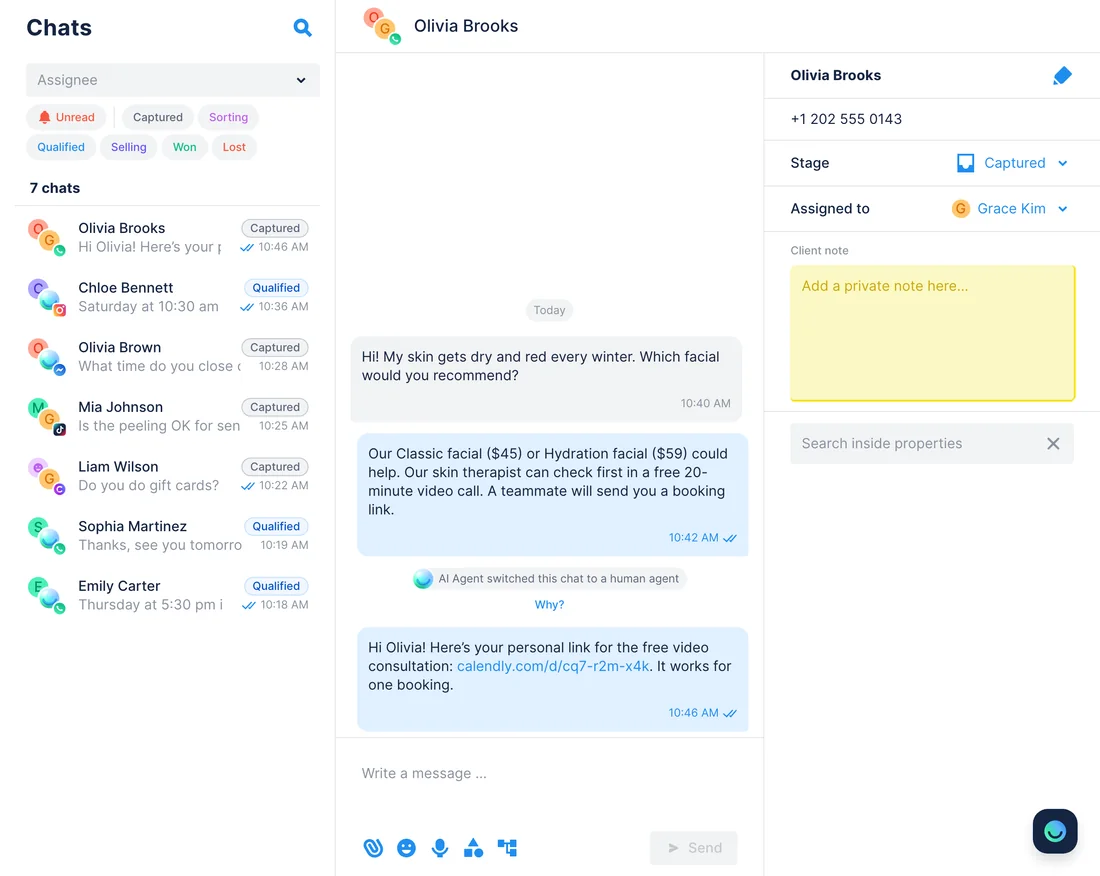
Asked for a consultation → a single-use Calendly link in the chat
WhenCustomers who can’t pick a treatment ask the AI Agent whether they can talk to someone first.
- Chatfuel MCP adds a handoff rule with
update_automation_setting: when someone asks for a video consultation, the AI Agent promises a booking link and passes the chat to your team. - Later,
list_chatsshows which chats wait for a person, andget_chatconfirms what each customer asked. - Calendly MCP picks the consultation with
event_types-list_event_typesand makes one link per customer withscheduling_links-create_single_use_scheduling_link. send_chat_messagedelivers each link after you approve its text. When the customer replies,return_chat_to_aigives the chat back to the AI Agent once you say yes, and it answers that reply.
ResultEvery customer gets a personal link that expires after one booking, in the same WhatsApp or Instagram chat where they asked.
AskWhen a customer asks for a video consultation, have the AI Agent say we’ll send a link and hand the chat to us. Then make a single-use Calendly link for everyone waiting and draft the messages.
Calendly event types → answers in the AI Agent’s FAQ
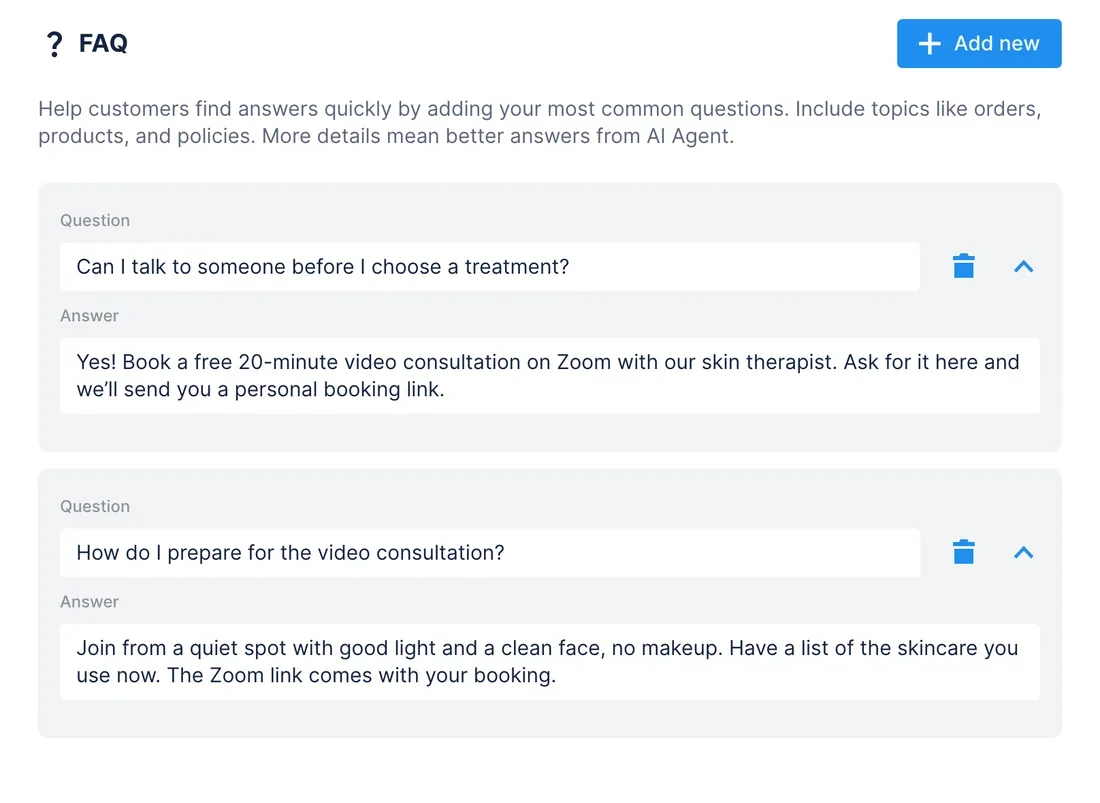
WhenYou add or change an event type in Calendly, such as a free video consultation.
- Calendly MCP lists your event types with
event_types-list_event_typesand reads the consultation’s length, location and description withevent_types-get_event_type. - Chatfuel MCP turns those details into questions and answers with
add_faq. test_replyputs a typical customer question to the AI Agent in a sandbox chat, so you check the wording before anyone else sees it.
ResultThe AI Agent explains what the consultation is, how long it takes and where it happens, just like your Calendly page.
AskRead our Calendly event types and add the video consultation to the Chatfuel FAQ: what it is, how long it takes and how to prepare. Then test what the AI Agent says to someone torn between two facials.
Booked in Calendly → Qualified on the Leads board
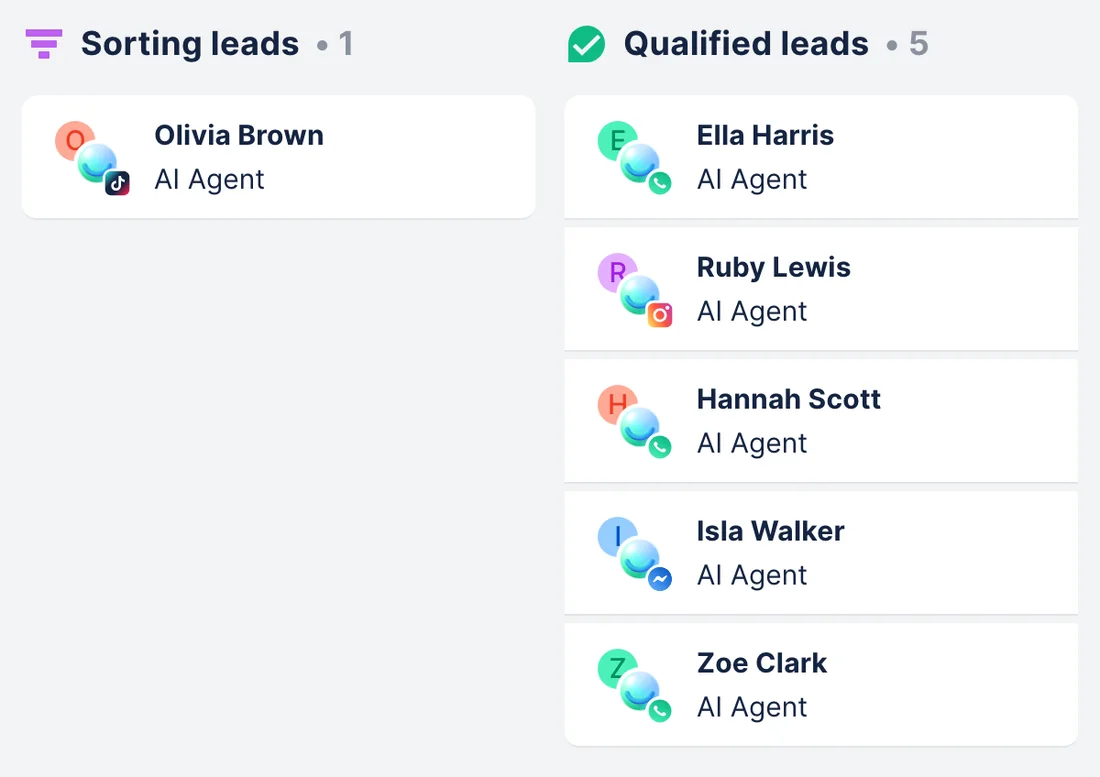
WhenCustomers book the video consultation from the links you sent, and the Leads board doesn’t show it.
- Calendly MCP lists this week’s consultations with
meetings-list_eventsand who booked each one withmeetings-list_event_invitees. - Chatfuel MCP looks up each person’s chat by name with
list_chats, and the assistant shows you the matches. - After your yes,
set_lead_stagemoves each lead to Qualified. This opens live chat, so from then on your team answers these customers instead of the AI Agent.
ResultThe Leads board shows who booked a consultation, and a teammate looks after each of them before the call.
AskWho booked our video consultation in Calendly this week? Find their Chatfuel chats and move them to Qualified on the Leads board.
Canceled or missed consultation → a new link in the chat
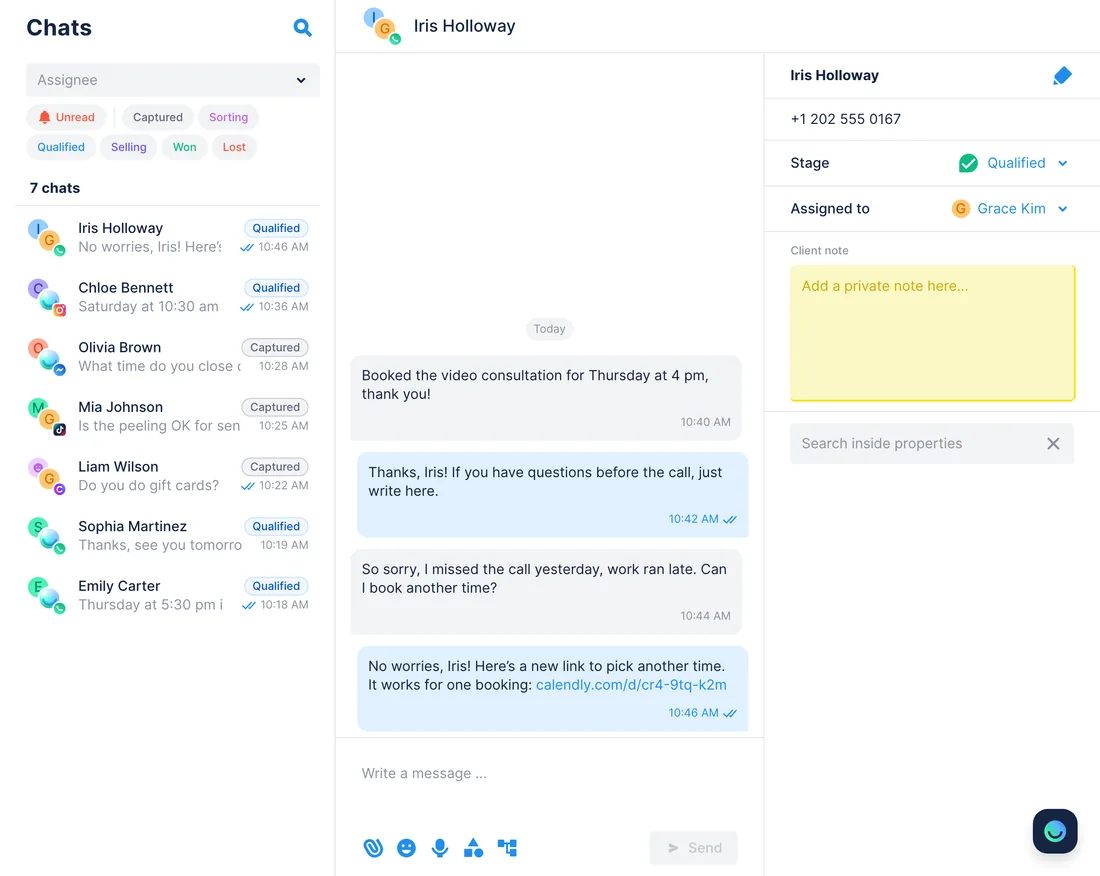
WhenA customer cancels the video consultation in Calendly or doesn’t join the call.
- Calendly MCP lists last week’s consultations with
meetings-list_events, canceled ones included, andmeetings-list_event_inviteesshows who booked each one and whom you marked as a no-show. - Chatfuel MCP finds each customer’s chat by name with
list_chats, and you confirm it’s the right person. scheduling_links-create_single_use_scheduling_linkmakes a fresh link, andsend_chat_messagesends it once you approve the text.
ResultPeople who missed their slot get a new link in the chat they already use. On WhatsApp this works only within 24 hours of their last message, on Instagram and Messenger within 7 days. The message opens live chat in that conversation; once the customer answers, ask the assistant to hand it back to the AI Agent.
AskWhich video consultations were canceled or missed this week? Find those customers in Chatfuel and draft a message for each with a new single-use Calendly link.
How to connect
Add Chatfuel MCP
Claude and ChatGPT list Chatfuel in their directories; Cursor adds it by URL. Either way, you sign in with your Chatfuel account.
Add Calendly MCP
Calendly is in Claude’s connector directory and among ChatGPT’s plugins. Other assistants, Cursor included, connect to https://mcp.calendly.com and open Calendly’s sign-in page.
Ask for both at once
One request can read Calendly and change Chatfuel, or the other way around. Chatfuel checks with you before it edits the bot or writes to a customer.
- Find Chatfuel in Claude’s connector directory, connect it and sign in.
- In the sidebar, open Customize › Connect your tools, search for Calendly and click Connect.
- Sign in to Calendly and click Approve. In a new chat, switch Calendly on under Connectors.
- Chatfuel MCP
- claude.ai/directory/chatfuel
- Calendly MCP
- From Claude's directory
- In ChatGPT’s plugin directory, install Chatfuel and sign in.
- Open Plugins in the sidebar, find Calendly and click Connect.
- Click Sign in with Calendly and approve access. In a new chat, turn Calendly on from the + menu.
- Chatfuel MCP
- chatgpt.com/plugins
- Calendly MCP
- From ChatGPT's directory
- Put Chatfuel in ~/.cursor/mcp.json with https://mcp.chatfuel.com/panel as its URL.
- Add Calendly with "url": "https://mcp.calendly.com". Cursor registers itself with Calendly when you sign in, so there’s no client ID or secret to paste.
- The first time Cursor calls Calendly, sign in in the browser and click Connect to Calendly.
- Chatfuel MCP
https://mcp.chatfuel.com/panel- Calendly MCP
https://mcp.calendly.com
What you need
- A Chatfuel bot connected to WhatsApp, Instagram, Facebook, TikTok or your website chat.
- A Calendly account on any plan, Free included. Calendly doesn’t require a paid plan for MCP, though some actions depend on the plan.
- At least one event type in Calendly. The Free plan comes with one event type and one calendar connection.
- Claude or ChatGPT on any plan, both named by Calendly, or Cursor or another assistant that registers its own OAuth client.
Limits
- Chatfuel’s booking calendar and Calendly don’t sync. If one specialist takes appointments in both, the same hour can be booked twice, so give each its own hours.
- The AI Agent can’t create Calendly links or book Calendly time by itself. Links go out only when you ask the assistant and approve the message.
- Chatfuel MCP doesn’t return a customer’s email or phone unless they typed it in the chat, so Calendly invitees are matched to chats by name. Check each match before you approve.
- WhatsApp delivers your team’s text only within 24 hours of the customer’s last message, Instagram and Messenger within 7 days. A follow-up days after a missed call may not go through.
- Calendly MCP accepts only assistants that register their own OAuth client. An app that asks you to paste a client ID and secret can’t connect, and the server can’t be self-hosted.
- Calendly’s API limits cover integrations too: 50 requests per user per minute on the Free plan, 500 on paid plans. Booking a slot for an invitee directly needs a paid plan.
FAQ
Yes. Calendly hosts it at https://mcp.calendly.com and announced it in its developer changelog on March 11, 2026. Claude’s directory lists the connector as made by Calendly.
No. In chats, the AI Agent books into Chatfuel’s own calendar. Calendly links reach customers when you ask the assistant: it creates them with Calendly MCP and sends them with send_chat_message after your yes.
Yes, if the same person takes both. Neither calendar sees the other’s appointments. Keep them apart, for example video consultations in Calendly in the morning and treatments booked in Chatfuel in the afternoon.
Yes. MCP access and single-use links come with every Calendly plan. Free has one event type, and meetings-create_invitee, which books a slot for someone directly, needs Standard or higher; the use cases on this page don’t use it.
There’s no shared ID. It searches Chatfuel chats by the invitee’s name and lists the matches for you. If two customers share a name, you decide which chat is the right one.
Calendly’s docs don’t name Cursor, but they describe adding https://mcp.calendly.com to any MCP client that registers itself through OAuth. Cursor’s marketplace also lists a Calendly plugin, made by Cursor, that uses the same address.
More integrations


Connect Chatfuel MCP
Start a free trial, add Chatfuel to your assistant and ask about Calendly and your chats in one place.