"Our client is very sensitive to the use of AI. What we can do in the short term is more of the marketing automation side, and almost negate the AI assistant part."
That's a senior social lead at a US agency on a call with us this week. His executive creative director added the real question: "I'm thinking about the use cases where this would work, how we would introduce it to the client, and whether they'd be open."
The client wants faster replies and more clicks to the website. What they fear is a screenshot of a weird AI answer going around their community. Both are true at once, and the agency's job is to find the first step that gets the result without the risk. Here is how we'd run that conversation.
In this guide:
- why you sell the result and not the AI;
- which use case to pick first;
- three ways to start small that clients say yes to;
- the three objections you'll hear and what to answer;
- how to show it on a call instead of describing it;
- the number to agree on before anything goes live;
- what the first two weeks look like.
Sell the result, not the AI
The client doesn't need "AI". They need the person who commented "link?" under a reel to get the link in five seconds, not tomorrow. They need the 11 pm WhatsApp message answered before the person books somewhere else.
So the pitch is never "let's use AI in your DMs". It's "here is a step in your funnel where you lose people, and here is how we fix it". Your expertise is the content that brings attention. Automation turns that attention into a click or a booking. Frame it as a gap in their funnel you can both see.
Say it in the client's words, too. "Virtual assistant" and "auto-reply" land better than "agent", "knowledge base" and "handoff rules". Keep the terms for your own setup notes.
Pick a use case the client already has a problem with
On the call, the agency named three things their clients want, and they are the three we see most:
- Comment to DM for links. Someone comments on a post or reel, gets a public reply and the link in DMs. As the agency put it, Instagram doesn't want people to leave the app, so the link in bio is a pain and the DM is the bridge. One detail for the pitch: a person who doesn't follow the account gets that DM in their message requests, so the public reply should say "sent you a DM".
- Follower gating. "Follow us and comment WANT to get the guide." Worth knowing before you promise it: Instagram doesn't tell any third-party tool when someone follows you, so there is no "DM on follow" trigger. The automation delivers on the comment, and the follow stays an ask in the caption.
- Conversion to the website. People who ask about a product get the right page, fast.
If the client sells something simple and not expensive, ads plus instant replies convert on impulse: the person sees the ad, writes, gets the link and buys before the mood passes. If the client is a service business, a clinic or a salon, the use case is bookings: "do you have a slot on Saturday?" answered and booked in the chat.
Pick the one with a number behind it. "Links in DMs" has clicks. "Bookings" has appointments. "Answer questions faster" only has response time behind it, which is hard to tie to money, so leave it for later.
Three ways to start small
These are the angles that, in our experience, work with a client who is afraid of AI. Pick one.
1. One post, not the whole account
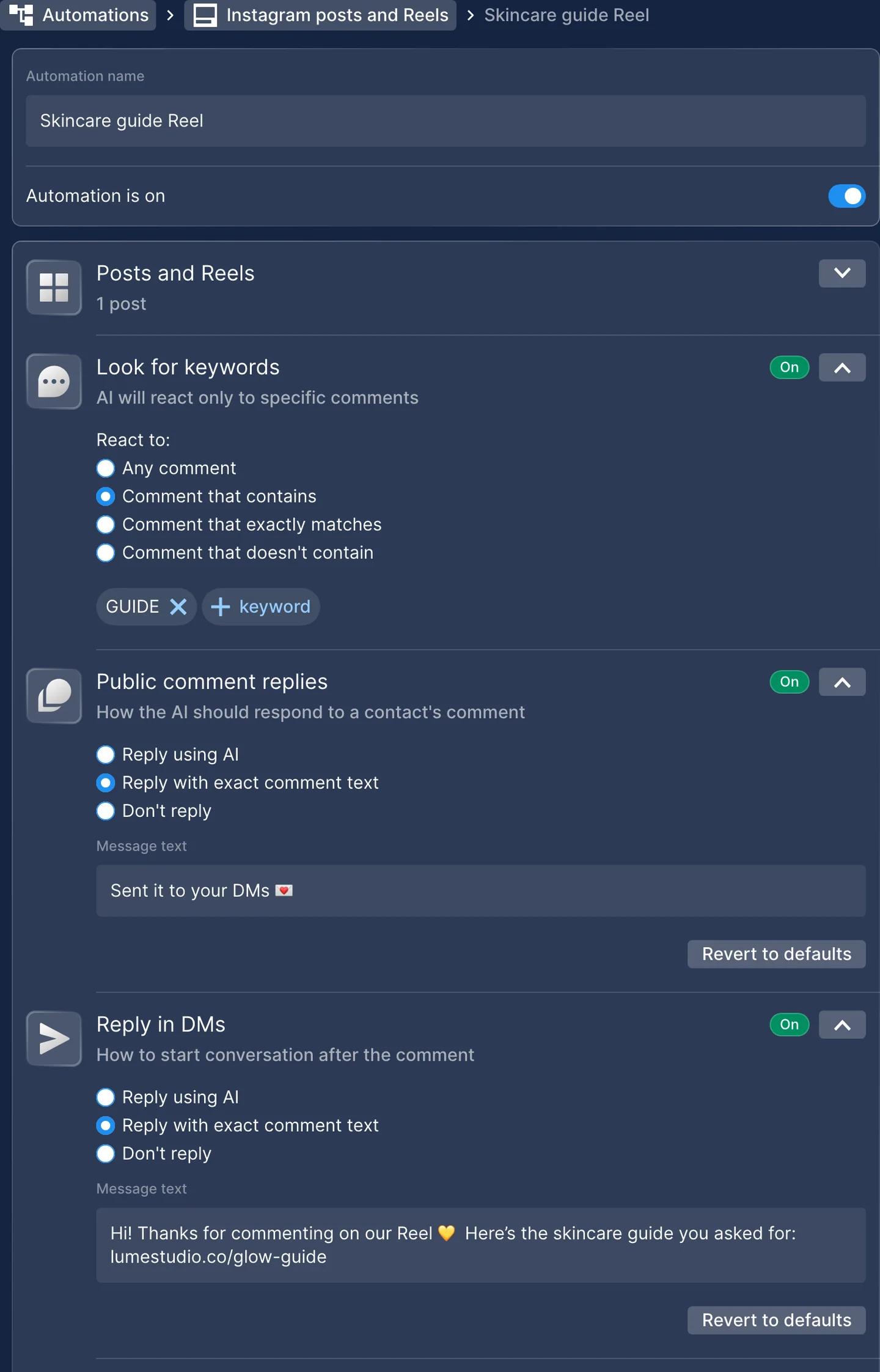
Set the automation for one campaign post or one reel. Keep the base comment automation off, and that post is the only thing that answers; everything else on the account stays as it was. The client sees real conversations on a small scale, with their own customers, before anything changes account-wide. Two weeks later you extend it or you don't, and the decision is based on their chats.
2. One job for the AI
Sit down with the client and pick one job for an assistant. An e-commerce brand from the UK did this for a new perfume launch: an assistant that helps a person browse the new line and recommends the right scent for them. The client understood immediately why AI was there: a fixed reply can't do that. It reads as better service for their customers, and the client gets comfortable with AI because it does one thing they can see and judge.
3. Static first, then read the chats
Start with exact-text replies only. No AI anywhere. After a week or two, open the chats together and look for where people leave: replies that sound too strict or impersonal, questions the script can't answer, people who write once and disappear. Then propose AI exactly at that point, with a goal attached: "this step loses people, let's try an AI reply here and watch the clicks".
The third route is the easiest to sell. You are showing the client a funnel step that doesn't work and proposing an experiment, and "AI" never has to be the subject.
For bookings the same idea is a ladder. Booking in Chatfuel has four autonomy levels: Intent Collection, where the AI only finds out what the person wants and a human books; Booking with Human Approval, where the AI collects everything and a human creates the booking; Booking with Human Review, where the AI books and notifies the team; and Full, where the AI books on its own. New bots start at Full, so set the level in Booking rules before the first chat, and move it up when the client trusts it.
The three objections you will hear
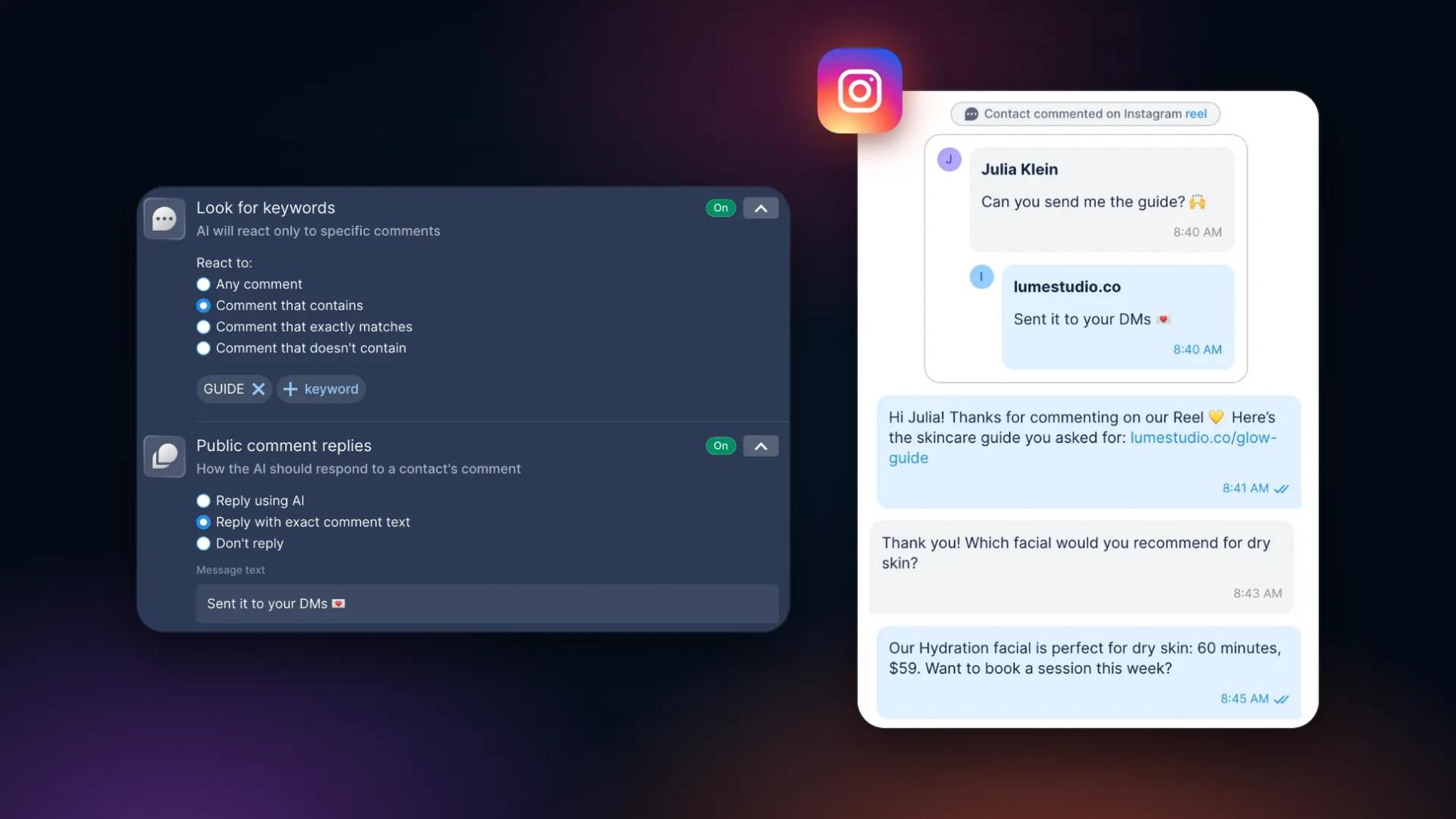
"AI in public will backfire on us." Then keep it out of public. Every comment rule in Chatfuel has two replies you set separately: Public comment replies under the comment and Reply in DMs. Each can be exact text, AI Agent, or no reply at all. For an AI-cautious brand the split is simple: the public reply is a fixed, approved line like "Thanks! Just sent you the link in DMs", and AI works only one-to-one in the DM, where a helpful answer matters more than a perfectly scripted one. Nothing AI-written appears under the post.
"We'll pay for every person who writes to us." The agency on the call came from a tool that charges per contact, and with clients who get hundreds of DMs a day the credits were gone before the automation did anything useful. On Chatfuel the wallet pays for AI replies, and for WhatsApp messaging if the client is on WhatsApp; contacts and teammates are unlimited, and an exact-text reply draws nothing from it. On the call we estimated about 2,000 chats a month, three or four messages each, at around $16 of AI usage. Check your client's numbers in the pricing calculator before you promise anything.
"The AI will say something wrong." It can still happen. Four things make it rare and contained: a knowledge base the AI answers from (catalog, FAQ, policies, links); instructions for tone, for which link goes with which question, and a line that makes the assistant introduce itself as the brand's AI assistant if the client wants that; Switch to human agents rules that send refunds, complaints or anything sensitive to a person; and the test chat, where you run a few real comments through the setup and show the client the answers before going live. Seeing the replies does more than any explanation.
One more argument. The models are different from what the client tried two years ago. One European brand that had stayed away told us this year why they finally signed up: the AI is good enough for their business now.
Show it, don't describe it
A demo beats a deck. Two ways to do it on a client call:
- Two posts, two modes. Set up one post with exact-text replies and another with an AI reply in the DM. Let the client comment on both from their own phone and watch what comes back. Or use the test chat on one rule and flip Reply in DMs from exact text to AI between two test comments; nothing touches the live post.
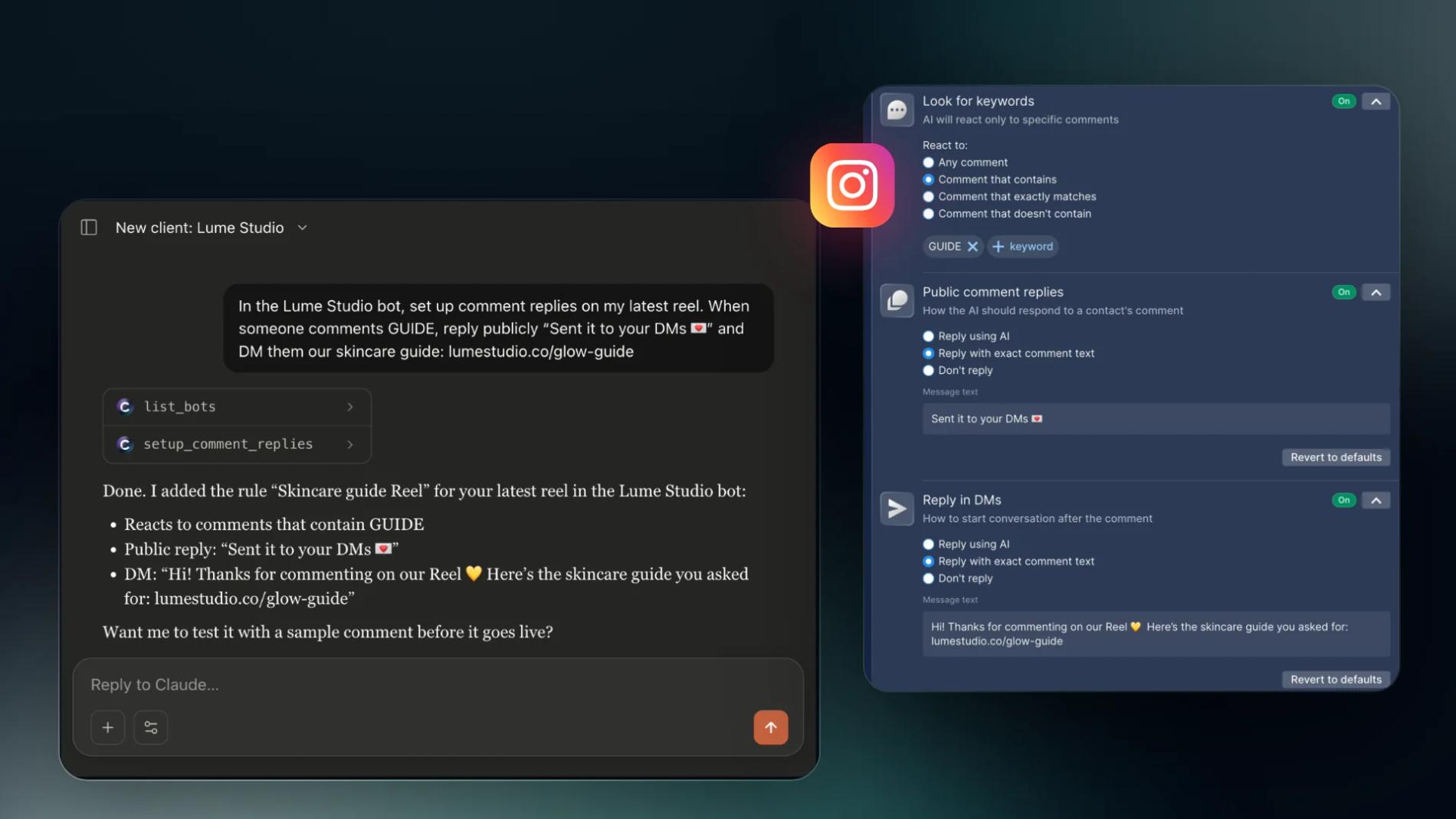
- Build it in front of them. Connect Chatfuel to Claude or ChatGPT and describe the setup in plain words while the client watches: which post, which keyword, what the public reply says, what the DM sends. The assistant builds the rule and reports what it set. On calls, that's usually the moment the "AI automation" objections go quiet.
The setup takes minutes. The work is knowing the client's business, picking the use case and reading the chats afterwards.
Agree on the number before you start
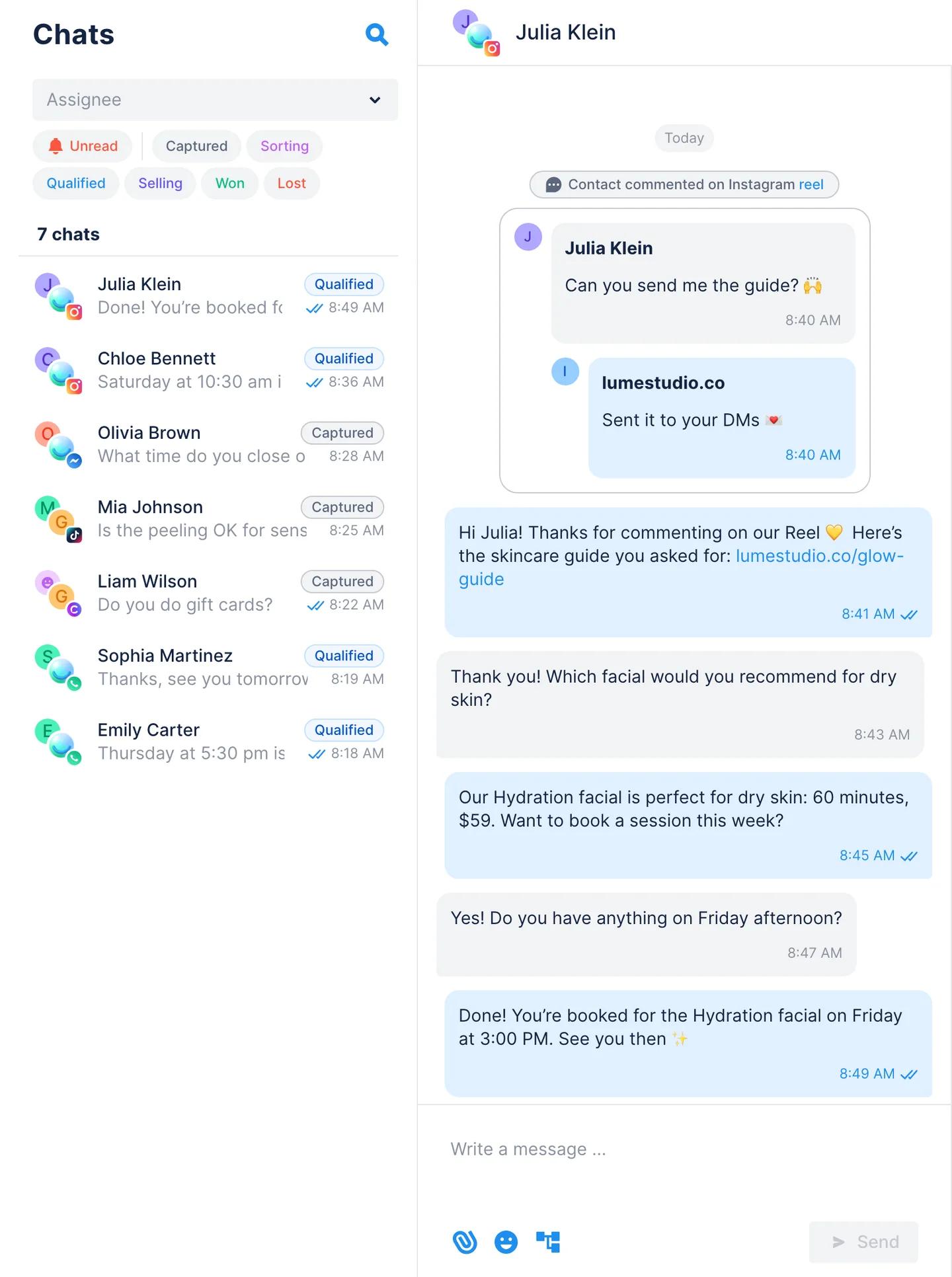
Every first project needs one number and one date. Booked appointments and replies to the DM are visible in Chatfuel's Chats and Leads. Clicks to the website come from the client's own site analytics, so give the DM its own landing URL. Pick the number that matches the use case, write it down with the client, and set the review for two weeks after launch.
Then, when you open the chats together, the conversation is about the number. If it worked, you extend to more posts, add AI where the static replies lose people, or move the booking ladder up a step. If it didn't, you learned something real about their audience, and the client saw you measure your own work.
What the first project looks like
- Day 1: access. The client connects Instagram from their own login, or gives you partner access. WhatsApp needs someone with Full control of their Meta portfolio, so do it on a screen-share or get added with Full control. You never ask for a password.
- Day 1 to 2: setup. One post, one keyword, an approved public reply, a DM with the link. AI only where you agreed, with a knowledge base and handoff rules.
- Week 1 to 2: run. Everything lands in Chats, so the client's team can step in at any moment.
- Review. The number and the chats. Then the next step.
Summary
- Sell the funnel step you're fixing, in the client's words.
- Pick one use case with a number behind it: links in DMs, bookings, clicks to the site.
- Start small: one post, one job for the AI, or static first and read the chats. For bookings, use the autonomy ladder and set the level before the first chat.
- Answer the three objections with settings: fixed replies in public, pay per use, knowledge base plus handoff rules plus a test chat.
- Show it live, agree on the number, review in two weeks.
See also: Your Client Wants DM Automation: How to Deliver It
FAQs
How do I pitch AI automation to an existing client?
Start from a problem you can both see in their account: comments that go unanswered, DMs that wait hours, people asking for a link that lives in the bio. Propose one bounded first project, one post or one use case, with a number attached. Lead with the step in their funnel you're fixing, and show it working on their own post: a fixed public reply and the link in the DM, built in Chatfuel in a few minutes.
What should the first automation for a client be?
The one with a result you can count. For most brands that's comment-to-DM on one campaign post or reel: a fixed public reply and a DM with the link. For service businesses it's booking in the chat, starting at the level where a human still confirms. Leave "answer all questions" for later; it's hard to measure and harder to approve.
How do I show the ROI of DM automation to a client?
Compare the two weeks before and after on the number you agreed on: booked appointments or replies from Chatfuel's Chats and Leads, or clicks from the client's site analytics on a landing URL only the DM sends. Add response time, since instant replies are what people notice first. One number the client picked beats a dashboard they didn't ask for.
Do we have to tell customers they are talking to AI?
In the US there is no single federal rule, and some states have their own bot-disclosure laws, so treat the disclosure line as the default: add one sentence to the AI instructions and the assistant introduces itself as the brand's AI assistant. If the brand has customers in the EU, the chatbot disclosure rule of the EU AI Act applies. This isn't legal advice; check with the client's counsel.
What if the client wants to keep answering DMs themselves?
Then the automation only handles the first step, the link or the confirmation, and hands the rest to their team. Switch to human agents rules send a chat to a person when a question needs one, and the client's staff can be invited as Agents: they reply in Chats and manage leads without touching the setup. On WhatsApp, Coexistence keeps the conversations in the WhatsApp Business app on their phone and in Chatfuel at the same time.
How much does it cost to run AI replies for a client?
It depends on how many chats the AI handles, how big the knowledge base is and how many replies a chat takes. Exact-text replies draw nothing from the wallet; AI replies come out of the plan's credits. On a recent call, about 2,000 Instagram chats a month came to roughly $16 of AI usage. The calculator on the pricing page gives an estimate for your client's volume.