 Chatfuel
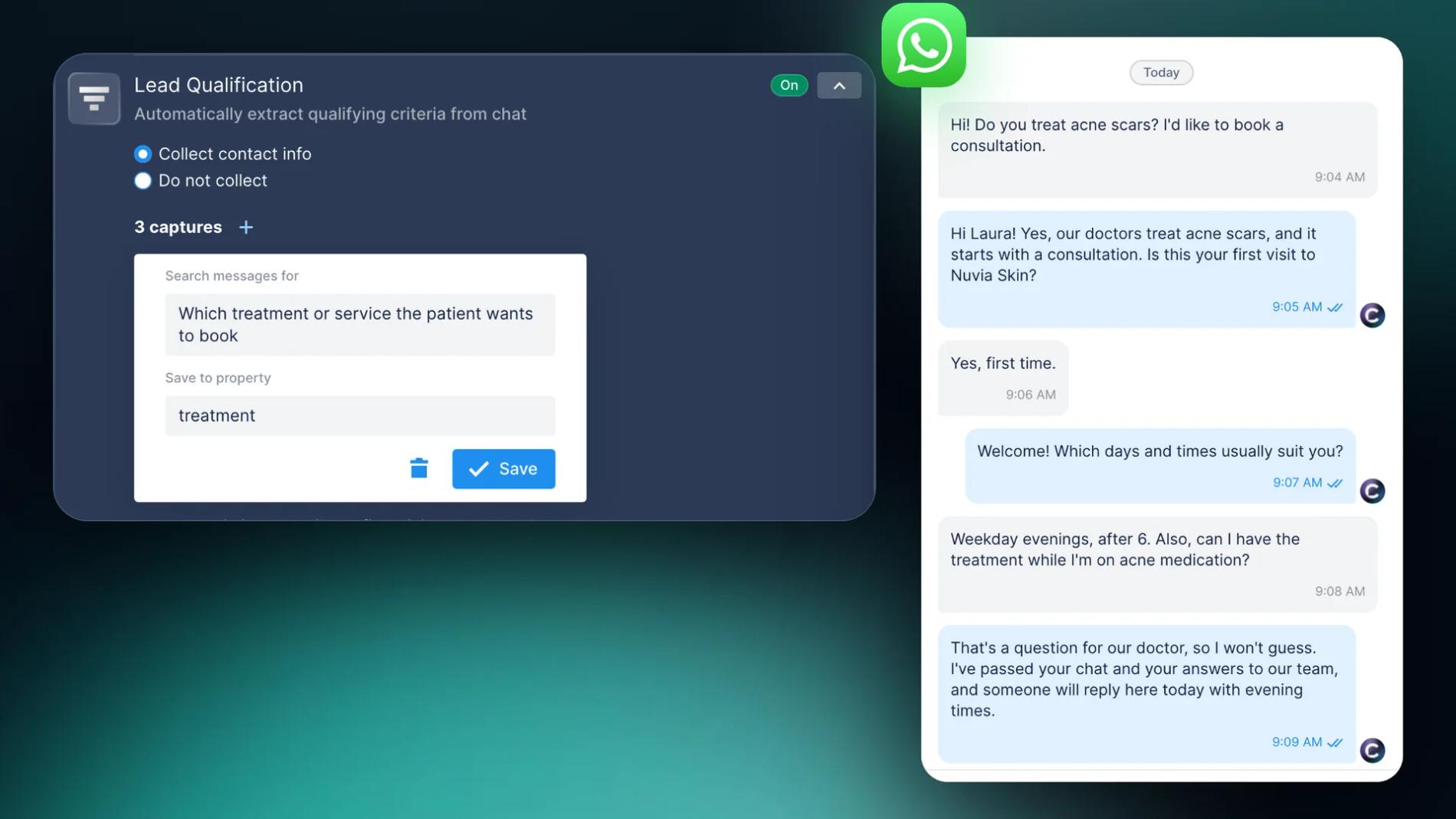
A new patient writes to your clinic on WhatsApp at 9 pm: "Do you treat acne scars? I'd like to book a consultation." The front desk is closed, and by morning she may have booked with the clinic that answered first. A WhatsApp bot can reply in seconds. It asks what she needs, whether it's her first visit and when she can come, then saves her answers to the contact card for your team.
The bot shouldn't act like a doctor, though. Its job is to sort requests and book visits, while medical questions go to your staff. Here's how to set that up with Chatfuel's AI Agent for clinics: the questions to ask and the point where a person takes over.
Why clinics lose new patients on WhatsApp
People message several clinics at once and book with whoever replies first. Most of these messages come in when your team is busy: during appointments, on the phone, after hours and on weekends. And the questions are usually the same: do you do this treatment, how much is it, is there anything this week?
An AI Agent on WhatsApp can take that first step at any hour. It replies right away, even at night and on weekends, using what you put in your AI Knowledge Base: services, prices, open hours, address. It asks the questions your front desk would ask, one at a time, and saves each answer as a property on the contact card. Once the patient is qualified, asks something medical or wants a person, the chat goes to a teammate.
When your team comes in, the qualified chats are already in the inbox with every answer saved.
What the AI Agent asks a new patient
Three questions are enough to start, and the helpdocs suggest the same set for clinics: the service, the main concern, and whether the person is a new or returning client.
| Property to save | What the AI Agent looks for | Why your team needs it |
|---|---|---|
| treatment | Which treatment or service the patient wants to book | The specialist to book and the slot length |
| patient type | Whether it's the first visit or a returning patient | First visits often start with a consultation |
| preferred time | Which days and times suit the patient | Your team can offer a matching slot |
| main concern (optional) | What the patient wants to fix, in their own words | The specialist can prepare for the first visit |
A few rules make the chat easier to answer:
- Ask one question per message. Start with the treatment, then the visit type, then the time.
- Say why you're asking. "Is this your first visit? First visits start with a consultation" gets more answers than the bare question.
- Keep medical history out of the chat. Symptoms and medication can wait for the consultation.
- Never ask for ID or card numbers. WhatsApp's Business Messaging Policy forbids asking people to share card numbers, personal ID numbers or other sensitive identifiers.
How to set it up in Chatfuel
- Connect your WhatsApp number. If your clinic already uses the WhatsApp Business app, Chatfuel can connect that number and you keep using the app.
- Fill in the AI Knowledge Base. In AI Knowledge Base › General information, add your services, prices, Open hours and address, so the AI Agent can answer questions while it qualifies the patient.
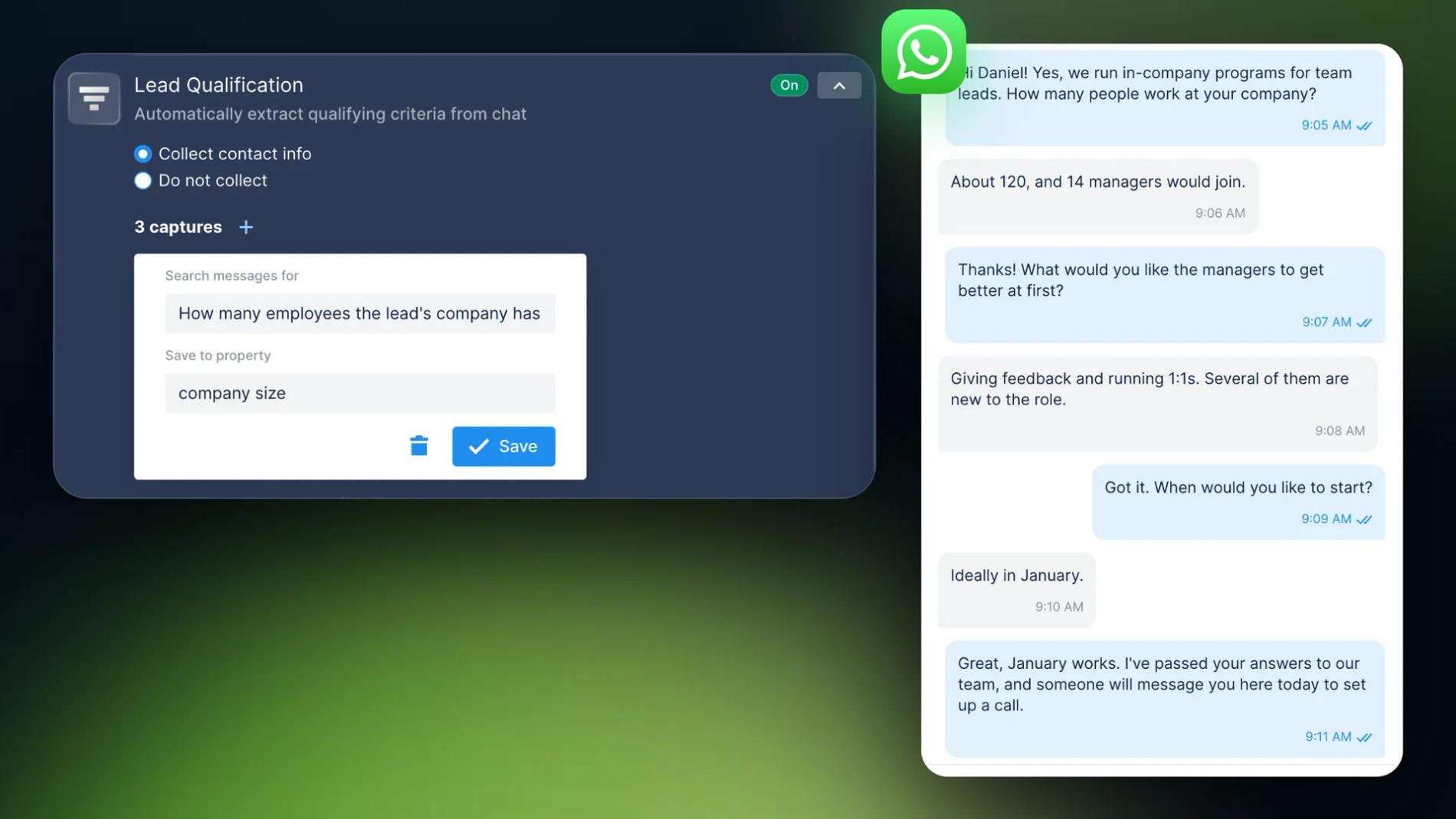
- Turn on Lead Qualification. Open Automations › AI Agent, find Lead Qualification and choose Collect contact info. Add one capture per question: in Search messages for, describe what to find; in Save to property, name the property (how captures work).
- Tell the AI Agent to ask. By default, it only fills the fields from what the patient happens to mention. To make it ask, write the order in AI instructions: "Ask one question per message: which treatment, whether it's the first visit, which days and times suit them. Never give medical advice."
- Add the handoff rules. In Switch to human agents, choose Switch to teammates and add the rules from the next section.
- Test it. Run the automation with Test automation (test chat) before you turn it on. Play a patient who asks about a treatment, then one who asks about their medication.
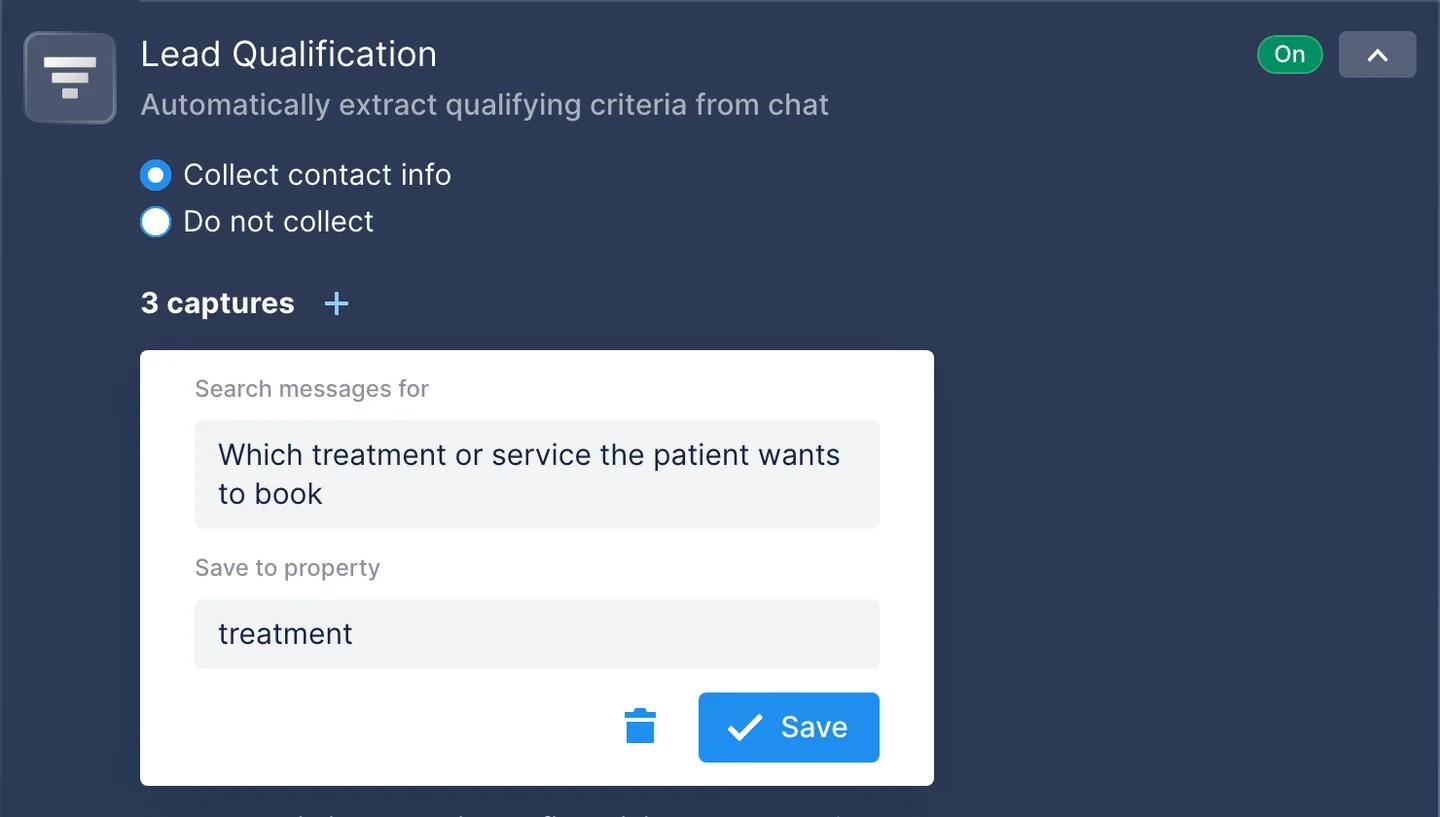
There's no lead score to tune: a lead counts as qualified once every field has an answer. The chat then moves from Sorting to Qualified on the Kanban board.
Keep medical questions with your staff
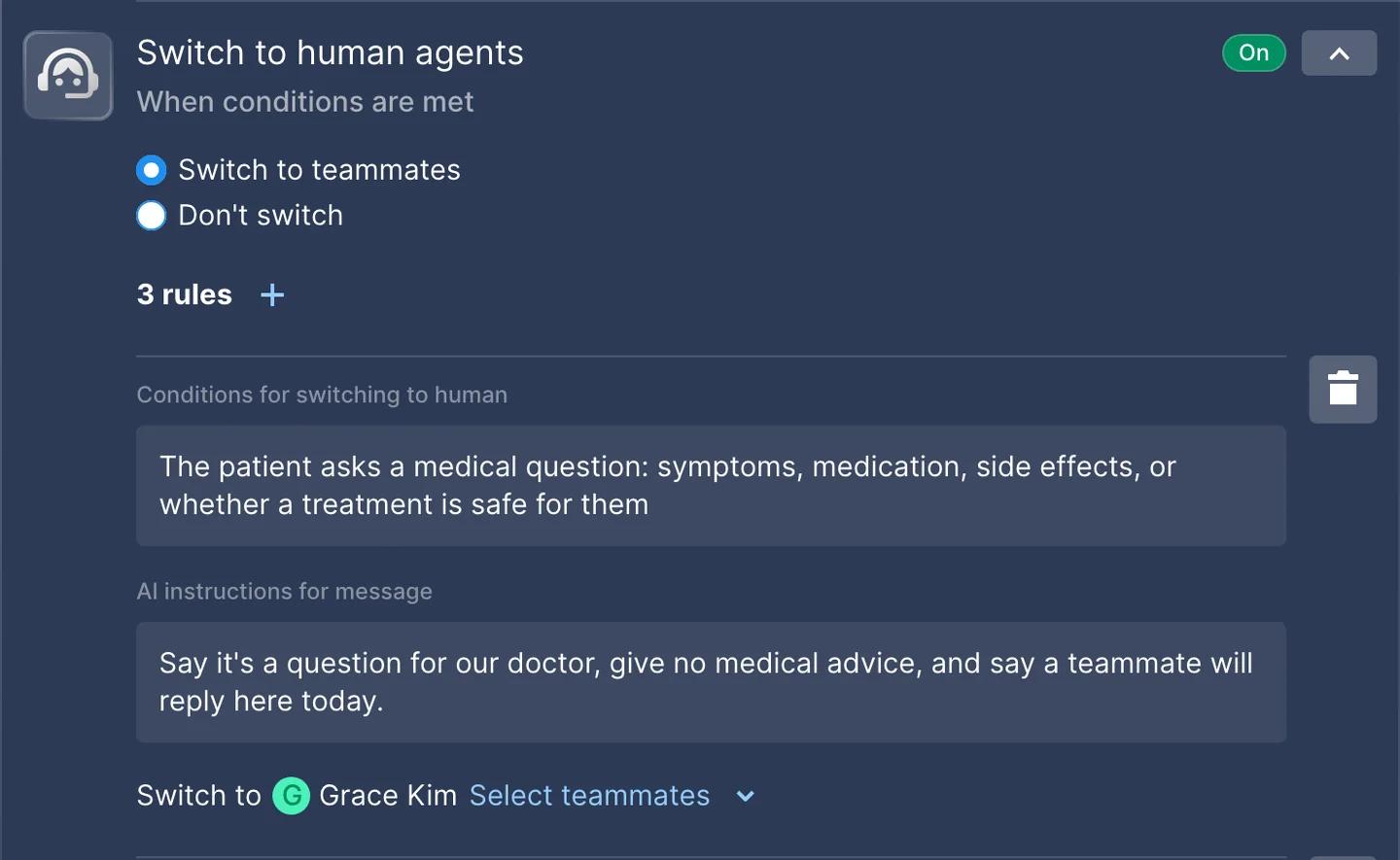
A clinic bot has to know where to stop. In Chatfuel, you set that in Switch to human agents. Each rule has a condition, a message the AI Agent sends and the teammate who gets the chat. You can add up to 20 rules per automation.
Most clinics can start with three rules:
- Medical questions. In Conditions for switching to human: "The patient asks a medical question: symptoms, medication, side effects, or whether a treatment is safe for them." In AI instructions for message: "Say it's a question for our doctor, give no medical advice, and say a teammate will reply here today."
- A qualified patient. "The patient has told us the treatment, whether it's their first visit, and the days and times that suit them." The chat goes to your coordinator with the answers saved.
- Emergencies. "The patient describes severe pain, bleeding, or another emergency." Tell the AI Agent to ask them to call the clinic or local emergency services right away, and send the chat to the teammate on duty.
WhatsApp's own rules point the same way. Its policy allows automation only with "prompt, clear, and direct escalation paths" to a person, and the first one it lists is an in-chat transfer to a human agent. The same policy says not to send or ask for health information over WhatsApp where local rules require stricter systems for it, so check what applies to your clinic. Chatfuel's security docs list compliance with GDPR and Brazil's LGPD. Chatfuel isn't a HIPAA-covered entity, but it follows HIPAA-aligned safeguards and signs a Business Associate Agreement on request.
From a qualified lead to a booked visit
When the rule fires, the chat moves to the teammate you picked, or to the shared team inbox. Web notifications and the Chatfuel mobile app alert your team about the new chat. The coordinator sees the whole conversation and replies in the same WhatsApp chat.
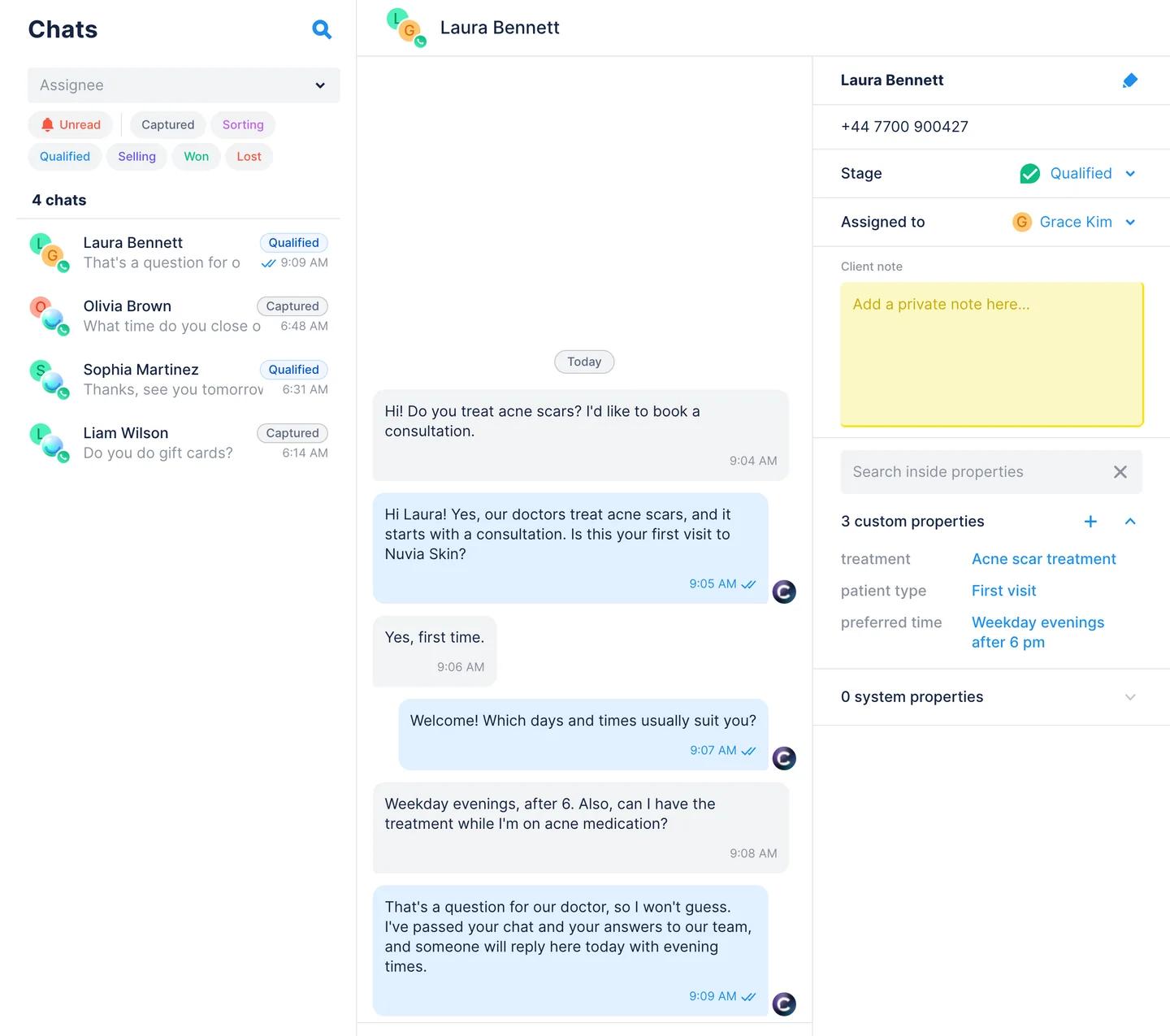
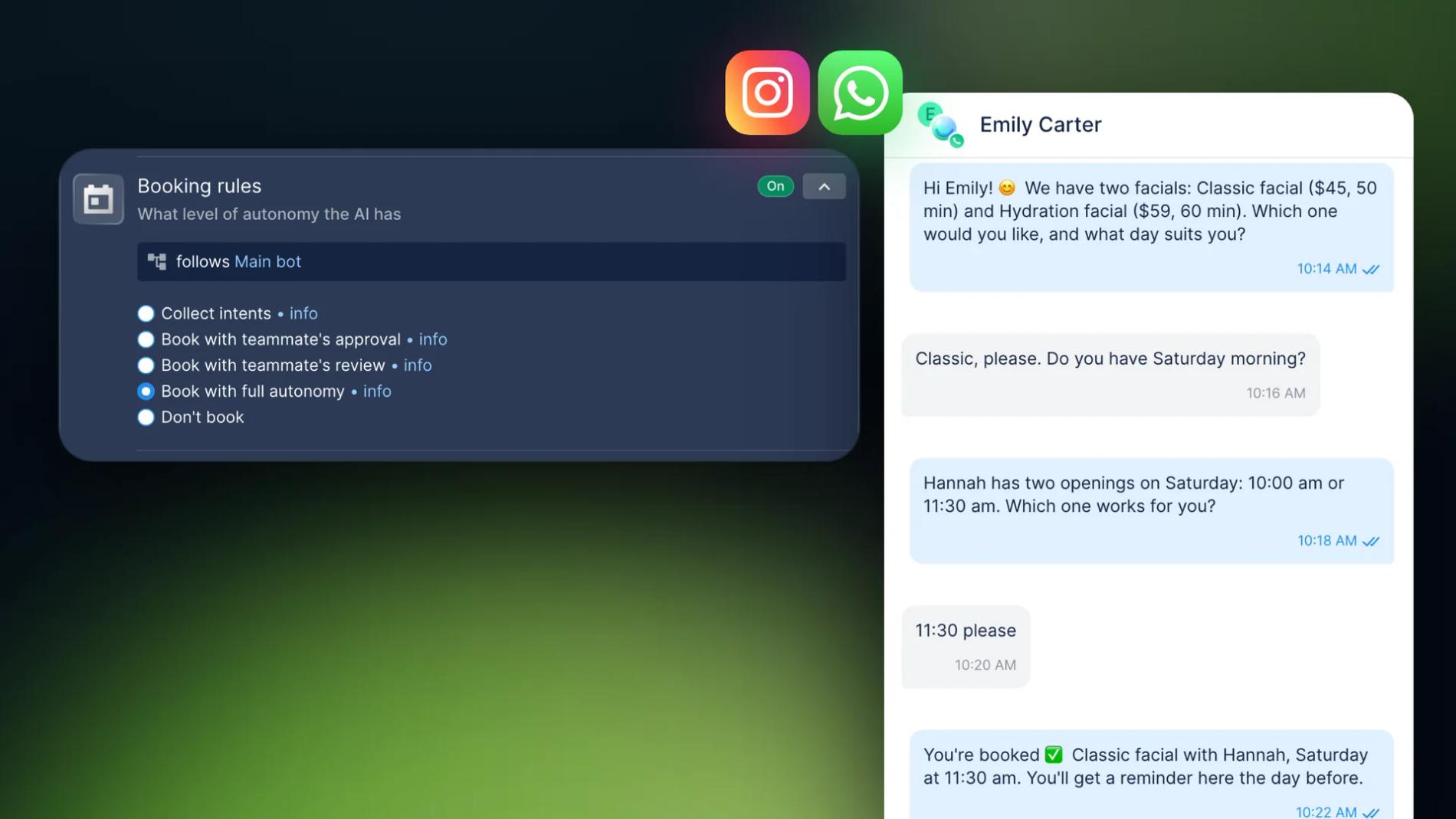
The AI Agent can also book the visit itself. Add your services and specialists with their schedules, then decide in Booking rules how much it can do on its own. For consultations and treatments that need a doctor's check first, choose Book with teammate's approval: the AI Agent collects the service, the time and the specialist, and a teammate confirms (autonomy levels). The patient then gets WhatsApp reminders a day and two hours before the visit. The full setup is in our guide to automating appointment booking on WhatsApp and Instagram.
Leads from Instagram and ads
Patients don't only write on WhatsApp. The same AI Agent answers Instagram direct messages, story replies and comments, and you can give Instagram its own captures and rules.
Many clinics get new patients from ads that click to WhatsApp. In Chatfuel, the Click-to-WhatsApp ads source can have its own automation, so campaign leads can get extra questions (setup). A dental clinic, for example, could ask leads from an implant ad when they last had a check-up and send anyone with urgent tooth pain straight to the team on duty.
Chatfuel can also send conversion events to Meta for these chats, by default when a chat is switched to a person. Health businesses should check their ad account first: Meta restricts some mid- and lower-funnel events for advertisers in the health and wellness category, and its terms forbid event names or data based on health information. Keep events generic and never name them after a treatment or condition.
What to measure
- Each week, count how many chats reach Captured, Sorting and Qualified on the Kanban board, and how many qualified patients book.
- Read the chats your team took over. If staff keep getting the same question, add the answer to the AI Knowledge Base.
- Ask the AI Co-pilot. A question like "how many qualified leads this month?" gets you the counts from your account.
More on clinics that book from the chat: Chatfuel for healthcare and Chatfuel for dental clinics.
See also: How to Qualify B2B Leads on WhatsApp Before the Sales Call
Checklist
- Services, prices and Open hours in AI Knowledge Base.
- Three captures in Lead Qualification: treatment, patient type, preferred time.
- AI instructions that make the AI Agent ask one question per message and never give medical advice.
- Switch to human agents rules for medical questions, qualified patients and emergencies.
- Booking rules set to Book with teammate's approval for consultations.
- Notifications on, so a person sees every handoff.
FAQs
How can a WhatsApp bot qualify leads for my clinic?
Connect your clinic's WhatsApp number to Chatfuel and turn on Lead Qualification with one capture per question: the treatment, whether it's a first visit and the preferred time. The AI Agent asks one question per message and saves each answer on the contact card. Once every answer is in, it hands the chat to your team.
Can AI triage new patient leads on WhatsApp before my staff replies?
Yes, if by triage you mean sorting. The AI Agent finds out which treatment the patient wants, whether they're new and when they can come, then routes the chat by your rules. It doesn't diagnose. Medical questions and emergencies go straight to a person, so every decision about a patient's health stays with your staff.
What happens when a patient asks a medical question?
A Switch to human agents rule catches it. The AI Agent tells the patient it's a question for the doctor, gives no advice and passes the chat to the teammate you picked. Your team gets a notification and replies in the same WhatsApp chat.
Can the bot book the appointment after it qualifies the lead?
Yes. Add your services and specialists with their schedules, then pick a level in Booking rules. With Book with teammate's approval, the AI Agent collects the service, the time and the specialist, and a teammate confirms the booking. Patients get WhatsApp reminders a day and two hours before the visit.