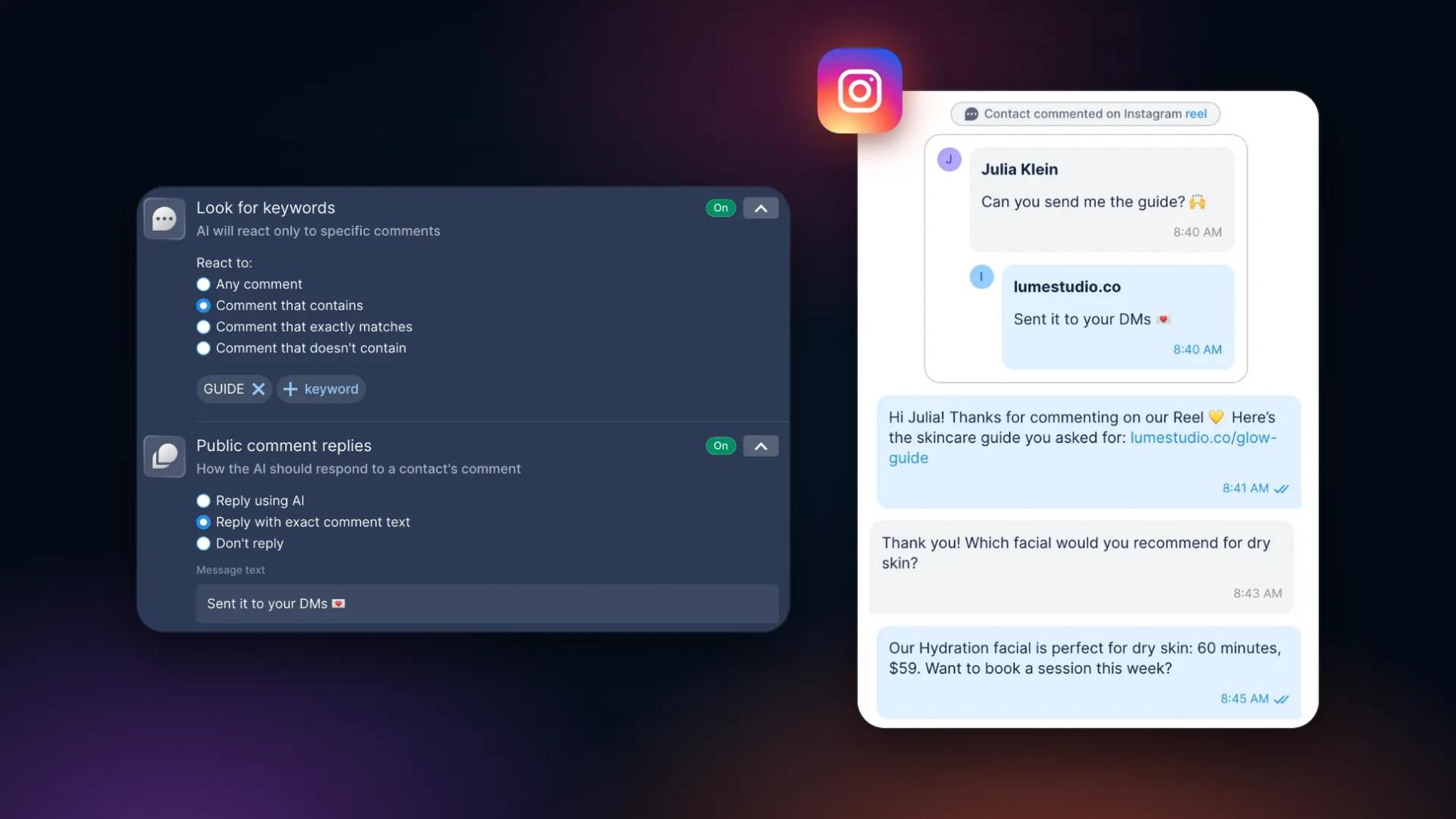
Two calls this week, same question from two sides.
A digital marketing agency owner: "I have one Instagram automation. A person comments a keyword, they get a link in DMs. I want to give it to hundreds of clients, change one word for each, and the client should do nothing except connect their Instagram. How do I work with you: as an affiliate or as an agency?"
A freelancer the same day: "My client needs a WhatsApp chatbot with AI and a human takeover. I can't find what it will cost me per month, so I can't tell my client what it will cost them."
Both are really one question: a client wants automation, how do I deliver it without building a platform, and how do I price it. Here is how we answer it on calls.
In this guide:
- three ways to work with Chatfuel as an agency, and which one to pick;
- what the client does and what you do, step by step;
- how to run one template for a hundred clients without clicking through it a hundred times;
- what one client costs you, so you can set your own price;
- how the agencies we talk to charge for it.
Three ways to deliver automation to a client
There are three setups. They differ in who pays Chatfuel and who bills the client.
| Affiliate | Agency plan | SDK | |
|---|---|---|---|
| Who pays Chatfuel | The client, with their own card | You, one subscription for the whole workspace | You |
| Who bills the client | Chatfuel. You get a revenue share | You, at any price you set | You, inside your own product |
| Your access | The client invites you as a teammate | You build the client's company in your workspace and invite the client | Your code |
| Fits | You don't want to handle billing | Close client relationships, you want the margin | You have a dev team and want a white-label product |
Affiliate. The client signs up through your link, attaches a card, and pays Chatfuel directly. You get a revenue share from every payment: 30% to start, 35% after 300 paying referrals, 40% after 400. You register at affiliate.chatfuel.com, add a billing address and PayPal, and there are no W-8 or W-9 tax forms; payouts go out once a month, from $50. The ceiling is the commission: if the client is on a $20 plan, your cut is a few dollars a month. Your real income is the setup and the service you sell on top.
Agency plan. You buy one workspace and create a company inside it for every client. Billing stays on your side: the client never sees a price tag in their company, and you charge them however you want. You keep the margin and you do the invoicing.
SDK. You can build your own white-label platform on top of Chatfuel. For the agency owner on the call this was out immediately: "it's a headache, you need a technical team". Fair. It's the right route only when you have developers and a product of your own.
The decision on that call: start as an affiliate, because it keeps billing off the agency's plate, and move to the agency plan once the client list grows and the margin starts to matter. That's a good default. The switch is for the next clients: you upgrade your own workspace in Plan and wallet → Upgrade and create the new companies there. Clients who signed up through your link keep their own account and their own subscription.
What the client does, what you do
The owner's requirement was "make the client's path as simple as possible". In both setups the client's part is two minutes. The one thing Meta keeps on their side is the Instagram authorization: the connection is approved from the client's own Instagram login, unless they have given your agency partner access to their business. Never ask for the password.
Agency plan: you build, the client connects
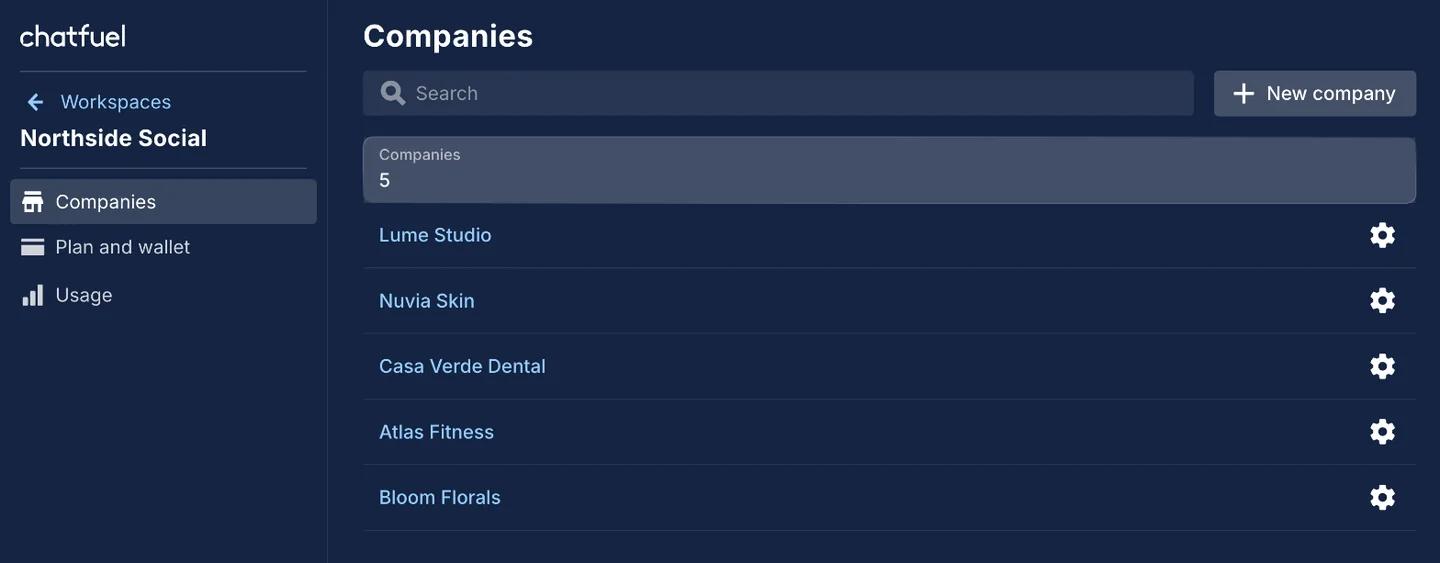
- In your workspace, open Workspaces → Companies and click New company. Name it after the client. Companies are unlimited on Agency M and up, so a new one costs nothing.
- Set up the automation the way you want it. For a comment-to-DM funnel that's a Posts and Reels rule under AI Agent → Automations: the keyword, the public reply, the DM with the link.
- Go to Settings → Teammates, click Generate link, choose Editor, and send the link to the client. Editor is enough to connect an account and keeps billing out of view. It can also edit the automation, so if you'd rather the client didn't touch it, remove them after the connection and re-invite them with an Agent link: chats and leads, no settings. Their sales team gets Agent links from the start.
- The client opens it, goes to Settings → Instagram, clicks Connect Instagram and allows access. Their account has to be a professional one; if it's still personal, the connection flow walks them through the switch.
- Turn the rule on (new rules start off) and check that Main bot is on. Leave the base comment automation off, or set its replies to Don't reply, or every other comment on the account gets answered as well.
If you have partner access to the client's Meta business, step 4 is yours too: you connect the account yourself in a minute or two, and the client never has to log in to Chatfuel.
Affiliate: the client signs up, then lets you in
- The client signs up through your affiliate link, attaches a card and starts the 7-day trial. The trial is the full product with $15 in credits.
- During onboarding they connect their Instagram. Same two clicks: Connect Instagram, allow.
- They go to Settings → Teammates, generate an Editor link and send it to you. Editor is enough to build; Admin can also manage teammates and billing.
- You open the link, apply your template, turn it on.
Either way, the client's Instagram shows up in the company before you touch anything, and you never need their login.
One template, a hundred clients
The agency owner's model was one base automation per client with one word changed. His question: "Do I have to edit the template every single time?"
From Claude or ChatGPT, no. Connect Chatfuel to the assistant you already use through Chatfuel MCP and describe the job for the new client:
"In the Lume Studio bot, set up comment replies on my latest reel. When someone comments GUIDE, reply publicly 'Sent it to your DMs 💌' and DM them our skincare guide: lumestudio.co/glow-guide."
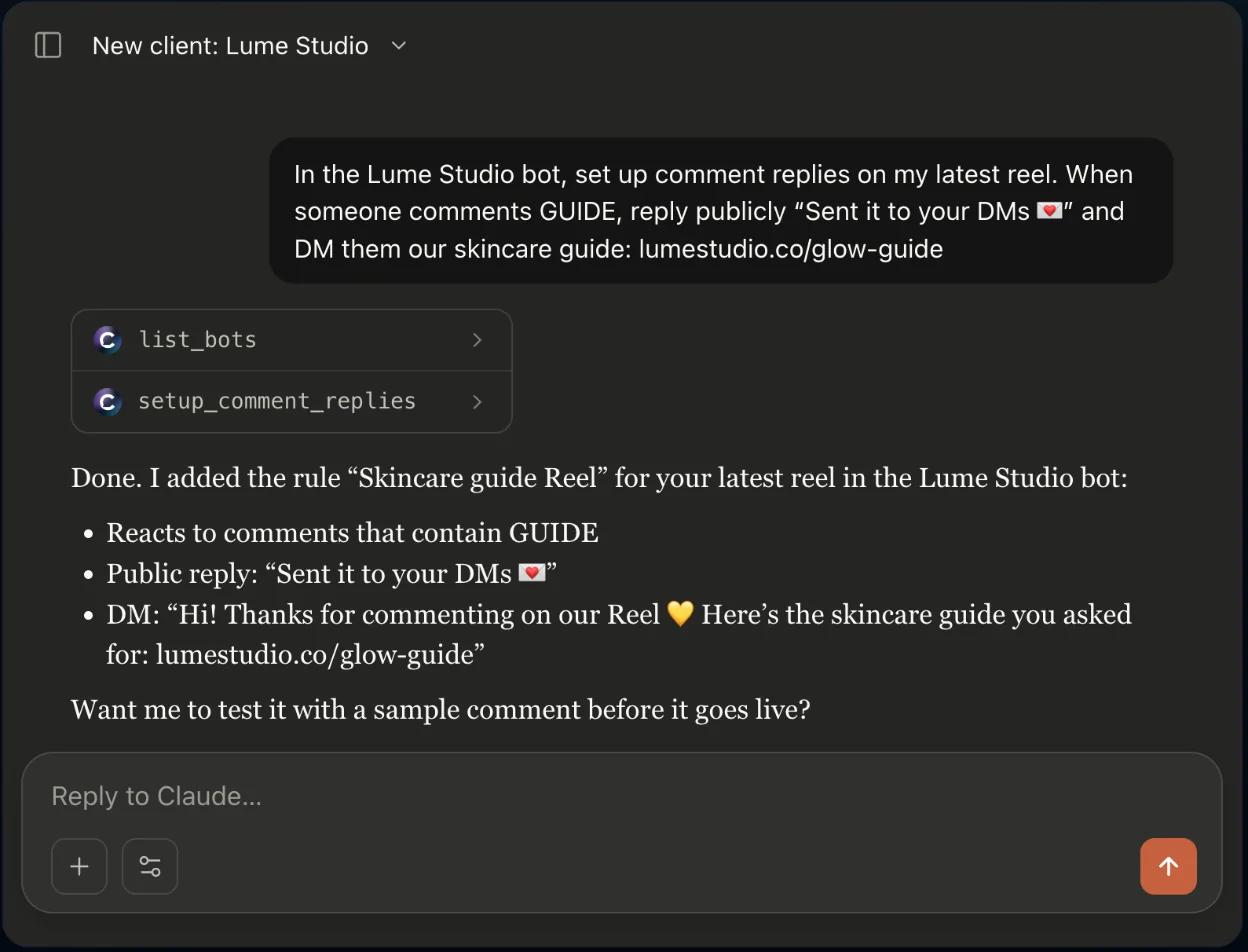
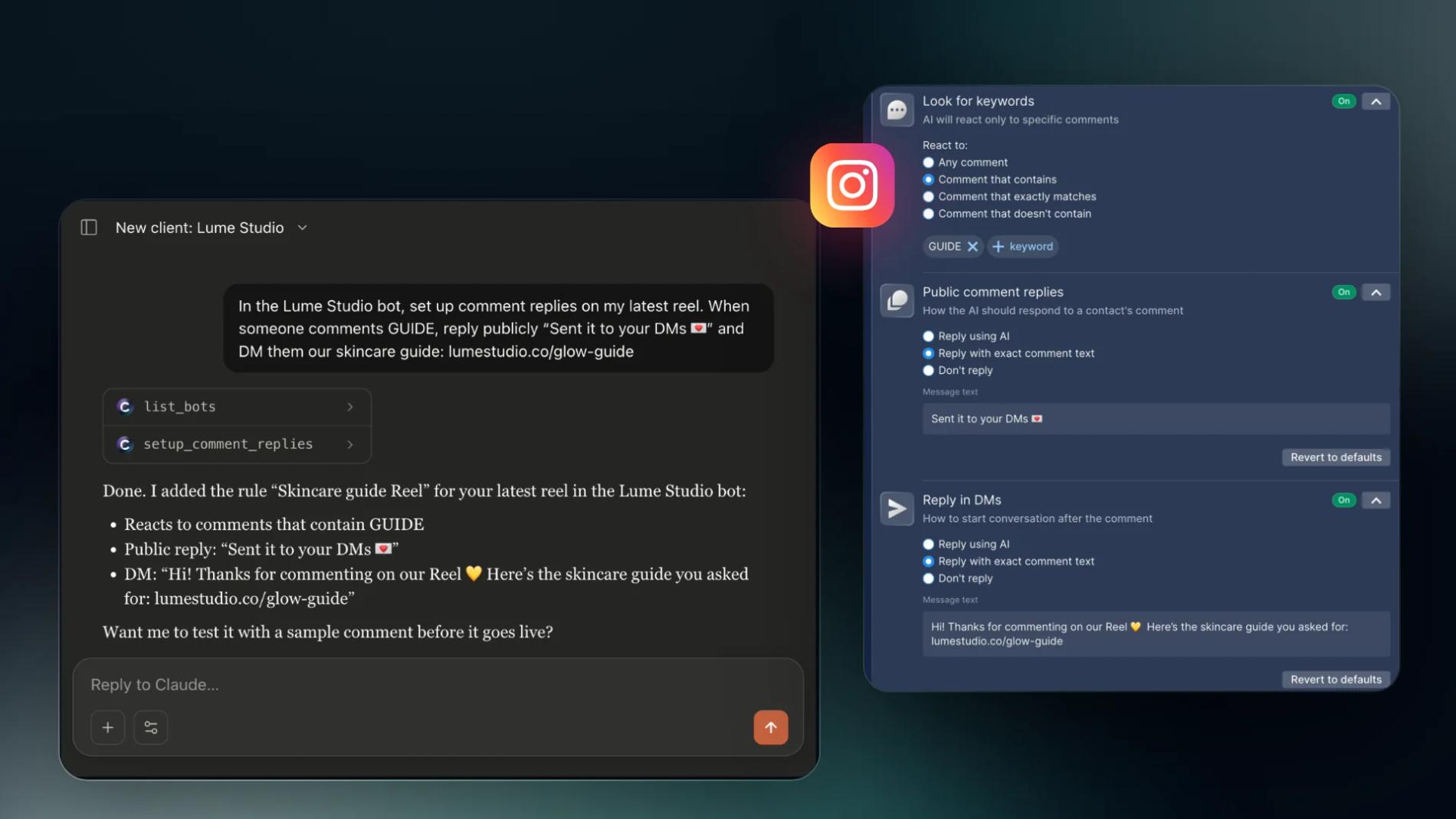
The assistant goes to Chatfuel, builds the rule and reports what it set. In the dashboard it's a normal rule you can open and edit:
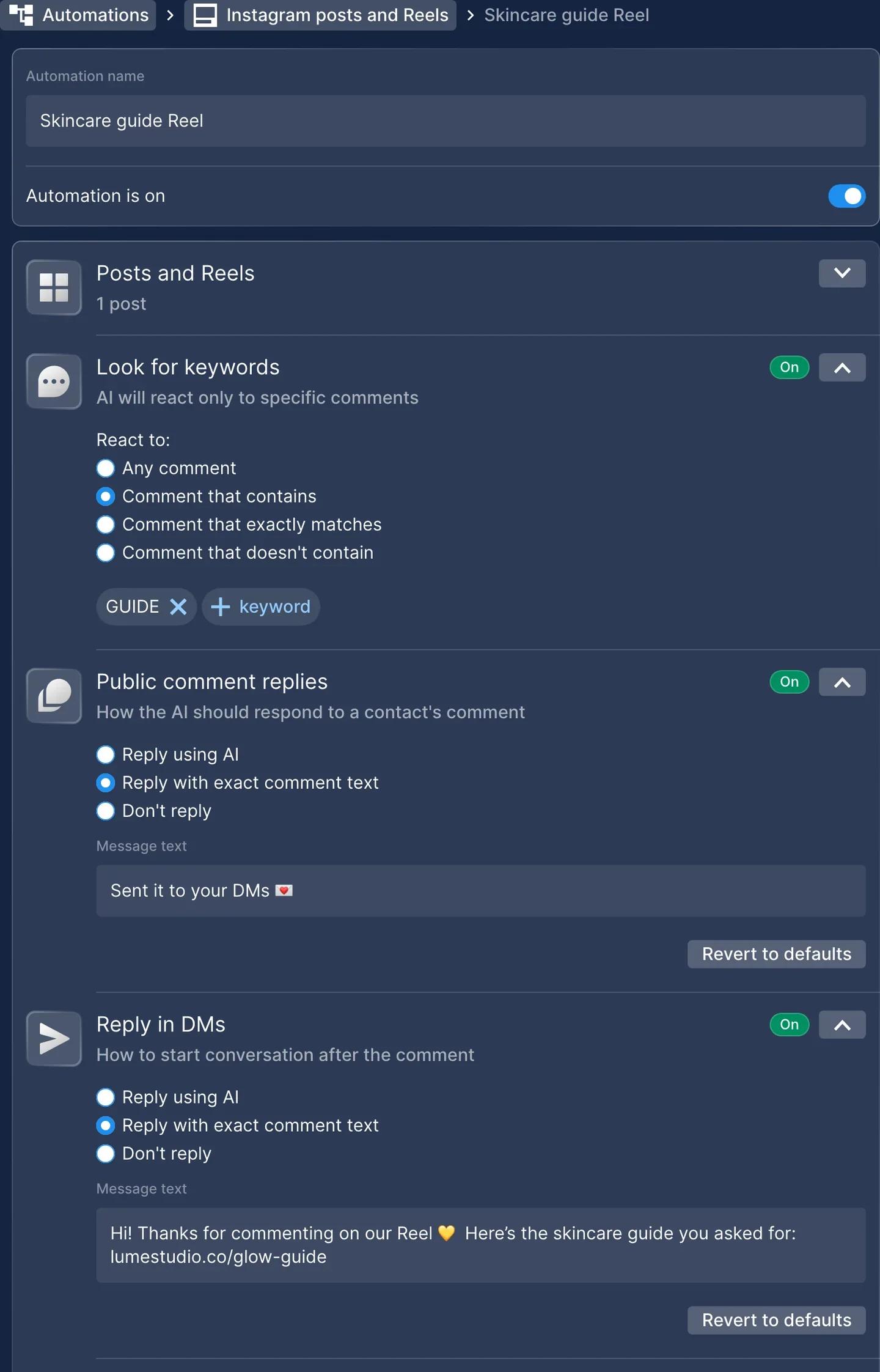
Your template is that request: same text, new name and new link for every client. What you see in the chat is what lands in the account. After a few weeks of working this way we stopped opening the automation settings by hand for routine changes. More requests of this shape are in Chatfuel MCP example prompts.
In the dashboard, yes. Open AI Agent → Automations → Posts and Reels, add a rule, pick the post, set the keyword, write the public reply and the DM. For a rule with one keyword and two phrases it's two or three minutes. For a hundred clients that's a working day of clicking.
Two things still happen in the dashboard: you generate the teammate link, and the client connects the channel. The assistant can't do either.
The owner's last worry was trust: "Can I rely on it when the client's success depends on this?" The assistant doesn't rewrite anything on its own. It asks one yes/no question before a change that overwrites or turns something off, and it asks for a yes on the exact text of any message it sends to a customer. "Maybe" doesn't count as a yes.
What one client costs you
Your price starts from your cost per client. Here's the math.
You pay for AI usage, not for contacts. Every plan includes all channels, unlimited contacts and unlimited teammates. What comes out of your wallet is AI replies, AI Co-pilot answers, WhatsApp templates and the WhatsApp messages Meta charges for. A rule that answers with exact text draws nothing from the wallet, however many people comment. Once you add an AI layer, that part is paid.
The calculator asks for three things: how many chats a month, how much the bot needs to know, and how many replies per chat. A comment-to-DM with a two-line knowledge base is cheap. A WhatsApp agent that answers questions from a 200-item catalog is not.
Rough estimates from the calls, for one client per month:
- Instagram comment-to-DM, minimal knowledge base, about 200 chats a month: around $1 to $2.
- The same at about 1,000 chats: around $5 to $10.
- WhatsApp AI chatbot with a medium knowledge base and a human takeover, about 100 chats a week: around $25 to $44.
Run your own numbers in the pricing calculator before you quote a client. It's the same tool we use on calls.
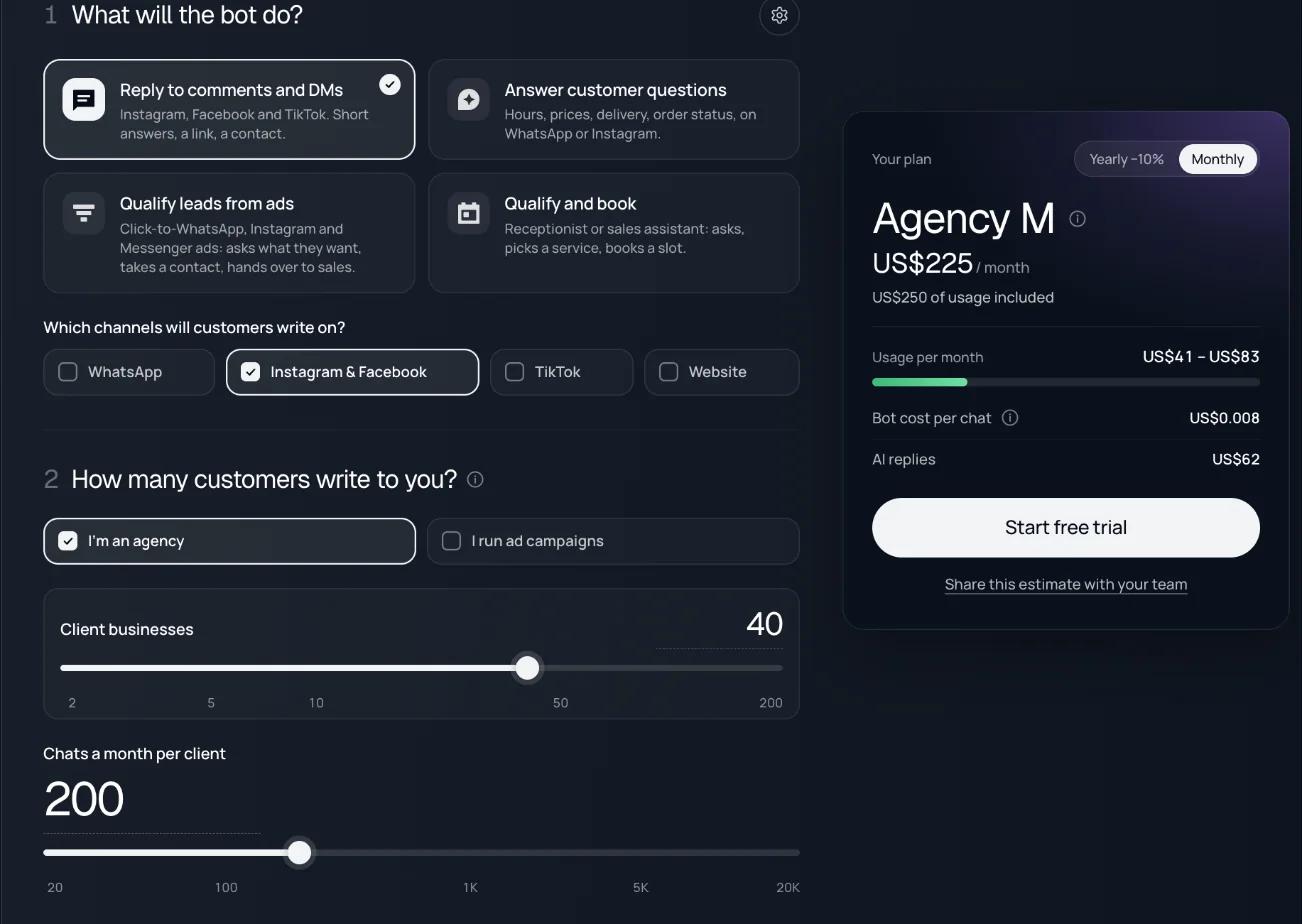
Then pick the plan. The subscription is fixed, the wallet moves with traffic.
| Plan | Price / month | Credits included | Client companies |
|---|---|---|---|
| Business S | $20 | $20 | 1 |
| Business M | $45 | $50 | 1 |
| Agency S | $100 | $100 | Up to 3 |
| Agency M | $225 | $250 | Unlimited |
So a freelancer with one WhatsApp client fits Business M. An agency with 40 comment-to-DM clients at about 200 chats each comes to $40 to $85 of usage a month, well inside the $250 of credits on Agency M. At 500 clients averaging 200 chats you're at $500 to $1,000 of usage a month, which is Agency XL territory, and still a dollar or two per client. One wallet sits behind every client company, so you top up in one place; turn on auto-top-up in Billing so a client's viral reel doesn't stop the automation mid-conversation. All plans are on the pricing page.
How the agencies we talk to charge for it
Chatfuel has no stake in what you charge, so this is what we see on calls, not a rule.
The freelancer's question was the honest one: "What does it cost me per month, so I can tell my client?" For his one WhatsApp client the answer was $25 to $44 of usage inside Business M, so his own price is whatever he puts on top of about $45. With three clients he'd move to Agency S, pay $100 for the workspace and charge each client independently.
The agency owner's question was margin. As an affiliate his income is a 30% share of a $20 or $45 plan. On the agency plan he pays Chatfuel once and sets the price himself. We have agencies that pay us about $20 for a client and bill that client $200 and more; the $20 is Agency M spread across a dozen companies plus a few dollars of AI usage each. The platform is invisible to the client either way.
Two things worth charging for separately, because the client can't do them without you:
- A monthly report. Ask the assistant: "Analyze the last 15 chats in the Lume Studio bot and write a short report for the client." A few agencies on Chatfuel sell exactly this as an add-on.
- A review of the chats. Where people drop off, which questions the script can't answer, where to add AI. That review is also how you sell the next layer.
Whatever model you pick, say it out loud before the project starts: who pays for the platform, and who owns the account if the client leaves. On the agency plan the company lives in your workspace; as an affiliate the account is theirs.
Summary
- Pick a setup by who should bill the client: affiliate if you want Chatfuel to handle it, agency plan if you want the margin, SDK only with a dev team.
- The client's part is two minutes: open your link, connect Instagram, allow. The Instagram authorization is the one step Meta keeps on their side unless you have partner access.
- Keep one request as your template and send it to Claude or ChatGPT per client; the assistant asks before it overwrites or turns anything off, and before it sends any text to a customer.
- You pay for AI usage, not for contacts. Exact-text replies draw nothing from the wallet; AI replies cost cents per chat. Check a real estimate in the calculator before you quote.
- Price your time: the setup, the chat reviews and the report. The platform is a few dollars per client.
See also: How to Sell AI Automation to a Client Who Isn't Sure
FAQs
How much should an agency charge for Instagram DM automation?
Start from your cost, which is small: an exact-text comment-to-DM rule draws nothing from the wallet, and AI replies for a typical client run a few dollars a month. Agencies on Chatfuel usually charge a setup fee plus a monthly fee for management, or add automation as a line in an existing retainer. The client pays for your setup, the chat reviews and the reporting; the platform cost is a rounding error next to that.
Should I join an affiliate program or buy an agency plan?
Affiliate when you don't want to handle billing: the client pays Chatfuel, you get 30% to 40% of every payment and build inside their account as a teammate. Agency plan when you want the margin and one place to manage every client: you pay one subscription, create a company per client, and bill them yourself. The agency owner on the call chose to start as an affiliate and switch once his client list grows.
Do I need my client's Instagram password to set up automation?
No, and you shouldn't ask for it. The client connects their Instagram from their own login in two clicks, or gives your agency partner access to their Meta business so you connect it yourself. Everything else, the automation and the knowledge base, you build from your own teammate access.
How long does it take to set up one client?
For a comment-to-DM rule, two or three minutes in the dashboard, or one request to Claude or ChatGPT if you keep a template request. The client's part, connecting Instagram, takes about two minutes. A WhatsApp AI agent with a knowledge base and booking takes longer, because the knowledge base is the work.
Can my client see what the platform costs me?
Not on the agency plan. Billing lives at the workspace level, so there is no price inside the client's company and no payment step on their side. Their team can be invited as Agents: they answer chats and work leads but can't open billing, edit automations or see other clients.
Can one company run Instagram and WhatsApp for the same client?
Yes. A company is one business: its Instagram, Facebook Page, WhatsApp number, TikTok and website chat, with one knowledge base behind all of them. Two different businesses are two companies.