
How to Send Conversion Events to Meta from WhatsApp Ads
Send two or three conversion events from chats that started on a click-to-WhatsApp ad, so Meta optimizes your ads for customers, not just conversations.
Last updated on
Conversion events tell Meta what happened in a WhatsApp chat after someone tapped your ad: they asked about a price, booked, or paid. Chatfuel sends these events over Meta's Conversions API (CAPI) from the Ads optimization page, so your campaign learns to find people who become customers, not just people who start a chat. Pick two or three events that describe your funnel, give each one a trigger, and make the deepest event with enough volume the campaign goal.
How conversion events work
Without events, Meta sees one thing: a conversation started. That is the cheapest action a person can take, so an unoptimized campaign keeps buying more of it. A clinic's week might be 200 chats from the ad, 40 price questions, 12 bookings and 3 visits, yet Ads Manager sees only the 200. Conversion events show Meta the other three numbers.
Every conversion event has two halves: the event type Meta receives, for example ViewContent, and the trigger, the moment in the conversation that fires it. Events are sent only for conversations that started from an ad that clicks to WhatsApp: Meta credits each event to the ad by its click ID, and contacts who wrote on their own are skipped.
Every funnel fits three levels:
- Early interest: asked about a service, its price or duration. Event:
ViewContent. - Intent: got the booking link, booked, was handed to a salesperson, or asked for a payment link. Events:
InitiateCheckout,LeadSubmitted,AddToCart. - Outcome: sent a payment confirmation, signed, or was marked as won. Events:
QualifiedLead,OrderCreated.
Note: Meta's
Purchaseevent isn't offered: Meta requires an order value with it, and a chat doesn't carry one. UseQualifiedLeadfor the money moment in a service business andOrderCreatedin a store.
Each event Meta accepts costs $0.02 from your wallet. Rejected, duplicate, retried and test events are free.
Which events to send
Answer three questions with the client:
- What does a won client look like? A payment confirmation, a signed contract, a lead marked as won. That is the outcome event.
- Who closes the deal: a calendar, a payment link or a person? That picks the middle trigger: a booking, a handoff, or a moment the AI recognizes in the chat.
- How many ad conversations reach each moment in a week? The campaign goal needs an event that fires at least about 10 times a week, or Meta has too little to learn from.
Then follow four rules:
- Two or three events, one per level. One early event plus one outcome is the minimum; add the middle step when the funnel has a real one. More events split the same behavior across near-duplicates.
- Never send a booking as the outcome. Meta would learn that a booking is a sale and buy people who book and never show up.
- Optimize on the deepest event with regular volume, and measure the rest. A rarer event still shows the funnel per ad: how many asked, booked and paid. When volume grows, move the goal one level deeper.
- Use Meta's standard event names, the same across a client's campaigns. Meta's optimization learns from names it recognizes; a custom name is reported but counted on its own.
Don't send an event for "replied at all": replying costs nothing, so optimizing on it buys the cheapest traffic. Use the First message trigger only as a baseline of how many clicks became chats.
How to choose a trigger
If a system action exists, use its built-in trigger: a booking, a handoff, a status change, a filled contact field either happened or didn't. When only the meaning of the conversation tells you, write a Custom AI instruction: the AI reads the conversation, including messages your team types by hand, and decides.
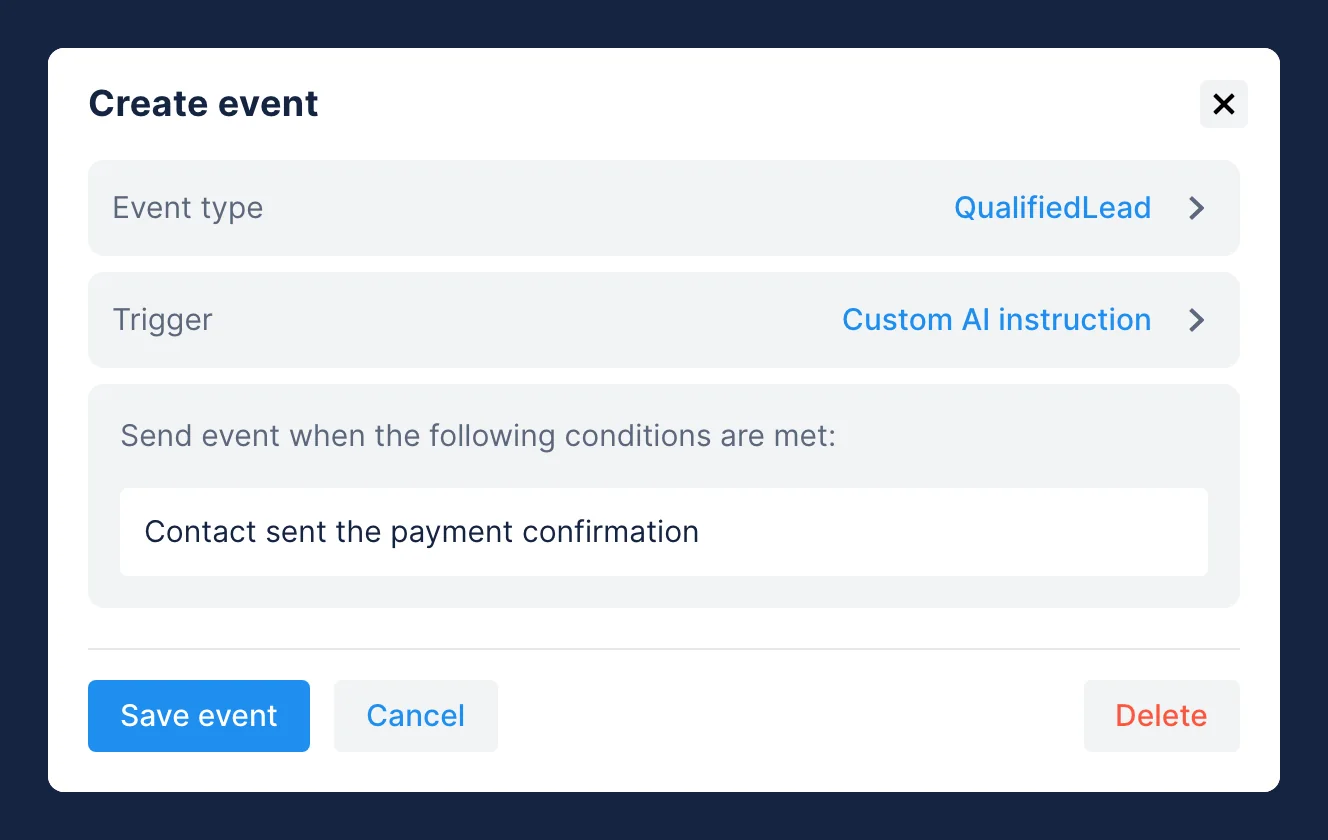
- Custom AI instruction: the AI decides the conversation matches your description. Use it for questions and confirmations phrased a hundred ways.
- Booking: a meeting is booked in Chatfuel Calendar. Bookings made in other tools need a Custom AI instruction.
- Chat switched to human agent: the AI hands the chat over, or an agent takes it. A handoff is a step toward a sale, not a sale.
- Contact status: a lead moves to Qualified, Selling, Lead won or Lead lost. Use it if the team already moves leads between stages.
- Properties: a contact property gets a value that meets your condition, such as a phone, city or budget.
- Keywords: a message contains or exactly matches your words. Use it for promo codes and words the ad asks people to send; "hi" fires on everyone.
- First message: a contact writes for the first time. A baseline only: Meta already optimizes on this.
Write a Custom AI instruction like a brief for a new employee: one moment, plain language, any language, up to 512 characters. Good: Contact asked for a payment link. Bad: Contact is interested (a state, not a moment), Contact asked about price or booked (two moments), Good lead (a judgement that fires unpredictably). In the events table, this trigger shows as Custom prompt.
Ready-made event sets by business type
Copy the line that matches how the business sells: early interest, intent, outcome. Text in italics is a Custom AI instruction that starts with "Contact".
- Aesthetic or dental clinic:
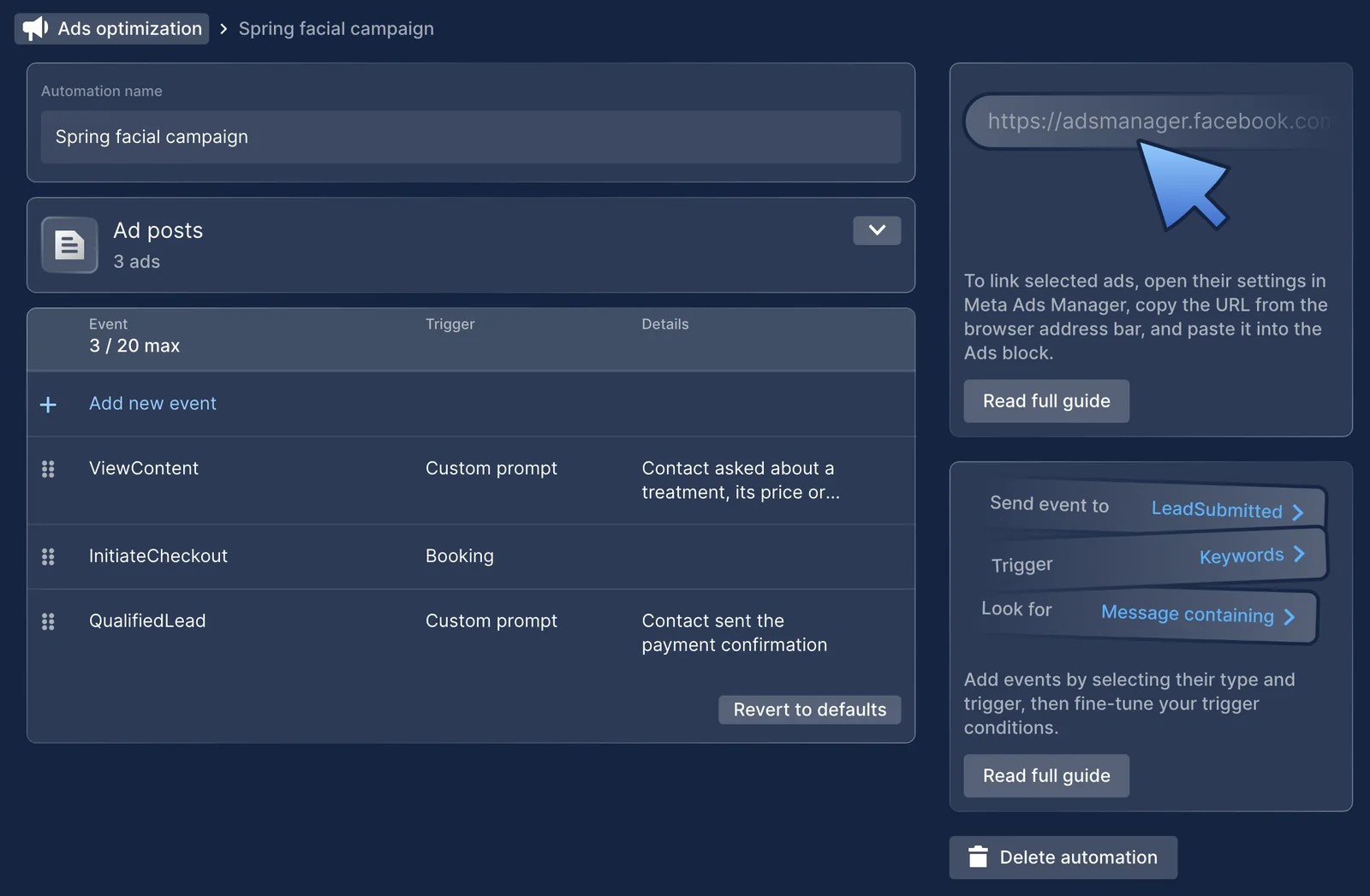
ViewContentasked about a treatment, its price or duration;InitiateCheckoutreceived the booking link;QualifiedLeadsent the payment confirmation. - Salon or spa on Chatfuel Calendar:
ViewContentasked about a service or a price;InitiateCheckouton Booking;QualifiedLeadon Contact status Lead won. - Legal or professional services with a sales team:
ViewContentasked about the requirements or how the process works;LeadSubmittedon Chat switched to human agent;QualifiedLeadconfirmed signing the contract. - Car dealership or other high-ticket sale:
ViewContentasked about a model or a price;LeadSubmittedon Chat switched to human agent;QualifiedLeadon Contact status Lead won. - Online store selling in the chat:
ViewContentasked about a product;AddToCartasked for a payment link;OrderCreatedsent the payment confirmation. - Course or school:
ViewContentasked about the course, the timetable or the price;LeadSubmittedon Properties, phone or email filled;QualifiedLeadon Contact status Lead won. - Agency selling its own services:
ViewContentasked about services or prices;LeadSubmittedon Properties, budget filled;QualifiedLeadon Contact status Lead won.
If bookings live outside Chatfuel Calendar, replace Booking with Contact received the booking link. If nobody moves leads between stages, replace Contact status with a Custom AI instruction. In long sales cycles, deals that close after Meta's 7-day attribution window aren't credited, so read the outcome as a trend, not a total.
Set it up in Ads optimization
- In the left menu, open Ads optimisation. If the page shows Connect WhatsApp or Reconnect WhatsApp to update permissions, do that first: events need the conversions permission on your WhatsApp Business account.
- Open Default events for all ads to set events for every ad; by default it sends
LeadSubmittedon Chat switched to human agent. To give some ads their own events, click Add event set, then under Ad posts click Add IDs and paste the ad ID or the ad's URL from Meta Ads Manager. Keep each ad in one event set so nothing is counted twice. - Click Add new event. Under Event type, pick a standard event, marked from Meta, or type a name to create your own.
- Under Trigger, pick the trigger and fill in its conditions.
- Click Save event. An event set holds up to 20 events. Events apply to conversations that start after you save.
Choosing the campaign goal is one of the few steps the AI Co-Worker can't complete for you: it happens in Meta Ads Manager, inside your own Meta account. There, set the campaign's conversion event to the deepest event that fires at least about 10 times a week.
Or ask the AI Co-Worker
Tell it what you want in chat:
"For my WhatsApp ads, send ViewContent when someone asks about prices, InitiateCheckout when they book, and QualifiedLead when their status changes to Lead won."
It applies the change and confirms what it set.
Before you launch
- Two or three events, one per level, and no booking sent as the outcome.
- Each Custom AI instruction describes one moment.
- Standard Meta names, the same across the client's campaigns.
- Each ad sits in one event set, or only in the defaults.
- A real tap on the real ad reached Meta Events Manager, credited to the ad.
- The campaign goal is the deepest event with about 10 a week or more.
- A day-7 reminder to check the funnel shape with the client.
Common issues
I set it up and see nothing
Chats people started on their own have no ad to credit, so no event is sent. If you linked specific ads, check that this ad is in the event set. The conversation shows a system message with the events sent and, if Meta rejected them, the reason. Expect the first real read about a week after you save.
The number looks too high
Usually the keywords are too broad, or the trigger is a status every lead passes through. Narrow the keywords or move the event one step deeper, and check that one moment doesn't fire from two triggers, such as Booking and the keyword "book".
The numbers are lower than in the CRM
That's expected: some conversations start outside ads and carry no attribution, and some deals close after Meta's 7-day window. Compare trends week over week, not totals against the CRM.
Can I change the events later?
Yes, changes apply to new conversations. Keep event names stable so reports stay comparable, and tune the triggers underneath.
Do I need access to the client's ad account?
No. WhatsApp tells Chatfuel which ad each conversation came from, and the events appear in the client's Ads Manager credited to that ad. The WhatsApp Business account needs only the conversions permission, which the Ads optimization page asks you to grant by reconnecting WhatsApp.