


Connect Chatfuel MCP with Zapier MCP
Leads your AI Agent qualifies, chats waiting for your team and the week's bookings go to Google Sheets, Microsoft Teams and the other apps you've connected to Zapier. A price list kept in a sheet comes back as answers the AI Agent gives, all from one assistant chat.
What the integration can do
Tools the assistant calls on each side, named as the servers name them.
| Tool | What it does |
|---|---|
list_chats | Lists customer chats with their channel, status and lead stage. |
get_chat | Returns the latest messages of one customer chat with its channel, status and lead stage. |
review_chats | Summarizes customer chats for a period instead of returning every message. |
add_faq | Adds question and answer pairs to the FAQ the AI Agent answers from. |
update_faq | Changes or removes FAQ entries after you confirm. A removed entry can't be restored. |
set_company_info | Saves the company name, email, phone, address, website and how to pay that the AI Agent uses, after you confirm. |
test_reply | Sends a sample customer message to a sandbox chat and returns the AI Agent's reply. |
list_bookings | Lists appointments between two dates: time, service, specialist, customer name and status. |
| Tool | What it does |
|---|---|
discover_zapier_actions | Searches Zapier's apps for actions you can add, such as Create Spreadsheet Row in Google Sheets. |
enable_zapier_action | Turns on one app action in your Zapier MCP server, so the assistant can run it. |
execute_zapier_read_action | Runs an enabled read or search action, such as reading the rows of a Google Sheet. |
execute_zapier_write_action | Runs an enabled write action, such as adding a sheet row or posting a Teams message. Uses 2 Zapier tasks. |
manage_zapier_connections | Returns a link to connect an app to Zapier, or sets which connection an app uses by default. |
What to ask the assistant
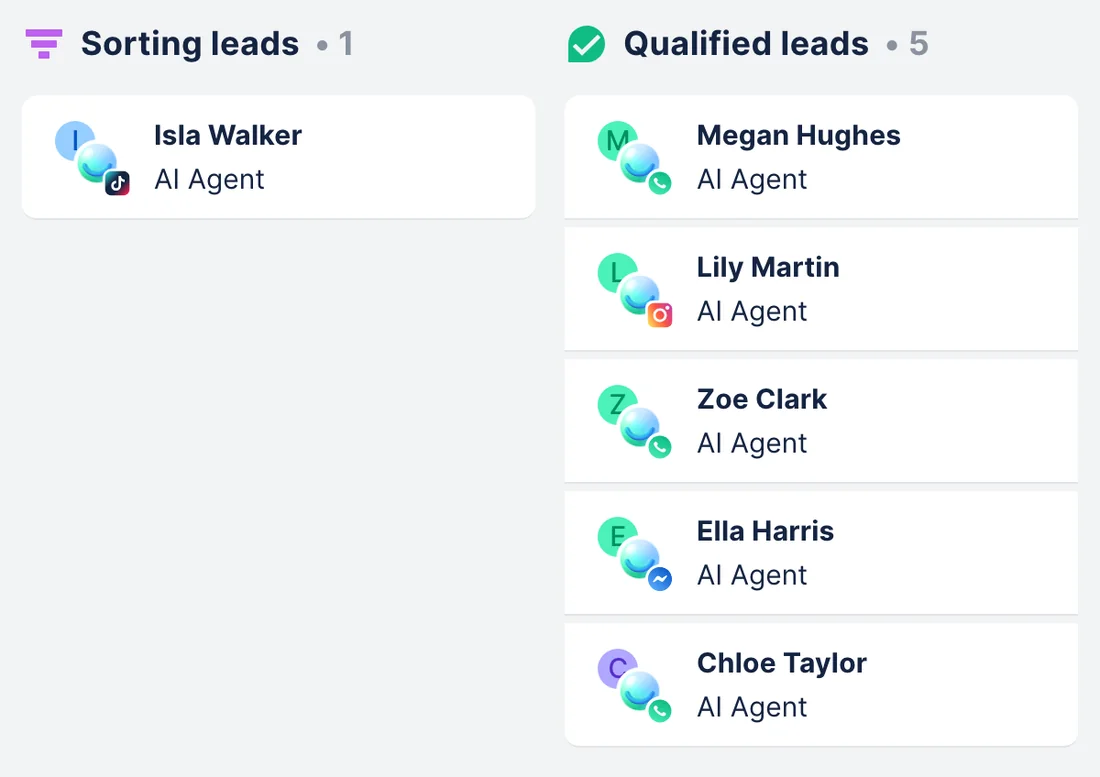
Qualified chat leads → rows in Google Sheets
WhenYour team follows up on leads from a shared Google Sheet, and the AI Agent qualifies new ones in chats every day.
- Chatfuel MCP finds the chats at the Qualified stage with
list_chats, andget_chatreads each one: the treatment, the preferred day, and an email or phone if the customer typed it. - Google Sheets' Create Spreadsheet Row action has to be enabled in Zapier MCP first. The assistant can find it with
discover_zapier_actionsand turn it on withenable_zapier_action; if Google Sheets isn't connected to Zapier yet,manage_zapier_connectionsgives you a link to connect it. execute_zapier_write_actionadds one row per lead: name, channel, treatment, contact details and the chat date. Each row is one Zapier call, 2 tasks.
ResultThe sheet lists every lead the AI Agent qualified in WhatsApp, Instagram, Facebook, TikTok and website chat, ready for your team's follow-up.
AskFind this week's qualified leads in our Chatfuel chats and add each one to the Chat leads sheet in Google Sheets through Zapier: name, channel, treatment, and the email or phone if they typed one.
Price list in Google Sheets → answers from the AI Agent
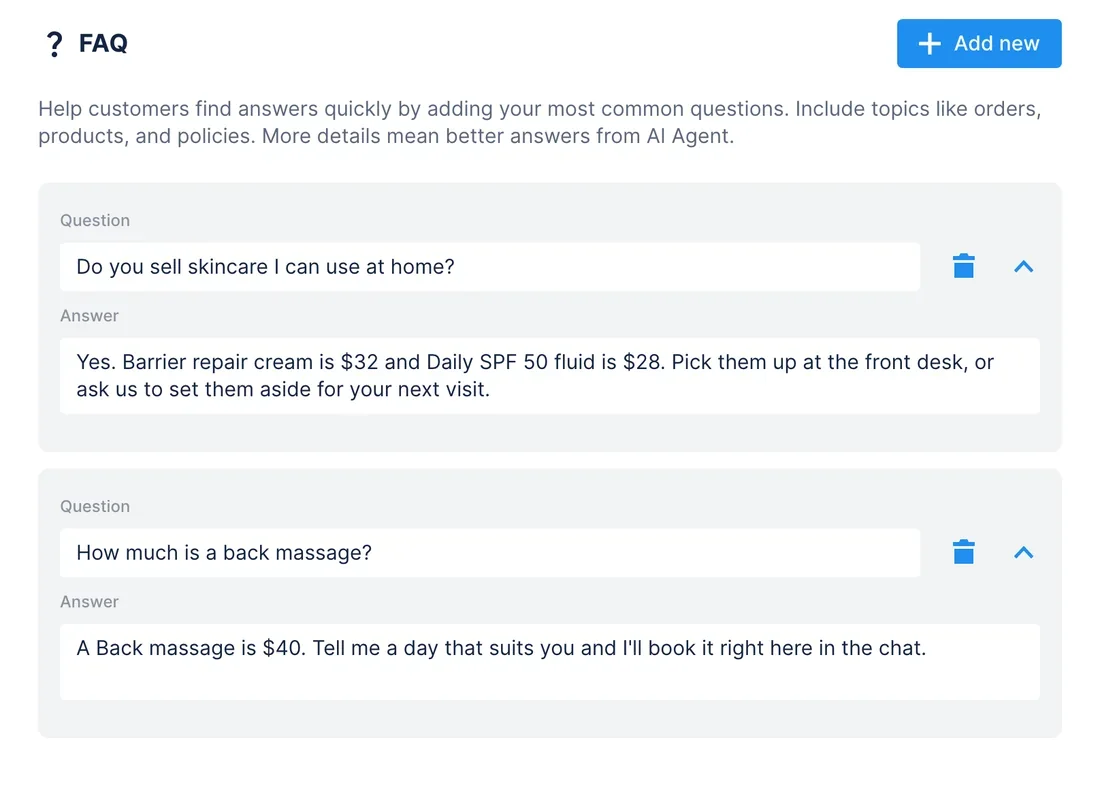
WhenYour team keeps prices in a Google Sheet, and this week it added two skincare products and raised one price.
- With Google Sheets' Get Many Spreadsheet Rows (Advanced) action enabled in Zapier MCP,
execute_zapier_read_actionreads the price list, up to 1,500 rows. - Chatfuel MCP adds the new items to the FAQ with
add_faq.add_faqskips questions the FAQ already has, so after your yes,update_faqrewrites the answers whose price changed. - If the sheet also holds your address or payment options,
set_company_infoupdates the company details after your yes. test_replyasks the AI Agent about a new product in a sandbox chat.
ResultCustomers get the prices on your sheet, and the AI Agent stops quoting the old ones.
AskRead our Price list sheet in Google Sheets through Zapier. Add new items to the Chatfuel FAQ, fix the prices that changed, then test how the AI Agent answers about the barrier repair cream.
Chats waiting for a person → a message in Microsoft Teams
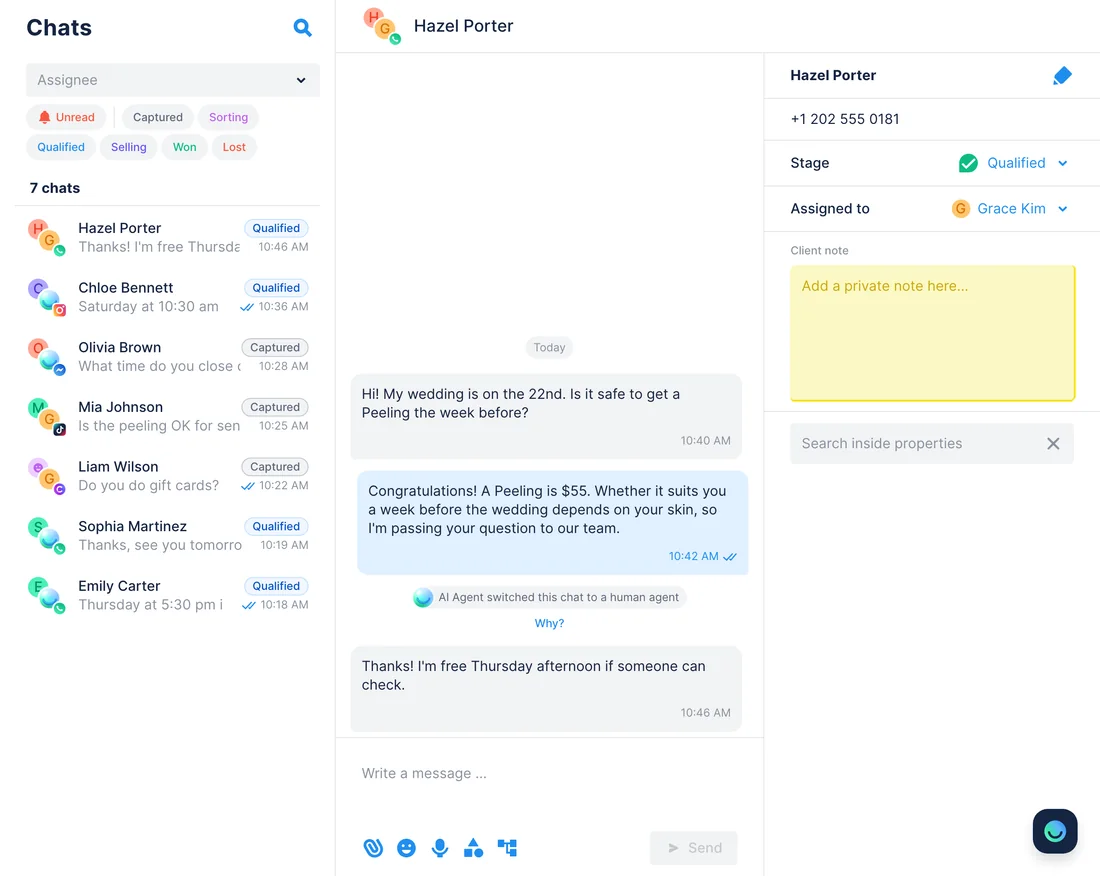
WhenThe AI Agent hands questions it can't answer to your team, and your team spends the day in Microsoft Teams rather than the Chatfuel inbox.
- Chatfuel MCP lists the chats handed off to a person, and those where the customer's last message has no reply, with
review_chats. get_chatreads what each of those customers asked.- With Microsoft Teams' Send Channel Message action enabled in Zapier MCP,
execute_zapier_write_actionposts one message to your team's channel: each customer's name, channel and question.
ResultYour team sees in Teams who's waiting and why, and answers them in the Chatfuel inbox. One message for the whole list costs 2 Zapier tasks.
AskWhich Chatfuel chats are waiting for a person? Post one list to the Reception channel in Microsoft Teams through Zapier: name, channel and what each customer asked.
Bookings from chats → a log in Google Sheets
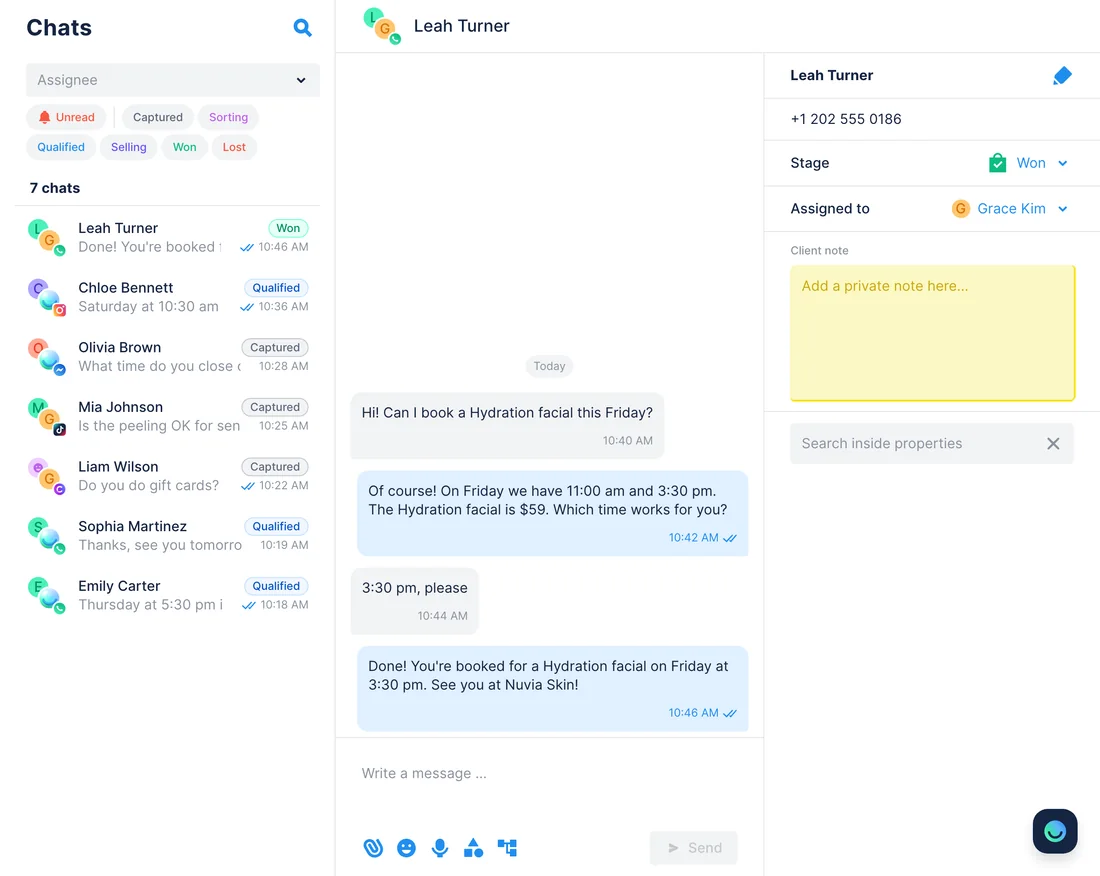
WhenThe AI Agent books clients in chats, and you keep a sheet of each week's appointments for reports.
- Chatfuel MCP lists last week's appointments with
list_bookings: time, service, specialist, client name and status, up to 31 days in one request. - With Create Spreadsheet Row enabled in Zapier MCP,
execute_zapier_write_actionadds one row per appointment. 20 appointments mean 20 calls, 40 Zapier tasks. - The assistant sums up the week: appointments per service and how many were canceled or no-shows.
ResultA booking log your manager can filter and share. It works as a log, not a contact sync: appointments carry only the client's name, with no phone or email to match a customer record.
AskList last week's Chatfuel appointments and add each one to our Bookings 2026 sheet in Google Sheets through Zapier: date, time, service, specialist, client and status.
How to connect
Connect Chatfuel MCP
Sign in to Chatfuel from your assistant. Claude and ChatGPT list it in their directories; Cursor connects by the address https://mcp.chatfuel.com/panel.
Connect Zapier MCP
Claude adds Zapier from its connector directory, Cursor installs Zapier's marketplace plugin, and ChatGPT takes https://mcp.zapier.com/api/v1/connect as a developer-mode plugin. Each one signs you in to Zapier.
Enable the actions, then ask
Zapier's apps reach the assistant as actions you enable once, such as Create Spreadsheet Row in Google Sheets, and the assistant can find and enable them for you. Chatfuel asks for a yes before it changes your bot.
- On Team and Enterprise plans, an Owner first enables Zapier in Organization settings.
- Add Chatfuel from Claude's connector directory and sign in.
- In a chat, ask Claude to connect Zapier MCP and click Connect on the Zapier card.
- Click Copy prompt, then Continue. Choose your Zapier account, click Allow and paste the copied prompt back in Claude.
- Chatfuel MCP
- claude.ai/directory/chatfuel
- Zapier MCP
- From Claude's directory
- Install the Chatfuel plugin from ChatGPT's plugin directory and sign in.
- Turn on Developer mode in the Security and login settings, open Plugins, click + and name the plugin Zapier MCP.
- Paste https://mcp.zapier.com/api/v1/connect, keep the authentication setting as it is, click Create, then Connect and sign in to Zapier.
- If your Business, Enterprise or Edu workspace already has Zapier, pick it with @ in a chat and sign in instead.
- Chatfuel MCP
- chatgpt.com/plugins
- Zapier MCP
https://mcp.zapier.com/api/v1/connect
- Add Chatfuel to ~/.cursor/mcp.json with the URL https://mcp.chatfuel.com/panel.
- Install the Zapier plugin from the Cursor marketplace: type /add-plugin zapier in Cursor's chat.
- Open a new Agent chat, paste the setup prompt from Zapier's Cursor guide (docs.zapier.com/mcp/get-started/connect/cursor) and sign in to Zapier when asked. If sign-in keeps failing, update Cursor: some versions have an OAuth bug.
- Chatfuel MCP
https://mcp.chatfuel.com/panel- Zapier MCP
/add-plugin zapier
What you need
- A Chatfuel bot with at least one channel connected: WhatsApp, Instagram, Facebook, TikTok or website chat.
- A Zapier account on any plan. MCP is included and spends tasks from the same monthly quota as your Zaps.
- Google Sheets, Microsoft Teams or the other apps you use, connected in Zapier. The assistant can use connections you own or ones shared across the Zapier account.
- Claude, ChatGPT with Developer mode or a Business, Enterprise or Edu workspace that added Zapier, or Cursor with Zapier's plugin.
Limits
- Each successful Zapier call uses 2 tasks, and rows go in one call each: 25 leads in a sheet cost 50 tasks. Zapier's Free plan has 100 tasks a month.
- Once the task quota runs out and pay-per-task billing is off, Zapier stops the calls until the billing cycle resets.
- Zapier's docs describe no confirmation step before a write action. Ask the assistant to show you the rows or the message before it adds them; each call is recorded in the History tab at mcp.zapier.com.
- Neither server runs on a trigger, and Zapier can't call Chatfuel MCP. Data moves when you ask the assistant, not when a new lead arrives.
- A row holds only what the chat holds: name, channel and messages, plus a phone or email the customer typed. Appointments carry the client's name only.
- Zapier's workflow tools for Next Gen Zaps are in Early Access, so these use cases rely on standard app actions only.
FAQ
Yes. Zapier hosts it at https://mcp.zapier.com/api/v1/connect, publishes it in the MCP Registry as com.zapier/mcp and describes it as generally available.
2 tasks per successful tool call, from your plan's regular quota. Failed calls and checking which tools you have don't use tasks, but the onboarding Zapier runs when you first connect does. Ten leads added one row at a time make 10 calls, or 20 tasks. Chatfuel MCP calls don't touch your Zapier tasks.
Any of Zapier's 9,000+ apps whose actions are enabled on your Zapier MCP server and connected to your account. This page uses Google Sheets and Microsoft Teams; Zapier's app directory lists what each app can do.
No. Chatfuel MCP writes only in chats that already exist, and on WhatsApp only within 24 hours of the customer's last message. It has no broadcasts or contact import, and Zapier has no way to call it.
Yes. In Zapier's agentic mode, the assistant can save the routine as a Zapier skill: Markdown instructions it loads when you ask. A skill isn't a schedule, so it still runs only on request.
Yes, though Zapier isn't added from a public directory there. You create a private developer-mode plugin with the server address, or a workspace Owner on Business, Enterprise or Edu publishes Zapier for everyone, which Zapier says needs a Zapier Enterprise account.
More integrations


Connect Chatfuel MCP
Start a free trial, add Chatfuel to your assistant and ask about Zapier and your chats in one place.