


Connect Chatfuel MCP with Pipedream MCP
Pipedream turns the ready-made actions of 3,000+ apps into tools your assistant can call, including apps with no MCP server of their own. Next to Chatfuel MCP, questions from your Google reviews become answers the AI Agent gives, an Eventbrite event gets comment replies, and chats waiting for your team land in the front desk's Google Tasks.
What the integration can do
Tools the assistant calls on each side, named as the servers name them.
| Tool | What it does |
|---|---|
review_chats | Summarizes customer chats for a period instead of returning every message. |
get_chat | Returns the latest messages of one customer chat with its channel, status and lead stage. |
return_chat_to_ai | Hands a chat in live chat back to the AI Agent after your yes, and the AI Agent answers the customer's last message. |
get_knowledge_base | Returns what the AI Agent answers from: company info, instructions, business hours, FAQ, services and specialists. |
add_faq | Adds question and answer pairs to the FAQ the AI Agent answers from. |
test_reply | Sends a sample customer message to a sandbox chat and returns the AI Agent's reply. |
list_posts | Lists recent posts and reels of the Instagram account and the Facebook Page connected to your bot. |
setup_comment_replies | Sets up AI or fixed replies to comments, for all of them or by keyword; on Instagram and Facebook also a DM and a choice of posts. |
list_chats | Lists customer chats with their channel, status and lead stage. |
set_lead_stage | Moves a lead to another stage of the Leads board, such as Qualified or Won. |
| Tool | What it does |
|---|---|
google_my_business-list-locations | Lists the business locations of your Google Business Profile account, so the assistant can pick the clinic. |
google_my_business-list-all-reviews | Returns the Google reviews of one location: stars, text, the reviewer and the reply you posted, if any. |
google_my_business-create-update-reply-to-review | Posts your reply under a Google review, or replaces the reply that's there. Pipedream marks it as destructive. |
eventbrite-get-event-details | Returns one Eventbrite event: its name, start and end time, and the link to its listing page. |
google_tasks-list-task-lists | Lists the task lists of the Google account you connected. |
google_tasks-create-task | Adds a task to a list, with a title, notes and a due date. |
google_tasks-list-tasks | Returns the tasks of one list, including the ones already completed. |
google_forms-get-form | Returns a Google Form's questions and the link you share with the people who fill it in. |
google_forms-list-form-responses | Returns the responses a Google Form has received, with each person's answers. |
What to ask the assistant
Google reviews → answers the AI Agent gives
WhenNew Google reviews of your clinic keep raising the same three points: redness after a Peeling, whether the Hydration facial suits sensitive skin, and where to park.
- Pipedream MCP finds the clinic with
google_my_business-list-locations, thengoogle_my_business-list-all-reviewsreturns that location's reviews: stars, text, the reviewer's name and any reply already posted. - Chatfuel MCP shows what the AI Agent already knows with
get_knowledge_base. The assistant drafts answers only for the points it doesn't cover yet, andadd_faqsaves them after your yes. test_replyasks the AI Agent where to park in a sandbox chat.- For replies on Google too, the assistant drafts one per review, and
google_my_business-create-update-reply-to-reviewposts each text you approve. Pipedream posts it the moment it's called and replaces any earlier reply.
ResultCustomers who ask in WhatsApp, Instagram or your website chat get what reviewers wished they'd known, and each review gets an answer in your words.
AskRead our latest Google reviews through Pipedream and find the questions people keep raising. Add answers to the Chatfuel FAQ for the ones the AI Agent can't answer yet and test one. Then draft a reply to each review for me to approve.
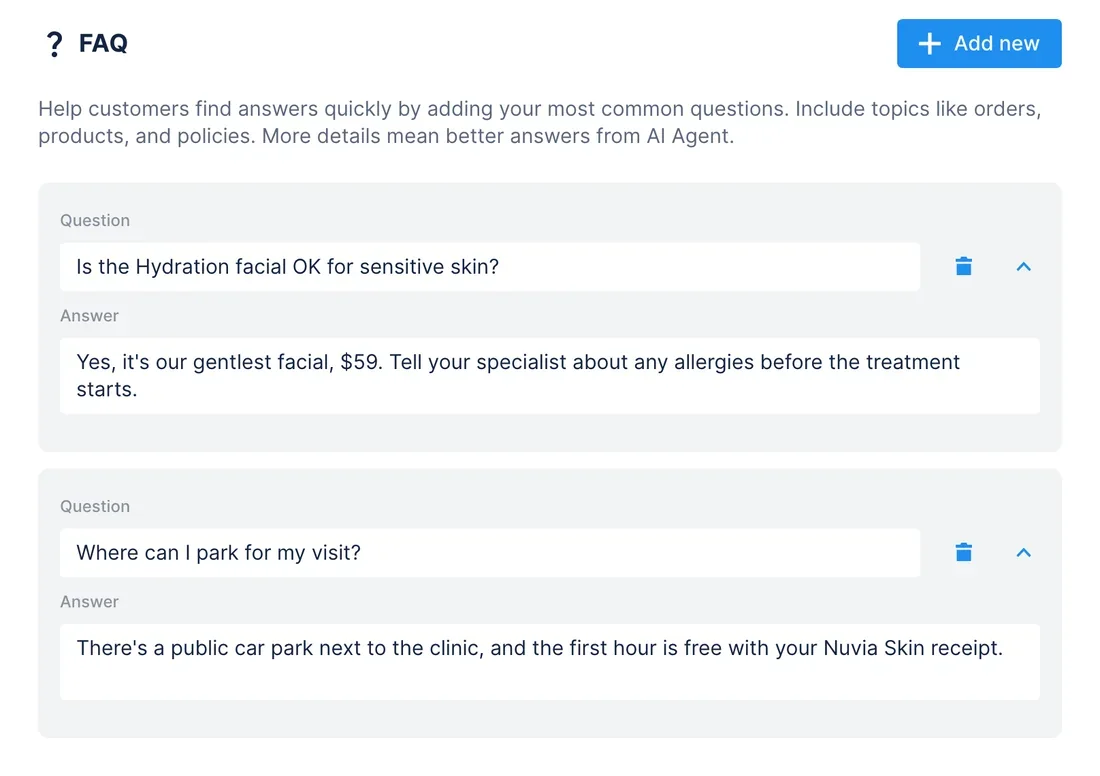
Eventbrite event → comment replies with the ticket link
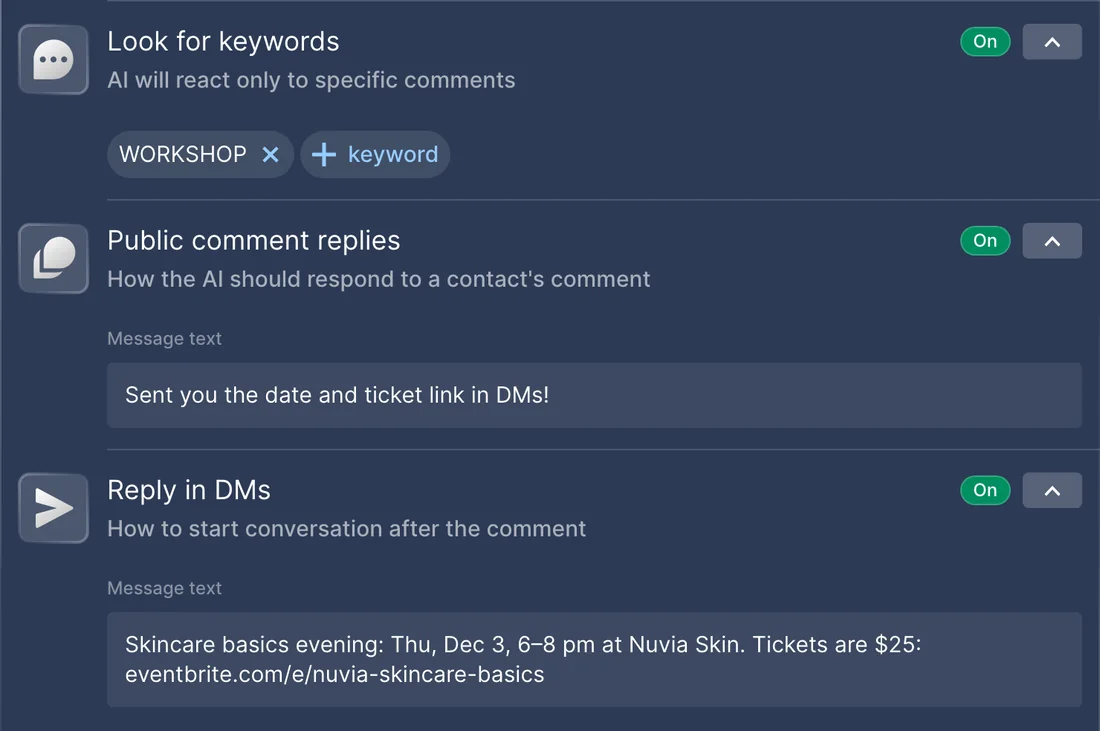
WhenYour clinic sells tickets on Eventbrite for a Skincare basics evening on Thursday, December 3, and an Instagram post announces it. People comment to ask when it is and where to get a ticket.
- Pipedream MCP reads the event with
eventbrite-get-event-details: its name, start and end time, and the link to its Eventbrite listing. The price sits in Eventbrite's ticket types, so you give it in the request: $25. - Chatfuel MCP finds the announcement among your recent Instagram posts with
list_posts. - After your yes,
setup_comment_repliesties a comment automation to that post and the keyword WORKSHOP plus a couple of spellings: a short public reply and a DM with the date, time, price and ticket link. add_faqsaves the same details, so the AI Agent can answer when people write back in the DM.
ResultEveryone who comments WORKSHOP gets the ticket link in their DMs, and the AI Agent quotes the date and time exactly as Eventbrite has them.
AskGet our Skincare basics evening from Eventbrite through Pipedream. Set up Chatfuel replies on the Instagram post about it: anyone who comments WORKSHOP gets a short reply and a DM with the date, time, the $25 price and the ticket link. Add the same details to the FAQ.
Chats waiting for a person → Google Tasks for the front desk
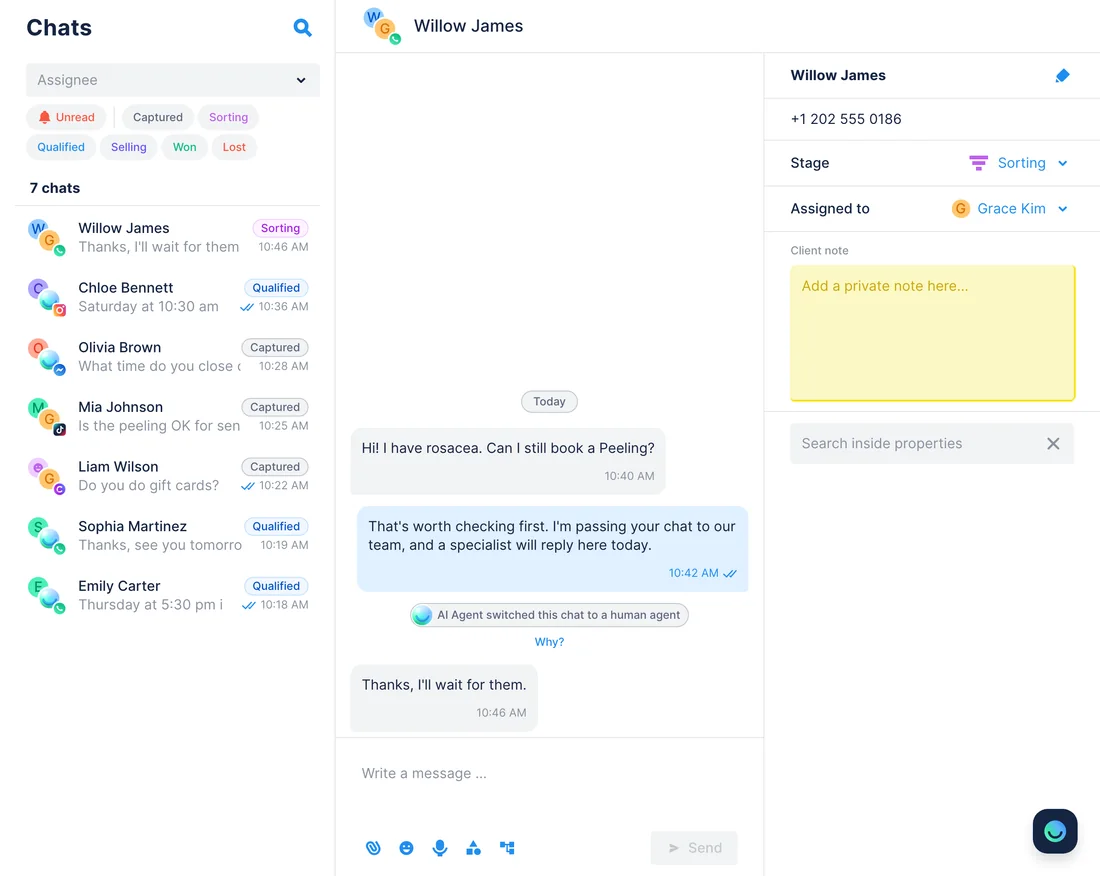
WhenThe AI Agent passes a chat to your team when a question needs a person, like a first Peeling for someone with rosacea. Your front desk plans its day in a Google Tasks list, not in the Chatfuel inbox.
- Chatfuel MCP lists the chats handed off to a person, and those whose last customer message has no reply, with
review_chats.get_chatreads what each customer asked. - Pipedream MCP finds the Front desk list with
google_tasks-list-task-lists, andgoogle_tasks-create-taskadds one task per chat: the customer's name and channel as the title, the question in the notes, today as the due date. - The next day,
google_tasks-list-tasksshows which of those tasks the team has ticked off. - For each finished one,
return_chat_to_aihands the chat back to the AI Agent after your yes, and the AI Agent answers the customer's last message.
ResultThe front desk sees every waiting customer in the list it already works from, and finished chats go back to the AI Agent instead of sitting in live chat. Google Tasks keeps a due day, not a time.
AskWhich Chatfuel chats are waiting for a person? Add a task for each one to our Front desk list in Google Tasks through Pipedream, with the customer's name, channel and question, due today.
Skin questionnaire in Google Forms → Qualified on the Leads board
WhenBefore a first Peeling, your clinic asks new clients to fill in a short skin questionnaire in Google Forms. The AI Agent should hand out the link, and your team books those who've sent it.
- Pipedream MCP reads the form with
google_forms-get-form: its questions and the link people open to fill it in. After your yes,add_faqsaves an answer about preparing for a first Peeling that includes the link. - Later in the week,
google_forms-list-form-responsesreturns the answers: the name and phone each person entered, their skin type and the treatment they want. - Chatfuel MCP looks for each person's chat by name or phone with
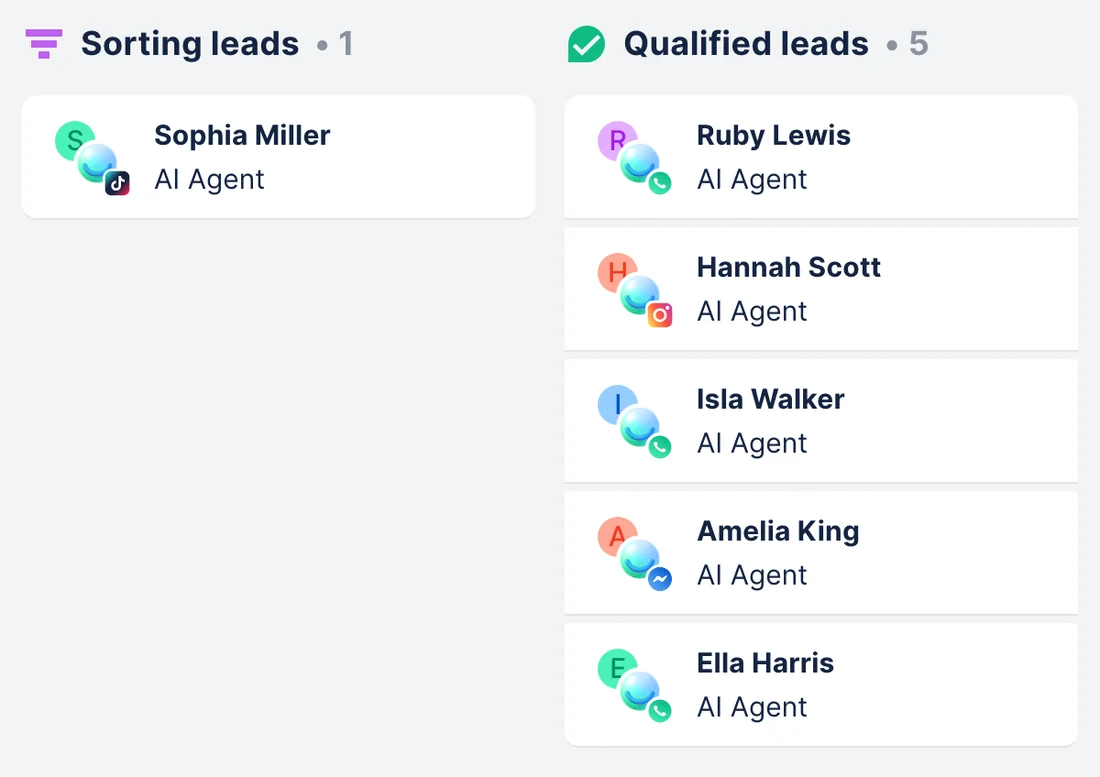
list_chats. The assistant lists the responses that match no chat, or more than one, for you to check. set_lead_stagemoves each match to Qualified, one lead at a time after your yes. That opens live chat, so the AI Agent stops replying there and your team takes over to book.
ResultThe Qualified column shows exactly who has sent the questionnaire, and your team books their first Peeling already knowing their skin type.
AskAdd the link to our Skin questionnaire in Google Forms to the Chatfuel FAQ about a first Peeling. Then read this week's responses through Pipedream, find each person's Chatfuel chat by name or phone and move them to Qualified.
How to connect
Connect Chatfuel MCP
Take Chatfuel from Claude's or ChatGPT's directory, or point Cursor at https://mcp.chatfuel.com/panel, and log in to the account that runs your bot.
Add Pipedream MCP by its address
Pipedream isn't in the assistants' directories, so each one gets the same address: https://mcp.pipedream.net/v2. Give the server a short name such as Pipedream, because Pipedream adds it to every tool name.
Pick your apps at sign-in
Pipedream asks you to log in or create a free Pipedream MCP account, which is separate from a pipedream.com account. Select the apps, such as Google Business Profile and Google Tasks, connect your account in each and authorize the assistant.
- Add Chatfuel from Claude's connector directory and log in.
- Open Customize › Connectors, click + Add › Add custom connector, name it Pipedream and paste https://mcp.pipedream.net/v2. Click Continue, then Add.
- Click Connect. On Pipedream's screen, log in, select your apps, connect the account for each one and allow access.
- On Team and Enterprise, an Owner adds the connector under Organization settings › Connectors, and each member connects their own accounts. Claude's Free plan allows one custom connector.
- Chatfuel MCP
- claude.ai/directory/chatfuel
- Pipedream MCP
https://mcp.pipedream.net/v2
- Install the Chatfuel plugin from ChatGPT's directory and log in.
- Pipedream has no listing there. Switch on Developer mode in the settings, then create a plugin (Pipedream's guide calls it a connector) with https://mcp.pipedream.net/v2.
- Click Create and authorize Pipedream: log in, pick the apps and connect each account.
- In a chat, open + › More › Developer mode and turn Pipedream on before you ask.
- Chatfuel MCP
- chatgpt.com/plugins
- Pipedream MCP
https://mcp.pipedream.net/v2
- Add Chatfuel to ~/.cursor/mcp.json with the URL https://mcp.chatfuel.com/panel.
- Click Add to Cursor in Pipedream's guide (Cursor 1.0 or later), or add a pipedream server with "url": "https://mcp.pipedream.net/v2" to the same file.
- Authorize when Cursor asks. Pipedream registers Cursor by itself, so there's no client ID to copy; pick the apps and connect them in the browser.
- Chatfuel MCP
https://mcp.chatfuel.com/panel- Pipedream MCP
https://mcp.pipedream.net/v2
What you need
- A Chatfuel bot with WhatsApp, Instagram, Facebook, TikTok or website chat connected. For the comment use case, the Instagram account that posted the announcement.
- A Pipedream MCP account, free for your own use. It's separate from pipedream.com, so a Pipedream Workflows login doesn't carry over.
- Your own accounts in the apps: a Google Business Profile that manages the clinic's location, an Eventbrite organizer account, and the Google account that holds the Tasks list and the questionnaire form.
- Claude, ChatGPT with Developer mode, or Cursor.
Limits
- Pipedream runs an action as soon as the assistant calls it and documents no approval step of its own. Its tools are labeled read, write or destructive, as the review reply is, so ask to see the text before it goes out.
- Tool names come from Pipedream's actions, such as google_tasks-create-task, and the server name you choose is added to each. If your assistant rejects names as too long, Pipedream's advice is a shorter server name.
- Each action sees only what the connected account can: reviews of the locations your Google account manages, events of your Eventbrite organization, tasks in one Google account.
- Nothing runs on its own here. A new review, form response or handoff reaches Chatfuel only when you ask the assistant.
- Chatfuel MCP has no phone or email for a chat unless the customer typed one, so a form response is matched by name or phone and some need a manual check. Moving a lead to Qualified opens live chat, and the AI Agent stays quiet there until the team hands it back.
- Google Tasks stores a due date without a time, and an Eventbrite event's details carry no ticket price.
FAQ
Yes. Pipedream, now part of Workday, hosts it at https://mcp.pipedream.net/v2 and documents setup for ChatGPT, Claude and Cursor. It isn't listed in the MCP Registry, and Pipedream gives it no beta or GA label.
Any of the 3,000+ apps on mcp.pipedream.com that you select and connect, each with its own tools built from Pipedream's ready-made actions. Some have no MCP server of their own: Google Tasks and Google Forms aren't among Google's Workspace MCP servers, for example.
Pipedream says its hosted MCP servers are free for your own use. Its credit pricing is for developers who build Pipedream into their own products. The apps you connect, like Eventbrite or Google Business Profile, keep their own plans.
No. Pipedream is closing Workflows and String on March 31, 2027 and says its MCP servers aren't affected. None of these use cases needs a workflow: the assistant calls each app's action directly.
Pipedream says it doesn't store or log request or response bodies for calls made through MCP. Your app credentials stay encrypted on its servers and never reach the AI model, and you can revoke a connected account at any time.
No. Neither server reacts to the other, so ask the assistant when you want a check, for example every Monday: it reads the reviews since then and suggests FAQ answers for you to approve.
More integrations


Connect Chatfuel MCP
Start a free trial, add Chatfuel to your assistant and ask about Pipedream and your chats in one place.