 Chatfuel
An AI assistant for WhatsApp sales answers the questions that come before a purchase: what it costs, whether it comes in another size or color, how long delivery takes and how to pay. It replies in seconds, day or night, in the customer's language, and hands the chat to a person when needed.
In Chatfuel, that assistant is the AI Agent. It reads your catalog and instructions, answers on WhatsApp, sends product photos, shares your payment link and moves the lead along your pipeline. You set it up once, and it works on Instagram, Messenger, TikTok and website chat too.
Below: what it does in a sales chat, what it needs from you, how to set it up and what it can't do.
What an AI sales assistant does on WhatsApp
A customer writes "Hi, how much is the linen dress, and do you have it in M?" Then:
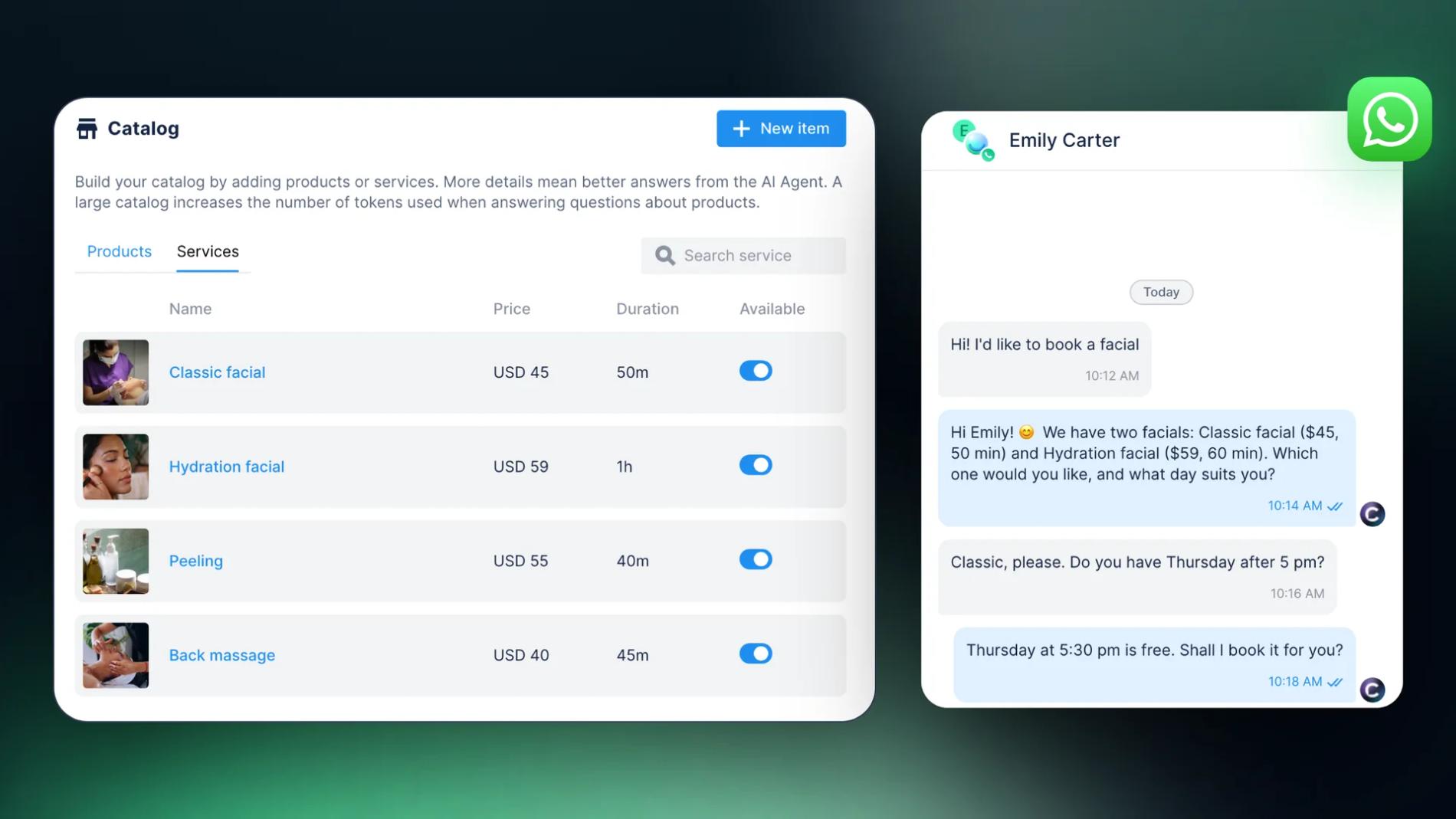
- It answers from your catalog. The AI Agent finds the dress, gives the price and the sizes you listed, and sends a product photo if you allow it.
- It handles the follow-up questions. Delivery, materials, opening hours, returns: anything in your AI Knowledge Base, in any language, voice messages included.
- It recommends. If the customer is unsure, it suggests other catalog items that match the request.
- It moves to the order. When the customer is ready, it shares your payment link or collects what you need to take the order: name, phone, address.
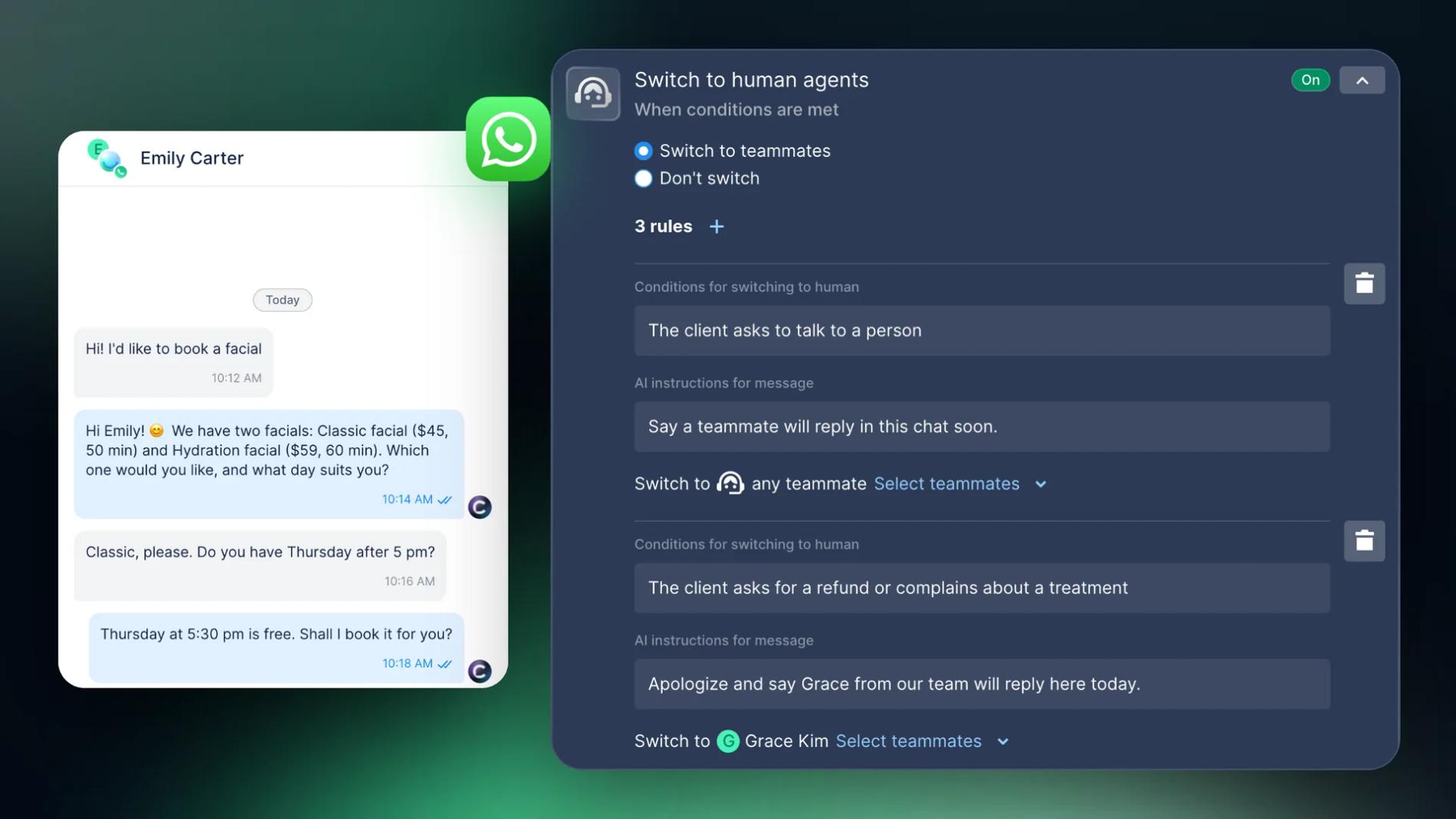
- It hands off when it should. A wholesale request, a complaint or a custom order goes to a teammate, with the whole conversation in front of them.
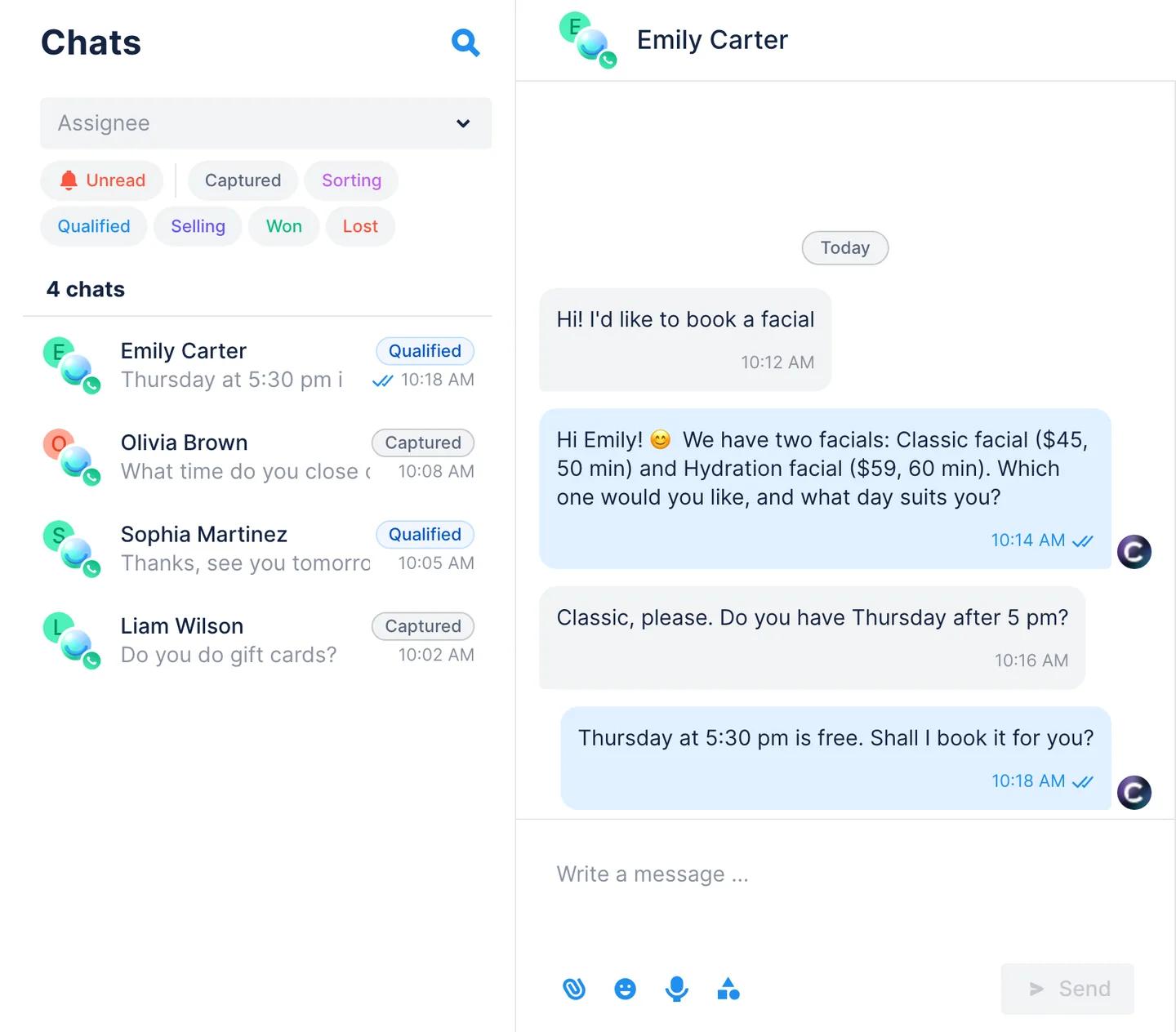
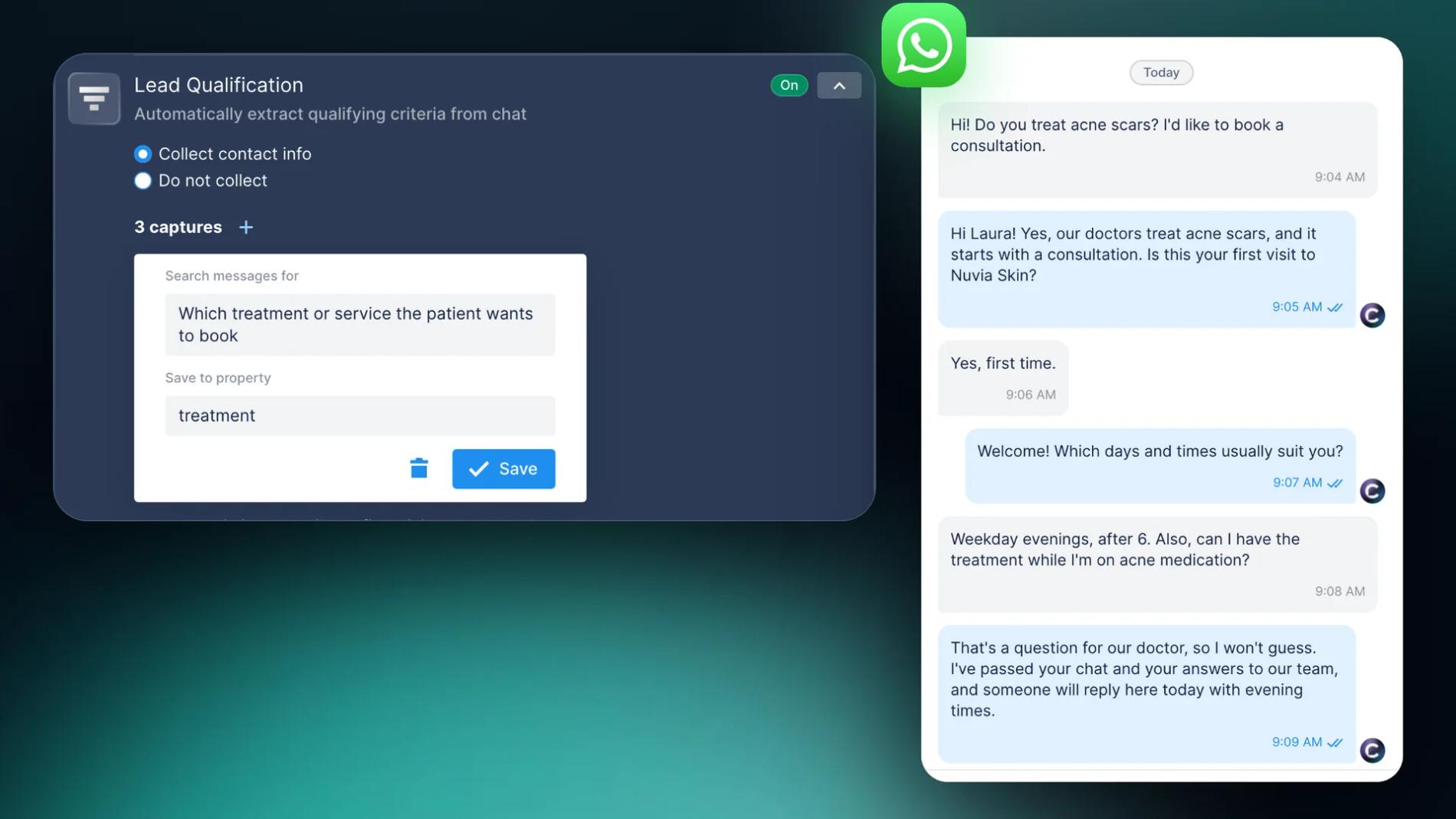
Along the way it saves the details people share (name, phone, email, city, budget) to the contact card and moves the lead through the stages of the Kanban board: Captured, Sorting, Qualified. You can see who's ready to buy without reading every chat.
See also: How to Answer Sizing and Product Questions in WhatsApp Before Someone Orders
What it needs from you
The assistant works from three things you give it:
- A catalog. Each item gets a name, a description with options, prices and availability, and up to 10 photos. Keep it under 50 items and write descriptions the way customers talk ("runs small, size up"). The AI Agent recommends products only from the catalog.
- Business facts. About, orders and bookings, and FAQ in the AI Knowledge Base: delivery areas and times, returns, payment methods, opening hours.
- Instructions. Tone, name and language go in AI instructions, for example "Speak Spanish. Keep messages under 2 lines." This is also where you paste your payment link.
How to set it up in Chatfuel
- Add your products. In Chatfuel: open AI Knowledge Base → Catalog → New item → New product, fill in the name, description and price, and add photos. Repeat for each item. You can also paste a price list to the AI assistant in the dashboard and let it create the items. How to set up the AI Knowledge Base.
- Choose when photos go out. Set how many images per product the AI Agent sends, and whether it sends them when asked or when a product first comes up. How to attach photos to products.
- Add your payment link. Paste your Stripe, PayPal or Square link into AI instructions and say when to share it. How to make the AI send a payment link.
- Turn the AI on for WhatsApp. In Chatfuel: open Automations → WhatsApp → Incoming messages and switch the AI on. It starts switched off, and it covers direct messages, Click-to-WhatsApp ads and posts that click to WhatsApp. How to activate AI in WhatsApp.
- Set your handoff rules (next section) and turn on Send follow-ups if you want the AI to check back with people who go quiet.
You can build all of this before your number is connected: it's saved as a draft and goes live when WhatsApp connects. If you'd rather describe your business than click through settings, connect Claude or ChatGPT through Chatfuel MCP and set it up from there.
When a person takes over
Some chats still need a person. In Switch to human agents you add up to 20 rules for when the AI Agent should step back and who gets the chat, for example orders over a certain size, a city or a language.
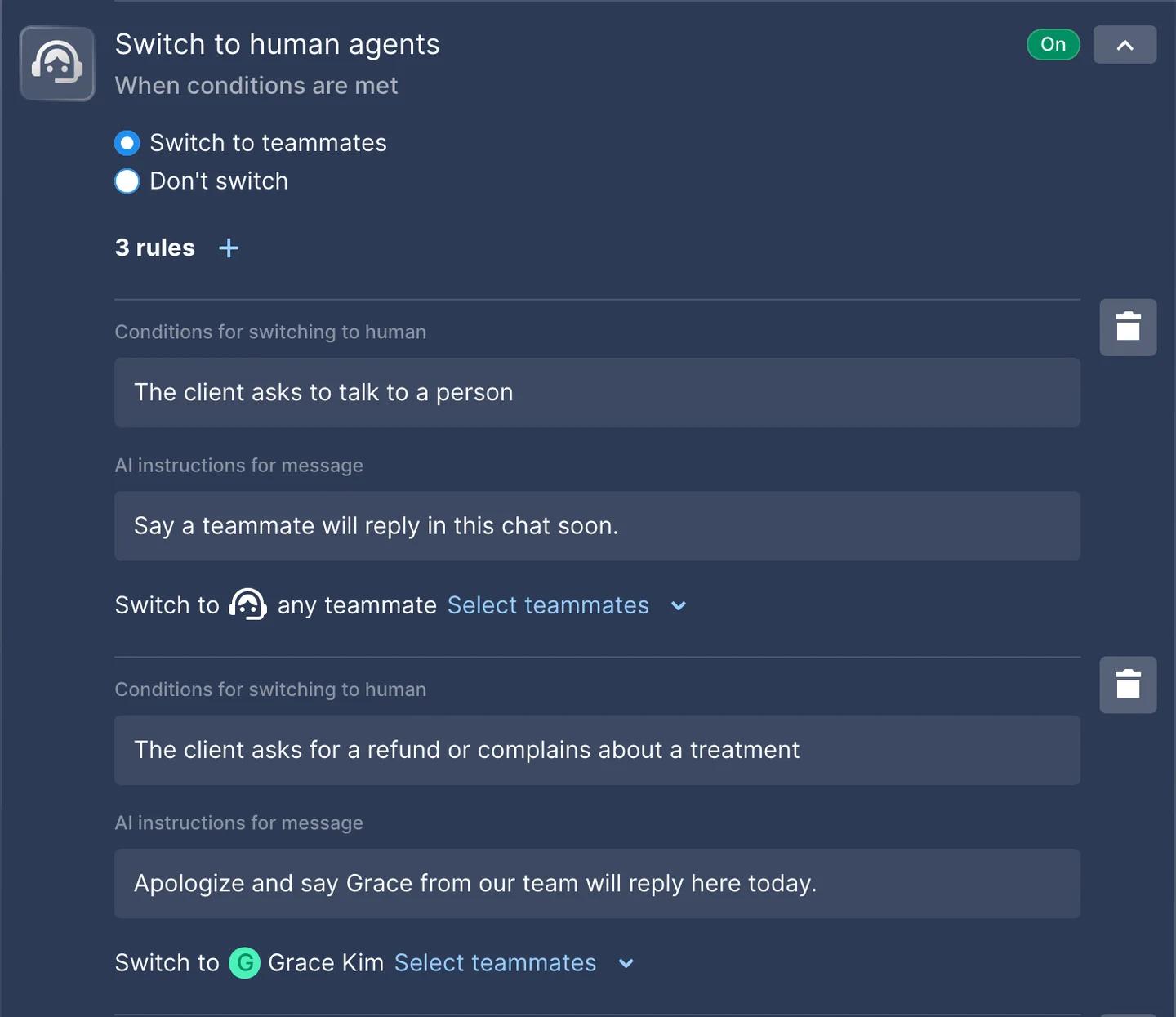
You can also step in at any moment: reply in Chats or assign the chat to yourself, and the AI stops right away. You get the full history, so the customer doesn't have to repeat anything. With a chat timeout, the chat goes back to the AI after the time you set, from 10 minutes to 7 days. How to set up chat assignment rules.
What it doesn't do
Before you launch, know what's out of scope:
- It doesn't take payments. It shares your payment link and can check a receipt image the customer sends; the payment happens with your provider.
- It doesn't sync with your store. The catalog doesn't connect to Shopify or Meta Commerce Manager, so update prices and availability in Chatfuel when they change.
- It replies in text and photos. AI replies have no buttons or carousels, and the AI doesn't send PDFs or video files.
- It follows WhatsApp's rules. Free-form replies and follow-ups go out inside the 24-hour window after the customer's last message. After that, you reach people with an approved template from Chats or Broadcasts. How the 24-hour window works.
Checklist
- Catalog filled in: names, prices, options, availability, photos.
- Delivery, returns and payment methods in the AI Knowledge Base.
- Tone, language and your payment link in AI instructions.
- AI switched on for WhatsApp incoming messages.
- Handoff rules for big orders, complaints and custom requests.
- A test chat from your own phone before you announce it.
See what the AI Agent can do for your sales team on the AI sales manager page, or read more in WhatsApp Sales Automation for Small Business 2026.
FAQs
What does an AI assistant for WhatsApp sales do?
It answers customers' questions about products, prices, options and delivery from your catalog and business facts, recommends items, shares your payment link and hands the chat to a person when needed. In Chatfuel this is the AI Agent, and it also saves lead details and moves leads through your Kanban board.
Can an AI sales assistant take payments on WhatsApp?
Not by itself. In Chatfuel, the AI Agent shares the Stripe, PayPal or Square link you add to its instructions, and it can check a receipt image the customer sends. The payment itself happens with your payment provider.
When does a person take over the chat?
When one of your handoff rules matches, such as a big order, a complaint or a specific city, or whenever a teammate replies in Chats. The AI stops at once and the teammate sees the full conversation.
Does the AI sales assistant reply in Spanish and Portuguese?
Yes. The AI Agent understands and replies in the customer's language, including voice messages. You can also fix the language in AI instructions, for example "Speak Portuguese".