


Connect Chatfuel MCP with Typeform MCP
Typeform already holds what customers tell you in surveys, quizzes and request forms. Ask your assistant to turn those answers into what the AI Agent says in WhatsApp, Instagram and web chat, and to bring your forms to the people who are already writing to you.
What the integration can do
Tools the assistant calls on each side, named as the servers name them.
| Tool | What it does |
|---|---|
review_chats | Summarizes customer chats for a period instead of returning every message. |
get_knowledge_base | Returns what the AI Agent answers from: company info, instructions, business hours, FAQ, services and specialists. |
add_faq | Adds question and answer pairs to the FAQ the AI Agent answers from. |
set_instructions | Replaces the rules the AI Agent keeps to in every reply, such as topics to avoid, after you confirm. |
test_reply | Sends a sample customer message to a sandbox chat and returns the AI Agent's reply. |
list_posts | Lists recent posts and reels of the Instagram account and the Facebook Page connected to your bot. |
setup_comment_replies | Sets up AI or fixed replies to comments, for all of them or by keyword; on Instagram and Facebook also a DM and a choice of posts. |
list_bookings | Lists appointments between two dates: time, service, specialist, customer name and status. |
list_chats | Lists customer chats with their channel, status and lead stage. |
get_chat | Returns the latest messages of one customer chat with its channel, status and lead stage. |
send_chat_message | Sends the text you approved to a customer in their chat and moves the chat to live chat. |
set_lead_stage | Moves a lead to another stage of the Leads board, such as Qualified or Won. |
| Tool | What it does |
|---|---|
accounts-list_accounts | Lists the Typeform accounts you belong to and where each is hosted; most other tools need the account it returns. |
forms-public_list_forms | Lists the forms your user owns, with search and pages. |
forms-public_get_capabilities | Returns the question types, edit operations and logic rules the form tools accept. |
forms-public_create_form | Creates an empty form in a workspace and returns its form ID. |
forms-public_validate_patch | Checks a set of form edits against the draft without saving them and returns the token needed to apply them. |
forms-public_patch_form | Saves checked edits to the form's draft; respondents see nothing until it's published. |
forms-public_preview_form | Shows the latest draft as an interactive preview in Claude or ChatGPT, with submissions turned off. |
forms-public_publish_form | Makes the form's current draft live, only when you ask for it. |
insights-public_discover | Returns the fields and measures of a form that can be queried; the other insights tools need it first. |
insights-public_aggregate | Returns counts, averages, sums and NPS for one question or a whole form. |
insights-public_list | Returns every answer to one question, page by page. |
insights-public_list_responses | Returns one row per respondent: several answers side by side, with submission time, device and URL parameters. |
What to ask the assistant
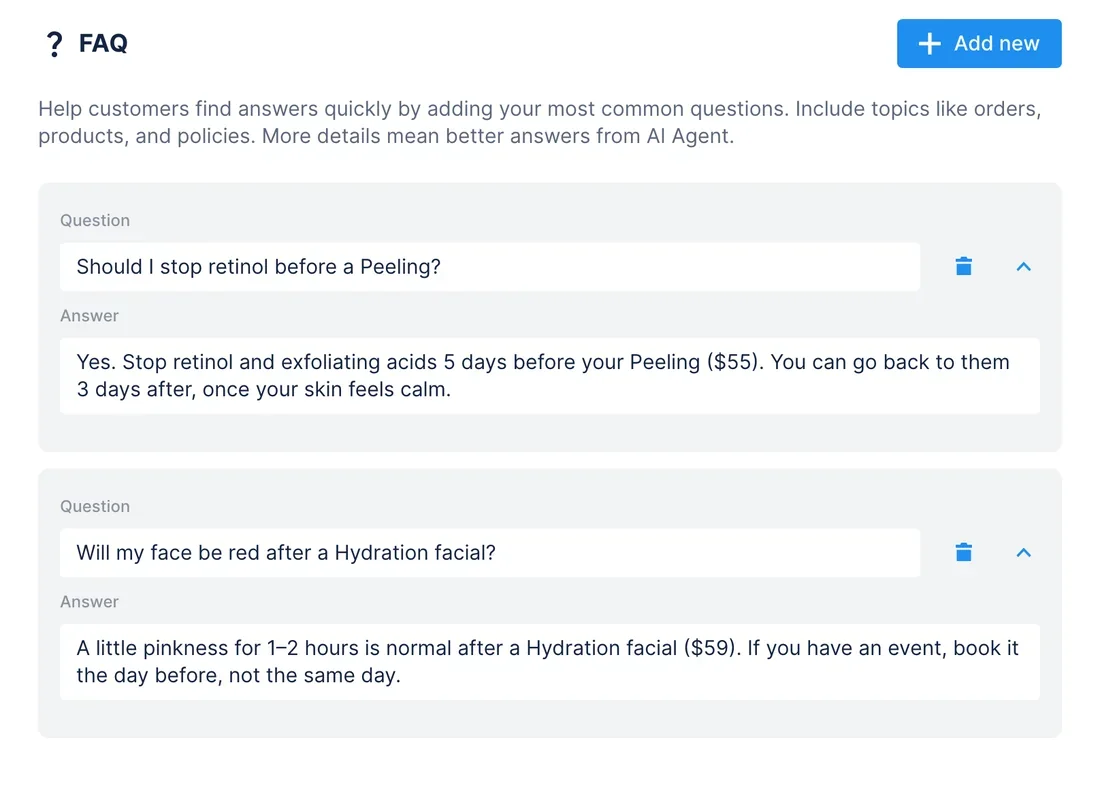
Post-visit survey in Typeform → answers the AI Agent gives before the next visit
WhenAfter every visit, clients get Nuvia Skin's Post-visit survey in Typeform: an NPS score and the question “What do you wish you'd known before your visit?”
- Typeform MCP finds the survey with
forms-public_list_forms.insights-public_discoverreturns its fields,insights-public_aggregatethe NPS and the number of responses, andinsights-public_listevery answer to the open question. - The assistant groups what clients wrote, such as stopping retinol before a Peeling or redness after a Hydration facial, and
get_knowledge_baseshows which of those topics the FAQ already answers. add_faqadds the missing topics. For the one clients mention most,set_instructionssaves the current instructions plus one new line after your yes, so the AI Agent brings it up when someone books a Peeling.test_replyasks the AI Agent about retinol before a Peeling in a sandbox chat, and you read the answer before a client does.
ResultWhat clients only found out after their visit, they now hear in the chat before it.
AskRead the answers to “What do you wish you'd known before your visit?” in our Post-visit survey in Typeform. Add the missing topics to the Chatfuel FAQ, then test what the AI Agent says about retinol before a Peeling.
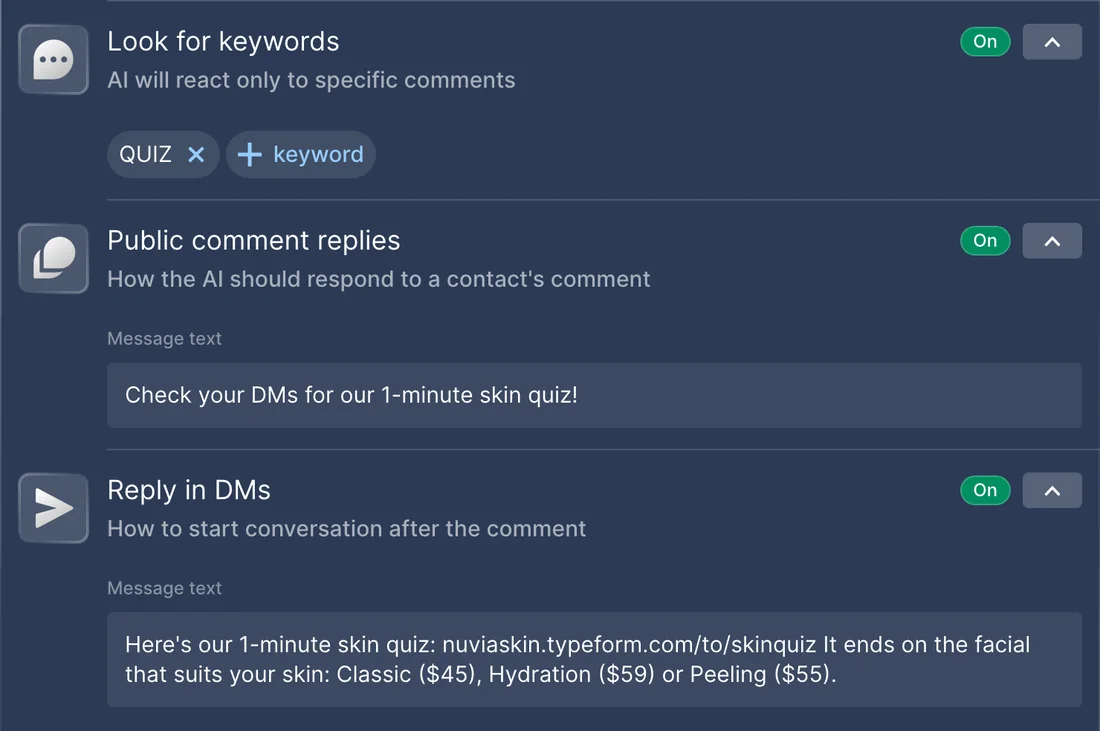
“Which facial is right for me?” in chats → a Typeform skin quiz → its link by DM to commenters
WhenCustomers keep asking in Instagram DMs which facial suits their skin, and you'd rather answer with a quiz you can post about.
- Chatfuel MCP's
review_chatsconfirms the question repeats across chats, andget_knowledge_basereturns the three treatments to recommend: Classic facial $45, Hydration facial $59 and Peeling $55. - Typeform MCP builds the quiz:
forms-public_get_capabilitiesreturns the question types and logic it can use,forms-public_create_formmakes the form, andforms-public_validate_patchandforms-public_patch_formadd five questions with branching logic that ends on one of the three treatments with its price. forms-public_preview_formshows the quiz in the chat with submissions off. After your yes,forms-public_publish_formmakes it live, and you copy its link from Typeform's Share panel.list_postsfinds the reel about the quiz, andsetup_comment_repliesanswers comments with QUIZ on it: a short public reply and the quiz link in a DM. Replies limited to one reel turn off Chatfuel's reply to other Instagram comments, so it asks you first.
ResultEveryone who comments QUIZ gets the quiz in their DMs, and every path through it ends on a treatment with its price.
AskCustomers keep asking which facial suits their skin. Build a 5-question skin quiz in Typeform that ends on the Classic facial, Hydration facial or Peeling with the price, and show me a preview. Once it's live, reply to QUIZ comments on our latest reel with the link in a DM.
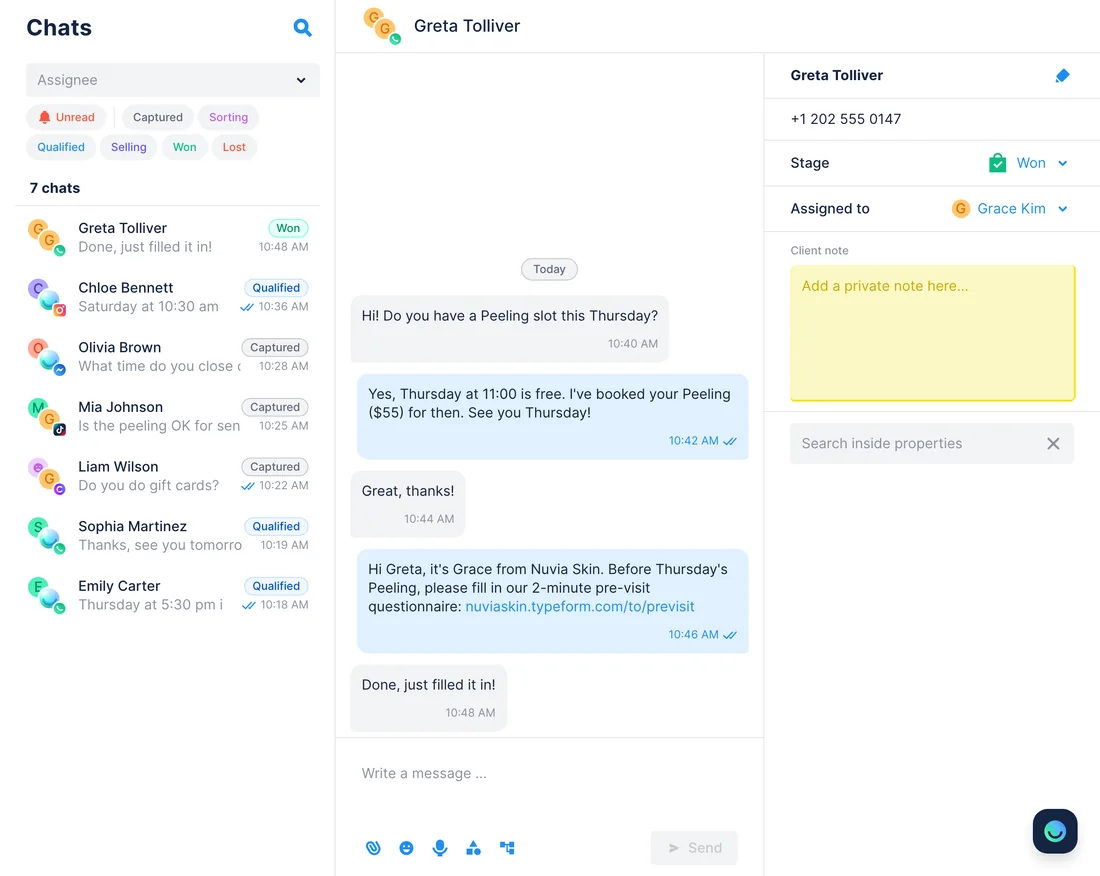
This week's Peeling bookings → who skipped the pre-visit questionnaire → a reminder in their chat
WhenBefore a Peeling, Nuvia Skin asks each client to fill in a short Typeform about skin type, medication and allergies, and a few still arrive without it.
- Chatfuel MCP lists this week's appointments with
list_bookings: time, service, specialist and client name. - Typeform MCP reads the Pre-visit questionnaire with
insights-public_discoverandinsights-public_list_responses, one row per client with their name and submission time. The assistant compares the names and finds two Peeling clients with no response. list_chatsfinds each of them by name, andget_chatreads the chat where they booked.- The assistant drafts a reminder with the questionnaire link, and
send_chat_messagesends it after your yes to that exact text. It goes out only within 24 hours of the client's last WhatsApp message, or 7 days on Instagram and Messenger.
ResultClients get the questionnaire in the chat where they booked, and the specialist reads their answers in Typeform before the Peeling.
AskCompare this week's Peeling bookings in Chatfuel with the responses to our Pre-visit questionnaire in Typeform. For everyone who hasn't filled it in, draft a reminder with the link that I can send in their chat.
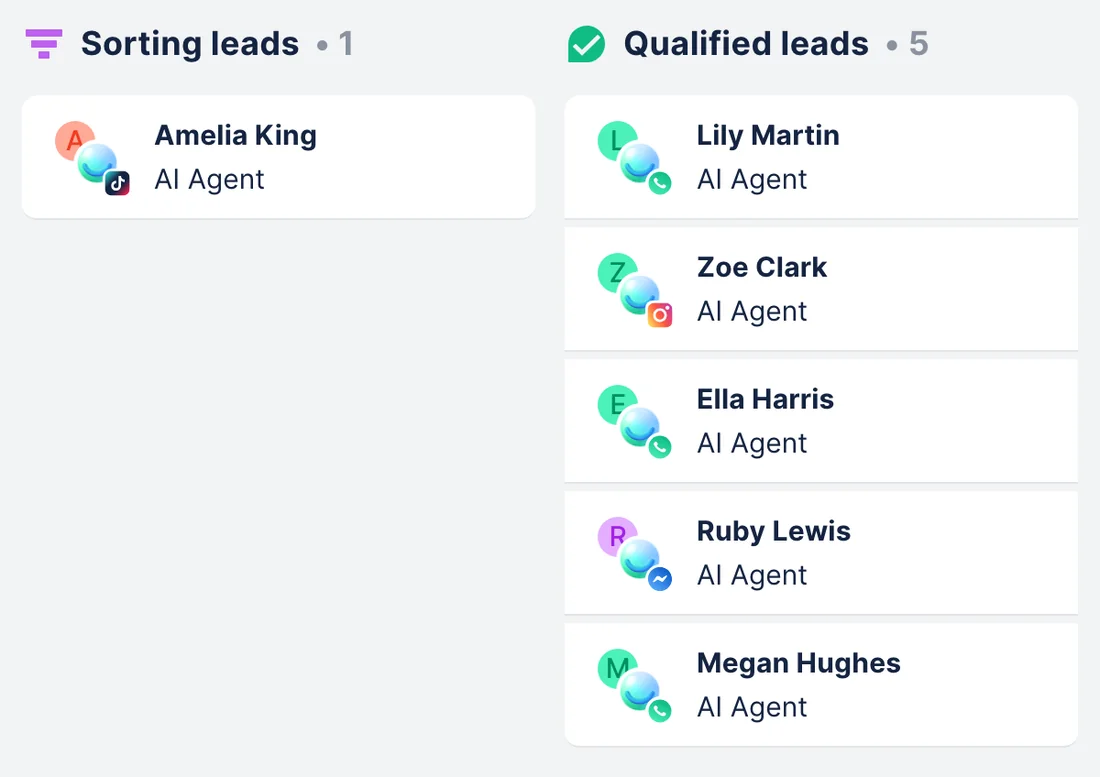
Consultation requests in Typeform → leads on the Chatfuel board for your team
WhenThe Free skin consultation form on your website asks for a name, a WhatsApp number or Instagram handle and the treatment someone has in mind, and many of these people also message you.
- Typeform MCP finds the form with
forms-public_list_forms.insights-public_discoverandinsights-public_list_responsesreturn each request with the name, number or handle, treatment and submission time. - Chatfuel MCP searches
list_chatsfor each number or handle and opens the matches withget_chatto see what the person already asked. set_lead_stagemoves each match to Qualified leads after your yes for that lead. The chat is assigned to you and moves to live chat, so the AI Agent stops answering and a person takes over the consultation.- Requests with no matching chat are listed for you, with the contact details from the form.
ResultPeople who asked for a consultation and also wrote to you sit in Qualified leads on the Leads board, with someone from your team on the chat.
AskRead this week's requests in our Free skin consultation form in Typeform. Find each person's Chatfuel chat by their WhatsApp number or Instagram handle and move them to Qualified leads on the Leads board.
How to connect
Connect Chatfuel MCP
Add Chatfuel from the directory in Claude or ChatGPT, or by its address in Cursor, and log in to the Chatfuel account that runs your bot.
Connect Typeform MCP
Add Typeform from Claude's connectors or ChatGPT's plugins, or put https://api.typeform.com/mcp in Cursor. Typeform asks you to sign in and grant all its permissions at once; accounts hosted in the EU use their own address.
Say which form and account
Name the form in your request, and the Typeform account if you belong to more than one. Typeform keeps edits as a draft until you ask to publish, and Chatfuel waits for your yes before it changes the AI Agent or writes to a customer.
- Find Chatfuel in Claude's connector directory, connect it and log in.
- Go to Customize › Connectors, click Add › Browse connectors, search for Typeform and click Connect, then Authorize.
- Choose Always allow, Needs approval or Blocked for Typeform's read and write tools. If your Enterprise account is hosted in an EU data center, add Typeform as a custom connector with your EU address instead.
- Chatfuel MCP
- claude.ai/directory/chatfuel
- Typeform MCP
- From Claude's directory
- Add the Chatfuel plugin from ChatGPT's plugin directory and log in.
- Open Plugins in the sidebar, search for Typeform and click + to add it.
- Click Authorize, log in to Typeform, and wait for ChatGPT's note that Typeform is installed.
- Chatfuel MCP
- chatgpt.com/plugins
- Typeform MCP
- From ChatGPT's directory
- Add Chatfuel to ~/.cursor/mcp.json with the address https://mcp.chatfuel.com/panel.
- Add a "typeform" server with "url": "https://api.typeform.com/mcp", or https://api.eu.typeform.com/mcp or https://api.typeform.eu/mcp for an EU-hosted account. The server speaks Streamable HTTP only, so don't set it up as SSE.
- Sign in to Typeform when Cursor opens the browser and accept the permissions. Typeform has no Cursor guide; this is the route it gives for any tool with custom MCP connectors.
- Chatfuel MCP
https://mcp.chatfuel.com/panel- Typeform MCP
https://api.typeform.com/mcp
What you need
- A Chatfuel bot whose AI Agent replies on at least one channel. The quiz use case needs Instagram or Facebook connected, and the reminders need bookings in Chatfuel.
- A Typeform account. Every plan can connect, and Typeform checks your plan when a tool runs: the Free plan collects 10 responses a month, and a question type your plan lacks blocks publishing.
- Typeform sign-in with OAuth. Personal access tokens don't work with Typeform MCP.
- Claude with access to connectors, ChatGPT with access to apps, or Cursor.
- For the reminder and consultation use cases, Typeform forms that ask for a name and a WhatsApp number or Instagram handle.
Limits
- A new Typeform response stays in Typeform until you ask. The assistant reads responses and changes Chatfuel only inside the request you make; there's no trigger between the two.
- A response and a chat share no ID. The assistant matches them by a WhatsApp number or Instagram handle from the form, or by name, so check two people with the same name before you approve.
- insights-public_list_responses skips payment, ranking, matrix, multi-format and AI conversation answers, and exporting or deleting responses needs Typeform's own API.
- Typeform's docs don't say its MCP returns a form's share link. Copy the link from the Share panel, or check the one the assistant builds from the form ID, before it goes into a DM or the FAQ.
- There's no Typeform sandbox: a form the assistant publishes is live at once. Edits to a form already collecting responses can affect the results you have.
- send_chat_message reaches WhatsApp only within 24 hours of the client's last message, Instagram and Messenger within 7 days. It and a move to Qualified leads both put the chat in live chat, so the AI Agent stops answering there.
FAQ
Yes. Typeform runs it at https://api.typeform.com/mcp and lists it in the MCP Registry as com.typeform/typeform. It speaks Streamable HTTP only and signs you in with OAuth. Typeform's docs give no release stage, neither beta nor generally available.
EU data residency is an Enterprise feature with two addresses, https://api.eu.typeform.com/mcp and https://api.typeform.eu/mcp, and a token from one doesn't work on the other. In Claude, add Typeform as a custom connector with your address instead of the directory listing. Your Customer Success Manager can tell you which one is yours.
No. The AI Agent answers from Chatfuel's knowledge base. When you ask, the assistant reads responses in Typeform and writes what it finds into the FAQ or instructions, or uses them to find chats and leads.
Any plan connects, and every account sees the same tools. Typeform checks features when a tool runs and returns an error such as PAYMENT_REQUIRED if your plan lacks one. The Free plan collects 10 responses a month, which is little for the survey use case.
Typeform's form tools save edits to a draft, and forms-public_publish_form is meant to run only when you ask for the form to go live. forms-public_preview_form lets you click through the draft in the chat with submissions off. In Claude, set Typeform's write tools to Needs approval to confirm each change.
Typeform's guides cover Claude and ChatGPT, and for other tools it says to add the server address and sign in with OAuth. In Cursor, add https://api.typeform.com/mcp to mcp.json; don't configure it as SSE, which Typeform doesn't support.
More integrations


Connect Chatfuel MCP
Start a free trial, add Chatfuel to your assistant and ask about Typeform and your chats in one place.