


Connect Chatfuel MCP with Slack MCP
Customers write in WhatsApp, Instagram and your website chat, while your team talks in Slack. Ask your assistant to post the chats that need a person and the warmest leads in a channel, then take the team's answers back to the customer or into the FAQ.
What the integration can do
Tools the assistant calls on each side, named as the servers name them.
| Tool | What it does |
|---|---|
list_chats | Lists customer chats with their channel, status and lead stage. |
get_chat | Returns the latest messages of one customer chat with its channel, status and lead stage. |
review_chats | Summarizes customer chats for a period instead of returning every message. |
send_chat_message | Sends the text you approved to a customer in their chat and moves the chat to live chat. |
return_chat_to_ai | Hands a chat in live chat back to the AI Agent after your yes, and the AI Agent answers the customer's last message. |
add_faq | Adds question and answer pairs to the FAQ the AI Agent answers from. |
test_reply | Sends a sample customer message to a sandbox chat and returns the AI Agent's reply. |
set_lead_stage | Moves a lead to another stage of the Leads board, such as Qualified or Won. |
| Tool | What it does |
|---|---|
slack_search_channels | Finds a Slack channel by name, such as #front-desk. |
slack_search_public | Searches messages in the public channels of your Slack workspace. |
slack_search_users | Finds people in your Slack workspace by name, so a post can mention them. |
slack_read_channel | Reads the recent messages of a Slack channel. |
slack_read_thread | Reads a Slack message together with every reply in its thread. |
slack_send_message | Posts a message in a channel or a thread under your own Slack name. |
What to ask the assistant
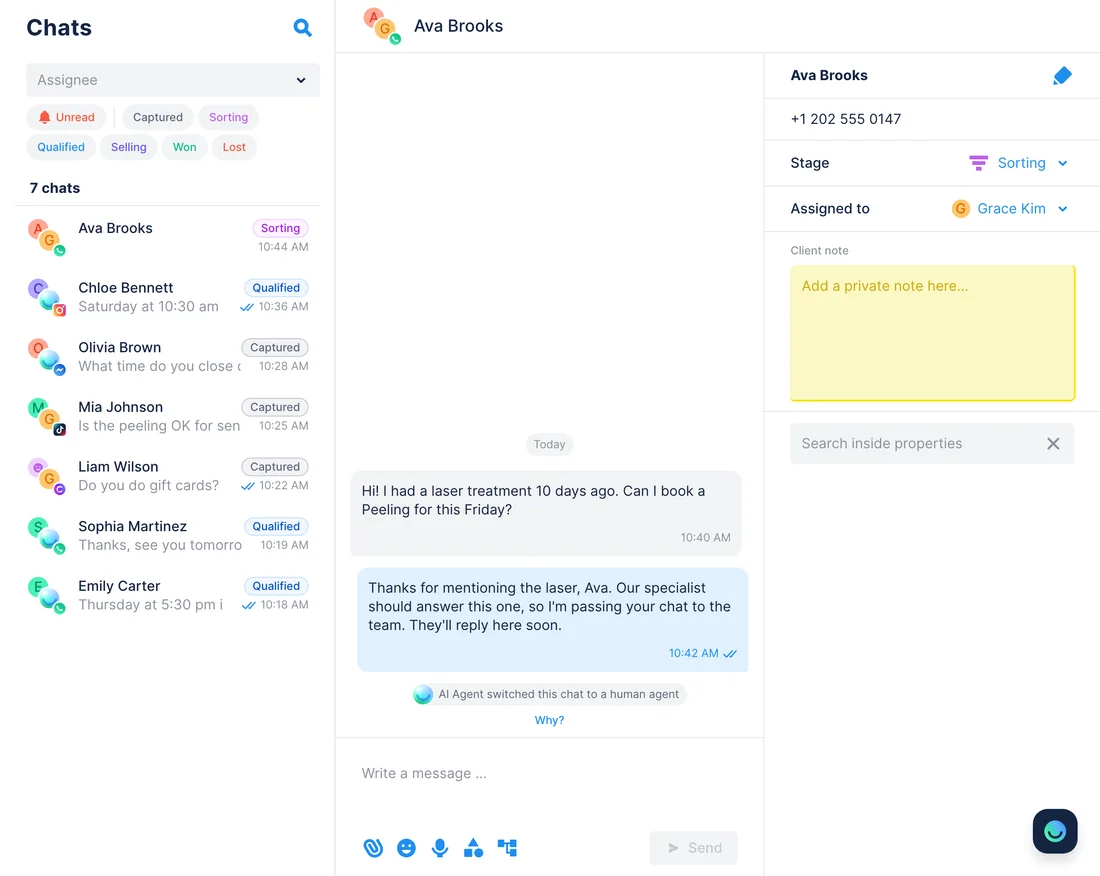
Chats waiting for a person → a post in #front-desk
WhenThe AI Agent passes chats it can't settle to your team, and your front desk keeps an eye on Slack rather than the Chatfuel inbox.
- Chatfuel MCP pulls the chats nobody on the team has taken with
list_chats; each one says whether a handoff to a human is waiting. get_chatreads the latest messages of each, so the post can say what the customer needs, not just who wrote.- Slack MCP looks up #front-desk with
slack_search_channels, andslack_send_messageposts one line per chat with the name, the channel and the question.
ResultThe front desk sees who is waiting and why without opening Chatfuel, then picks up each chat in the inbox by the customer's name.
AskWhich Chatfuel chats are waiting for a person? Post them in #front-desk on Slack, one line each with the customer's name, channel and question.
Reply agreed in a Slack thread → sent to the customer
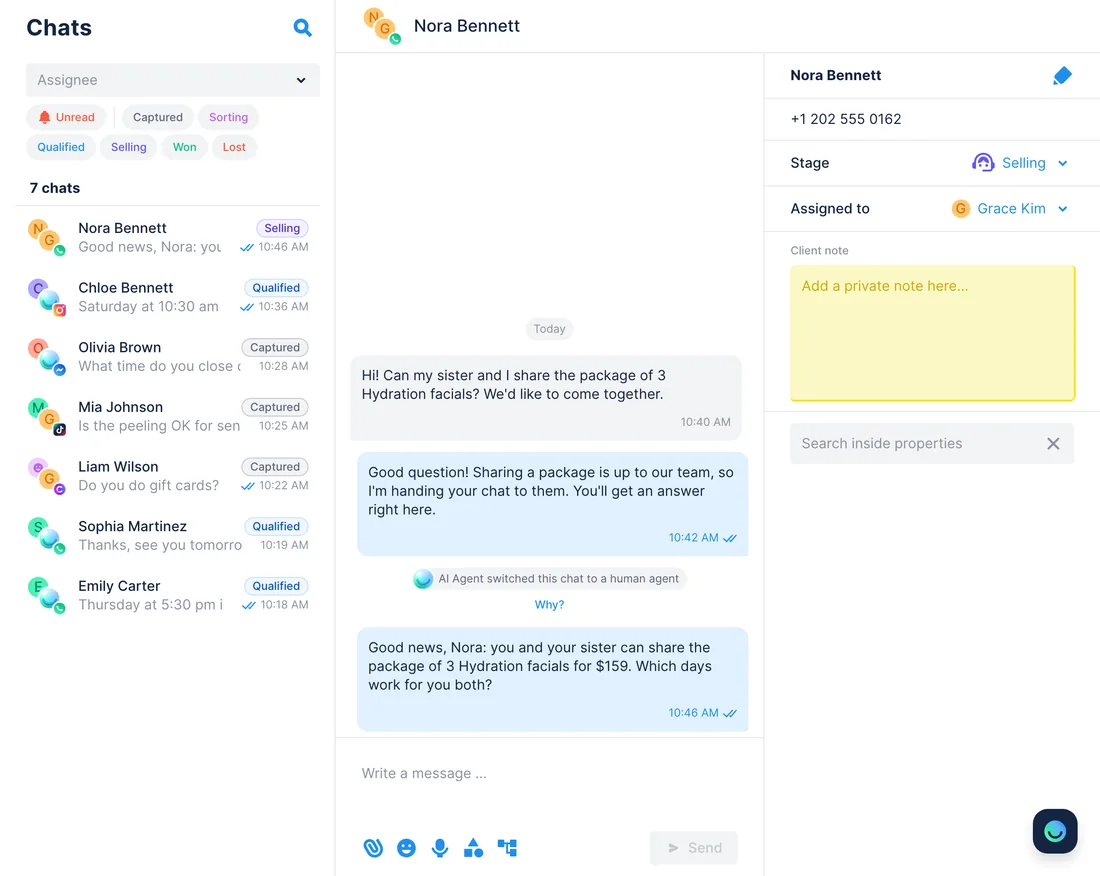
WhenA customer asks for something only your team can approve, and the team settles it in a Slack thread.
- Slack MCP finds the discussion with
slack_search_publicand reads every reply withslack_read_thread. - Chatfuel MCP finds the customer's chat by name with
list_chatsand opens it withget_chat: WhatsApp takes a free-form message only within 24 hours of the customer's last one. - The assistant turns the team's decision into a reply and shows you the text. After your yes to those exact words,
send_chat_messagedelivers it and moves the chat to live chat with you. - When the conversation is over,
return_chat_to_aigives the chat back to the AI Agent after your yes.
ResultThe customer gets the team's decision in the chat they started, and nobody retypes it from Slack.
AskRead the #front-desk thread about Nora Bennett's package question and draft her a reply with what the team decided. I'll approve it before you send.
Questions the FAQ misses → a Slack thread → new FAQ entries
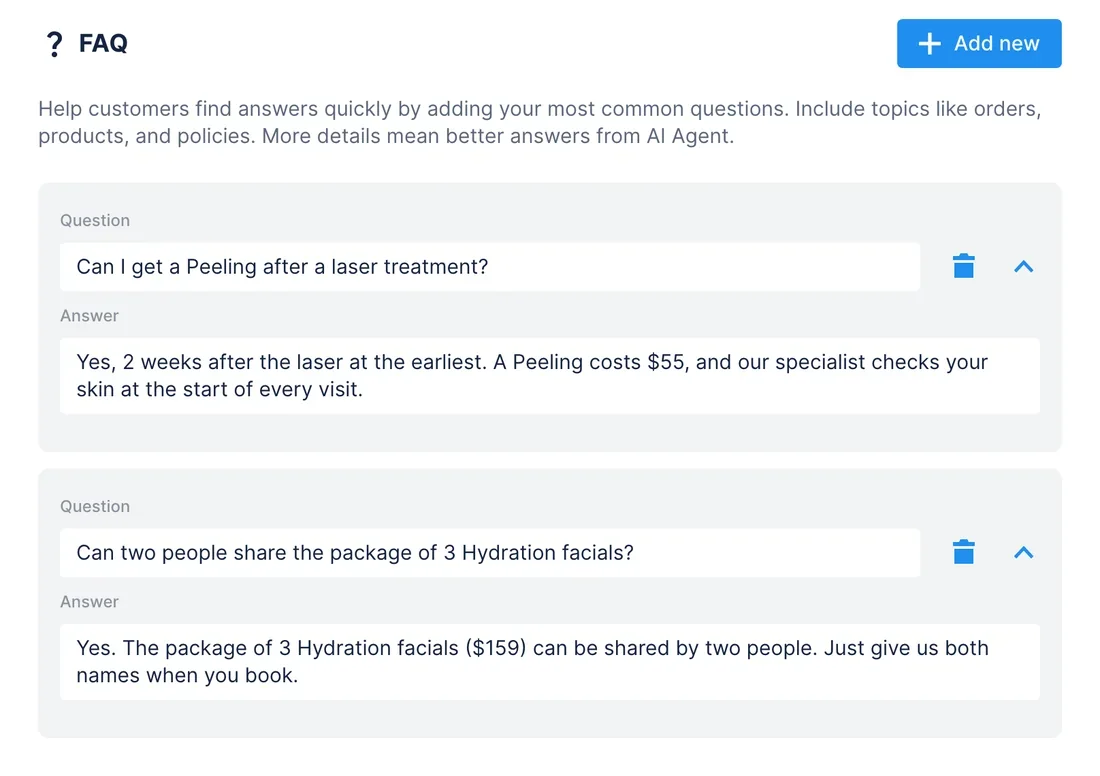
WhenCustomers keep asking things the FAQ doesn't cover, and the people who know the answers are in Slack.
- First request:
review_chatslists the week's customer questions the FAQ doesn't cover, andslack_send_messageposts them in #front-desk with a request to answer in the thread. - Once the team has replied, ask again:
slack_read_channelfinds that post andslack_read_threadreads the answers. - Chatfuel MCP adds each question with its answer through
add_faq; a question already in the FAQ is skipped. test_replyputs one of the questions to the AI Agent in a sandbox chat that no customer sees.
ResultAnswers your team gives once in Slack become FAQ entries, so the AI Agent replies to the next customer who asks instead of handing the chat off.
AskRead the replies in the #front-desk thread with this week's open customer questions, add each answer to our Chatfuel FAQ and test the package question.
Qualified leads → a list for #sales
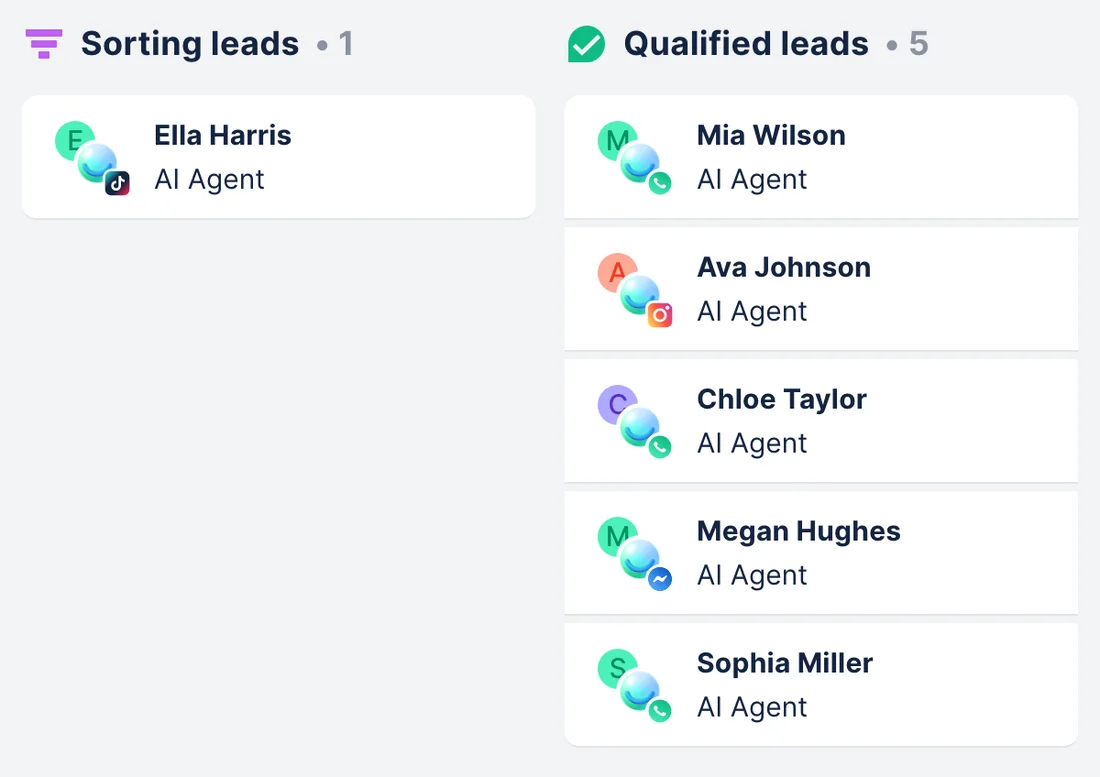
WhenLeads who asked about packages sit at Qualified and Selling on the Leads board, while Grace Kim, who sells the packages, works from Slack.
- Chatfuel MCP pulls the chats at the Qualified and Selling stages with
list_chats, andget_chatreads what each lead asked for, plus a phone or email if they typed one. - Slack MCP finds Grace with
slack_search_usersand #sales withslack_search_channels;slack_send_messageposts one line per lead and mentions her. - When Grace notes in the thread who bought,
slack_read_threadreads it, andset_lead_stagemoves those leads to Closed Won after your yes. Their chats return to the AI Agent.
ResultYour salesperson starts from a short list of warm leads in Slack, and the Leads board shows who bought without anyone updating it by hand.
AskPost our Qualified and Selling leads from Chatfuel in #sales, one line each with what they asked for, and mention Grace Kim.
How to connect
Connect Chatfuel MCP
In Claude, pick Chatfuel from the connector directory; in Cursor, add it by its URL. Sign in with the Chatfuel account that owns your bot.
Connect Slack MCP
Claude members connect Slack from the directory once a Slack admin approves the Claude in Slack app and a Claude Owner enables the connector. In Cursor, install Slack's plugin or add its server with Slack's client ID.
Name the channel in your request
Say which channel to post in or which thread to read. Chatfuel waits for your yes before it writes to a customer or moves a lead, and Slack posts show your name, so read the draft first.
- In Customize › Connectors, add Chatfuel from the directory and sign in.
- A Slack admin approves the Claude in Slack app, and a Claude Owner enables Slack in Organization settings › Connectors (Team and Enterprise plans).
- Back in Customize › Connectors, find Slack, click Connect and sign in to your workspace.
- Chatfuel MCP
- claude.ai/directory/chatfuel
- Slack MCP
- From Claude's directory
- Slack's MCP server doesn't list ChatGPT among its clients, and Slack gives no steps to connect it there.
- ChatGPT's own Slack app is a separate integration: OpenAI documents searching messages, threads and channels, not posting to a channel.
- Chatfuel MCP still works in ChatGPT from its plugin directory, but the use cases on this page need Slack MCP in Claude or Cursor.
- Chatfuel MCP
- chatgpt.com/plugins
- Slack MCP
- Not available in ChatGPT
- In ~/.cursor/mcp.json, add Chatfuel with the URL https://mcp.chatfuel.com/panel.
- Run /add-plugin slack, or add "slack" to mcp.json with "url": "https://mcp.slack.com/mcp" and "auth": {"CLIENT_ID": "3660753192626.8903469228982"}.
- Click Connect next to Slack in Cursor's MCP settings and sign in to the workspace your admin approved.
- Chatfuel MCP
https://mcp.chatfuel.com/panel- Slack MCP
/add-plugin slack
What you need
- A Chatfuel bot that already answers customers in at least one channel, such as WhatsApp, Instagram or your website chat.
- A Slack workspace where an admin has approved the app your assistant connects through, if the workspace requires approval. Slack lets only Marketplace and internal apps use its MCP server.
- Claude on a Team or Enterprise plan, with the Claude in Slack app on a paid Slack plan and the connector enabled by an Owner; or Cursor.
- For the #sales use case, leads on the Chatfuel Leads board, which the AI Agent sorts when Lead Qualification is on.
Limits
- ChatGPT can't run these use cases: Slack doesn't document its MCP server for ChatGPT, and OpenAI's Slack app doesn't say it posts to channels.
- Slack hears about a handoff only when you ask the assistant to check. Nothing is pushed between the two servers, so ask at the start of a shift or whenever you want an update.
- Posts, mentions and thread replies go out under your own Slack name, not as a bot, and only to channels you can post in.
- The Slack post can't link to the chat. Chatfuel MCP shares the customer's name, channel and messages, with a phone or email only if the customer typed it.
- WhatsApp takes a free-form reply only within 24 hours of the customer's last message, Instagram and Messenger within 7 days. Once sent, the reply puts the chat in live chat, and the AI Agent stays quiet there until it gets the chat back.
FAQ
Yes. It's Slack's own server at https://mcp.slack.com/mcp, announced in Slack's developer changelog on February 17, 2026. Slack's pages don't call it beta or generally available.
Not per Slack's docs. Its developer pages list Claude.ai, Claude Code, Perplexity and Cursor and give no ChatGPT steps. ChatGPT's own Slack app searches messages and threads, but OpenAI doesn't list posting to a channel among its actions, so use Claude or Cursor here.
Slack lets only Marketplace and internal apps use its MCP server, and admins approve those apps the usual way. For Claude, that's the Claude in Slack app; Cursor connects through Slack's client ID. Slack also says admins can restrict MCP access.
No. Neither server watches the other. The assistant checks Chatfuel and posts in Slack when you ask, so a handoff at 3 pm shows up in Slack at your next request.
Yours. Slack MCP works with your user sign-in, so posts and thread replies appear under your name.
Not from Slack itself. The assistant reads the thread, writes the reply and shows it to you; send_chat_message delivers it in the customer's WhatsApp, Instagram, Messenger, TikTok or website chat after you approve those exact words.
More integrations


Connect Chatfuel MCP
Start a free trial, add Chatfuel to your assistant and ask about Slack and your chats in one place.