


Connect Chatfuel MCP with Gmail MCP
When customers in WhatsApp or Instagram ask for details by email, a personal draft for each of them waits in your Gmail, ready to check and send. From the same assistant chat, the answers your team already wrote by email go into the AI Agent's FAQ, and a customer's email thread helps you reply in her chat. Google's Gmail server is in Developer Preview and only writes drafts, so every email leaves when you press Send.
What the integration can do
Tools the assistant calls on each side, named as the servers name them.
| Tool | What it does |
|---|---|
list_chats | Lists customer chats with their channel, status and lead stage. |
get_chat | Returns the latest messages of one customer chat with its channel, status and lead stage. |
update_automation_setting | Changes one setting of an automation: when the AI replies, handoff to your team, follow-ups, lead qualification, booking rules or comment replies. |
review_chats | Summarizes customer chats for a period instead of returning every message. |
get_knowledge_base | Returns what the AI Agent answers from: company info, instructions, business hours, FAQ, services and specialists. |
add_faq | Adds question and answer pairs to the FAQ the AI Agent answers from. |
test_reply | Sends a sample customer message to a sandbox chat and returns the AI Agent's reply. |
send_chat_message | Sends the text you approved to a customer in their chat and moves the chat to live chat. |
return_chat_to_ai | Hands a chat in live chat back to the AI Agent after your yes, and the AI Agent answers the customer's last message. |
list_bookings | Lists appointments between two dates: time, service, specialist, customer name and status. |
| Tool | What it does |
|---|---|
search_threads | Searches your mailbox with Gmail search operators such as from:, to:, in:sent or newer_than: and returns threads with their subjects and short snippets. |
get_thread | Returns every message of one email thread with its sender, recipients, date and full text. |
create_draft | Saves a new email in your Drafts with recipients, subject and text, or as a reply to an existing message. It never sends anything. |
list_drafts | Lists the drafts in your account, optionally filtered by a search such as to: and an address. |
list_labels | Lists the labels you created in Gmail with their IDs, which the other label tools and label: searches need. |
label_thread | Adds one or more labels to a whole thread, including messages that arrive in it later. |
What to ask the assistant
Asked for details by email in the chat → a Gmail draft per customer
WhenPeople ask the AI Agent about the package of 3 Hydration facials ($159) and want the details by email, to read later or show a partner. Those emails rarely get written: they slip between chats.
- Chatfuel MCP turns on contact collection with
update_automation_setting: when a customer wants the details by email, the AI Agent asks for the address and saves it to an email attribute. - At the end of the day,
list_chatslists the recent chats andget_chatreads them. The assistant keeps those where a customer typed an email and asked about the package. - Gmail MCP checks with
search_threads, using to: and that address, whether someone on your team already wrote to them, and leaves those people out. create_draftwrites one email per customer: the package price, what the three visits include, how to book, and a line about what they asked in the chat.
ResultYour Drafts folder holds a personal email for each customer, and you send each one from Gmail after a read. The Gmail server has no send tool, so nothing reaches anyone before you click Send. Google's reference says drafts can't carry attachments yet, so link to the price list in the text.
AskFind today's Chatfuel chats where a customer left an email and asked about the package of 3 Hydration facials. Skip anyone we've already emailed, and draft a personal Gmail email for each of the others.
Your team's email answers → the AI Agent's FAQ
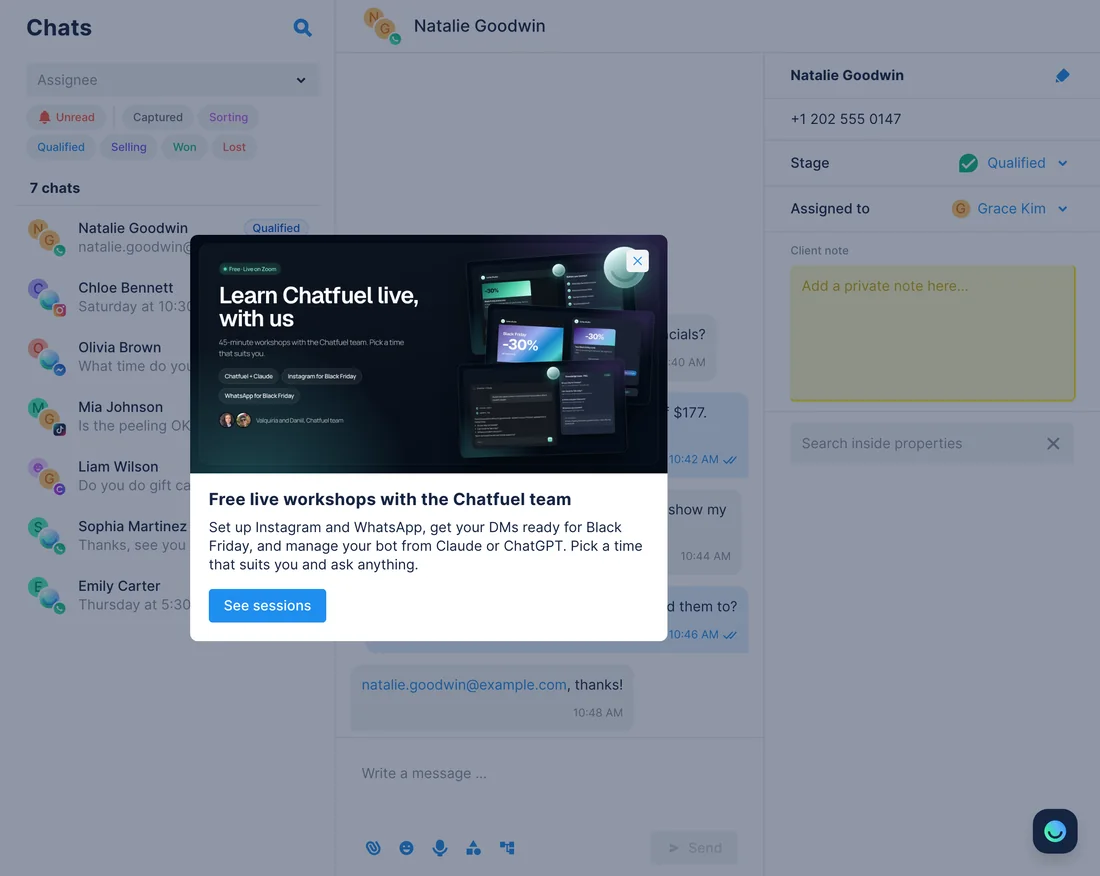
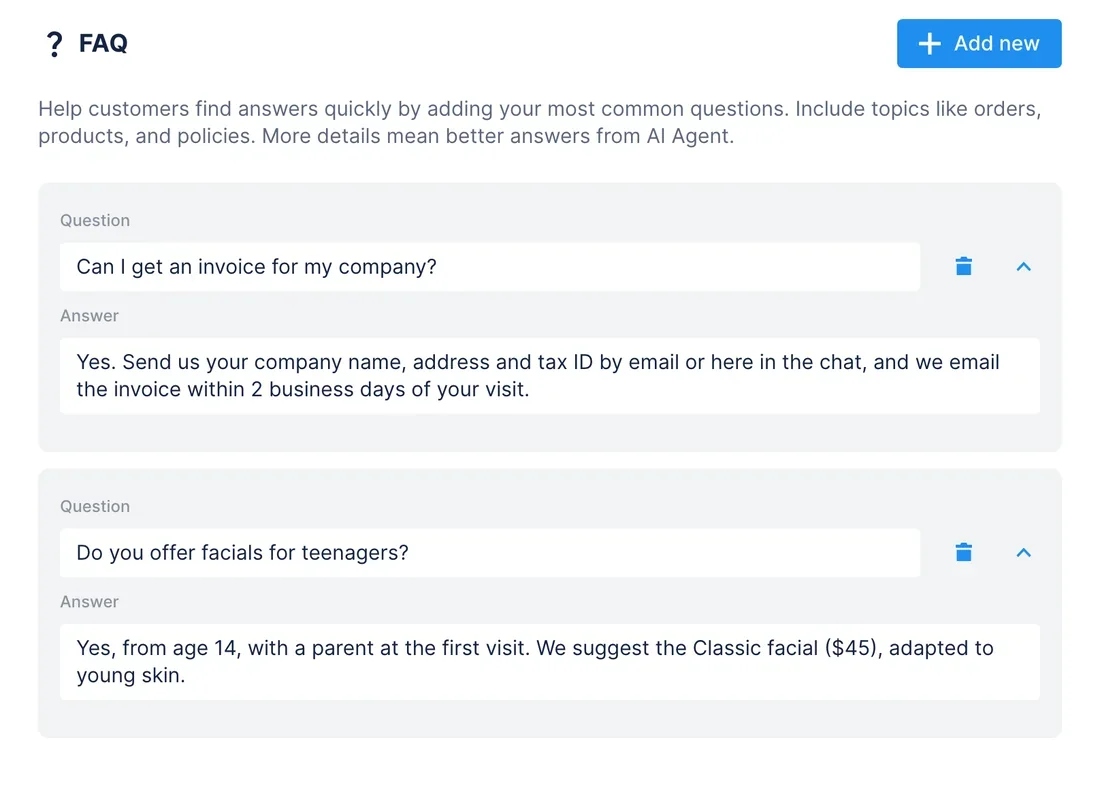
WhenSome customers write to the clinic's Gmail instead of the chat, and Grace Kim answers them there: invoices for companies, facials for teenagers. In WhatsApp and Instagram, the AI Agent still doesn't know those answers.
- Chatfuel MCP runs
review_chatsover the last month; among other things, it lists the customer questions no FAQ entry covers. - Gmail MCP looks for each topic in your sent mail with
search_threads(in:sent newer_than:90d), andget_threadreads how Grace answered. add_faqturns the answers you approve into FAQ entries, andtest_replyasks the AI Agent one of the questions in a sandbox chat.list_labelsfinds the In FAQ label you made in Gmail, andlabel_threadputs it on the threads you used, so the next search skips them with -label.
ResultThe AI Agent answers in the chat with the words Grace already chose by email, and your mailbox shows which threads made it into the FAQ. Labels need the gmail.modify scope, which Google's setup page doesn't add.
AskFind the questions our Chatfuel FAQ doesn't cover yet, look up how Grace answered them in our sent Gmail over the last 90 days and add those answers to the FAQ. Then label the threads you used In FAQ.
"I emailed you" in the chat → an answer from the email thread
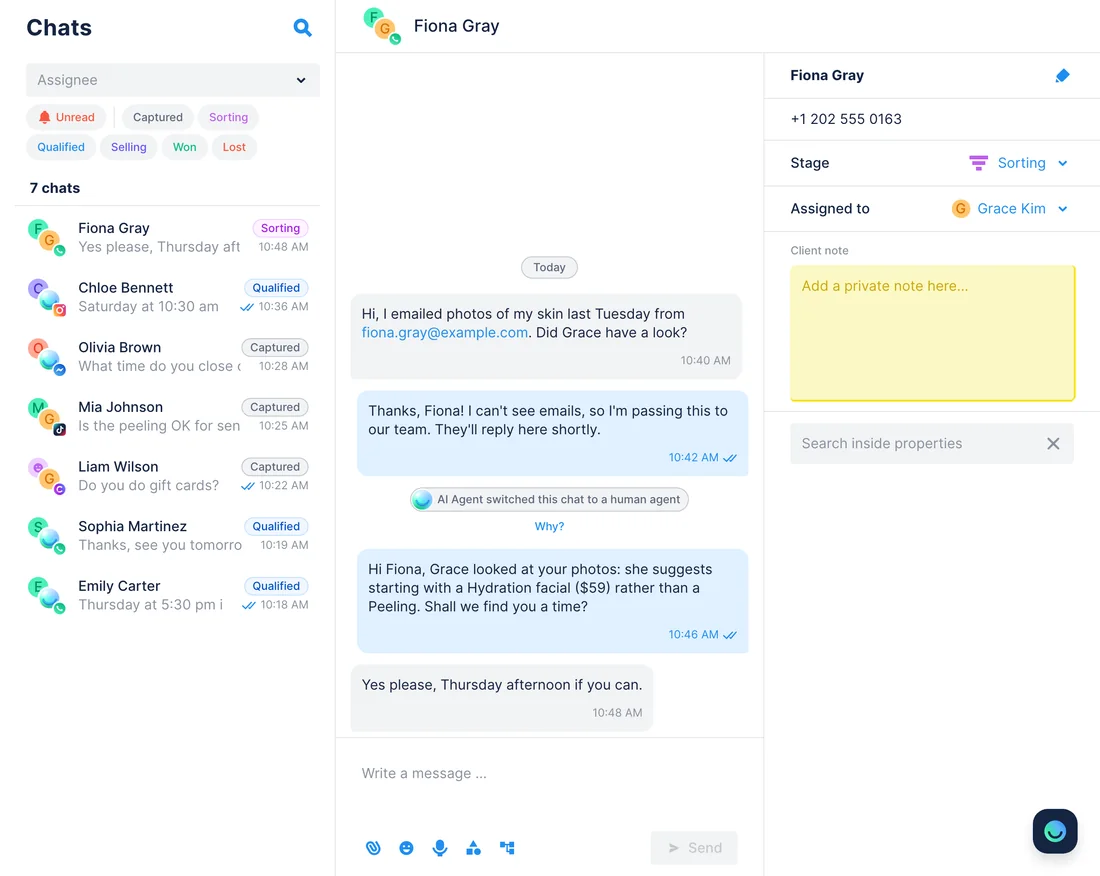
WhenA customer writes on Instagram that she sent photos of her skin to the clinic's email last week and asks what Grace thinks. The AI Agent can't see your inbox.
- Chatfuel MCP adds a handoff rule with
update_automation_setting: when a customer refers to an email she sent, the AI Agent says the team will check and passes the chat on. list_chatsshows the chats waiting for a person, andget_chatreads her message and the address she typed.- Gmail MCP finds her thread with
search_threads, using from: and that address, andget_threadreads her email and Grace's reply: start with a Hydration facial, not a Peeling. send_chat_messagesends the short answer you approve, andreturn_chat_to_aihands the chat back after your yes, so the AI Agent can book her visit.
ResultShe gets Grace's advice in the chat she wrote from, and nobody copies text between apps. Instagram accepts your reply within 7 days of her last message, WhatsApp within 24 hours. If she typed no address, the assistant asks you which thread is hers.
AskFind the Chatfuel chats waiting for us where a customer mentions an email she sent. Read her thread in Gmail with Grace's reply and draft a short answer for the chat. Hand the chat back to the AI Agent once I've sent it.
Yesterday's visits → aftercare emails that match the chat
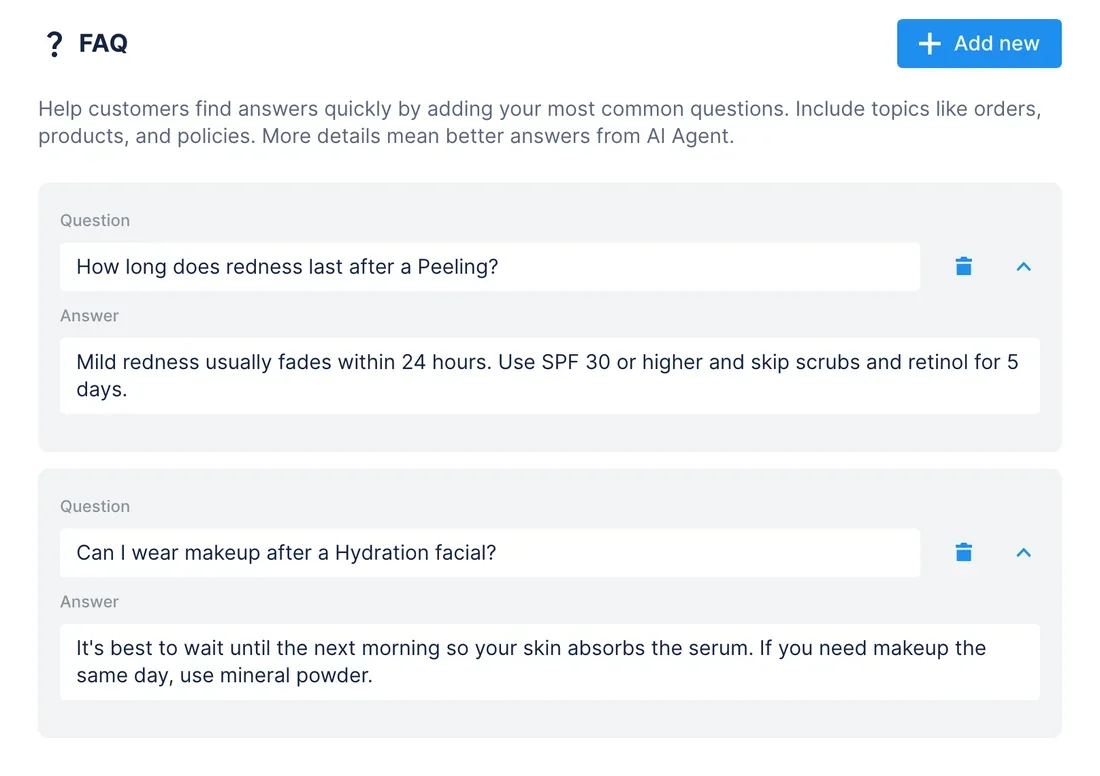
WhenAfter a Peeling or a Hydration facial, clients ask the same aftercare questions in the chat, and Grace wants each of them to get written care tips by email the next morning.
- Chatfuel MCP lists yesterday's appointments with
list_bookingsand keeps the Peelings and Hydration facials marked as attended: time, service, specialist and client name. get_knowledge_basereads the aftercare answers in the FAQ. Any that are missing,add_faqadds after your yes, so the chat and the email say the same thing.list_chatsfinds each client's chat by name, andget_chatlooks for the email she typed when she booked.- Gmail MCP checks
list_draftsfor an aftercare draft to that address, thencreate_draftwrites one per client with the tips for her treatment.
ResultClients who left an email get care tips in your words once you send the drafts, and the AI Agent gives the same answers when they ask in the chat. Chatfuel bookings carry no email, so clients who never typed one are listed for you instead.
AskCheck yesterday's attended Peelings and Hydration facials in Chatfuel, make sure the FAQ has aftercare answers for both, and draft an aftercare email in Gmail for each client who typed her email in the chat.
How to connect
Get into Google's preview
Gmail's MCP server answers only accounts in the Google Workspace Developer Preview Program. Apply with your Workspace account and a Cloud project; Google registers both and confirms by email, usually in a couple of days.
Set up the Cloud project
Enable the Gmail API and the Gmail MCP API, add the gmail.readonly and gmail.compose scopes on the consent screen (plus gmail.modify for labels) and create a Web application client marked Use this client for an AI-powered agent.
Add both servers and ask
Chatfuel comes from the Claude or ChatGPT directory, or from https://mcp.chatfuel.com/panel in Cursor. Gmail goes in by https://gmailmcp.googleapis.com/mcp/v1 with your client ID and secret. Chatfuel asks for a yes before each bot change and each customer message.
- Connect Chatfuel from Claude's connector directory and sign in.
- Claude's directory also has a Gmail connector made by Google, but Claude's help page says it only searches and reads mail. For drafts and labels, add Gmail as a custom connector.
- Give your Google OAuth client the redirect URI https://claude.ai/api/mcp/auth_callback. Then open Settings › Connectors (Admin settings › Connectors on Team and Enterprise), click Add custom connector, name it Gmail and paste https://gmailmcp.googleapis.com/mcp/v1.
- Enter the client ID and secret under Advanced settings, click Add and sign in with the Google account that's in the preview. Google lists Claude Pro, Max, Team and Enterprise for this.
- Chatfuel MCP
- claude.ai/directory/chatfuel
- Gmail MCP
https://gmailmcp.googleapis.com/mcp/v1
- Add the Chatfuel plugin from ChatGPT's directory and sign in.
- Google names no ChatGPT steps for Gmail. Turn on Developer mode, open Plugins, click + and pick Add custom MCP server with the URL https://gmailmcp.googleapis.com/mcp/v1.
- Choose OAuth and enter your Google client ID and secret: Google offers no automatic client registration.
- Copy the redirect URL ChatGPT shows into the client in Google Cloud, create the plugin and sign in with Google.
- Chatfuel MCP
- chatgpt.com/plugins
- Gmail MCP
https://gmailmcp.googleapis.com/mcp/v1
- Add Chatfuel to ~/.cursor/mcp.json with the URL https://mcp.chatfuel.com/panel.
- In Google Cloud, allow http://localhost:8787/callback on your agent client for the desktop app, and https://www.cursor.com/agents/mcp/oauth/callback if you use Cursor on the web.
- Add a gmail server with "url": "https://gmailmcp.googleapis.com/mcp/v1" and an auth block with CLIENT_ID, CLIENT_SECRET and the gmail.readonly and gmail.compose scopes, plus gmail.modify for labels.
- Sign in to Google when Cursor first calls a Gmail tool.
- Chatfuel MCP
https://mcp.chatfuel.com/panel- Gmail MCP
https://gmailmcp.googleapis.com/mcp/v1
What you need
- A Chatfuel bot whose AI Agent answers customers on WhatsApp, Instagram, Facebook, TikTok or website chat. The aftercare use case also needs booking set up, so the AI Agent books visits.
- A Google Workspace account and Cloud project accepted into the Google Workspace Developer Preview Program, which Gmail MCP requires.
- In that project: the Gmail API and the Gmail MCP API enabled, an OAuth consent screen, and a Web application OAuth client with Use this client for an AI-powered agent selected. Google's Workspace MCP servers have refused unmarked clients since November 11, 2026.
- The gmail.readonly and gmail.compose scopes for reading mail and writing drafts, and gmail.modify for the label steps.
- Claude on Pro, Max, Team or Enterprise, ChatGPT with Developer mode, or Cursor, signed in to the Gmail account your team answers customers from.
Limits
- Gmail MCP is a Developer Preview. Google's program terms provide it as is, allow no users outside your company before GA, and let Google use data sent through it to improve the API.
- Google documents no tool that sends email. The assistant writes drafts, and someone on your team sends each one from Gmail.
- Per Google's create_draft reference, drafts can't include attachments yet. Link to a price list or care sheet in the email text instead.
- Chatfuel gives names, not emails, for chats and bookings, and list_chats can't search by email. An address exists only if the customer typed it in the chat, and matching a chat to a thread relies on that address.
- Claude's Gmail connector from its directory is read-only, per Claude's help page. Drafts and labels need the custom connector with your own OAuth client.
- Emails can carry hidden instructions. Google tells you to screen prompts and responses for injection, with Model Armor or a tool of your own, and to review every action the assistant takes. Without offline access, Google also asks you to sign in again about every hour.
FAQ
Yes. Google runs it at https://gmailmcp.googleapis.com/mcp/v1 over Streamable HTTP as one of the Google Workspace MCP servers, labeled Developer Preview. It isn't in the MCP Registry and isn't generally available yet.
Not with the tools Google documents. create_draft saves the email in your Drafts, and you review and send it in Gmail. Messages in WhatsApp or Instagram go out only through Chatfuel's send_chat_message, after your yes to the exact text.
Agree to the program terms and send Google's application form with your Workspace account and Cloud project details. Google adds your email to the program's Google Group, registers the project and confirms by email, usually within a couple of days. Membership covers every preview feature, not only Gmail.
Claude's directory lists Gmail, made by Google, but Claude's help page says that connector can't create, send or modify emails. Drafts and labels need Google's custom connector setup with your own OAuth client and the gmail.compose and gmail.modify scopes.
Only from the chat. Chatfuel MCP returns names, channels and messages, not contact fields, so the assistant looks for an address the customer typed. Turn on contact collection so the AI Agent asks for it when someone wants details by email.
No. Nothing runs between the two servers in the background. The assistant searches Gmail and updates Chatfuel, or writes drafts, only when you ask it in the chat.
More integrations


Connect Chatfuel MCP
Start a free trial, add Chatfuel to your assistant and ask about Gmail and your chats in one place.