


Connect Chatfuel MCP with Close MCP
Your AI Agent answers customers on WhatsApp, Instagram and Messenger, and your team sells by phone from Close. Ask your assistant to turn call requests from the chat into Close tasks, follow up on a Smart View in the customer's chat, and give the AI Agent the answers your team gives on calls and in SMS templates.
What the integration can do
Tools the assistant calls on each side, named as the servers name them.
| Tool | What it does |
|---|---|
update_automation_setting | Changes one setting of an automation: when the AI replies, handoff to your team, follow-ups, lead qualification, booking rules or comment replies. |
list_chats | Lists customer chats with their channel, status and lead stage. |
get_chat | Returns the latest messages of one customer chat with its channel, status and lead stage. |
get_knowledge_base | Returns what the AI Agent answers from: company info, instructions, business hours, FAQ, services and specialists. |
add_faq | Adds question and answer pairs to the FAQ the AI Agent answers from. |
update_faq | Changes or removes FAQ entries after you confirm. A removed entry can't be restored. |
test_reply | Sends a sample customer message to a sandbox chat and returns the AI Agent's reply. |
send_chat_message | Sends the text you approved to a customer in their chat and moves the chat to live chat. |
| Tool | What it does |
|---|---|
find_contacts | Finds Close contacts by name, email or full phone number; a number without a country code is read as one from your own country. |
create_lead | Creates a lead in Close, the record its contacts, tasks and notes belong to. |
create_contact | Adds a contact with a phone or email to a Close lead. |
create_task | Creates a task on a lead and assigns it to a teammate, such as a call to make. |
activity_search | Searches activities newest first, for example the calls and meetings with your clients. |
fetch_objects | Returns full Close records by id: leads with their contacts, calls with transcripts, SMS templates and more. |
find_smart_views | Lists the Smart Views, Close's saved searches, that you can see. |
lead_search | Lists leads by keyword, lead status or Smart View, most recently updated first. |
create_note | Adds a note to a Close lead. |
find_sms_templates | Lists or finds the SMS templates your team sends from Close. |
What to ask the assistant
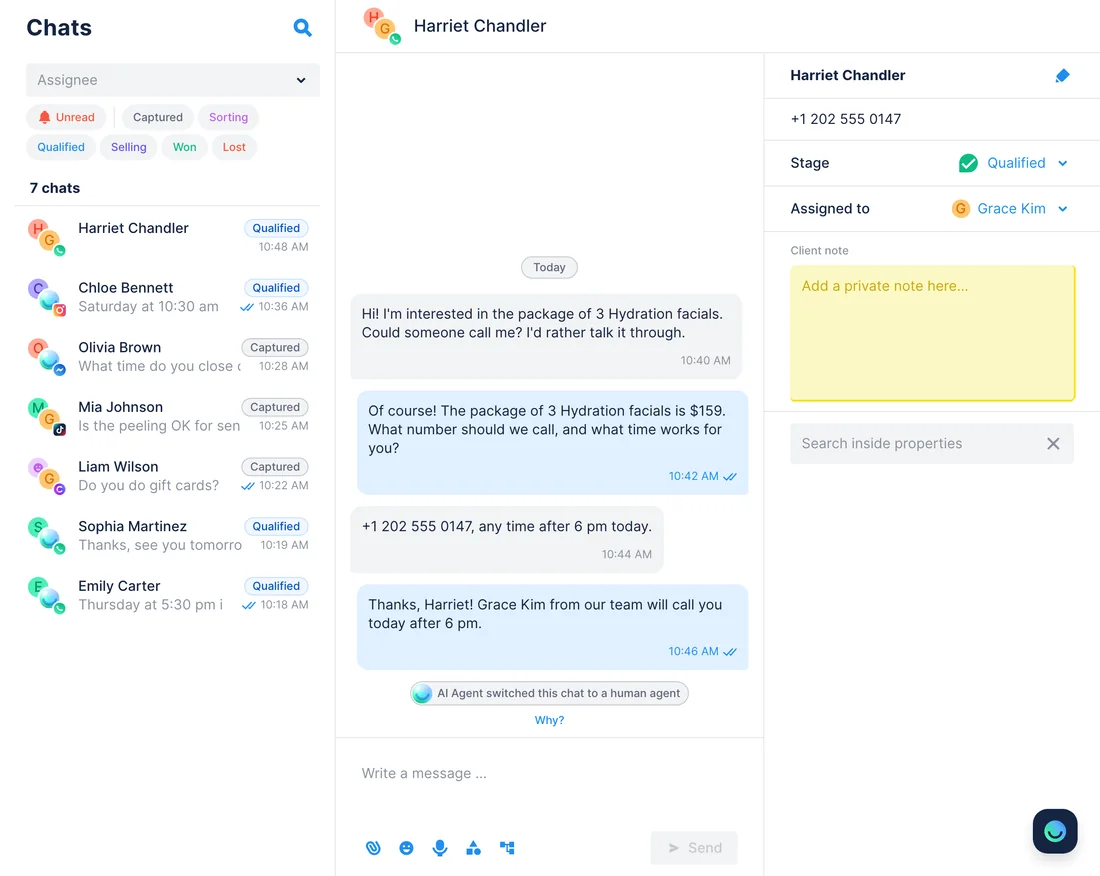
Call request in the chat → a call task for your rep in Close
WhenSome customers would rather talk than type: they ask in the chat for someone to call them about a treatment or the package.
- Chatfuel MCP adds a handoff rule with
update_automation_settingafter your yes: once a customer who wants a call has given a number and a time, the AI Agent tells them Grace Kim will call and passes the chat to your team. - Later,
list_chatspicks out the chats waiting for a person, andget_chatreads each one for the number, the time and the treatment. - Close MCP looks the number up with
find_contacts. When nobody matches,create_leadandcreate_contactadd the client with that phone. create_taskgives Grace Kim a task on the lead for the day the customer chose, with the time and the treatment in its text.
ResultGrace opens Close to a list of call-backs, each with the number and the time the customer picked, and nobody copies anything out of the chat. The chats stay with your team in live chat until you hand them back to the AI Agent.
AskAdd a handoff rule for customers who ask us to call them: get a number and a time, then pass the chat to the team. Then add today's call requests to Close and give Grace Kim a task to call each one at the time they chose.
Questions from Close calls → answers the AI Agent gives in the chat
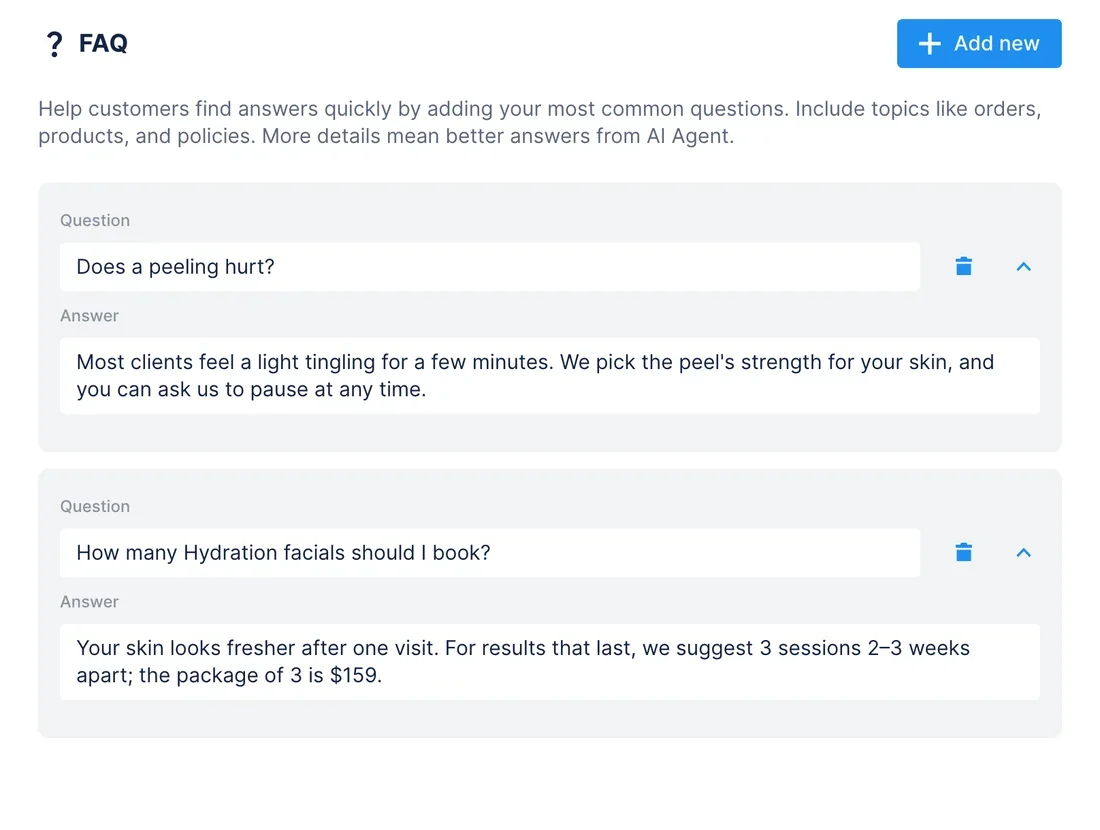
WhenGrace hears the same questions on the phone every week, and customers who write instead of calling ask them too.
- Close MCP lists last month's calls with
activity_search. fetch_objectsreads the calls with their transcripts, and the assistant picks out the questions clients asked most and how Grace answered them.- Chatfuel MCP checks the FAQ with
get_knowledge_baseand adds the missing questions withadd_faq, in Grace's words. test_replyasks one of the new questions in a sandbox chat, so you see the AI Agent's answer before a customer does.
ResultA customer who writes at 11 pm about a peeling gets the answer Grace would give on the phone, and Grace spends her calls on bookings instead of repeating herself.
AskRead our Close calls from the last 30 days and find the questions clients ask most. Add the ones our Chatfuel FAQ doesn't cover, using the answers Grace Kim gave on the calls, then test what the AI Agent says about whether a peeling hurts.
Smart View in Close → a follow-up in each client's chat
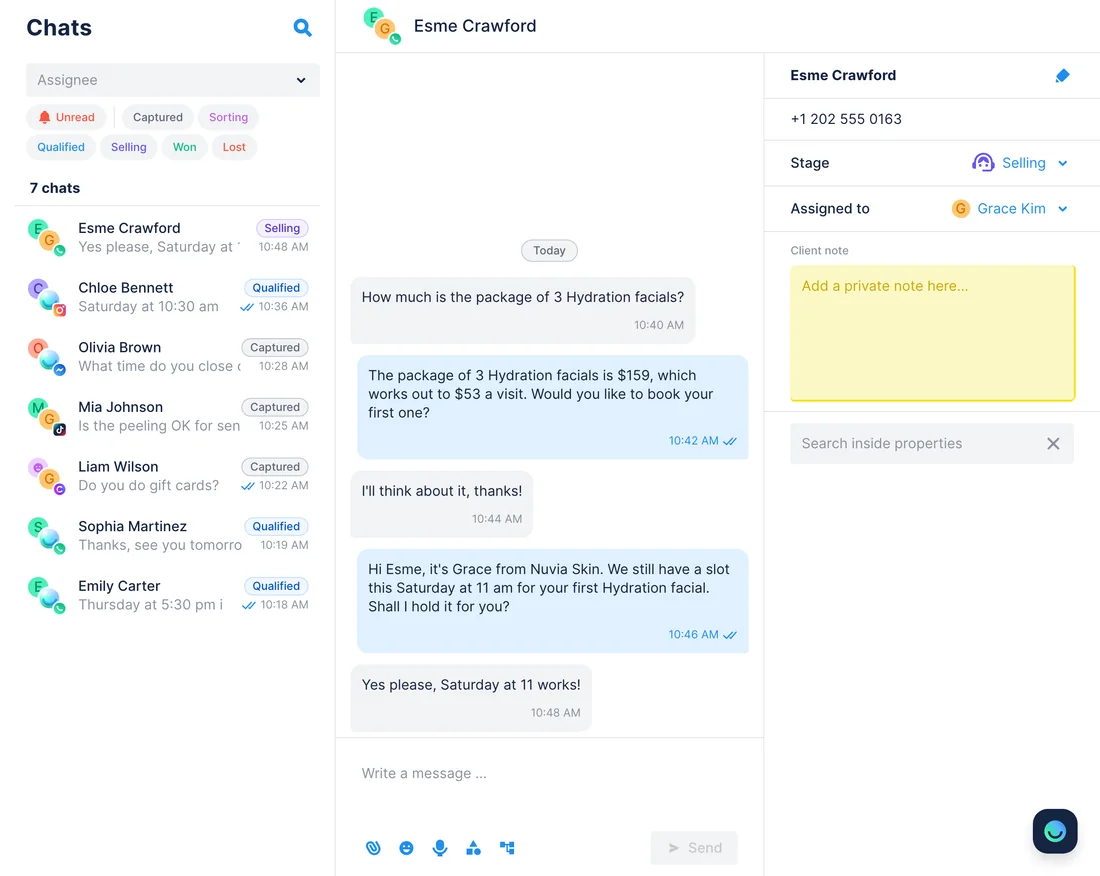
WhenYour team keeps a Smart View of clients who got a price for the package of 3 Hydration facials and haven't booked yet.
- Close MCP finds the view with
find_smart_viewsand lists its leads withlead_search;fetch_objectsadds each lead's contacts and phone numbers. - Chatfuel MCP finds each client's chat by phone with
list_chats, or by name on Instagram and Messenger, andget_chatshows where the conversation stopped. - The assistant drafts a short follow-up for each client.
send_chat_messagesends one only after your yes, and only inside the reply window: 24 hours after the customer's last WhatsApp message, 7 days on Instagram and Messenger. create_noterecords on the Close lead what was sent and when.
ResultClients in the Smart View hear back in the app they already chat in, and the lead's timeline in Close shows the follow-up. Chats outside the window come back as a list for Grace's calls. Each message sent puts that chat in live chat; once the client answers, ask the assistant to give it back to the AI Agent.
AskOpen our Close Smart View "Package quote, no booking". For each lead, find the client's Chatfuel chat by phone and draft a short follow-up from Grace Kim; I'll approve each message. Then add a note in Close for every message sent.
Close SMS templates → the same advice from the AI Agent
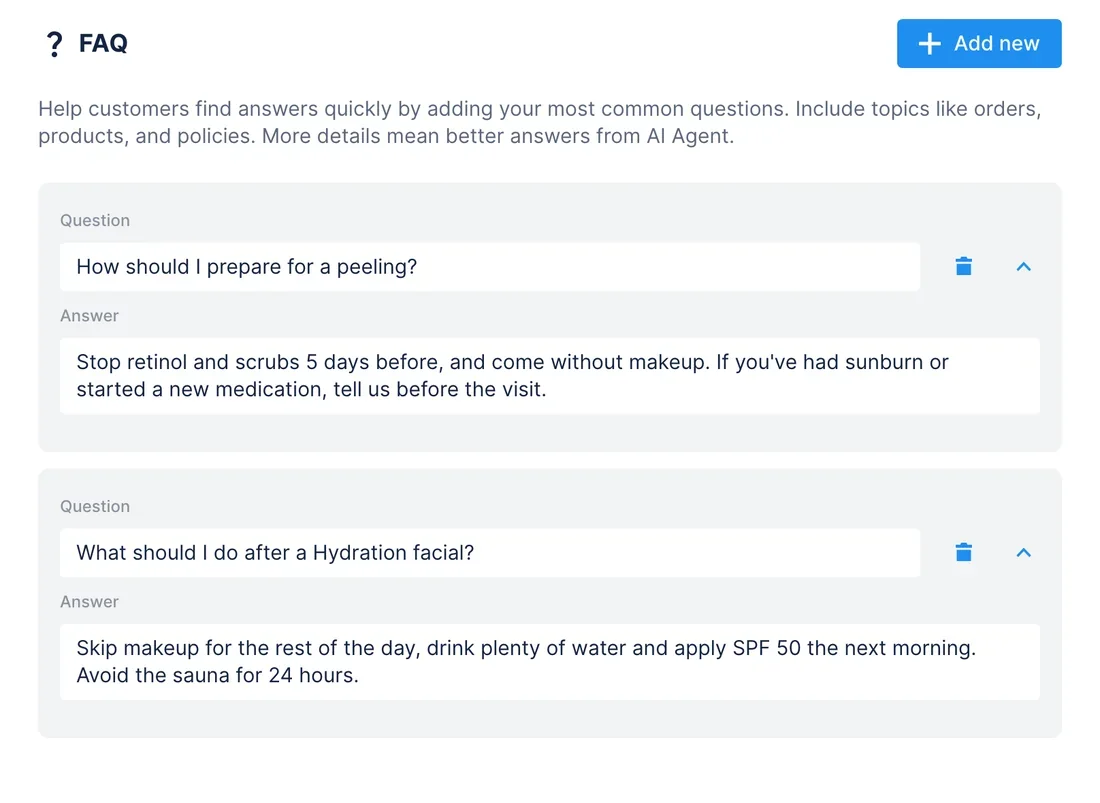
WhenYour team texts clients from Close with SMS templates on how to prepare for a treatment and what to do after it, and the same questions arrive in the chat.
- Close MCP lists the templates with
find_sms_templates, andfetch_objectsreturns the full text of the ones about treatments. - Chatfuel MCP reads the FAQ with
get_knowledge_baseto see which topics it already answers. add_faqturns each template into an answer without the name tags, andupdate_faqrewrites an older answer that says something else, after your yes.test_replyasks the AI Agent how to prepare for a peeling in a sandbox chat.
ResultA client gets the same preparation and aftercare advice whether Grace texts it from Close or the AI Agent answers on WhatsApp at midnight.
AskRead our Close SMS templates about preparing for treatments and aftercare. Add their advice to the Chatfuel FAQ, fix any FAQ answer that says something different, then test what the AI Agent tells a client before a peeling.
How to connect
Connect Chatfuel MCP
Chatfuel is in the Claude and ChatGPT directories, and Cursor takes its address. Sign in with the Chatfuel account that owns your bot.
Connect Close MCP
Add Close from Claude's connector directory or ChatGPT's plugin directory, or give Cursor https://mcp.close.com/mcp. On Close's sign-in page, pick the organization and how much the assistant may do: Read, Write safe or Write destructive.
Ask for both at once
A single request can read one server and write to the other. Chatfuel waits for your yes before it changes the AI Agent or messages a customer; Close lets the assistant do only what the access level you granted covers.
- Find Chatfuel in Claude's connector directory, connect it and sign in to your Chatfuel account.
- Open Settings › Connectors, pick Close and click Connect. On Claude's free plan, add it in the desktop app instead: + › Add Connectors, then search for Close.
- On Close's page, choose the organization and the access level. Close's guide reminds you to turn its tools on in every new chat.
- Chatfuel MCP
- claude.ai/directory/chatfuel
- Close MCP
- From Claude's directory
- Connect the Chatfuel plugin from ChatGPT's directory with your Chatfuel login.
- Search ChatGPT's plugin directory for Close, listed as Close CRM for ChatGPT, and click Connect.
- Sign in to Close and choose the organization and the permissions to grant. In a Business or Enterprise workspace, an admin may have to allow the Close plugin first.
- Chatfuel MCP
- chatgpt.com/plugins
- Close MCP
- From ChatGPT's directory
- In ~/.cursor/mcp.json, add a server named chatfuel at https://mcp.chatfuel.com/panel.
- For Close, click Add Close to Cursor in Close's docs, or enter https://mcp.close.com/mcp in Cursor's MCP Tools settings and click Install.
- When Cursor lists Close as Needs authentication, click Connect, choose your organization and scope on Close's page and click Allow.
- Chatfuel MCP
https://mcp.chatfuel.com/panel- Close MCP
https://mcp.close.com/mcp
What you need
- A Chatfuel bot whose AI Agent already replies on WhatsApp, Instagram, Messenger, TikTok or your website.
- A Close account on any plan: Close includes the Claude and ChatGPT integrations on Solo, Essentials, Growth and Scale.
- Write safe access for the call-back and Smart View use cases, so the assistant can add leads, contacts, tasks and notes. The calls and SMS templates use cases only read Close.
- Close's Call Assistant add-on for the calls use case: it transcribes recorded calls longer than 30 seconds.
- Claude, ChatGPT or Cursor. On the web, Claude's connector directory needs a paid Claude plan; the desktop app adds Close on any plan.
Limits
- The two servers never talk to each other. A new chat, a new Close task or an edited template stays where it is until you ask the assistant.
- Chatfuel MCP returns a customer's name, channel, stage and messages, not a phone or email they didn't type. Close's find_contacts needs the whole number, and one typed without a country code is read as a number from your own country.
- Write safe only creates. Editing an existing lead, contact or task takes Write destructive, which can also delete records; to change the level, disconnect Close and connect it again.
- Without Call Assistant, Close has no call transcripts to read, only voicemail ones, so the calls use case finds fewer questions.
- Every customer message needs your yes to its exact text and goes out only inside the reply window: 24 hours after the customer's last WhatsApp message, 7 days on Instagram and Messenger. Sending, like a handoff, moves the chat to live chat, where the AI Agent stays quiet until you hand it back.
- Close's server speaks Streamable HTTP only, not SSE, and one connection covers one Close organization.
FAQ
Yes. Close runs it at https://mcp.close.com/mcp and lists it in the MCP Registry as com.close/close-mcp. Close also maintains the Claude connector and the ChatGPT plugin built on it.
Read lets the assistant look without changing anything. Write safe adds new leads, contacts, notes and tasks, which the call-back and Smart View use cases need. Write destructive also edits and deletes, so grant it only if you want existing records changed.
By a phone or email the customer typed, otherwise by name. find_contacts matches a full phone number, and list_chats finds a chat by name, handle or phone, so Instagram and Messenger chats without a phone are matched by name.
From Close's Call Assistant add-on, which you switch on under Settings › Plan in Close. It transcribes recorded calls longer than 30 seconds, and voicemails get transcribed without it. fetch_objects returns the transcript with the call.
Yes, with one connection each. In Claude, Close suggests a custom connector per organization with ?1, ?2 and so on after the server URL, because Claude won't add the same URL twice.
In Close, go to Settings › Accounts & Apps › Authorized Apps and revoke the assistant's entry. Connect again later if you need a different access level.
More integrations


Connect Chatfuel MCP
Start a free trial, add Chatfuel to your assistant and ask about Close and your chats in one place.