
Set up Instagram comment autoreplies by just asking Claude or ChatGPT
Tell your AI assistant what to reply and who to DM. Chatfuel turns every comment into a DM, a lead or a sale. No flows, no builder.
Works in Claude ChatGPT Codex Cursor Gemini CLI VS Code Meta Muse



150,000+ businesses running on Chatfuel
Chatfuel is an official ChatGPT partner and is listed in Claude's connector directory.
 Dora TsengGoSky AI Agency
 CJ HutsenpillerTacobot
 Swayam DhawanCodeYE Media
 Ferdinand KjærulffGrowthBond
- Official Meta Partner
- WhatsApp Business Solution Provider
From 22 steps to one sentence
The same comment automation, set up two ways.
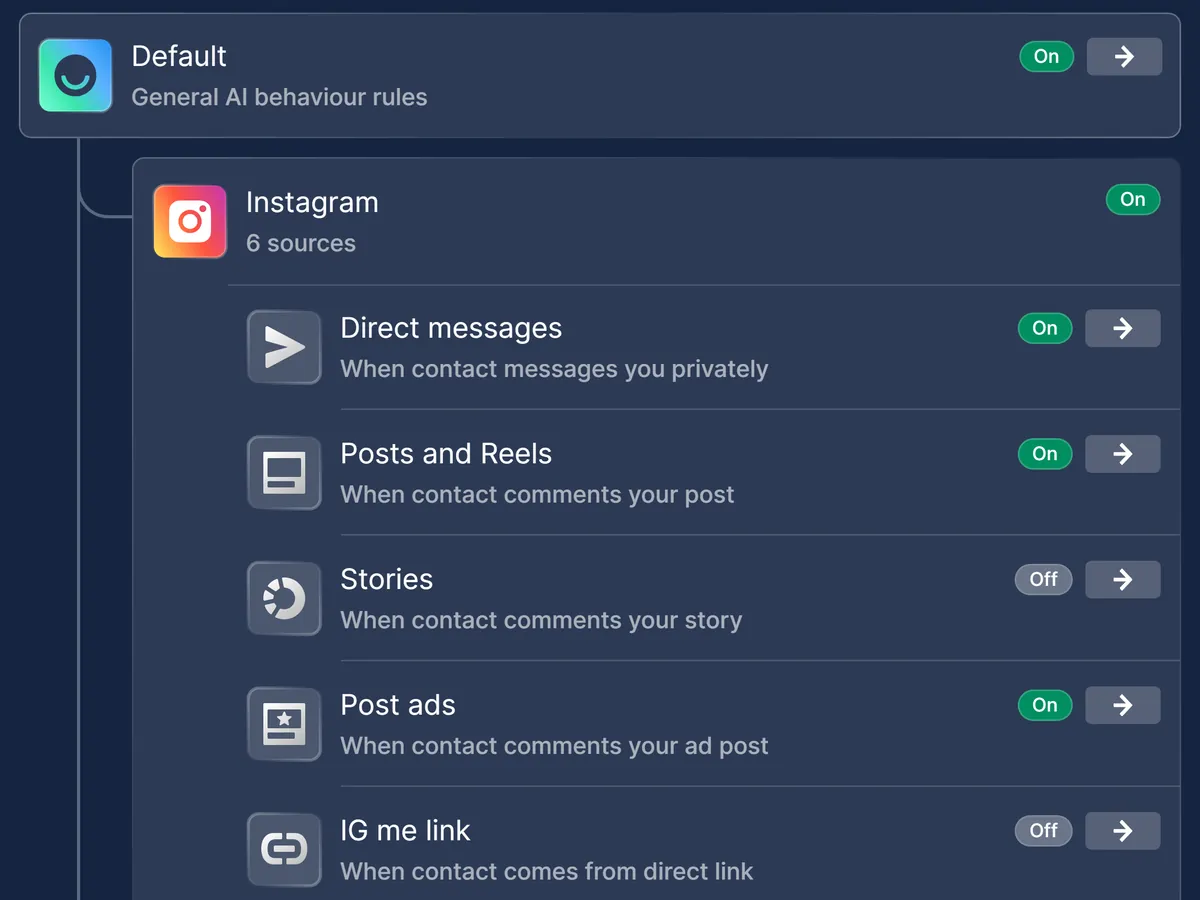 Automations › Instagram › Posts and Reels
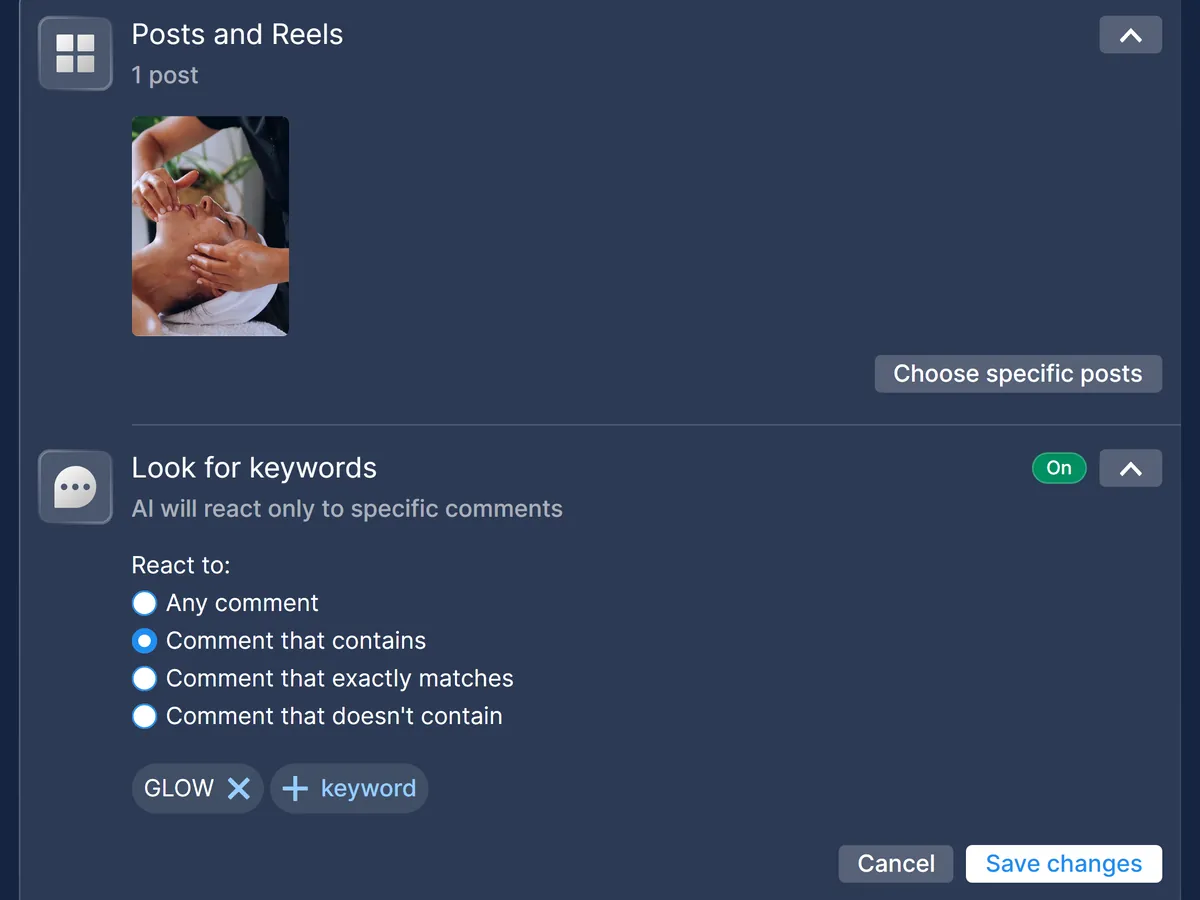 Posts and Reels, Look for keywords
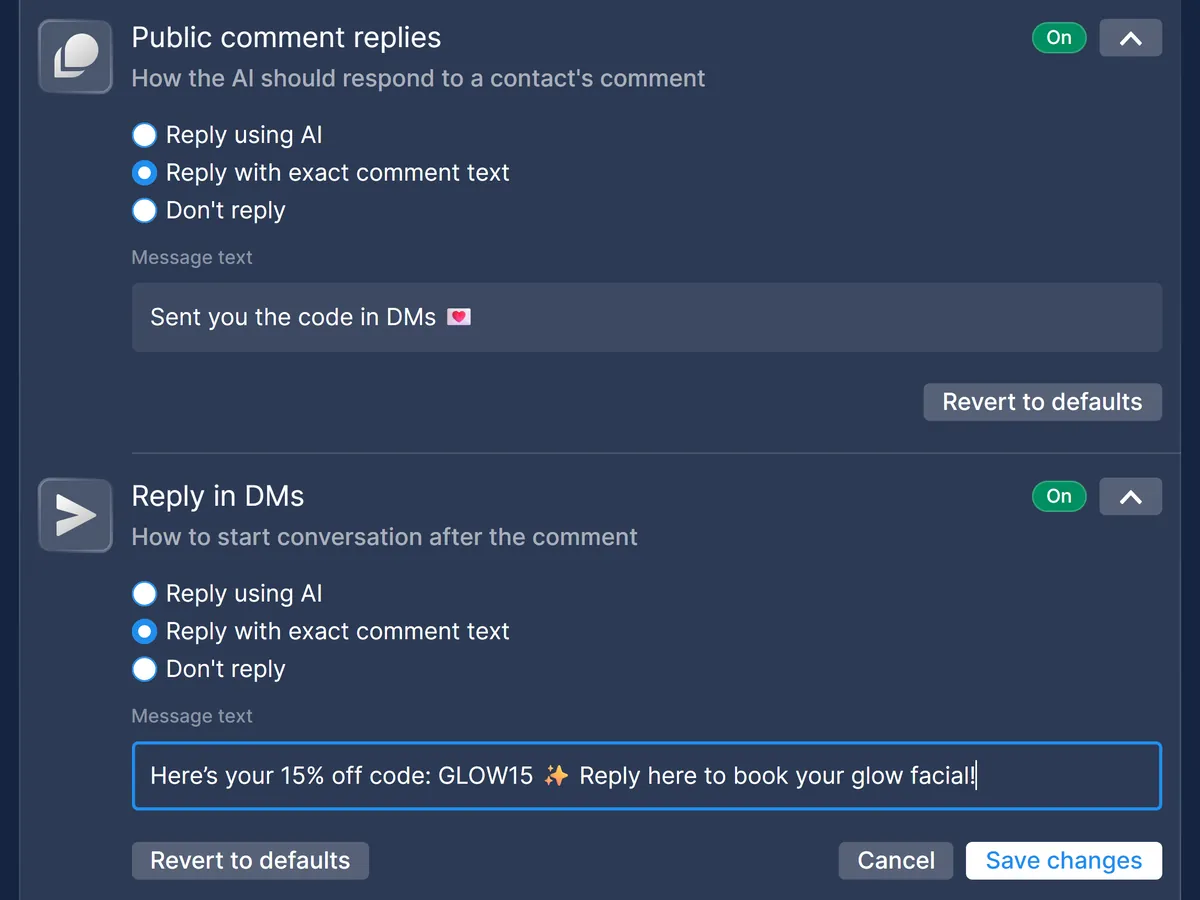 Public comment replies, Reply in DMs
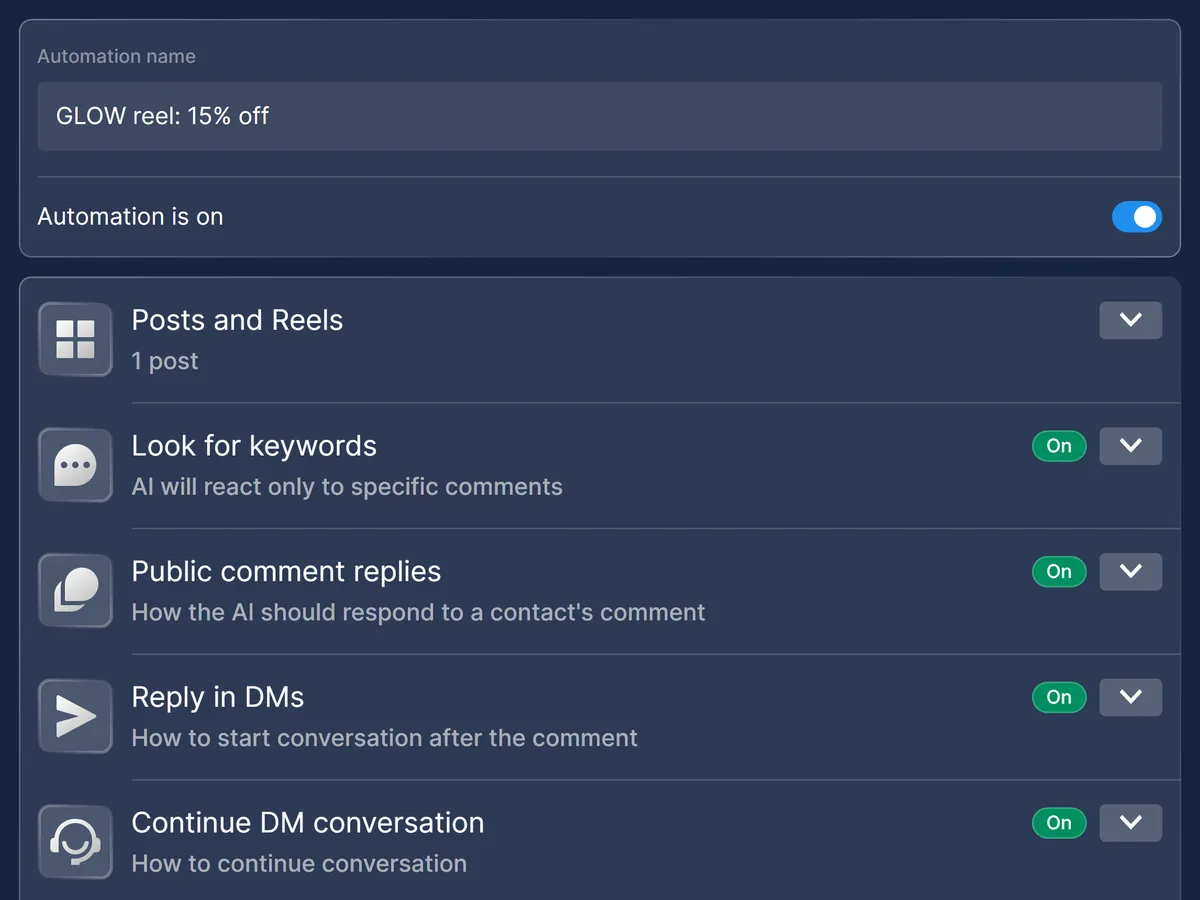 Automation is on
Open Automations › Instagram › Posts and Reels, add a rule, pick the posts, add a keyword, write the public reply and the DM, save each block, switch it on.
When someone comments 'GLOW' under my facial reel, DM them our 15% code GLOW15. Publicly reply 'Sent you the code in DMs'.
One message. The assistant finds your posts and writes the replies. Before it turns off or rewrites an automation, it asks you.
Connect in 3 steps. Nothing to install.
Add Chatfuel to your assistant
In Claude, open Customize → Connectors and find Chatfuel; in ChatGPT, open Plugins. Chatfuel hosts the server. Other assistants take this address:
https://mcp.chatfuel.com/panelSign in with Chatfuel
Log in to your Chatfuel account and approve. Instagram stays connected to Chatfuel through Meta's official API.
Ask
Type what you need in your own words, in any language. For example: “Reply to comments on my latest reel and DM them the guide.”
What to ask: ready prompts for your case
Copy a prompt, change the details to your business and send it to your assistant.
Hand out your freebie in DMs
Everyone who comments the keyword gets the link in DMs, and the conversation goes on in Chatfuel.
Prompt“DM everyone who comments 'GUIDE' with the link to my free ebook.”
Answer price and size questions
The AI replies under the comment and sends the product link in DMs, so a question turns into an order.
Prompt“Make the AI reply to comments on my latest post. Answer price and size questions and send the product link in DM.”
Reply only where you want
The assistant lists your recent posts, and you pick the ones to reply under. Comments on other posts get no reply.
Prompt“Make the AI reply to comments only under a few of my Instagram posts, not all of them.”
Fill your live with one keyword
People who comment the keyword under your launch post get the registration link in DMs.
Prompt“When someone comments 'LIVE' under my launch post, DM them the registration link.”
Choose the tone and the language
Tell the AI how to sound: short or detailed, friendly or formal, and in which language.
Prompt“Reply to comments on my Instagram only in English, short and friendly.”
Facebook and TikTok too
Facebook works like Instagram. On TikTok, replies go by keyword only, and TikTok doesn't allow a DM to the commenter, so the reply invites them to write first.
Prompt“Set up the same price replies for my Facebook and TikTok comments.”
Your assistant doesn't just set it up. It keeps it running.
Ask about your comments and chats any time, in the same chat.
“Why did this comment get no reply?”
The assistant explains which automation matched and why, and proposes a fix.
“What couldn't the AI answer this week?”
It reviews up to 100 chats from the week and lists the questions your FAQ doesn't cover.
“Tell Maria her order ships Friday.”
It drafts the message and sends it after your yes. Or it takes over the chat so you answer yourself.
“Add to the FAQ: delivery is $5, free on orders over $50.”
Your AI agent learns the answer and uses it when it replies.
Use the assistant you already pay for
Connect Chatfuel once, then ask from the app you use every day.
- ClaudeWeb, desktop and mobile appsSetup guide
- ChatGPTWeb, desktop and mobile appsSetup guide
- Claude CodeTerminal and IDESetup guide
- CodexCLI and IDESetup guide
- CursorAgent chatSetup guide
- VS CodeChat in agent modeSetup guide
- Gemini CLITerminal and AntigravitySetup guide
- Meta MuseMuse app and muse.aiSetup guide
Safe for your Instagram and your Chatfuel account
- Meta's official APIChatfuel works through Meta's official API: no scraping, no unofficial tricks that put an account at risk.
- Read-only if you wantTurn on Read-only when you connect: the assistant can look, but can't change anything.
- It asks before changesThe assistant asks a yes/no question before it turns off or rewrites an automation. Deleting bots, billing and broadcasts stay in the dashboard.
- Sign in with ChatfuelThe assistant never sees your password. Disconnect it in Connected apps any time, and its access stops right away.
Simple pricing, credits included
Plans start at $20 a month with $20 in credits for AI replies. Any Chatfuel account can connect an assistant, and MCP adds no limits of its own.
Business plan
$20/mo
- $20 in credits every month
- All channels included
- Unlimited contacts & team
7-day free trial
FAQ
About setting up comment autoreplies from an AI assistant.
Yes. Add Chatfuel from Claude's connector directory or ChatGPT's plugin directory, sign in with your Chatfuel account and describe what you want, for example “DM everyone who comments ‘price’”. The assistant creates the comment automation in your bot and tells you its name.
No. You type what you need in your own words, in any language. Comment replies are set up as automations, so there's no flow to build. Flows aren't available through MCP at all; they stay in the Chatfuel dashboard.
Claude (web, desktop and mobile apps, Claude Code), ChatGPT, Codex, Cursor, VS Code, Gemini CLI and Meta Muse. Any other MCP client works with the server address https://mcp.chatfuel.com/panel.
Chatfuel connects through Meta's official API, not scraping or unofficial automation. Instagram's own limits still apply: after a comment, you can send one DM to a new contact and then wait for their reply. People who don't follow you get it in message requests, which is why the public reply should say “Check your DMs”.
Yes. Ask for chosen posts, and the assistant lists your recent posts so you can pick them. Or name a keyword, like “price”, plus a few synonyms. When you set up replies for chosen posts or keywords, the reply to every other comment is turned off; ask for both if you want both.
Reels, yes: they're posts like any other. Facebook works the same as Instagram, with a public reply and a DM. TikTok replies go by keyword only, and TikTok doesn't allow a DM to the commenter. Comments on ads have their own automation in the Chatfuel dashboard.
It can't build or show flows, delete bots or workspaces, change billing, manage your team or send broadcasts. Those stay in the Chatfuel dashboard. On a Read-only connection, it doesn't change anything.
Any Chatfuel account can connect, and MCP adds no limits of its own. Replies written by the AI need a plan with AI credits: plans start at $20 a month with $20 in credits, and you can start with a 7-day free trial.
Yes. What the assistant sets up is a regular comment automation in your Chatfuel bot. You'll find it in Automations, where you can change it or turn it off.
The AI Co-pilot is the assistant built into the Chatfuel dashboard. MCP lets you reach the same account from the assistant you already use, like Claude or ChatGPT.
Your next comment can turn into a sale. Just ask.
Try Chatfuel free for 7 days, then connect your assistant.