 Kristina Margulets
Your customers already have WhatsApp open all day. They'd rather send a quick message than call, fill in a form or wait for an email.
More than 3 billion people in over 180 countries use it, and according to Meta, people have more than a billion active conversations with businesses every day across WhatsApp, Messenger and Instagram.
WhatsApp Business messaging is how a company takes part in those conversations: answering questions, taking bookings, sending order updates and offers. It also comes with rules that personal chats don't have: who can start a conversation, which messages you can send and when, and what each one costs.
There are three ways to run it:
- Chatfuel on the WhatsApp Business Platform. An AI Agent answers every chat in seconds, your team takes over in a shared inbox, and Broadcasts send Meta-approved templates to customers who opted in.
- The WhatsApp Business app. A free app for one phone and a few linked devices, with greeting and away messages and quick replies.
- The WhatsApp Cloud API on its own, if you have developers to build and host your own system.
This guide covers who starts the chat, the types of messages you can send, the 24-hour window, costs, Meta's rules and how to set it all up.
See also: What Is WhatsApp Business and How to Use It
What is WhatsApp Business messaging?
WhatsApp Business messaging is any conversation between a business account and its customers on WhatsApp. Meta offers two products for it: the WhatsApp Business app for small businesses, and the WhatsApp Business Platform, which you use through a partner such as Chatfuel or through your own code on the Cloud API.
Customers see the same thing in every case: a chat with your business name. The difference is on your side.
| Feature | Chatfuel (WhatsApp Business Platform) | WhatsApp Business app | Cloud API on your own |
|---|---|---|---|
| Who replies | AI Agent plus unlimited teammates in one inbox | One phone plus up to 4 linked devices (10 with a paid subscription) | Whatever your developers build |
| Automatic replies | AI Agent answers, books and hands chats to people | Greeting message, away message, quick replies | Your own code |
| Starting a conversation | Approved templates to any contact who opted in | Any chat, as in a personal account | Approved templates |
| Messages to many people | Broadcasts to all WhatsApp contacts or a segment | Broadcast lists (only people who saved your number) and paid business broadcasts | Your own code |
| Setup | Connect a number, no code | Install the app | Meta app, server, developers |
| Price | Chatfuel plan plus Meta's fee per delivered message | Free app, paid extras | Meta's fee per delivered message plus hosting |
You don't have to choose between the first two. With Coexistence, the same number works in the WhatsApp Business app on your phone and in Chatfuel at the same time.
Who starts the conversation
Every WhatsApp business chat starts one of two ways, and the rules differ for each.
The customer writes first
Most business chats start with the customer. When someone messages you, Meta opens a 24-hour customer service window, and inside it you can reply with anything you like. Ways to get customers to write first:
- WhatsApp links and QR codes. A link such as
wa.me/12025550123opens a chat with your number and can include a pre-filled message. Make one with the free WhatsApp link generator. In Chatfuel, your number also gets its ownwa.chatfuel.comlink and QR code under Settings › WhatsApp. - A chat button on your website. The free WhatsApp chat widget adds one in a few minutes.
- Click-to-WhatsApp ads. An ad on Facebook or Instagram opens a WhatsApp chat with your business. If you reply within 24 hours, Meta opens a free entry point window of up to 7 days. See Click-to-WhatsApp ads.
- Everywhere else you show your number: your Instagram bio, Google Business Profile, packaging and receipts.
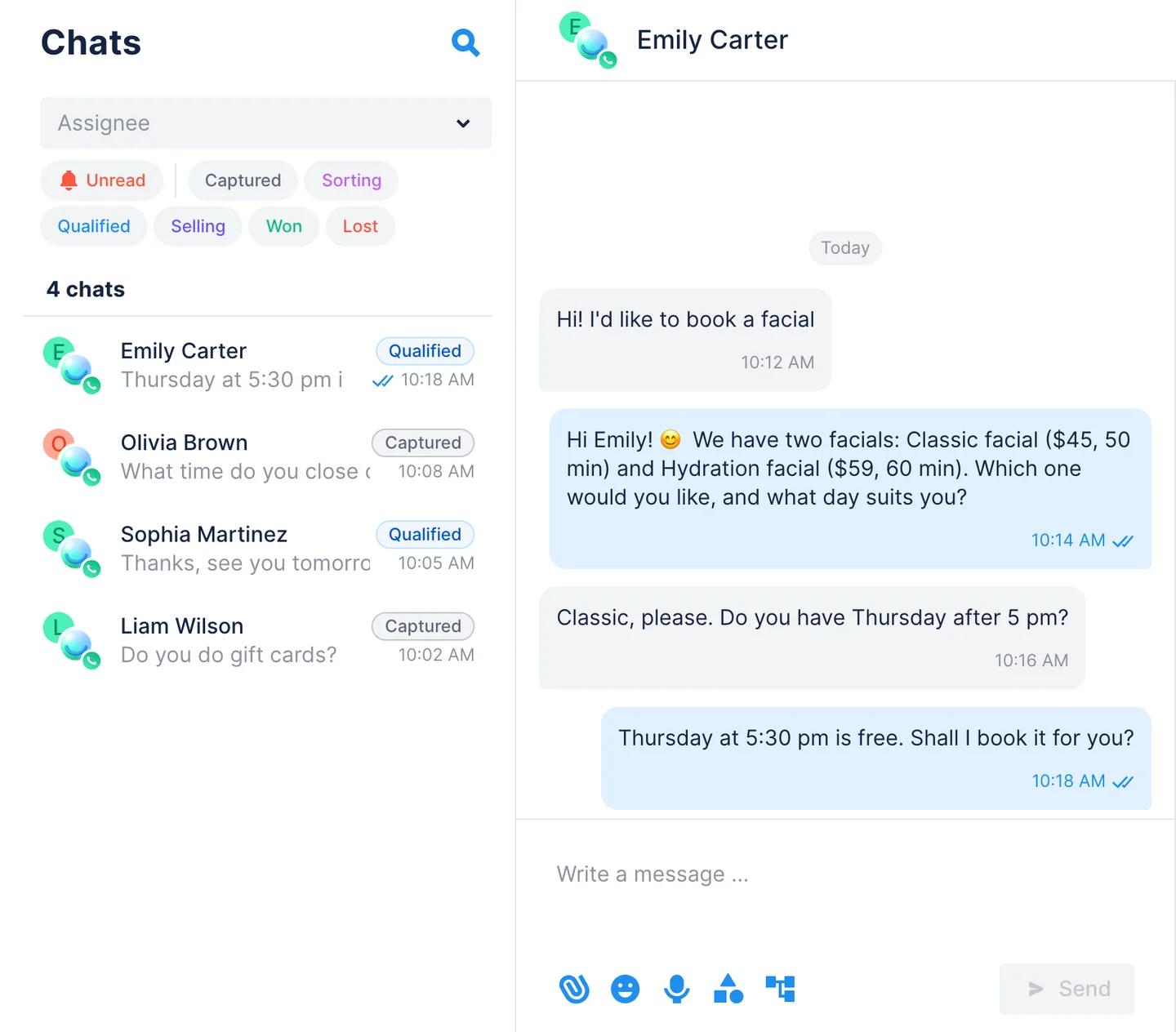
The business writes first
To message someone who hasn't written to you in the last 24 hours, the WhatsApp Business Platform lets you send only a message template approved by Meta. That covers a first message, an appointment reminder, an order update or a promotion. You can also message only people who gave you their number and agreed to hear from you (see opt-in below).
The WhatsApp Business app has no templates: you write as you would in a personal chat. Its broadcast lists, though, reach only people who saved your number in their contacts.
Types of WhatsApp business messages
Free-form messages
Inside the 24-hour window you can send any message: text, photos, videos, documents and voice notes. Chatfuel's AI Agent replies in text, sends photos of your services and products, and understands the voice messages customers send. Your team can reply from Chats with text, files and voice messages.
Message templates
Templates are pre-approved messages for starting or restarting a conversation. Meta reviews each one, usually within 24 hours, and puts it into one of three categories:
- Marketing: offers, new services, invitations to come back.
- Utility: updates about something the customer already did, such as an order confirmation, a delivery update or an appointment reminder.
- Authentication: one-time passcodes.
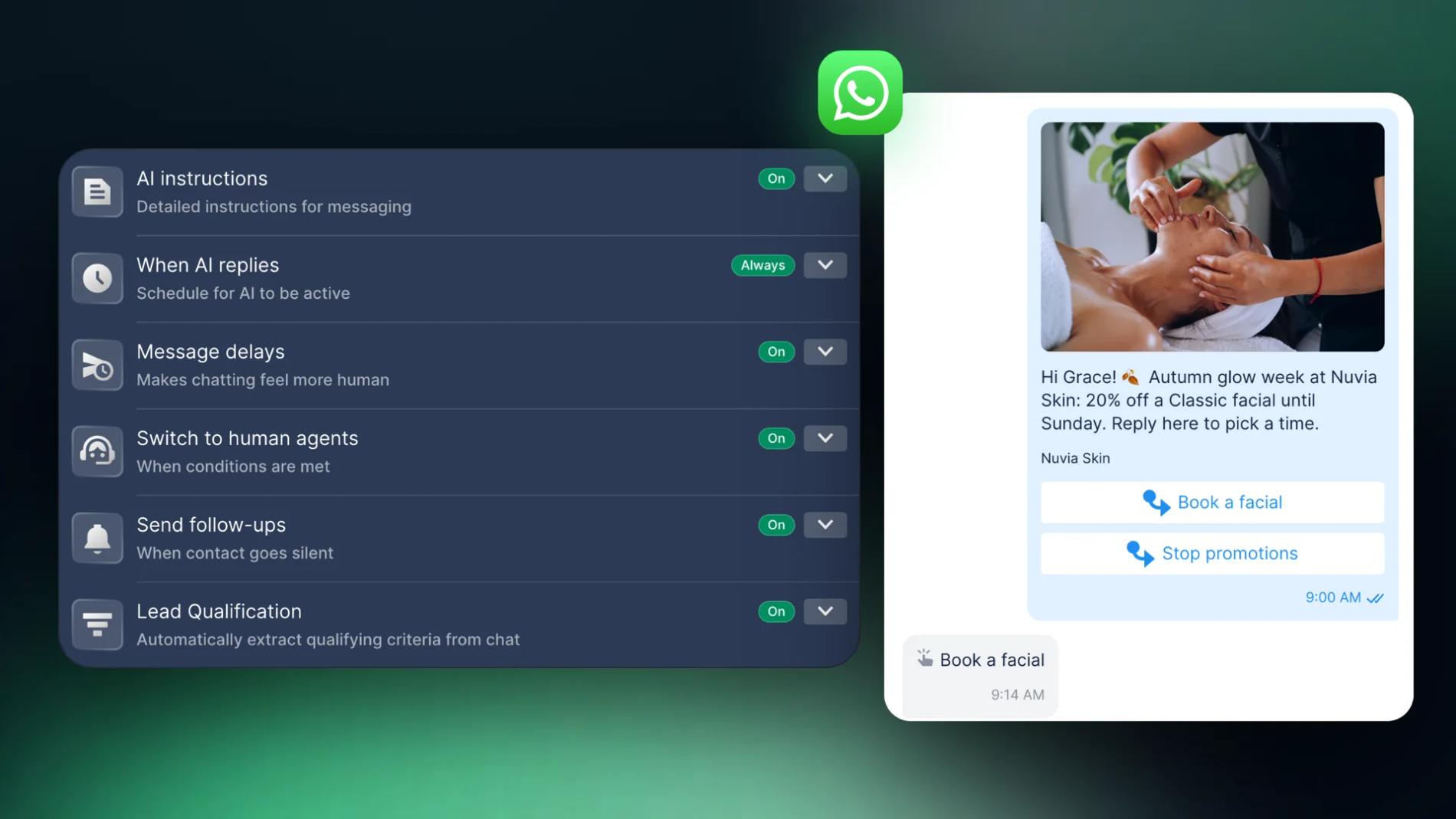
If you submit a template as Utility and Meta decides it's promotional, it gets approved as Marketing. A template can have a header with text, an image, a video or a document, a body with variables such as the customer's first name, a footer and buttons: up to 3 quick-reply buttons, a website link or a phone number. Marketing templates can also carry an opt-out button such as "Stop promotions".
You create templates in WhatsApp Manager. Guide: How to create WhatsApp templates.
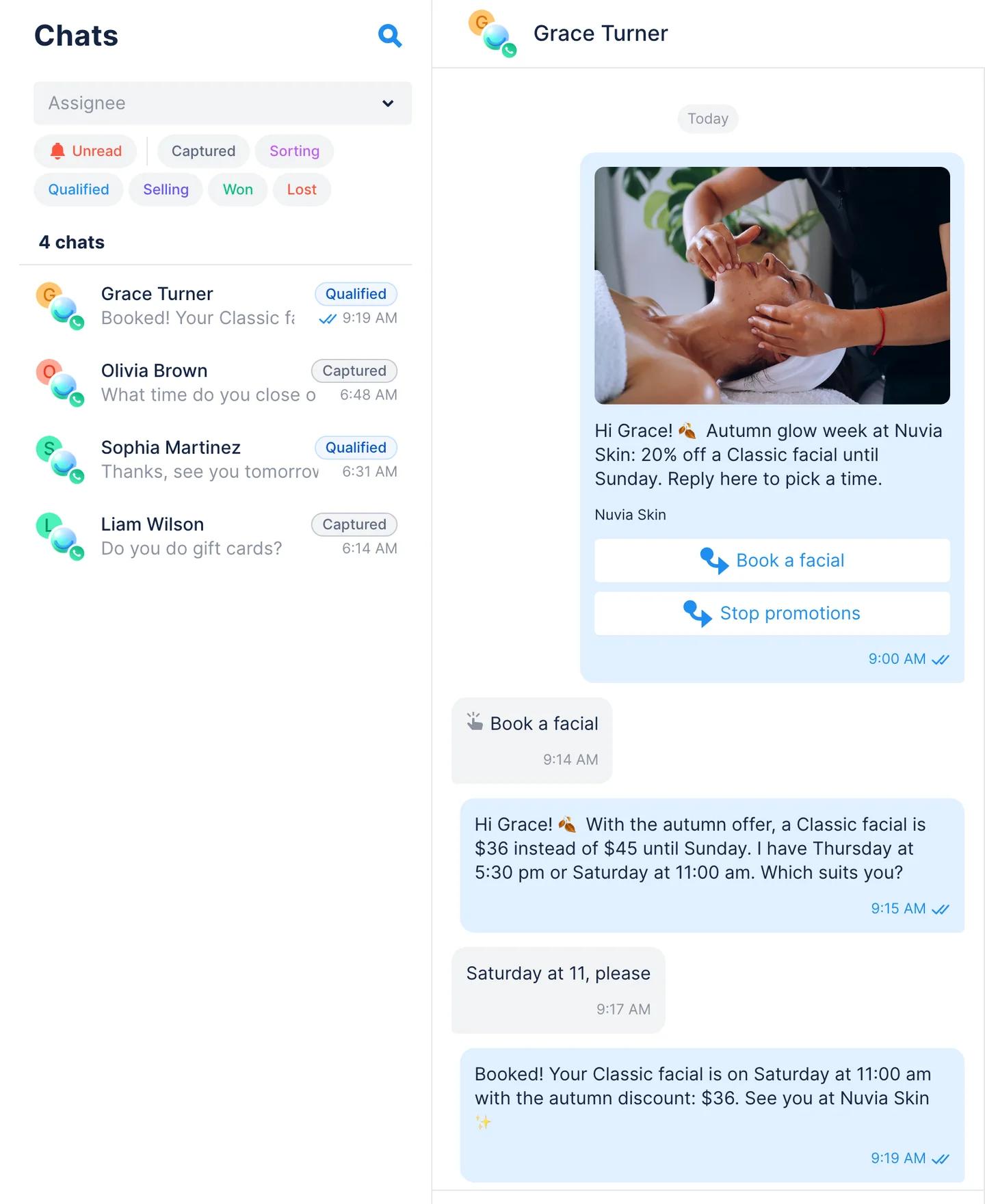
Interactive messages
The Cloud API also supports interactive messages inside the window: up to 3 reply buttons, list messages with up to 10 options, a button that opens a website, media carousels and WhatsApp Flows, which are forms with several screens inside the chat. They're built with code, and each has to be planned for every path a customer might take.
Chatfuel's AI Agent writes plain text on purpose. Customers answer in their own words, in any order and any language, and the AI Agent understands them without a menu. Read why Chatfuel doesn't use buttons.
The 24-hour window and what messages cost
- The window. Each message from a customer opens or resets a 24-hour customer service window. Inside it you can send anything; outside it, only templates.
- How Meta charges. Since 1 July 2025 Meta charges per delivered message, based on the template category and the customer's country.
- Replies are paid too. Since 1 October 2026, replies inside the window (service messages) are paid after the first 1,000 a month per phone number, and so are utility templates sent inside the window.
- Ads open a free window. Chats from Click-to-WhatsApp ads open a free entry point window of up to 7 days when you reply within 24 hours.
In Chatfuel, Meta's fees come out of the same wallet as your plan, so you get one bill. Rates by country and example budgets: WhatsApp Business Pricing: App, API and Meta Fees and WhatsApp API pricing.
How to run WhatsApp Business messaging with Chatfuel
Chatfuel connects your number to the WhatsApp Business Platform as an official Meta Business Partner and adds an AI Agent and a team inbox on top. You don't need developers or a server.
1. Connect your number
In Chatfuel, open Settings › WhatsApp and click Add number. You'll log in with Facebook, pick or create a business portfolio and confirm the number.
- A new number gets verified by SMS or a call. Guide: How to connect a new phone number.
- A number already in the WhatsApp Business app connects through Coexistence: you scan a QR code from the app and keep using it on your phone. Guide: Connect a WhatsApp Business app number.
2. Let the AI Agent answer incoming messages
First, fill in AI Knowledge Base: general information, services or products with prices, FAQs and opening hours. The AI Agent answers only from what you put there.
Then open AI Agent › Automations › WhatsApp › Incoming messages and switch it on. In AI instructions, describe the tone and what the AI Agent should ask. In When AI replies, choose Always or Outside of working hours. Try it with Test automation before customers do. Guide: How to activate AI in WhatsApp.
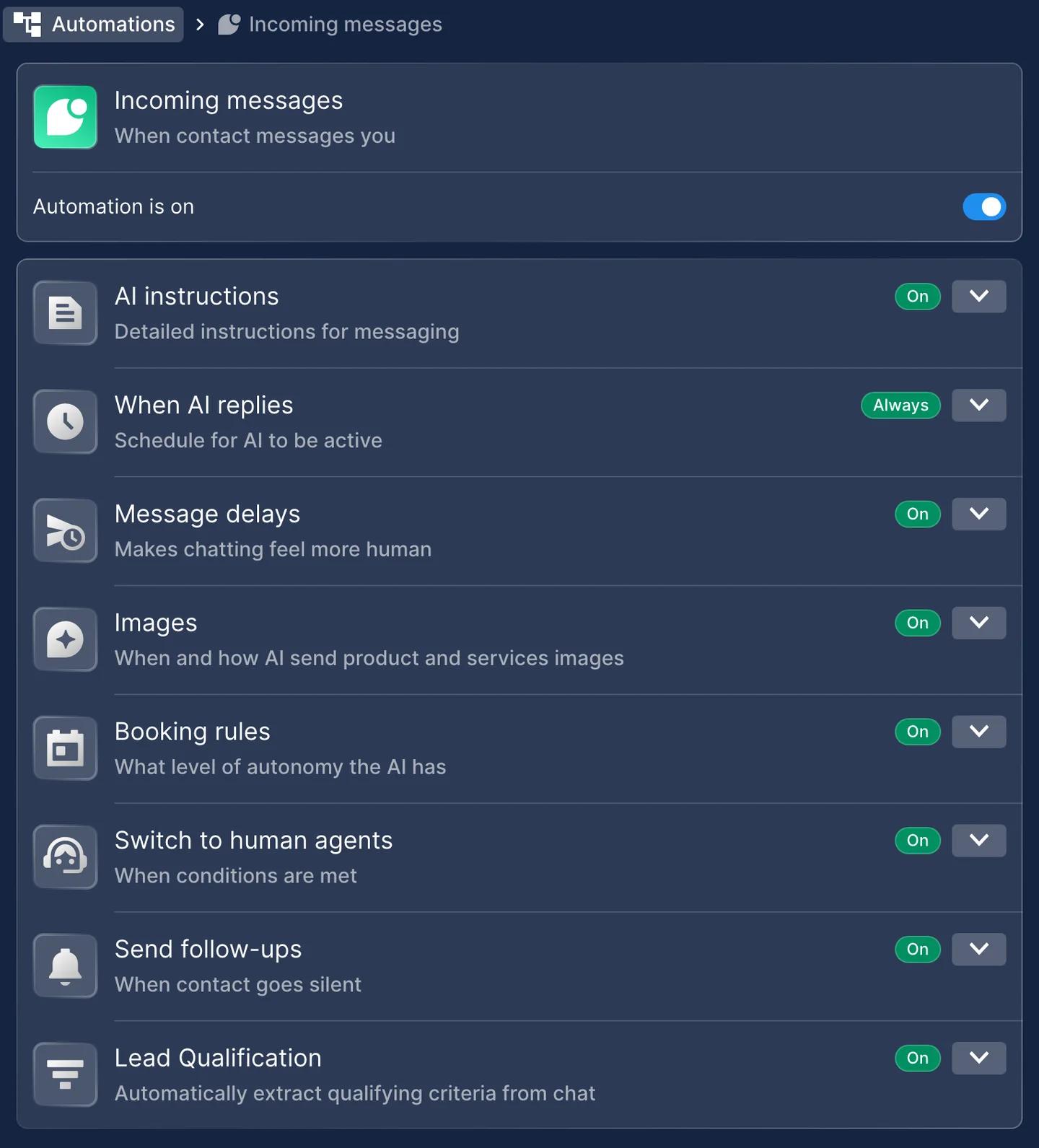
3. Hand chats to your team
Every WhatsApp chat lands in Chats, with its lead stage and who it's assigned to. With Switch to human agents you set rules for chats that should go to a person, such as refunds, complaints or large orders. A teammate can also take over any chat by replying, and the AI Agent stops in that chat. Every plan includes unlimited teammates, and they can answer from the mobile app as well. See Live chat.
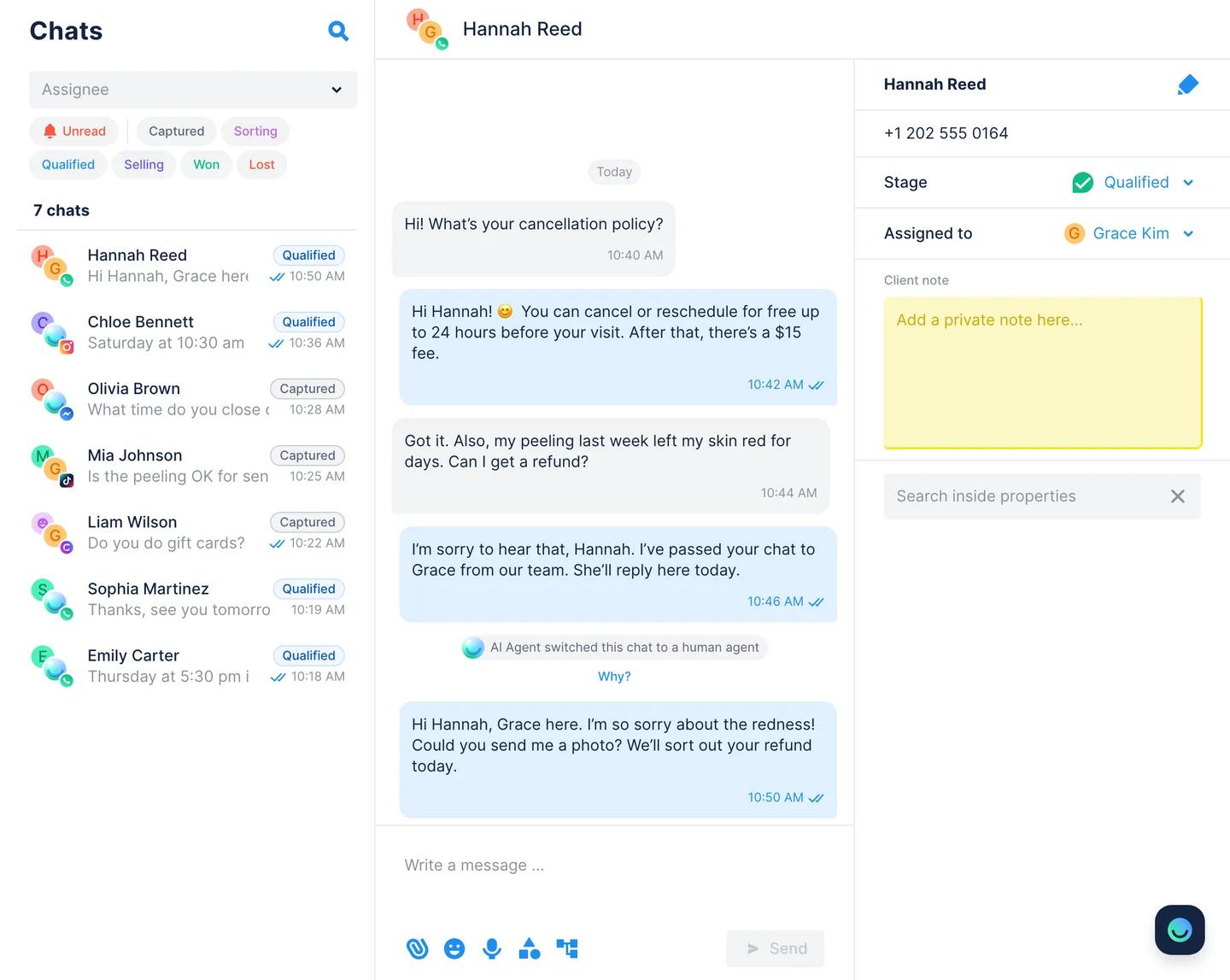
4. Start conversations with templates
To reach many customers, open AI Agent › Broadcasts and click New mass message. Choose an approved template, pick when to send it (now, in one hour, tomorrow at 9:00 or a custom time) and choose the audience: all WhatsApp contacts or a segment, for example everyone interested in facials. To write to one customer whose window has closed, click Send template in their chat. Guide: How to send messages outside the 24-hour window.
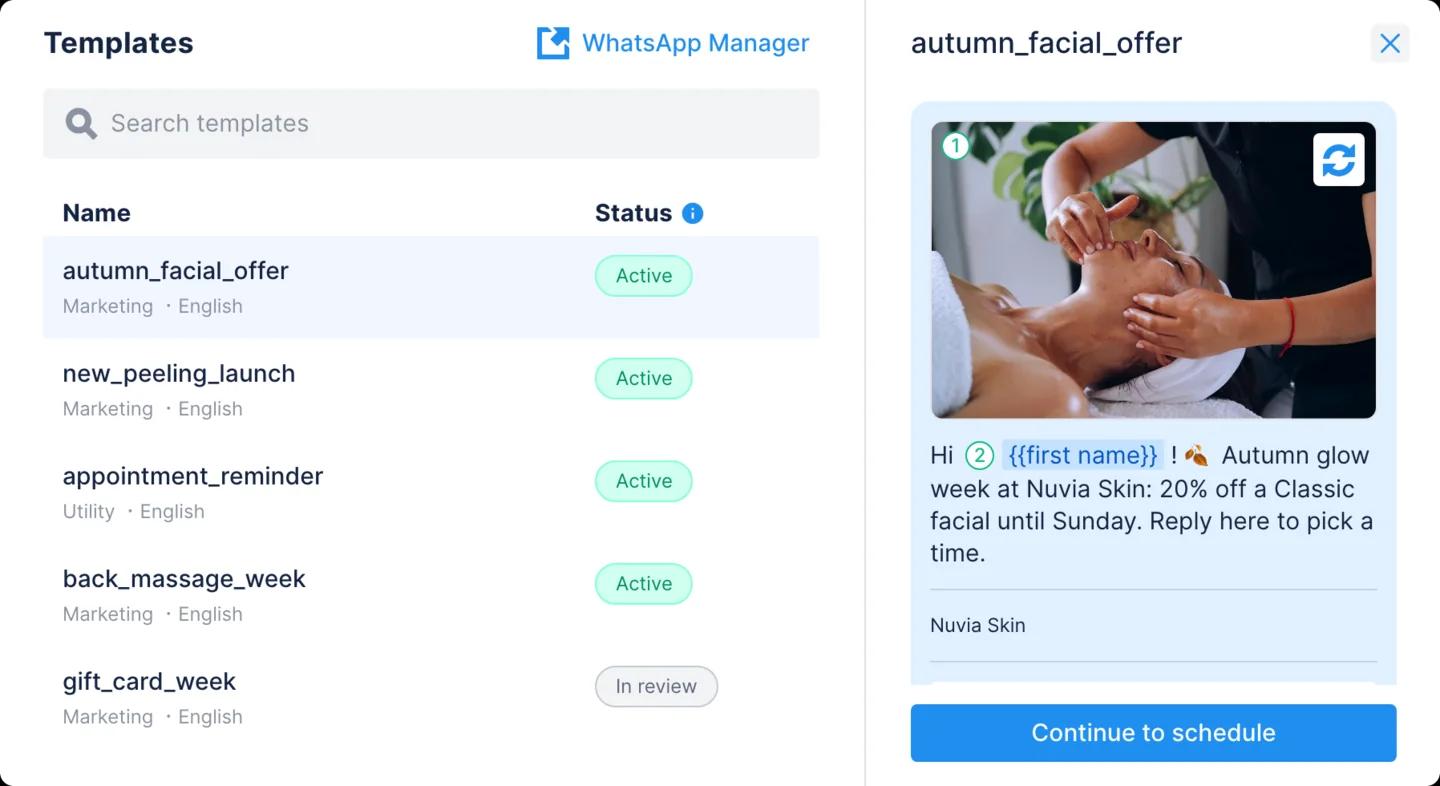
When a customer replies to a broadcast, the AI Agent answers right away. Order and delivery updates can also go out as utility templates from your own systems through the Chatfuel Public API. See Broadcasts and order tracking.
5. Follow up and qualify leads
Turn on Send follow-ups and the AI Agent writes to customers who went quiet while the window is still open. Lead Qualification collects contact details from the chat, and the AI Agent moves qualified leads along the Kanban board. See AI follow-ups and WhatsApp CRM.
See how Chatfuel works on WhatsApp
Messaging tools in the WhatsApp Business app
If you're on the free app, these are its messaging tools today. You'll find most of them in the app's Tools tab.
- Greeting message: sent automatically when someone messages you for the first time, or after 14 days without messages.
- Away message: sent always, on a custom schedule or outside your business hours.
- Quick replies: up to 50 saved answers you insert by typing "/". On a phone they can include photos and videos.
- Lists: formerly labels. Sort chats into up to 20 lists, such as new customers or unpaid orders.
- Catalog: your products or services with photos and, in some countries, prices.
- Broadcast lists: one message to many contacts, delivered only to people who saved your number.
- Business broadcasts: paid messages with a photo and a button, reviewed by Meta. You pay for each message delivered within five days, and they're available only in some countries.
- Linked devices: up to 4. With a paid Meta Verified subscription, up to 10, plus chat assignment between agents.
- Meta Business Agent: Meta's own AI for the app, rolling out gradually and not available in every country.
The app works while one or two people can keep up with every chat. When chats pile up after hours, several people need to answer, or you want to message customers who never saved your number, move to the Platform. With Coexistence, you keep the app too.
Rules and best practices
Get opt-in first
Meta's Business Messaging Policy lets you contact people only if they gave you their phone number and agreed to receive messages from you. You choose how to collect that consent: a checkbox at checkout, a form or a reply in the chat. Meta's opt-in guidelines ask you to state clearly that the person is opting in to messages from your business and to name the business. Local laws such as GDPR in the EU apply on top. When someone asks to stop, stop, and give marketing templates an opt-out button.
Keep your quality rating high
Meta rates each number on how people reacted to your messages over the past 7 days: blocks and reports pull it down. Your messaging limit is set per business portfolio. It caps how many different customers you can reach outside the 24-hour window in 24 hours: 250, then 2,000, 10,000, 100,000 and unlimited. Meta raises it one level at a time when your quality is high and you used at least half of your limit in the last 7 days.
Expect limits on marketing messages
Meta caps how many marketing templates each person receives, based on how they engage with business messages, so some sends won't be delivered. Meta also doesn't deliver marketing templates to US (+1) numbers.
Send fewer, more relevant messages
Send each offer to the segment it fits, use the customer's name and keep updates in utility templates and promotions in marketing ones. A message people want doesn't get blocked, and every block hurts your quality rating.
Answer while the window is open
A reply inside the 24-hour window is free-form, costs less than a template, and reaches a customer who is still interested. The AI Agent answers in seconds, at any hour.
Measure results
In Chatfuel, every broadcast shows its status and how many contacts it went to, replies arrive in Chats, and leads move through the Kanban board. You can also ask the AI Co-pilot questions about your chats. WhatsApp Manager shows template insights such as how many messages were delivered and read.
Use cases for WhatsApp Business messaging
- Customer support around the clock. The AI Agent answers questions about prices, hours and policies, and hands complex cases to your team. See customer support.
- Sales and bookings. The AI Agent suggests services from your catalog, books appointments and can send a payment link in the chat.
- Reminders and updates. Utility templates confirm appointments and orders. See appointment notifications and order tracking.
- Promotions and win-backs. Marketing templates go out through Broadcasts, and the AI Agent handles the replies.
- Lead qualification. The AI Agent asks the right questions and sorts leads by stage. See WhatsApp CRM.
What changed in 2025–2026
- July 2025: Meta switched to pricing per delivered message instead of per 24-hour conversation.
- October 2025: the On-Premises API reached its end, and the Cloud API is now the only way to use the Platform.
- November 2025: Meta launched the Marketing Messages API for WhatsApp for marketing templates. Meta plans to stop supporting marketing messages on the Cloud API on 13 October 2027.
- In the Business app: labels are becoming lists, and Meta is rolling out Meta Business Agent, its own AI for business chats.
- 1 October 2026: replies inside the 24-hour window became paid after the first 1,000 a month per number.
Summary
WhatsApp Business messaging comes down to two kinds of conversations. When a customer writes first, you have 24 hours to reply with anything you like. When you write first, you need a Meta-approved template and the customer's opt-in. With Chatfuel, the AI Agent answers every chat in seconds and your team takes over when needed. Broadcasts send templates to the right segment, and Meta's fees come out of one wallet. The free WhatsApp Business app covers the basics with greeting and away messages, quick replies and broadcast lists, as long as one or two people can keep up.
FAQs
What is WhatsApp Business messaging?
It's how businesses talk to customers on WhatsApp: answering questions, taking bookings and orders, and sending updates and offers. You can do it with a platform such as Chatfuel, where an AI Agent and your team answer on the WhatsApp Business Platform, or with the free WhatsApp Business app on a phone.
Is WhatsApp Business messaging free?
The WhatsApp Business app is free, with paid extras such as business broadcasts and Meta Verified. On the WhatsApp Business Platform, Meta charges per delivered message by category and country. Since 1 October 2026 that includes replies inside the 24-hour window after the first 1,000 a month per number, while chats from Click-to-WhatsApp ads stay free for up to 7 days.
Can a business message a customer first on WhatsApp?
Yes, if the customer gave you their number and agreed to receive messages. On the WhatsApp Business Platform, the first message must be a template approved by Meta. In Chatfuel you send it from Broadcasts to many people, or with Send template to one person.
What is the 24-hour window on WhatsApp?
When a customer messages you, Meta opens a 24-hour customer service window. Inside it you can send any message, and each new message from the customer restarts the 24 hours. After it closes, you can only send approved templates until the customer writes again.
Can I use the WhatsApp Business app and Chatfuel on the same number?
Yes. With Coexistence you connect a number that's already in the WhatsApp Business app, keep using the app on your phone and let the AI Agent answer in Chatfuel.
Can several people answer WhatsApp messages from one number?
In Chatfuel, yes: every plan includes unlimited teammates who answer from one inbox on the web or in the mobile app, and chats can be assigned to specific people. The WhatsApp Business app allows up to 4 linked devices, or up to 10 with a paid Meta Verified subscription.
Do I need customers' permission to message them on WhatsApp?
Yes. Meta's Business Messaging Policy requires the customer's phone number and their opt-in before you message them, and you must stop when they ask you to. Local laws such as GDPR apply on top.